
 Jo Galvez
Curogram makes each location's number textable. On the clinic side, texts land in a secure, routed inbox, and appointment changes write back to the Office Ally schedule.
Patient Ally, Office Ally's no-cost patient portal, still handles records and statements, while texting covers the quick questions a login was never worth: a copay amount, a parking rule, a time change.
Atlas Medical Center cut its no-show rate from 14.20% to 4.91% in three months with Curogram.
Most patient questions take ten seconds to ask. Is my copay due today? Does the Sunset office validate parking? Can my 2:15 move to Thursday?
Each answer takes even less time. Then the patient hears, "You can check that in the portal."
To ask, they now need a username, a password and a reset email that lands in spam. Many people stop there. The question goes unasked, and sometimes the visit goes with it.
We call that the portal detour. Patient Ally does its job well for records, statements and visit history. The trouble starts when quick, human questions get sent through a login wall built for a different task.
Our position is simple. Patients should be able to text the clinic number they already have saved, and reach a person on the other end.
Texting your Office Ally clinic without a Patient Ally login keeps the portal for what it's good at. The small stuff moves to the messaging app patients already check all day.
For groups that serve family practice, chiropractic and behavioral health patients, the stakes are real. Older patients, busy parents and anyone mid-errand often give up at a login screen. A missed visit from any of them leaves a hole in a lean schedule that's hard to fill the same day.
Nothing changes in how patients reach the clinic, and nobody has to remember a password. They text a number they know. Staff answer from a shared inbox, and Office Ally stays the record behind both channels.
Why the Portal Detour Loses Quick Questions
Portals are built for records. A one-line question needs a faster door.
What the Login Wall Filters Out
Patient Ally asks for a login before any interaction, even a short one. For viewing a statement, that's fair. For a quick question with no portal login handy, it's a dead end.
Plenty of patients never get past that step. A 2025 national survey analysis in JMIR found that 61.3% of U.S. adults had used a patient portal in the past year. About 4 in 10 had not, and those are often the patients a clinic most needs to reach.
The Sunset Parking Question
A patient wants to know if the Sunset location validates parking. The phone recording suggests the portal. She doesn't log in.
She circles the block twice, pays for a garage, and walks in 12 minutes late. The provider runs behind for the rest of the morning, and two later patients wait past their times.
What Patients Say in Reviews
When patients can't reach a person, they say so under each location's listing. A review like "easy to pay, hard to talk to" can sit under one site for years.
Reachable clinics give patients less to complain about, and our piece on location-level reputation management covers how groups track reviews site by site.
The Phone Tree Detour
Calling isn't always easier. A patient who calls with a parking question may sit through a menu, a hold, and a voicemail prompt. The recording at many sites points back to the portal. By then, the ten-second question has cost five minutes.
How Texting the Clinic Number Works
Patients text the clinic number they already know. Staff answers from a secure inbox, and Office Ally keeps the record.
The Number Already in Their Phone
Curogram makes each site's existing local number textable, so patients text the local clinic number they already call. There's no new short code to learn and no app to download.
A familiar number builds patient trust, because the reply comes from the office they know, signed by staff at that site.
Routed to Someone Who Can Answer
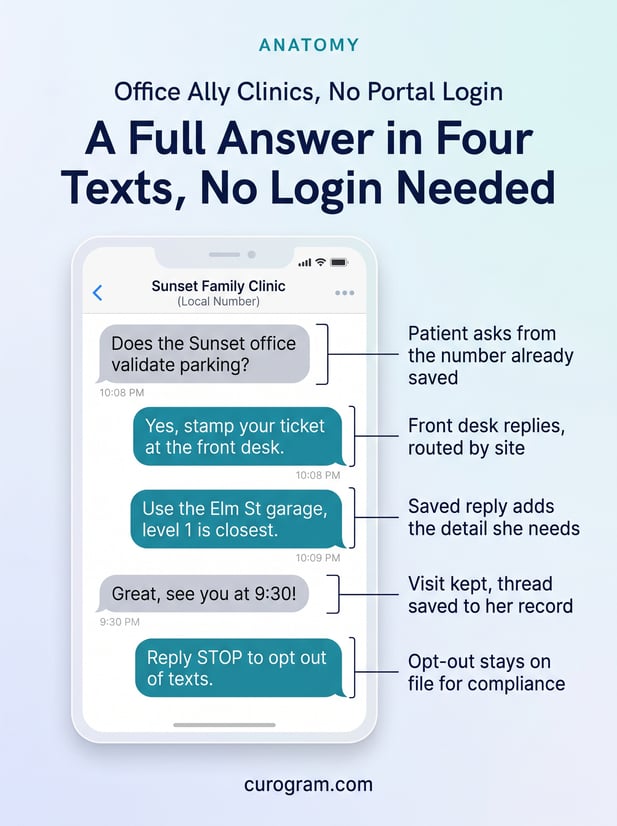
A patient can text the clinic a balance or appointment question, and routing sends it to the right desk. Billing threads go to billing. Time changes go to the local scheduler, and parking and hours go to that site's front desk.
When a patient asks to move a visit, the change writes back to Office Ally as Requested Reschedule through Curogram's Office Ally integration. Patient language syncs from Office Ally, so reminders can go out in the language on file.
|
Patient task |
Best channel |
|---|---|
|
View lab results or visit notes |
Patient Ally |
|
Download a statement |
Patient Ally |
|
Ask if a copay is due today |
Text the clinic |
|
Ask about parking or hours |
Text the clinic |
|
Move an appointment |
Text the clinic |
Curogram Highlight: No-App 2-Way Texting
No-App 2-Way Texting lets patients use the plain text messaging already on their phone, while the group answers from a secure, routed inbox. It works as a Patient Ally portal alternative for messaging, and Patient Ally stays in place for records.
Detail that shouldn't sit in a text moves through an encrypted, secure link. Curogram is HIPAA-compliant and SOC 2 Type II certified, signs a BAA, and records consent and opt-outs. See HIPAA-compliant texting for Office Ally users for the safeguards.

What Patients Notice First
A reply is the first thing patients notice. Soon after, they notice they didn't have to call.
The Clinic That Texts Back
The Sunset patient texts, "Does Sunset validate parking?" before she leaves home. The front desk replies with the garage name and where to get the ticket stamped. She parks once and walks in on time.
Nearly every patient can do this. Pew Research Center's 2026 mobile fact sheet reports that 98% of U.S. adults own a cellphone.
Fewer Empty Slots
Reminders that patients can answer make it easy to keep a visit or move it in time. Atlas Medical Center cut its no-show rate from 14.20% to 4.91% in three months with Curogram's reminders and confirmations.
Patient experience in a budget practice group improves when the channel patients use most is also cheap to run.
Staff Hear Fewer Repeat Calls
A written answer stays in the patient's phone. She can reread the parking note or the copay amount the next morning, with no second call. Front desks spend less of the day giving the same directions twice.
Over a week, that adds up to fewer interruptions at the window, where staff are checking in the patients who did show up.
For how this works across every site at once, see our overview of centralized patient texting across Office Ally locations.
Conclusion: Meet Patients in Their Messages App
Patients already know how to text. Most clinics in a budget group just haven't given them a number that texts back.
Patient Ally keeps your patients' records and statements. Curogram carries their quick questions to the right desk. Office Ally stays the backbone behind both, so nothing moves out of the system your staff already use.
Start small. Ask each front desk how often they tell a caller "we can't take texts." Count it for a week.
Then pick the busiest site and change that answer there first. Patients tend to find the new option on their own within days. Once one site is answering texts, the other sites' front desks usually ask for it next.
Book a demo and we'll show how to text-enable your busiest location first.
Frequently Asked Questions