
RXNT Front Desk Texting Workflow | Fewer Calls, One Inbox
 Jo Galvez : Nov 25, 2026, 8:00:01 AM
Your RXNT front desk answers the same calls all day. See the texting workflow that moves routine questions into one shared HIPAA-compliant inbox.
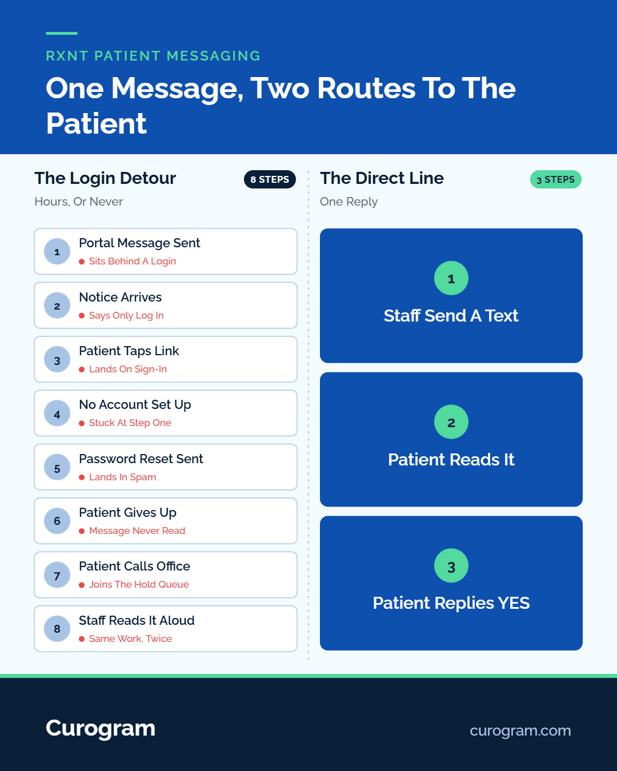
Most RXNT practices believe they already text their patients. In one narrow sense, they do. When staff send a portal message, MyRXNT can alert the patient by text or email that something is waiting. The message itself stays behind a login.
That alert is where the conversation breaks for a lot of patients. Someone who never set up a Patient Portal account taps the notice, lands on a sign-in screen, and does the easy thing. They call. Your front desk now answers a question that was already written down and sent.
Nobody did anything wrong. The patient tried, and the system asked for one step too many.
We call this the Login Detour. RXNT isn't the problem here. It runs charts, e-prescribing, and billing well for small practices, and its portal lets signed-in patients request visits, sign forms, and update insurance. The gap is between where the message sits and where patients actually look, which is their text thread.
Our position is simple. RXNT practices should keep the portal for records and add a HIPAA-compliant text line for everyday contact. A text reaches anyone with a phone. The portal reaches only the patients who registered.
Below, we cover where the detour costs a small front desk the most time. Then we show how a direct text line works next to RXNT without touching your charting, and what changes once patient conversations land in one shared inbox.
Expect real message wording, the exact statuses that sync, and the point where plain texting stops and secure messaging takes over.
RXNT packs a lot into one affordable suite, and its portal messaging works for patients who log in. The catch is how many never do.
The MyRXNT app only opens for patients who already have an RXNT Patient Portal account set up with your office. Messages sit under a Messages tab. If you turn on notifications, the patient gets a text or email saying a message is waiting.
So the text they receive is a pointer. The reply still needs the account, the password, and often the app. Those are the MyRXNT portal messaging limitations that matter at the front desk.
National data shows the size of the gap. In 2024, 65% of U.S. adults were offered and used an online portal, which leaves about a third who weren't reached that way.
One routine message can fail five ways before anyone notices:
Each step is small. Stacked together, they lose the patient, and RXNT still shows the message as sent. Step five is the exact call the portal was supposed to prevent.
Phones already eat staff time. In a March 2026 poll, practice leaders said scheduling drives 31% of their most time-heavy phone work, behind eligibility and prior authorization at 45%.
Now add the detour calls. The office manager works the voicemail list first thing while two patients wait at check-in. A good share of those callbacks are some version of "Did you get my message?" from patients the portal never reached.
Practice leaders feel this. In MGMA's December 2025 poll, 22% named phone access as their top patient access focus for 2026.
The fix is a second channel, built for the questions that don't need a chart open. Curogram adds it without changing what RXNT does.
Curogram connects to RXNT through a private API and reads your appointment schedule. When a patient confirms or cancels by text, Curogram writes Confirm or Cancelled back to RXNT, so the schedule shows who is coming.
RXNT charges no integration fee for the connection. You can see the setup details on Curogram's RXNT integration page.
|
Work |
Where it lives |
What Curogram adds |
|---|---|---|
|
Charts and e-prescribing |
RXNT |
Nothing; it stays in RXNT |
|
Appointment schedule |
RXNT |
Reads it; writes back Confirm and Cancelled |
|
Records and lab results |
MyRXNT portal |
Secure message link when needed |
|
Quick questions and reschedules |
Phone today |
One shared text inbox |
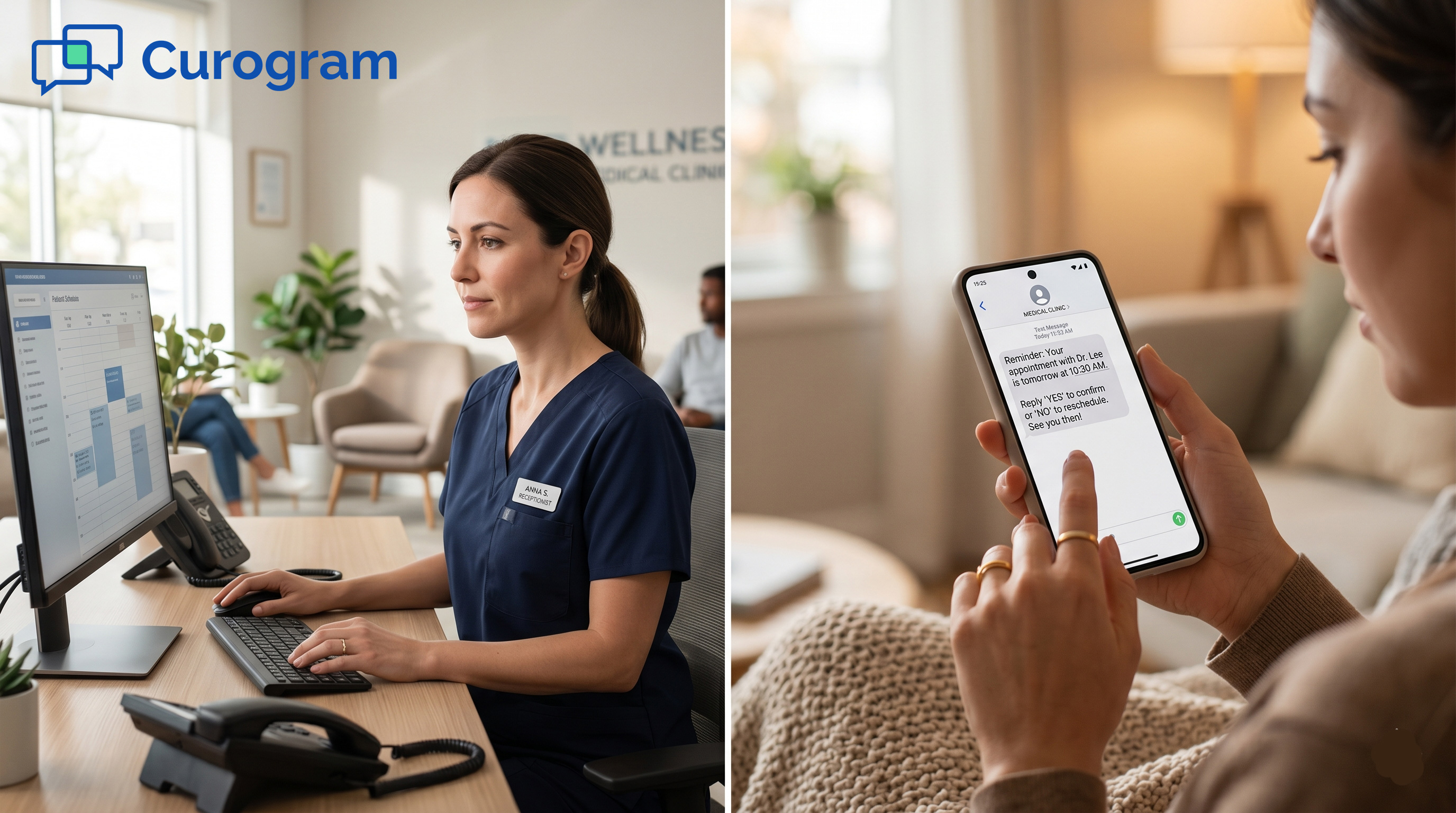
Standard SMS isn't encrypted, so the text itself carries logistics only. A safe reminder reads like this: "Hi Maria, you have an appointment on Tuesday at 2 PM. Reply YES to confirm."
Anything clinical goes by a secure link, and the patient verifies their identity to open it. No account is needed. That split matters for any HIPAA texting small practice setup.
The APA's guidance, for example, says texting is allowed when patients are warned of the risks and give documented consent.
Curogram Highlight: 2-Way HIPAA-Compliant Texting2-Way HIPAA-Compliant Texting gives your front desk one shared inbox for every patient conversation. Any staff member can open a thread, answer it, or hand it off, so a question never dies in one person's voicemail. Patients reply from the texting app already on their phone. There's nothing to download and no password to reset. Curogram is HIPAA-compliant and SOC 2 Type II certified, and it signs a Business Associate Agreement with your practice. For psychiatry and physical therapy offices, this RXNT secure messaging alternative also feels more personal, since a patient can answer from a break room. See how it works for RXNT offices on our two-way texting for RXNT users page. |

Results land in two places: fewer empty slots on the schedule and fewer calls on the line.
Atlas Medical Center cut its no-show rate from 14.20% to 4.91% in three months. The base was steady text reminders and confirmations that patients could answer in one reply.
Across Curogram client data from clinical settings, confirmation rates run above 75%. With RXNT, each confirmation writes back as Confirm. Many practices start with automated SMS reminders, because confirmations are the most routine message they send.
MGMA's 2025 no-show report points the same way. Practices that held or lowered no-show rates most often credited steady digital reminders, and MGMA advises two-way texting so patients can confirm or ask a question.
A reschedule call means answering, verifying, opening the schedule, finding a slot, and documenting it, one caller at a time. By text, staff can work several threads while each patient reads and replies.
Reach is the other gain. About 98% of U.S. adults own a cellphone, while 91% own a smartphone. Two-way SMS for medical offices works on both, and the MyRXNT app needs the smartphone. Intake can start in the same thread, with secure online forms sent as a link.
Your phone still rings. It rings for the calls that need a voice, like a new symptom or a billing dispute. Routine questions, directions, and reschedules move to text, and staff answer them between check-ins.
Mornings start differently too. A voicemail list becomes an inbox where each thread shows who asked, who answered, and when.
To set up the staff side, read our RXNT front desk texting workflow guide. For the patient side, see why practices text RXNT patients without a portal login.
RXNT should keep doing what it does well: charts, prescriptions, billing, and portal access for patients who want their records. Patient contact needs a channel that asks nothing of the patient but a glance at their phone.
That's the case for adding a text line. When you text patients from RXNT through Curogram, each one can answer in a single reply. Every answer lands where your whole team can see it, and confirmations write back to the schedule.
Good RXNT patient communication is measured by who you actually reach. The portal will keep serving the patients who registered. A text line covers the rest, from the retiree with a flip phone to the parent who answers at lunch.
Stop letting the Login Detour turn your RXNT portal back into a phone queue.
Schedule a short demo. Bring your daily call count and your RXNT schedule, and we'll show you which calls a shared text inbox would absorb first.
 Jo Galvez : Nov 25, 2026, 8:00:01 AM
Your RXNT front desk answers the same calls all day. See the texting workflow that moves routine questions into one shared HIPAA-compliant inbox.
 Jo Galvez : May 14, 2026, 2:00:00 PM
Patients at GE Centricity practices respond to SMS vs portals. See how text-based communication reaches all patient populations.
 Aubreigh Lee Daculug : Aug 12, 2026, 6:00:00 PM
Prime Clinical's portal reaches 15–20% of patients. Texting reaches 98%. Two-way SMS with a 48-hour HL7 integration. Schedule a demo.