
 Jo Galvez

Its patient messages, though, sit in the MyRXNT portal, which needs an account first. Curogram reads the RXNT schedule and puts every patient text on one screen, where any staff member can answer or hand off a thread.
When patients confirm or cancel, the status writes back to RXNT. Curogram client data shows confirmation rates above 75%.
Most of the calls your front desk answers today could have been a text. That claim is easy to test.
Keep a tally sheet by the phone for one morning. Sort each call into two piles: needed a voice, or needed one sentence.
In small RXNT offices, the second pile is usually the tall one. Confirmations. "Can I move my Thursday?" Directions and parking. "Did you get my forms?" None of these needs a chart open for more than a few seconds.
Each of those calls is short. Together, they keep one or two people on the phone while patients stand at the counter waiting to check in. The callers aren't wrong to call. For many of them, the phone is the only route they have.
The usual fixes fall short. Hiring takes months and adds payroll. The MyRXNT portal can carry messages, but only for patients who set up an account, and the people who call most often tend to be the ones who never did.
Our view is that the fastest efficiency gain for an RXNT front office is moving that second pile to a shared text inbox, before anyone talks about adding headcount. Routine questions get answered in writing, by whoever is free, while the phone stays open for the calls that need a person.
What follows is the workflow itself: the morning triage, who owns which kind of thread, what the saved replies say, and how confirmations flow back into RXNT. It's written for office managers and front desk leads who run the phones.
The Morning Phone Pileup at an RXNT Front Desk
Start with what RXNT already handles, because the problem sits just outside it.
Where RXNT Helps and Where Calls Slip Through
RXNT puts scheduling, billing, and charts in one system. Your team sees the whole day's appointments on one screen, which is a real gain for RXNT front office efficiency. The portal also sends reminders to patients who use it.
Patient contact is the gap. It still runs through a phone line that one person answers at a time. Portal messages reach patients with active MyRXNT accounts. Everyone else calls, and each call pulls a staff member away from the counter.
The First Hour, Call by Call
The doors open to a voicemail list from the night before. The first live caller goes on hold because a new patient is at the counter with a clipboard. Then the third reschedule request of the morning comes in, asking the same question the first two did.
Meanwhile, a portal message sent yesterday sits unread in an account the patient never activated. That patient will call too, probably at lunch, when one person is covering the desk alone.
The Math Behind the Backlog
Run an illustrative day. Sixty routine calls at five minutes each comes to 300 minutes. That's five hours of one person's shift spent on the phone, before a single check-in or insurance card.
National polling shows where that time goes. Practice leaders told MGMA that scheduling makes up 31% of their most time-heavy phone work. To reduce front desk call volume, start there, since scheduling questions are the easiest to answer in writing.
Leaders know the phones are a problem. In MGMA's December 2025 poll, 22% named phone access as their top patient access focus for 2026. At the desk, it feels like a shift that ends behind, with callbacks carried into tomorrow.
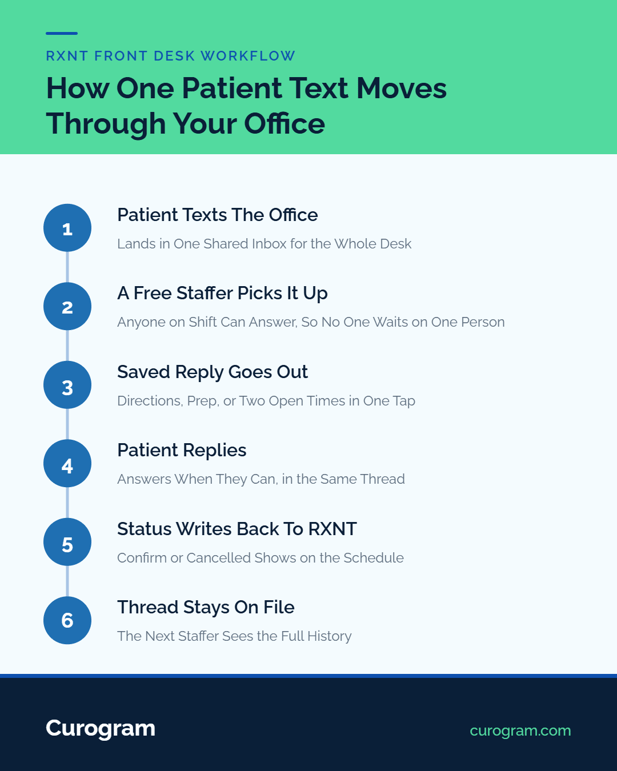
One Inbox for Every Patient Conversation
The workflow rests on one screen that the whole front office shares, plus a few rules about who answers what.
How the Shared Inbox Works Day to Day
Think of it as a shared team inbox healthcare staff can all work from. Every patient text lands in one view, and every thread keeps the full back-and-forth. Anyone on shift can pick up a thread, answer it, or pass it to the right person.
We suggest setting simple ownership rules in week one. A sample medical office texting workflow looks like this:
|
Thread type |
First owner |
Hand off when |
|---|---|---|
|
Confirm or cancel replies |
Writes back to RXNT |
The patient adds a question |
|
Reschedule requests |
Scheduler |
No slot works this week |
|
Directions, parking, prep |
Whoever is free |
Rarely needed |
|
Paperwork status |
Intake lead |
Forms are still missing |
|
Anything clinical |
Nurse, by secure message |
Always |
Saved Replies for the Questions You Answer Daily
Saved replies turn a repeat question into one tap. Keep them to logistics, since standard texts aren't encrypted:
- "Parking is free in the back lot. Use the side door marked Clinic."
- "We have Thursday at 10 AM or Friday at 3 PM. Reply 1 or 2."
- "Please arrive 15 minutes early and bring your insurance card."
- "We have your forms. See you Tuesday."
Clinical questions move to a secure message link, which the patient opens after confirming who they are.
Curogram Highlight: 2-Way HIPAA-Compliant Texting2-Way HIPAA-Compliant Texting is the engine behind this workflow. It gives the front office one inbox for every patient conversation, with saved replies for the questions staff answer all day. Curogram is HIPAA compliant and SOC 2 Type II certified, and it signs a BAA with your practice. It works alongside the RXNT schedule. Curogram reads appointments through a private API, and confirm or cancel replies write back as Confirm or Cancelled. Charting, prescribing, and billing don't change. For psychiatry and therapy offices, texting is also discreet, since a patient can reply from a waiting room or a workplace. The details for RXNT offices are on our two-way texting for RXNT users page. |

The Front Desk That Finishes On Time
Once the inbox runs, the change shows up in the shape of the day more than in any single feature.
From Phone Tag to Text Thread
A reschedule by phone often means two voicemails and a callback before anyone agrees on a time. By text, it's one thread, and the patient answers when they can. Staff can work several threads in the gaps between check-ins, where a phone call holds them for its full length.
That is the patient phone tag solution most offices are looking for. MGMA's 2025 no-show report gives the same advice, recommending two-way texting so patients can confirm or ask a question in place of reminders they can't answer.
Confirmations That Close Themselves
Confirmation calls are the easiest pile to remove. Across Curogram client data from clinical settings, confirmation rates run above 75%, and each one writes back to RXNT without staff touching it.
Atlas Medical Center paired steady text reminders with this kind of confirmation loop and cut no-shows from 14.20% to 4.91% in three months.
A sensible order is automated SMS reminders first, then text-to-pay links to take billing calls off the line too.
What the Office Manager Gets Back
Check-ins get full attention again. Lunch stops meaning the phones roll to voicemail. Overtime spent catching up on callbacks shrinks, which is where small practice staff productivity shows up on a timesheet.
The end of the day gets shorter too. A quick inbox sweep replaces the callback list: close answered threads, flag anything waiting on a provider, and leave the rest assigned for the morning.
For the bigger picture, see our guide to two-way HIPAA texting for RXNT practices. To see the patient side of the same inbox, read about texting RXNT patients without a portal login. Setup specifics live on Curogram's RXNT integration page.
Conclusion: Give Your Front Desk Its Afternoon Back
RXNT runs your schedule and your billing well. The calls that bury your front desk are mostly thirty-second questions that never needed a phone line, and a shared text inbox is the cheapest place to put them.
Start with the tally sheet. Count tomorrow morning's calls and voicemails, then mark the ones a single sentence would have answered. That number is the workload a texting workflow takes off your team.
The portal keeps its job. MyRXNT serves patients who want records and forms tied to their chart. The text inbox takes the quick questions and gives back the staff hours they use up today.
Book a demo with your daily call count, and we'll map the RXNT texting workflow for your front desk live, from morning triage to end-of-day follow-up.
Frequently Asked Questions