
9 min read

Digital Intake Forms for RamSoft | Automate Staff Workflows

Digital Intake Forms for RamSoft | Automate Staff Workflows
💡 RamSoft imaging center staff intake workflow automation with digital forms sends contrast screening questionnaires, MRI safety screenings, and medical history intake to patients' phones 24–48 hours before their appointment.            

Patients complete forms via text — no app, no registration, no clipboard required.     

This pre-visit approach eliminates manual data entry at the front desk and reduces technologist wait time from 20 minutes to under 2 minutes per study. For centers running 40–80 studies daily, that shift translates to 12–18% improvements in scanner utilization.        

Curogram powers this automation by routing the right intake form to the right modality automatically — keeping your schedule on time and your staff focused on care, not paperwork.

Your MRI scanner can handle 10 studies before noon. But at 8:05 a.m., your technologist is standing in the hallway waiting.

Not because the equipment failed. Not because the patient didn't show up.

Because a contrast screening form came back with a blank field, the handwriting on the insurance section is unreadable, and your front desk intake coordinator is on the phone with a patient trying to piece together what "no" actually means next to the pacemaker question.

This is the reality inside hundreds of imaging centers every single morning. And most of them have no idea how much it's costing them.

Think about this:

20 minutes of intake friction, multiplied by 40 studies a day, adds up to 800 minutes of compounding delays every week.

At a loaded technologist cost of $45 per hour, that's roughly $585 in idle time per week — before you factor in front desk overtime, rescheduled appointments, or the ripple effect on the rest of the day's schedule.

Scale that to a 50-study day across a busy center, and you're looking at losses that can approach $15,000 or more per month.

The frustrating part?

Your center probably already has a patient-facing app. RamSoft offers Blume, and it has built-in intake functionality. But here's the truth: most patients visit an imaging center once or twice a year.

They're not going to download an app, create an account, and log in for a single appointment. When they show up without completing forms in advance, your staff defaults to what works — a clipboard.

It sounds like a small inconvenience. It isn't.

The clipboard-to-data-entry bottleneck is one of the most overlooked cost drivers in imaging operations.

It slows your technologists, overwhelms your front desk, and quietly chips away at your scanner's actual capacity every single day.

But there's a better way to run pre-visit intake — one that doesn't ask patients to change their behavior, doesn't burden your staff, and works directly alongside your existing RamSoft workflow.

This article breaks down exactly how RamSoft imaging center staff intake workflow automation with digital forms eliminates that bottleneck and what it means for your throughput, your team, and your bottom line.

How 20 Minutes of Morning Paperwork Quietly Derails Your Entire Day

Every morning looks a little like this.

Your front desk opens, patients start checking in, and the clipboards come out. Twenty minutes later, a completed form lands on the desk — except it isn't really complete.

The contrast screening has a skipped field. The date-of-last-study section is blank. One answer is written over another.

Your front desk intake coordinator stops what they're doing, calls the patient back to the counter, rewrites the unclear sections by hand, and then manually keys each field into RamSoft PowerServer. While that's happening, the next patient is checking in.

And your technologist is already asking:

"Is the first patient ready?"

They aren't.

What Your Front Desk Is Re-Entering by Hand — Every Single Study

It's easy to underestimate how much ground staff have to cover when a form comes back incomplete.

For each study, the front desk coordinator may need to manually enter or verify:

  • Insurance company name, policy number, and group ID
  • Date of last contrast study and any prior contrast reactions
  • Pacemaker status and documented metal implant history
  • Allergy history flagged in the MRI safety screening
  • Renal function notes relevant to the contrast screening workflow
  • Diabetes medication details for CT appointments

That's not a five-second fix. That's five to ten minutes of focused data entry per patient — on top of managing the next check-in, answering the phone, and fielding questions from the technologist down the hall.

The Cascade Nobody Talks About

One delayed study pushes the next. A 20-minute intake gap at 8 a.m. becomes a 45-minute backlog by 10 a.m. Your schedule — the one that was supposed to run tight and smooth — is already behind before your first coffee break.

The numbers tell a clear story.

A center running 40 studies a day with a 20-minute intake delay per study loses roughly 800 minutes — more than 13 hours — of productive staff time every week.

At a loaded technologist rate of $45 per hour, that's about $585 in idle technologist time per week, or roughly $2,340 per month, before any cascade effects are factored in.

Scale to 50 studies a day and the losses can push toward $15,000 or more per month once you layer in overtime, rescheduled appointments, and downstream schedule disruption.

For a multi-site operation running three locations, multiply those figures by three.

These are example calculations based on industry staffing rates. Actual impact varies by facility size and staffing model.

It's not a scheduling problem or a staffing problem. It's a data problem — and specifically, a timing problem. The information your team needs to start a study doesn't arrive until the patient is already sitting in your waiting room.

Your PowerServer dashboard ends up showing lower daily throughput than your scanner is actually capable of delivering. You have the equipment.

You have the appointments. You just don't have the data in time.

And that gap — right there — is where the real money is being left on the table.

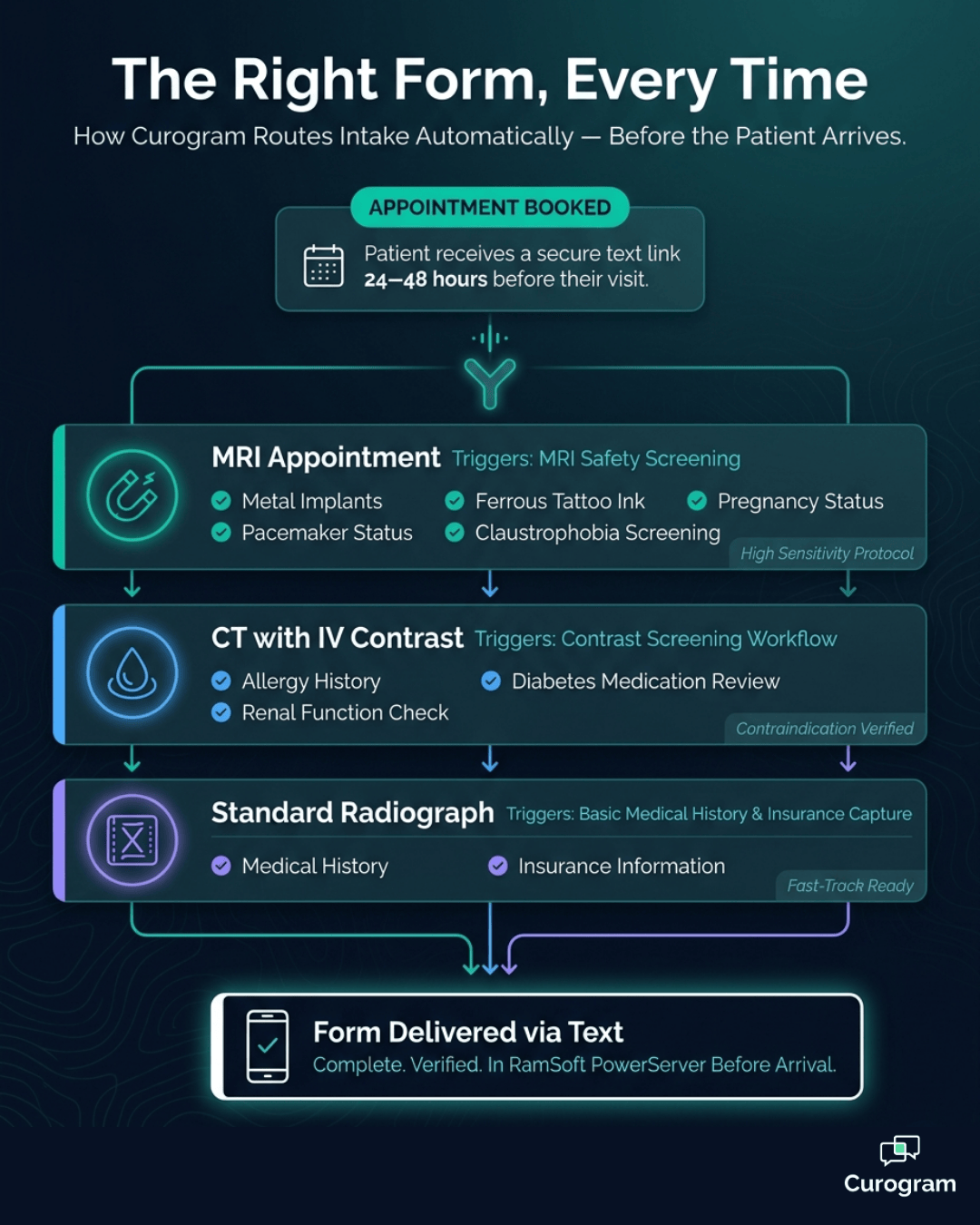
Infographic showing how Curogram auto-routes MRI, CT, and X-ray intake forms by appointment type

A Smarter Way to Handle Intake Before Patients Walk Through the Door

The fix isn't a better clipboard. It's sending the right forms to the right patients before they ever leave home.

Curogram delivers digital intake forms directly to patients' phones via text, 24–48 hours before their scheduled appointment.

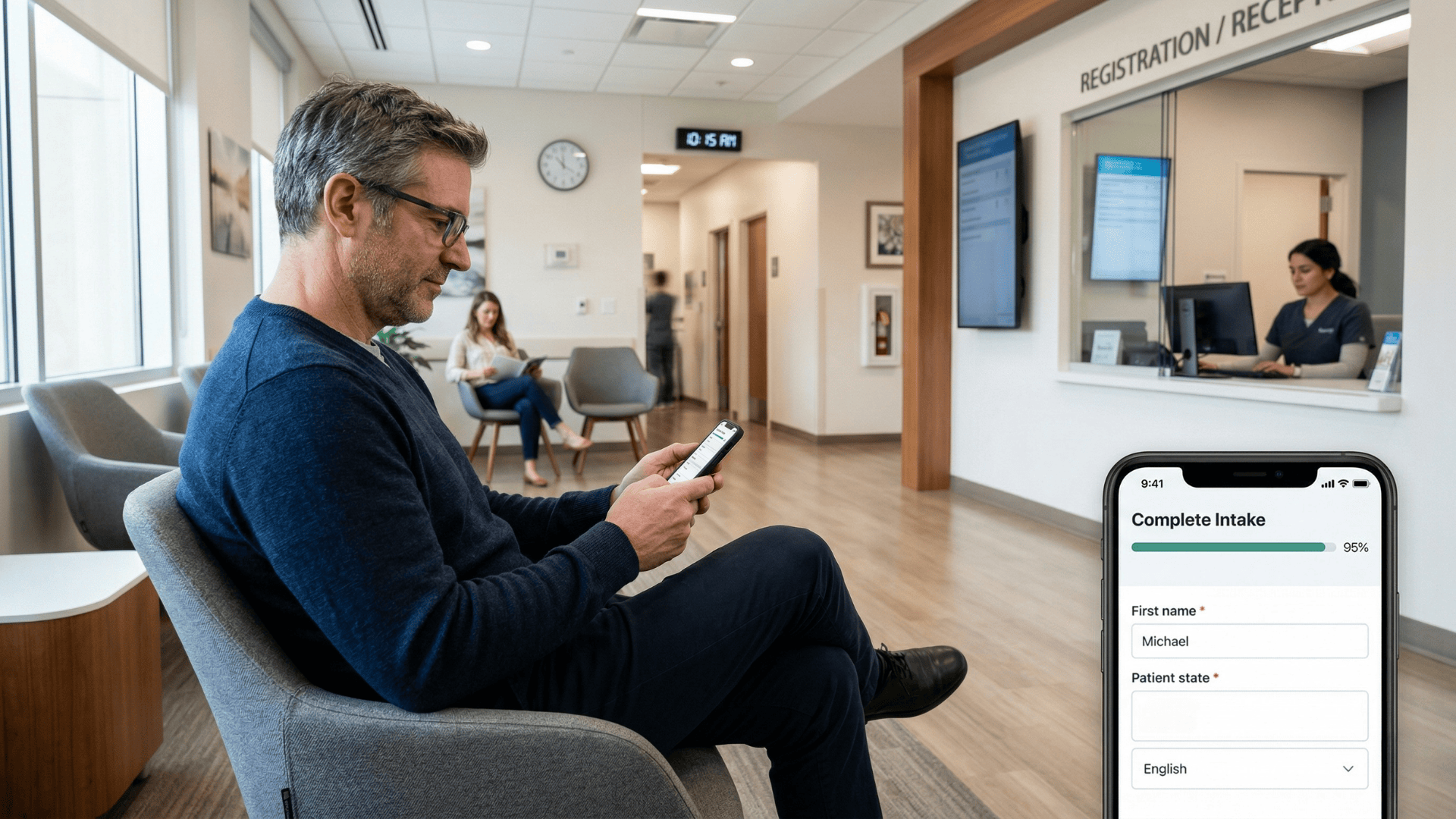
Patients fill out their contrast screening questionnaire, MRI safety screening, medical history, and insurance information on their own phone — in the time it takes to grab a coffee.

No app download required. No registration. No login. Just a secure link in a text message that opens instantly.

By the time your front desk opens, those forms are already completed and sitting in a staff dashboard.

Your coordinator isn't transcribing. Your technologist isn't waiting. And your scanner is ready to run.

The Right Form Goes to the Right Patient — Automatically

What makes this work at scale is that forms aren't generic. Curogram automatically attaches the right intake form to each appointment type, so your team never has to manually assemble a packet.

Here's how that routing works in practice:

  • MRI appointments trigger an MRI safety screening covering metal implants, pacemakers, ferrous-based tattoo ink, pregnancy status, and claustrophobia considerations.
  • CT with IV contrast appointments include a contrast screening workflow — allergy history, renal function verification, and diabetes medication review.
  • Standard radiograph appointments receive a streamlined medical history form and insurance capture.

No manual sorting. No missed fields. The system handles modality-specific imaging center intake form automation so your staff can focus on patients, not packets.

Patient completing pre-visit digital intake form on smartphone in imaging center waiting room

How the Data Gets Into RamSoft PowerServer

Once a patient submits their form, the data flows directly into your RamSoft PowerServer intake workflow via API integration — no re-entry, no copy-paste, no transcription. Your technologist logs in before the patient arrives and reviews the pre-populated screening results.

If anything raises a flag — a prior contrast reaction, a documented pacemaker, renal function below the threshold for IV contrast — they can coordinate with the radiologist before the patient ever reaches the suite.

When the patient walks in, the screening is done. The technologist's job is imaging, not detective work.

One Setup, Consistent Intake Across Every Site

For larger networks running multiple locations, Curogram deploys from a single centralized setup that pushes consistent pre-visit forms to patients across every branch.

Same contrast screening criteria. Same MRI safety questions. Same insurance verification format — every time, at every site.

Kill the clipboard! Streamline intake and decrease wait times with Curogram's mobile-friendly online forms.  

That standardization closes the gap in protocol consistency, simplifies compliance audits, and prevents the kind of intake drift that tends to develop quietly when each location manages its own paperwork process.

This is how digital form data entry stops being a bottleneck and starts being a competitive advantage.

What Your Workflow Looks Like When the Data Arrives Before the Patient Does

Imagine opening your morning to a dashboard full of reviewed intake forms. No blank fields. No illegible handwriting. No missing contrast screening answers. Just complete, verified data, already loaded into RamSoft PowerServer, ready for the day.

That's not an ideal. That's what pre-visit digital intake actually delivers.

Centers using text-based intake automation report an 85%+ pre-visit form completion rate.

In practical terms, that means fewer than 1 in 7 patients arrives without a completed form — and even those patients are handled through a rapid tablet-based fallback that still syncs digitally to PowerServer. Either way, there's no clipboard, no manual transcription, and no data entry bottleneck at the front desk.

Before and After: What Actually Changes

When intake arrives before the patient does, technologist ready-state wait time drops from 20 minutes to under 2 minutes.

Pre-visit form completion rates climb from 20–30% to 85% or higher. Scanner utilization improves by 12–18%. And the day-of intake scramble that used to define your mornings becomes the rare exception, not the daily norm.

The contrast between the two states is hard to miss:

  • Before: forms arrive at check-in, staff scramble to transcribe, technologist waits for clearance
  • After: forms arrive the night before, data is in PowerServer, technologist reviews and is ready before the patient parks

A 12–18% improvement in scanner utilization doesn't sound dramatic until you do the math.

If your center runs 50 studies per day and each study generates $200 in revenue, a 15% throughput improvement adds roughly 7–8 additional studies per day — or about $1,400 in daily revenue that your current intake process is leaving behind.

That's over $350,000 in additional annual capacity from a workflow change, not a capital investment.

The shift isn't just operational. It changes the entire rhythm of your team's day.

Your front desk intake coordinator stops spending the first three hours of every morning chasing incomplete paperwork and starts managing the actual patient experience. Your technologists walk into suites where screening is complete, context is clear, and imaging can begin. Your radiologists have medical history and prior imaging context ready before they open a study for reporting.

By mid-morning, instead of playing catch-up, your team is running ahead.

That's what happens when your intake workflow stops being reactive and starts being proactive. Patients arrive already processed. Your staff arrive already prepared.

And your scanner runs closer to its actual capacity — not just what incomplete intake allows.

Your Scanner Is Ready. Your Schedule Is Ready. Now Get Your Data Ready.

Your imaging center's throughput problem isn't the equipment. It isn't the staff. It's the 20-minute intake gap that quietly limits both, every single day.

RamSoft powers your imaging workflow. It's built to run a high-volume, high-accuracy operation. But no scheduling system, no matter how sophisticated, can compensate for intake data that arrives too late to be useful.

When contrast screening answers come in after the patient sits down in your waiting room, your workflow is already behind.

Curogram closes that gap. By delivering digital intake forms to patients' phones 24–48 hours before their appointment, your team has verified, complete data in RamSoft PowerServer before the patient's car is in your parking lot.

No manual transcription. No clipboard. No idle technologists. Just a pre-visit workflow that makes your scanner utilization numbers reflect your scanner's actual capability.

Imaging centers that replaced day-of paper intake with pre-visit digital forms report 85%+ form completion rates, technologist ready-state improvements that bring wait times under 2 minutes, and throughput gains of 12–18% — without adding staff, expanding hours, or purchasing new equipment.

The investment that gets you there isn't a capital purchase. It's a workflow change. And the ROI shows up in the first week.

If your center is running 40–80 studies a day and your front desk is still relying on clipboards, you're not operating at full capacity. You're operating at clipboard capacity.

And there's a measurable, real difference between the two.

This doesn't have to be complicated. Text-based intake fits directly into how your patients already communicate.

No app required. No change in patient behavior. Just forms that get completed on time, data that flows where it needs to go, and a schedule that finally starts when it's supposed to.

Schedule a Demo with the Curogram team and see a walkthrough of a pre-visit intake workflow built specifically around your RamSoft setup and your patient volume. 


Frequently Asked Questions

Is text-delivered medical form data HIPAA compliant?

Yes. Curogram operates under a full Business Associate Agreement (BAA) with your facility. Form links are unique, one-time-use, and expire after the patient submits their responses. All patient data is encrypted both in transit and at rest. Text delivery itself is not a HIPAA violation — what matters is the method (a secure link, not plain text), the authentication approach (the link is tied to a verified phone number), and secure backend storage. Curogram's setup meets all three requirements.

Will form data sync with PowerServer, or will staff have to enter it twice?

Form data syncs directly into your RamSoft PowerServer intake workflow via API integration — no manual re-entry required. Your technologist reviews pre-populated intake and screening results before the patient arrives. If a correction is needed (for example, a patient clarifies a contrast response), the technologist updates it once in the system. The goal is to eliminate the front desk's transcription burden entirely, not shift it to someone else.

What happens if a patient doesn't complete the form before their appointment?

The system flags incomplete pre-visit forms two hours before the scheduled appointment and automatically sends the patient a reminder text. If the form still isn't completed by check-in, your front desk uses a rapid tablet-based version of the same form to capture it on-site. It's still digital, still syncs to PowerServer, and is still significantly faster than a clipboard. As patients become familiar with receiving pre-visit intake via text, same-day completion rates typically reach 95%+.

Does Curogram work with all modality types at our center?

Yes. Smart form routing automatically matches the correct intake form to each appointment type. MRI bookings trigger the full MRI safety screening. CT with contrast appointments receive the contrast screening workflow. Standard X-ray appointments get a streamlined medical history and insurance capture. Your staff doesn't need to manually assign or assemble form packets — the system handles it based on the appointment type in your schedule.

Can this work across multiple imaging center locations?

Yes, and for multi-site networks, it's one of the most impactful deployment scenarios. A single centralized Curogram setup can push consistent pre-visit forms to patients across all your locations — same contrast screening criteria, same MRI safety questions, same insurance verification process. Data flows into a unified compliance dashboard, reducing protocol inconsistencies between sites and simplifying audit readiness across your entire operation.