
.jpg) Mira Gwehn Revilla
Mira Gwehn Revilla

- Multiply monthly no-shows by average visit value, then by locations and 12 months, to get the yearly leak.
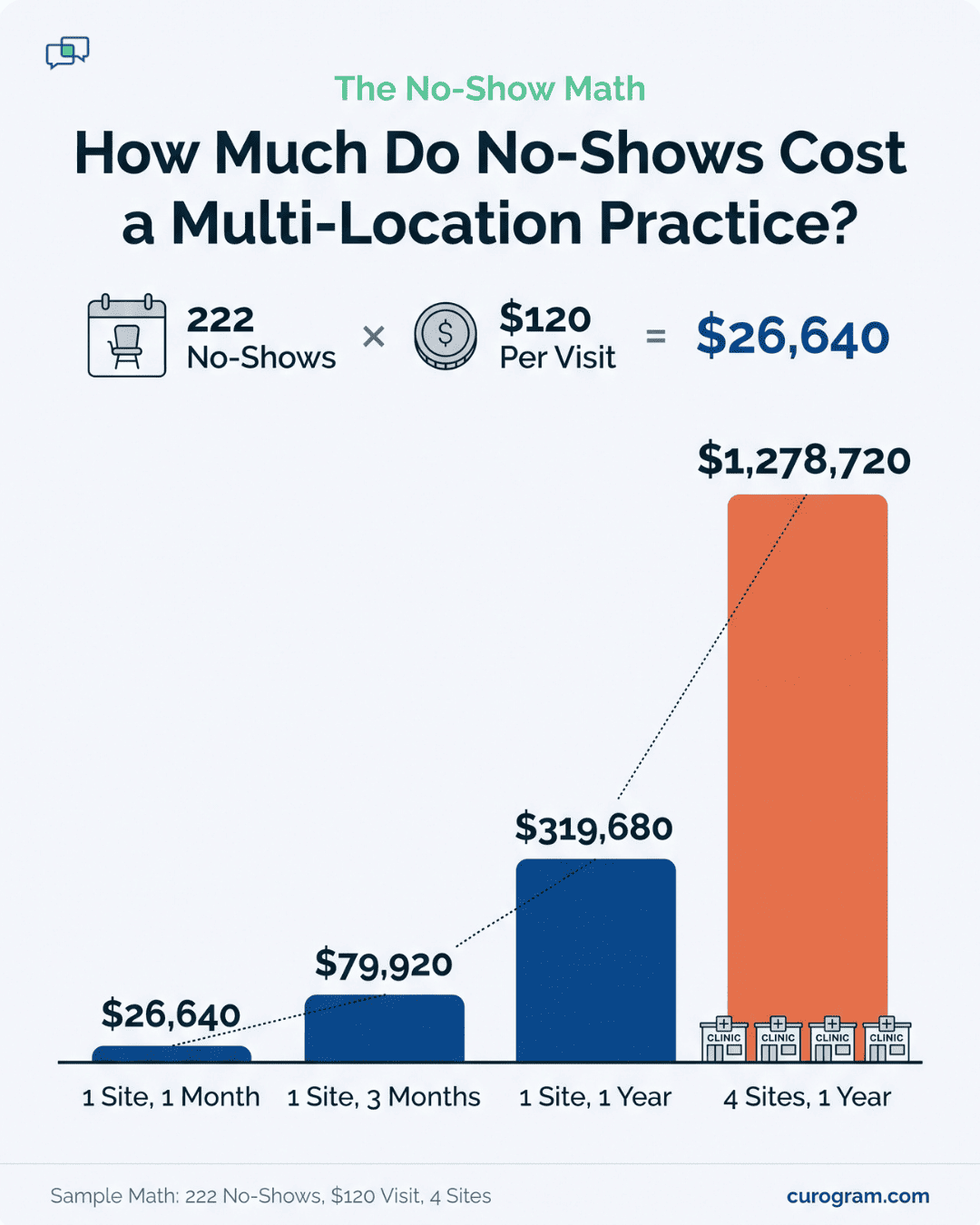
- An illustrative site with 222 no-shows at $120 a visit loses $26,640 a month.
- Two-way texts let patients confirm, cancel, or rebook by reply, so open slots appear in time to fill.
- Replies sync with the schedule, and a weekly report ranks each site by no-show and confirmation rate.
- Based on our internal data, practices on this kind of sequence run no-shows 53% below the industry average.
Your billing lead can quote, almost to the cent, what it costs to send a claim. Ask that same person what one empty provider slot costs, and you’ll likely get a guess. That gap says a lot about how cost-conscious groups run.
Office Ally groups tend to pick tools on price. They compare vendors, push back on add-ons, and cancel what doesn’t pay its way. No-shows dodge all of that. They never arrive as an invoice, so they never reach a budget review.
Our view is plain. No-shows are the biggest cost most of these groups have never priced, and the fix starts with arithmetic. A group no-show reduction playbook should open in a spreadsheet, before anyone looks at software.
Take an illustrative site that logs 222 no-shows in a month. At $120 per visit, that’s $26,640 in visits that never got billed. Run it across four sites for a year and the total passes $1.2 million. Few groups spend anything close to that on their whole tech stack.
The math only needs four inputs, and you already have all of them. What’s often missing is one reminder process for every location. Patients also need an easy way to cancel early, and each site needs a weekly number someone owns.
Those pieces are what close the gap. Atlas Medical Center, a Curogram client, cut its no-show rate from 14.20% to 4.91% in three months, based on our internal data. The steps below show how to price your own leak and run the same kind of rollout across every site at once.
The Five-Figure Leak
Every recurring cost in your group has a paper trail. Clearinghouse fees, phone lines, and EHR seats all show up as invoices, and someone signs off on each one.
Office Ally groups often run this way. Many chose Practice Mate or EHR 24/7 because the numbers made sense on paper.
No-shows leave no paper at all. A patient who skips a 10:40 follow-up creates no bill, no line item, and no alert. The provider sees a gap, the front desk marks the visit, and the day keeps moving. By month’s end, that loss is spread across dozens of rows in the schedule.
So it slips past the people whose job is to catch waste. Finance reviews what lands in accounts payable. A missed appointment revenue leak never lands there, which keeps it outside the one process built to find it.
The No-Show Cost per Location Math
The no-show cost per location math takes four inputs. Each one already lives in your reports.
|
Input |
Where to Find It |
Watch Out For |
|
Monthly no-shows per site |
Scheduler, filtered by no-show status |
Late cancels logged as no-shows |
|
Average visit value |
Paid amounts divided by visits, last 90 days |
Using billed charges, which run high |
|
Number of sites |
Your location list |
Part-time sites with fewer clinic days |
|
Months |
Always 12 |
None |
Now multiply. With an illustrative 222 no-shows, a $120 visit value, and four sites, you get 222 times $120 times 4 times 12. That comes to $1,278,720 a year, or $26,640 per site each month.
Treat those figures as a sample, since your visit value may be higher for specialists or lower for quick rechecks. Run it with your own data before you share it. A number built from your own reports is much harder for anyone to wave away.
Where the Number Hides in Your Reports
Your first count will probably come in low. Sites often log the same event three ways. One marks a missed visit as “NS,” another as a same-day cancel, and a third just reschedules it and moves on.
Before you trust the total, agree on one rule for every site. A patient who cancels less than 24 hours out, or not at all, counts as a no-show. Then pull the last 90 days again under that rule.
Run the math per site as well. A group average of 10% can hide one site at 6% and another at 15%. Those two sites need different fixes, and a blended figure points you at neither.
What 222 No-Shows Looks Like at the Front Desk
At 22 clinic days a month, 222 no-shows means about 10 empty slots every day at one site. Ten gaps rarely feel like a crisis in the moment. Each one is small.
A medical assistant dials three no-answer numbers to fill a hole that opened 15 minutes ago. A provider catches up on charts during a slot that was booked a month back. Someone marks “NS” on a row, and nobody looks at that row again.
Across four sites, that’s 40 empty chairs a day. In our example, it adds up to $106,560 a month in visits that never get billed.
Why the Leak Grows Over Time
One no-show costs more than one visit. A patient who skips a follow-up often skips the next one too, and the care plan stalls. Recall lists get longer, and staff spend hours chasing people who already drifted.
Patients do come back when asked. Based on our internal data, a multi-location practice sent SMS recalls to patients overdue for follow-up, and 35% booked within a month.
In all, 1,240 patients were seen from those messages alone. Still, it’s cheaper to keep a patient on the schedule than to win them back later.
There’s a capacity cost too. A provider’s hour at 11 a.m. can’t be saved for 3 p.m. Groups that add staff hours to meet demand may be buying time they’d already have if booked patients showed up.
Managing the Biggest Loss by Feel
Ask a site manager about no-shows and you’ll hear “Tuesdays are rough” or “it’s been worse since summer.” Those are impressions. Most groups have no weekly no-show rate per site, no target, and no one who owns the number.
That’s the gap a schedule utilization budget practice fills. It means setting a target fill rate for each location and reviewing it the way you’d review any cost line.
Without that habit, your busiest site and your leakiest site could be the same building, and the monthly report wouldn’t tell you.
The Reminder Policy Engine
Ask most multi-site groups for their reminder policy, and you’ll get five habits. One site texts two days out. Another calls the day before. A third hands out an appointment card and hopes.
When results differ, no one can say why. Timing, wording, and site habits all blur together.
Curogram sets one sequence for the whole group. You decide once on the timing, the wording, the follow-up, and what happens if a patient stays silent. Every location then runs the same rules. If one site’s numbers drift, you can rule out the policy and look at the site.
What the Sequence Looks Like
A sample sequence is below. The timing and wording are illustrative, so adjust both to your specialty and visit types.
|
When |
What the Patient Gets |
If No Reply |
|
3 days before |
“Hi Maria, you’re booked Thu 10/22 at 10:40 AM at our Elm St office. Reply C to confirm, R to reschedule, X to cancel.” |
Follow-up text fires |
|
1 day before |
Short reminder with the address and parking note |
Patient goes to the call list |
|
2 hours before |
Arrival note with check-in steps |
None |
Keep the message short and free of clinical detail. Name, date, time, and location are enough for a patient to act on.
Three days out is the key touch. It gives a canceling patient time to tell you, and it gives your staff time to offer the slot to someone else. A cancel that arrives the night before leaves far less time to refill the slot.
Consent matters too. Under the TCPA, an appointment reminder is an informational text, so it needs the patient’s prior express consent. Collect a mobile number with that consent at booking, and honor a STOP reply right away.
How Two-Way Replies Sort the Schedule
With two-way texting, the patient’s reply does the work. They text C, R, or X, and the status updates without anyone picking up a phone.
The X reply matters most. A patient who cancels by text three days out frees a slot you can still fill. A patient who never answers is the one most likely to become a no-show.
By the day before the visit, every appointment sits in one of three groups:
- Confirmed patients, who need nothing more from staff
- Freed slots, which go straight to the waitlist
- Silent patients, who get the follow-up text and then a short call
That third group is small, and it’s the only one that needs a person.
Freed Slots Show Up While You Can Still Fill Them
Timing decides whether a canceled slot gets used. A slot freed 72 hours out can go to a waitlist patient, a new patient who wants this week, or an urgent recheck. A slot found empty at check-in is gone.
Once a slot opens, staff can text the next waitlist patient: “An opening came up Thursday at 10:40 AM. Reply Y to take it.” The first yes gets the slot.
Covina Arthritic Clinic shows the scale this can run at. Based on our internal data, the clinic confirms more than 1,100 appointments a month through automated texts, with replies processed in real time. Before that, staff confirmed visits through manual follow-up calls.
Statuses Sync With the Schedule Your Staff Already Use
Curogram syncs with Office Ally, so confirm, cancel, and reschedule replies show up in the schedule your front desk already works from. Nobody copies replies from one screen into another. We have clients running this Office Ally connection today.
That changes the confirmation workflow front desk teams run each morning. Today it often means dialing through 60 names and leaving voicemails.
With replies syncing, most rows already show as confirmed, and staff work only the silent patients and reschedule requests. Based on our internal data, automated texting also cuts inbound calls by 24%.
A Weekly Number Each Site Owns
The last piece is ownership. Each week, every site sees its no-show rate, confirmation rate, and recovered slots.
|
Site (Illustrative) |
No-Show Rate |
Confirmation Rate |
Recovered Slots |
|
Elm St |
5.1% |
81% |
14 |
|
Ridge Rd |
9.8% |
64% |
6 |
|
Harbor Ave |
6.3% |
77% |
11 |
Ridge Rd trails the others by more than 13 points on confirmations. That’s a prompt to check for bad cell numbers or a booking habit. One common cause is staff saving a landline as the main number, so the texts never arrive.
Each site manager owns their row. The group’s operations lead owns the whole table and asks one question each Monday: which site moved, and why.

Closing the Leak at Every Location at Once
Reducing no-show rates across Office Ally multi-location groups works best as one rollout on one calendar. This walkthrough uses an illustrative four-site group.
Each site books 1,560 visits a month at a $120 average visit value. The before and after rates come from Atlas Medical Center’s real results, based on our internal data.
Step 1: Price the Baseline
Pull 90 days of appointment data for each site. Count no-shows, divide by booked visits, and write down the rate.
In our example, each site starts at 14.20%, the same rate Atlas began with. That’s about 222 no-shows per site each month. At $120 a visit, the group loses $26,640 per site, or $106,560 a month across all four.
Put that figure on the next budget agenda, next to your software costs.
Step 2: Write the Policy Once
Pick one person, usually the operations lead, to sign off on timing, wording, and the call-list rule. Every site gets the same version. Site managers can suggest edits, but changes go through that one owner.
Settle two more rules here:
-
Decide who gets the first waitlist text when a slot opens and how long they have to reply. Thirty minutes is a fair window for a same-week slot.
-
Set the call-list trigger. In our example, a patient who hasn’t replied 24 hours before the visit goes on a short list for one phone call. Staff don’t call anyone who already confirmed.
Step 3: Turn On Every Site the Same Week
We’d skip the one-site pilot. A pilot gives the other sites a reason to wait. In this example, each month of waiting costs the group another $106,560. A shared launch also gives every site the same start date to measure from.
Before launch, hold a 20-minute huddle at each front desk. Show staff where replies appear in the Office Ally schedule and how to work the call list. Then check mobile numbers, since sites with gaps in phone data will show it fast in their confirmation rate.
Step 4: Work the Weekly Report
For the first 12 weeks, review the per-site report each Monday. Look at the lowest confirmation rate first, since silent patients drive most no-shows. Fix one cause per site per week.
Say one site sits at 64% confirmations in week three. Its manager checks the records and finds that many patients have only a landline on file.
The fix is one question at check-in: “What’s the best cell number for text reminders?” Within a few weeks, that site’s rate should start to climb.
Step 5: Recompute at 90 Days
Atlas reached 4.91% in three months. Applied to our example group, the numbers shift like this:
|
Per Site, Per Month |
Before |
After 90 Days |
|
No-show rate |
14.20% |
4.91% |
|
No-shows |
222 |
77 |
|
Visits lost to no-shows |
$26,640 |
$9,240 |
That’s 145 visits back per site each month, worth $17,400. Across four sites, the group recovers $69,600 a month, or $835,200 a year.
Those visits refill provider time that used to sit empty. Our client data puts the revenue lift from recovered visits at 10% to 20%. The leak now has a number, an owner at each site, and a trend you can track every week.
Expect some spread between sites. One with clean phone data may beat 4.91% in two months, while one with landline gaps may need the full quarter. Recompute each site on its own, and keep the Monday review going after day 90.
Curogram Highlight: The Reminder Policy Engine
Curogram’s Reminder Policy Engine gives a multi-site Office Ally group one reminder rulebook and one place to see whether it’s working.
Your operations lead sets the timing, wording, follow-up, and call-list rules once. Every location runs them from the next appointment on.
Patients answer by text. A reply of C confirms, R starts a reschedule, and X frees the slot. Those statuses sync with the Office Ally schedule your staff already use. The front desk opens a schedule that already shows who’s confirmed.
Freed slots surface days ahead. Staff can text the waitlist from the same screen, and the first patient to reply takes the opening.
Each Monday, site managers get their own no-show rate, confirmation rate, and recovered-slot count. The group view ranks every location side by side, so a lagging site stands out in the first week.
Based on our internal data, practices using Curogram’s automated reminders and two-way texting average a confirmation rate above 75%. Their no-show rates run 53% below the industry average.
Setup doesn’t require new hardware or a new EHR. The engine works with the Office Ally tools your group already pays for, and we have clients running that connection now.
Conclusion: Price the Leak, Then Close It
A group this careful about costs deserves to see its largest one. For most Office Ally groups, that cost sits in the empty slots spread across every site’s schedule.
Office Ally already protects your margin on the claims side. Curogram carries that same discipline to the patient side, where the question is whether booked patients show up. Groups that run both have a handle on revenue at each end of the visit.
So compute one number this week. Take your monthly no-shows, multiply by average visit value, then by your number of sites, then by 12. Bring that figure to your next budget review and set it next to the tools you already scrutinize.
If the number is as large as we expect, the next question is how fast it can come down. Atlas Medical Center went from 14.20% to 4.91% in three months. Track it weekly, and you’ll see the ROI reminder automation brings in, site by site.
Book a demo with Curogram. We’ll compute your per-location leak from your own scheduling data.