
.jpg?width=30&height=30&name=square-formal-photo%20(1).jpg) Mira Gwehn Revilla
Mira Gwehn Revilla
Run the No-Show Math for Your Office Ally Group
.jpg?width=30&name=square-formal-photo%20(1).jpg) Mira Gwehn Revilla : Oct 21, 2026, 5:00:00 PM
Mira Gwehn Revilla : Oct 21, 2026, 5:00:00 PM
You negotiate every software dollar — but no-shows drain $20K–$30K per location monthly. One governed 2-way sequence cuts them 53% below average.
Ask a group ops director for last month's no-show count at each site, and they can pull it from DrChrono in a few minutes.
Ask what those no-shows cost, site by site, and there's usually no answer. An empty 2:40 slot creates no charge, no claim, and no line item. So it never lands on a revenue report.
That blind spot is expensive. At a mid-size site, the missed appointment revenue leak runs in the five figures every month, and most groups have never added it up.
Our view is that reducing no-show rates across DrChrono multi-location groups is one policy decision. You make it once at the group level and enforce it at every site.
Right now, each location probably runs its own version. One site has a front desk lead who calls every unconfirmed patient by 10 a.m.
Another still uses reminder settings someone picked two years ago. A third texts patients from a shared office cell phone, which is its own HIPAA problem.
When one of those sites gets its rate down, nobody can say why. The habit that worked stays in that building, tied to the one person who does it.
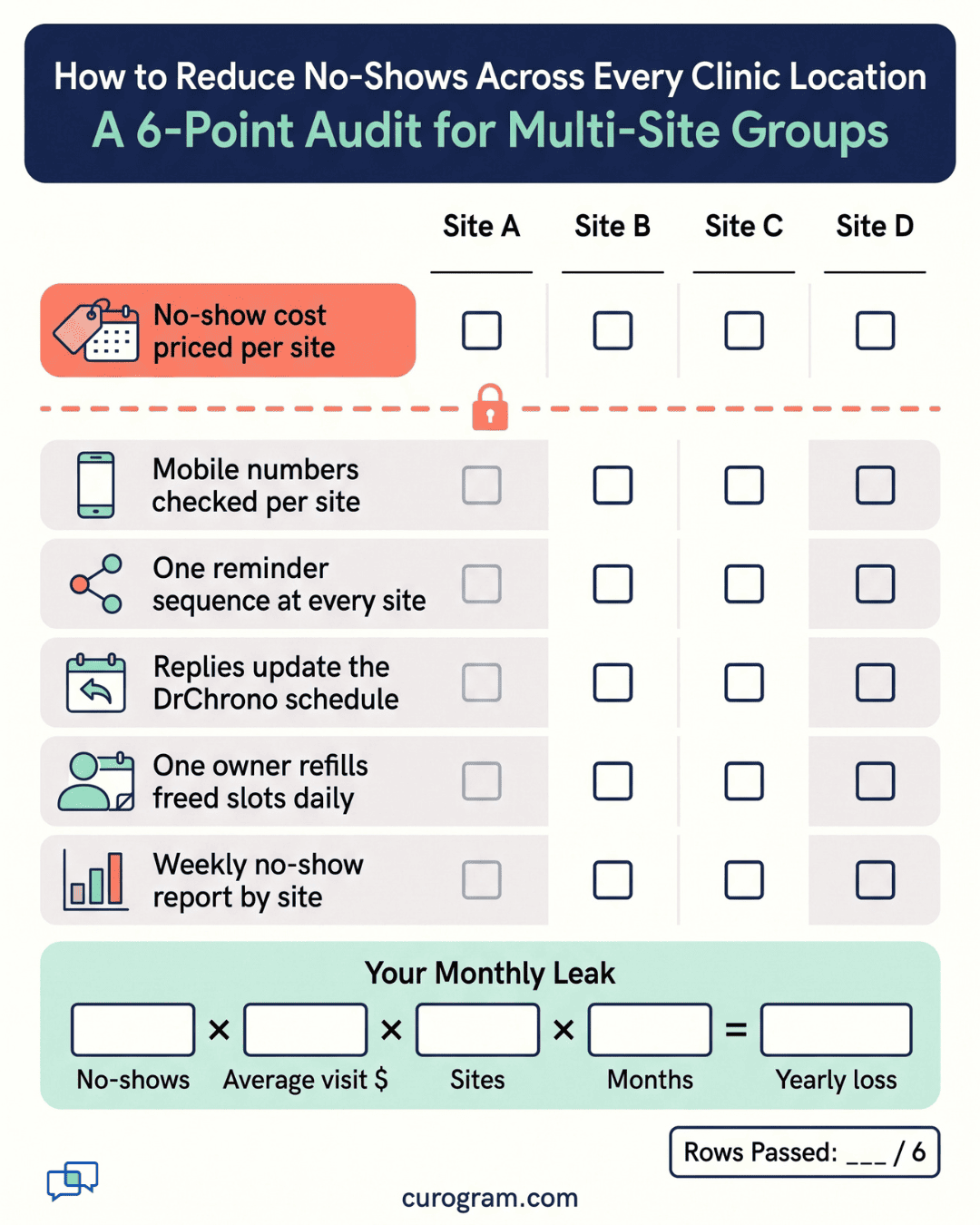
This group no-show reduction playbook starts with the math, because a loss with no number has no owner. You need four inputs: monthly no-shows, average visit value, number of locations, and 12. Multiply them and you have the annual figure your reports leave out.
From there, we'll walk through how a governed two-way sequence works with the DrChrono schedule. We'll also show what the numbers look like when every site runs the same play, using real results from our internal data.
DrChrono is good at recording what happened. A patient arrives, the visit is coded, a claim goes out, and the charge shows up in billing reports. A no-show creates one thing: a status change to "No Show" on the appointment.
That status carries no CPT code, no claim, and no balance due. So a site with 200 no-shows in a month can still post a revenue report that looks normal. Revenue is lower than it should be, but a lower number is easy to blame on the season, a short-staffed week, or payer mix.
Many groups that A/B test their landing pages and track cost per lead have no figure for their biggest recurring loss. The count sits in DrChrono, and nobody has multiplied it by anything.
You need two numbers per site, and both already live in DrChrono. For the first, filter appointments by office and by the No Show status for the last 90 days. Divide by three to get a monthly average. A 90-day window smooths out a slow holiday week or a flu-season spike.
For the second, take total collections for that office over the same 90 days and divide by visits seen. That gives you an average visit value based on what you were paid, which is lower than what you billed.
Run both numbers for every office, not just the one you're worried about. A site that "feels fine" can still sit 4 points above the group average. You won't know until the numbers are side by side.
The formula only counts the visit fee. It misses the labor that piles up around each empty slot.
A medical assistant spends 20 minutes calling three patients who missed morning visits. Two don't pick up. The third rebooks for next Thursday and takes a slot a new patient could have filled.
Some sites try to cover the gap by double-booking. That works until the day everyone shows, and the provider runs 45 minutes late by 3 p.m. Patients in the waiting room start asking the front desk how much longer.
Providers lose time too. A 30-minute new-patient slot that goes empty can't be filled at 8:55 a.m. for a 9:00 visit. The provider charts, checks messages, and waits.
None of this shows up as a cost line either. It shows up as overtime, as staff who feel behind every afternoon, and as patients who wait longer than they should.
Each site tends to fight no-shows with local habits. These habits form around whoever runs the front desk, and they rarely get written down.
|
Site |
Local habit |
What ops can see |
|
Site 1 |
Front desk calls every unconfirmed patient the day before |
No-show count only |
|
Site 2 |
DrChrono reminders on default timing, never reviewed |
No-show count only |
|
Site 3 |
Texts from a shared cell phone |
Nothing, and a privacy risk |
Say Site 1 runs at 7% and Site 3 runs at 16%. Without a no-show variance metric, the group can't tell how wide that gap is or whether it's growing. Nobody asks Site 1 what it's doing, so nobody copies it.
When the Site 1 lead goes on leave, the calls stop. Two weeks later, the rate climbs, and the group has no record of what changed.
A reminder policy has three parts: when messages go out, what they say, and what happens when a patient replies. Most groups have never written any of the three down. Curogram works as the reminder policy engine that holds all three in one place and applies them to every site.
Group ops sets the sequence once. A common pattern is a text 3 days before the visit, another the day before, and a short note 2 hours out for patients who haven't replied.
Site managers can't edit the timing on their own, so the sequence stays the same in month 12 as in month one.
A first reminder might read:
"Hi Maria, this is Valley Family Care. You have a visit with Dr. Lin on Tue 3/12 at 2:40 PM. Reply C to confirm, R to reschedule, or X to cancel."
The patient sees who it's from, when the visit is, and three ways to answer. They can reply from the lock screen without logging into a portal.
A good sequence also stops once it gets an answer. A patient who replies C at 3 days out shouldn't get two more nudges. Fewer, better-timed texts keep patients from tuning them out.
Think about the confirmation workflow front desk staff run each morning today. Someone prints or pulls up the list of unconfirmed visits. Then they start calling, leave voicemails, and mark notes in the chart.
With two-way replies, most of that list clears itself. Patients who reply C are done. Patients who reply X free a slot 3 days early, while there's still time to offer it to someone on the waitlist.
The morning list shrinks to the patients who haven't answered anything. Those are the calls that need a person. Staff spend their phone time on 15 patients instead of 80.
Patients who reply R start a text thread with the front desk. Staff can offer two open times in one message, and the patient picks one. That beats a game of phone tag that runs into the next day.
When a patient replies, the status writes to the appointment in DrChrono. A C marks the visit as confirmed. An X cancels it and opens the slot on the calendar.
Every front desk, every call center agent, and every provider works from the same live schedule. Nobody has to cross-check a separate texting app against the calendar at 7:45 a.m.
There's one real limit. The sequence can only reach patients with a mobile number on file in DrChrono, and landline-only patients still need a call.
So a clean phone field at intake matters. Ops should check what share of each site's patients have a mobile number listed, because a site at 70% coverage will lag a site at 95%.
A governed sequence still changes over time, but group ops decides what changes and when. Site managers send requests to group ops instead of editing settings on their own.
Ops then tests the change at one site for four weeks. A pediatrics office might want a 5-day reminder because parents plan around school.
If that site's confirmation rate rises on the weekly report, the change rolls out to similar sites. If it doesn't, it gets dropped, and the reason is written down.

Based on our internal data, practices using automated reminders and two-way texting run no-show rates 53% below the industry average. Average confirmation rates sit above 75% across current clients.
One site shows how fast this can move. Atlas Medical Center cut its no-show rate from 14.20% to 4.91% in three months. At Covina Arthritic Clinic, the system confirms more than 1,100 appointments a month without manual follow-up.
Recovered visits add up. Our internal research shows a 10% to 20% revenue increase, with each recovered appointment adding straight to the bottom line.
Let's run the Atlas rates through a sample group. Every figure below except the two rates is illustrative.
Step 1: Set the baseline. Four sites each book 1,500 visits a month. At 14.20%, each site loses 213 visits.
Step 2: Apply the new rate. At 4.91%, each site loses about 74 visits. That's 139 more patients seen per site, per month.
Step 3: Price the recovery. At a $120 average visit, 139 visits is $16,680 per site each month.
Step 4: Scale it. Across four sites, that's $66,720 a month, or about $800,000 a year.
|
Per site, per month |
Before |
After |
|
No-show rate |
14.20% |
4.91% |
|
Missed visits |
213 |
74 |
|
Lost revenue at $120 |
$25,560 |
$8,880 |
Your own result depends on your baseline. A group already at 8% has less room to gain than one at 14%. The steps stay the same, so plug in your own DrChrono numbers.
Two-Way Confirmation Logic is the part of Curogram that turns a reminder text into a scheduling action. A patient gets a text, replies with one letter, and the reply changes the visit in DrChrono.
A C reply marks the visit confirmed. An X reply cancels it and opens the slot, often days before the visit, while there's time to fill it. An R reply opens a text thread with the front desk so staff can offer new times without a phone call.
For a multi-location group, three things matter most:
The sequence stops once a patient answers, so confirmed patients don't keep getting texts. Staff only see the exceptions: patients who never replied, patients who asked to reschedule, and those with no mobile number on file.
Every message runs through a HIPAA-compliant platform, which closes the gap left by sites that text from shared office phones. Two-way threads stay tied to the patient record, so any staff member can pick up where a coworker left off.
Based on our internal data, practices using this approach run no-show rates 53% below the industry average, with confirmation rates above 75%. Atlas Medical Center dropped from 14.20% to 4.91% in three months.
A group that tracks cost per lead and tests every landing page should also know what an empty slot costs at each site. Right now, most DrChrono groups have that data sitting in the schedule, unpriced.
DrChrono keeps your calendar accurate. Curogram works on the other half of the problem: getting each patient to commit to the slot, say so by text, and give it back early when plans change.
Start with one number this week:
No-shows per month x average visit value x number of locations x 12
Run it with real figures from each site. If the result lands anywhere near the example math in this playbook, you're looking at one of the largest line items your group doesn't track.
Then look at how each site handles reminders today. If the answer is five different habits run by five different people, the gap between your best and worst site has no owner. One governed sequence puts that gap on the Monday report, next to a named person who owns it.
Book a demo with our team. We'll compute your per-location leak from your own DrChrono utilization data and model what recovery looks like across every site you run.
 Mira Gwehn Revilla : Oct 21, 2026, 5:00:00 PM
You negotiate every software dollar — but no-shows drain $20K–$30K per location monthly. One governed 2-way sequence cuts them 53% below average.

 Jo Galvez : Sep 18, 2026, 8:00:01 AM
No-shows drain $20K–$30K monthly per location — hidden inside network averages. This playbook standardizes 2-way reminders across athenahealth sites.

 Aubreigh Lee Daculug : Sep 1, 2026, 10:00:00 AM
No-shows drain $20K–$30K monthly per practice. This ops playbook standardizes reminders across eCW locations and drops no-shows 53% below industry...