
.jpg?width=30&height=30&name=square-formal-photo%20(1).jpg) Mira Gwehn Revilla
Mira Gwehn Revilla

Then you weigh those numbers against each site’s load. Curogram counts it all as texts move through its shared inbox, with no time studies or logs.
- Messages handled per location each day, split into scheduling and billing queues
- Median first-response time, which one bad Monday can’t drag off course
- Resolution rate, so a quick “got it” reply isn’t scored as a finished task
- Hourly volume curves that show when each desk gets slammed
- Confirmation follow-through, with our clients averaging above 75% (based on our internal data)
In most small groups, the front desk that gets help is the one that asks loudest. The Elm Street office manager calls twice a week about the phones. Ridgeview never calls, so the administrator files Ridgeview under “doing fine.”
Often it’s the other way around. Ridgeview may be fielding twice the texts, many of them about statements and copays, and still replying faster. No one can see it, because nothing in the group counts it.
Office Ally groups feel this gap more than most. Practice Mate and the Office Ally clearinghouse track every claim from submission to payment.
You can pull rejections by payer in a few clicks. Ask how many patient messages each site answered last week, though, and you’ll get a guess.
That gap shapes real decisions. The next hire, the next coaching talk, and the next “why is your desk so slow?” all ride on what someone heard. In a lean group with one or two people per desk, a wrong call costs payroll and morale at the same time.
Our position is plain. Front desks should be judged on measured work, and every site’s workload should be visible before anyone decides who needs help.
Benchmarking front office performance across Office Ally locations makes that possible, as long as the numbers are adjusted for each desk’s real load.
That adjustment is where most comparisons fail. Raw speed rewards the slow site. A desk that sees 40 texts a day can answer each one in five minutes. A desk that sees 120, half of them billing questions, can’t, and it shouldn’t be coached as if it could.
The Unfair Comparison
Every Office Ally group already runs on numbers. Billing staff know the clean claim rate, the denial count by payer, and which ERAs are still sitting unposted. Someone checks the clearinghouse rejection list before lunch.
Patient communication gets none of that attention. Nobody tracks how many texts the Westgate desk answered on Tuesday, how long a statement question sat before a reply, or how many reschedule requests came in after 4 p.m.
Part of the reason is that the work is scattered. Calls hit one line, texts land somewhere else, and voicemails pile up on a third.
Billing questions often go to whoever happens to be free. When the work is spread across that many places, there’s no single count to pull, so nobody pulls one.
So a group can quote its days in A/R to the decimal. Ask which front desk is busiest, and the answer comes from memory.
Even the phone system rarely helps. Its call log shows how many calls rang through, but it can’t tell a two-minute time change from a 15-minute balance dispute. And it misses every text, every portal note, and every patient who gave up and walked in.
Two Desks, Same Staffing, Different Weeks
Take two locations in the same group, each with two front desk staff. The numbers below are illustrative, but the pattern is common.
|
Measure (one week) |
Location A |
Location B |
|
Front desk staff |
2 |
2 |
|
Patient messages handled |
310 |
640 |
|
Share that were billing questions |
15% |
40% |
|
Median first-response time |
22 min |
14 min |
Location B carries double the message volume. Close to half of it is billing traffic, which takes longer because staff have to open the account, check the statement, and explain a balance. B still replies faster.
None of that is visible to the administrator. What she does hear about is the patient who waited on hold at Location B one afternoon and left a sharp voicemail.
So B’s “slow afternoons” go under review. Location A, with half the work and slower replies, gets left alone because nobody there complains.
What the Wrong Read Costs
Bad comparisons lead to bad spending. If the loud site gets the next hire, the group pays a full salary to a desk that didn’t need it. Meanwhile the overloaded desk keeps running short.
Coaching goes off course too. A manager sits down with Location B to talk about speed, which is the one thing B already does well. The real issues, such as slow replies at A or billing questions with no clear owner, never come up.
Staff notice all of this. A team that handles twice the load and gets called slow will stop trusting the people who judge it. That’s how front office turnover starts.
In a May 2025 MGMA Stat poll, practices that reported rising turnover named front-office staff among the most common hotspots, alongside medical assistants.
Replacing a trained front desk person in an Office Ally group costs more than a job post. The new hire has to learn Practice Mate scheduling, your payer mix, and which patients need a call instead of a text. For weeks, everyone else covers the gaps.
Decisions Built on the Last Complaint
In a large health system, an analyst might catch this. A lean group has no analyst. The administrator also handles credentialing, the payroll run, and the copier lease.
So staffing and coaching decisions default to recall. Whoever complained most recently feels like the biggest problem. A site that had a rough Monday stays “the slow one” for months, even after it fixes the cause.
Any manager would make the same call with the same inputs, and the only input is what people say out loud. Ask an administrator which site is busiest, and she’ll usually name the one with the most voicemails in her own inbox.
Without a fair workload comparison, locations get ranked by how often they ask for help. Teams too stretched to pick up the phone and complain end up last in line.
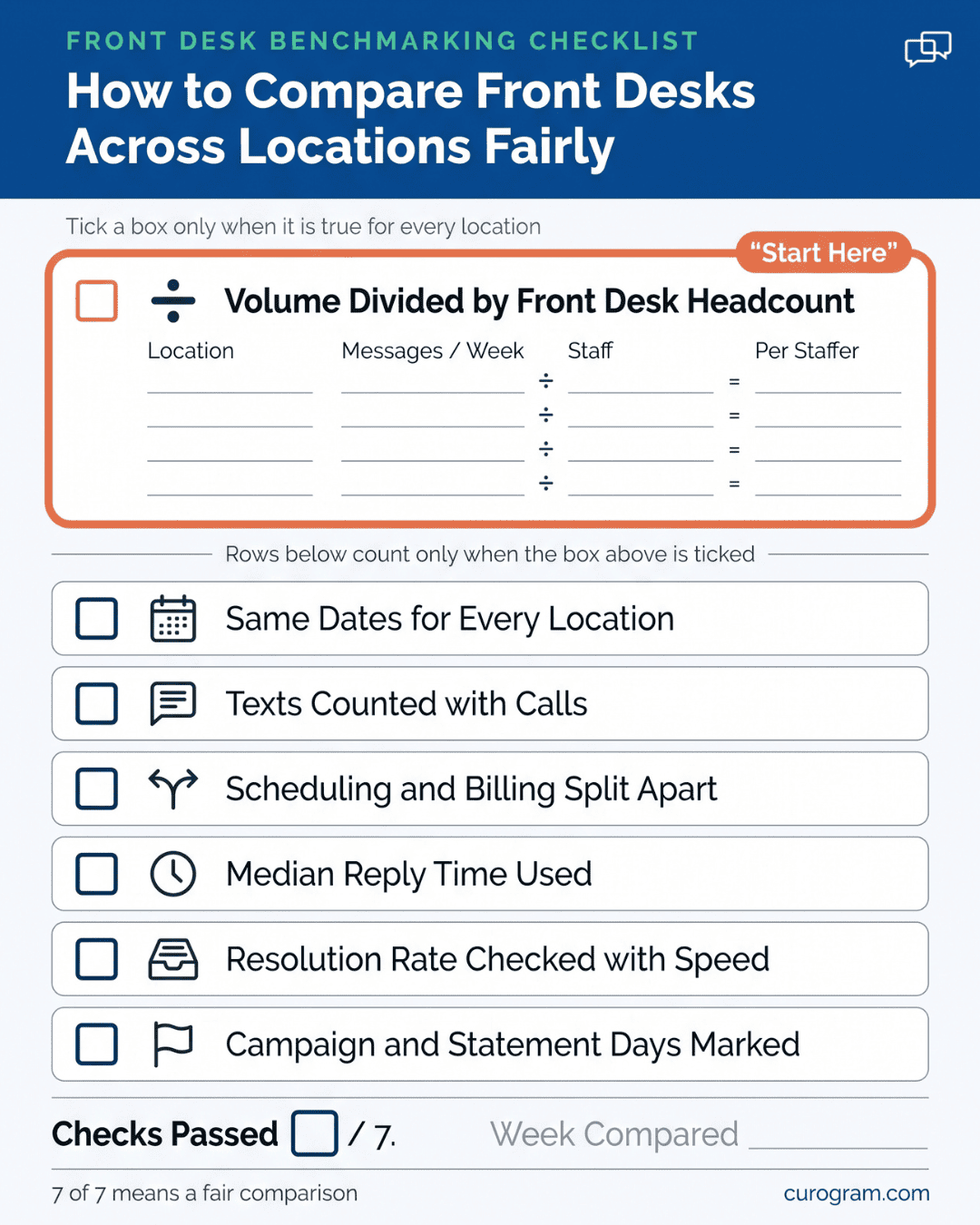
What Gets Counted
Four numbers do most of the work. Curogram tracks each one per location and per queue, using the timestamps on every patient text thread.
|
Measure |
What it tells you |
What it misses on its own |
|
Messages handled |
How much work a desk took on |
How hard each message was |
|
Median first-response time |
How long patients wait for a reply |
Whether the issue got solved |
|
Resolution rate |
How many threads closed out |
How long closing took |
|
Volume by hour |
When each desk gets slammed |
Who was on shift that hour |
Read across any row and the gap in the right column is covered by another measure. Messages handled says nothing about speed, and median response says nothing about closure, so the four work as a set.
Median first-response time is the front desk response time metric we’d watch first. A median is the middle value, so one chaotic morning with a 90-minute delay doesn’t wreck a whole week’s score. An average would.
Resolution rate keeps that speed honest. A desk can reply in two minutes with “We’ll check and get back to you.” If the thread then sits for a day, the patient is still waiting, and only the resolution rate shows it.
Scheduling and Billing in Separate Lanes
Office Ally groups carry an unusual load at the front desk. Many of them run billing in-house and send statements on a set cycle. The week after a statement run, the desk fields a wave of “what is this charge?” texts on top of normal scheduling traffic.
If you lump those together, the site with more billing work looks slow. A balance question takes longer than a time change. Staff have to open the ledger, check the EOB, and sometimes loop in the biller.
Curogram splits the data by queue. You see a location’s scheduling response time and its billing response time as two separate numbers.
That matters most in small groups where the same two people cover both. You can tell whether a slow week came from scheduling or from a statement run, and coach the right thing.
If billing response time jumps every fourth week, that’s a statement-cycle problem. A saved reply or a text-to-pay link may fix it faster than another hire.
Why the Picture is Complete
Most front desk counts only include the phone. Phone logs show how many calls came in. Text traffic never appears in them, and texting now carries a large share of the work.
Based on our internal data, practices that shift routine questions to automated texting see a 24% drop in inbound calls. Those patients still need answers, and they now ask by text. A phone-only count would show that desk getting less busy while its load just moved to another channel.
In Curogram, texting, appointment reminders, and recall campaign replies all flow through one platform tied to the schedule. A patient might reply “C” to confirm, ask to move a visit, or answer a recall text. Each of those lands in the same count.
That matters for fairness between sites. One location may run heavy recall work for a specialist, while another handles mostly same-week sick visits. Both kinds of traffic show up, so neither desk looks idle just because its work arrives by text.
Context That Makes the Numbers Fair
A number without context can be just as unfair as no number. If Ridgeview ran a recall campaign on Tuesday, its inbound volume may triple by Wednesday. Its response time will slip. That’s a planned spike, and the view should show it as one.
Curogram’s per-location views mark campaign days and volume spikes next to the trend line. A manager can see that Tuesday was slow and also see why.
The views stay at the team level. They track how a location’s workload and response times move week to week, which is the level a staffing or coaching talk needs. Individual names stay off the chart.
Front desk teams tend to welcome that. For many, it’s the first record that shows how much work they actually carry. A desk that handled 600 messages in a statement week can point to the number in its next review.

Coaching Where the Data Points
One week of data can change a staffing call. The group and numbers in this walkthrough are illustrative.
A three-site Office Ally group schedules in Practice Mate. Elm Street has asked for a third front desk hire, and its manager has made the case twice in a month. Approval is one signature away. First, she pulls one week of per-location data from the same Monday through Friday.
|
One week |
Elm Street |
Ridgeview |
Westgate |
|
Front desk staff |
2 |
2 |
1 |
|
Messages handled |
290 |
610 |
240 |
|
Messages per staffer |
145 |
305 |
240 |
|
Billing share |
18% |
41% |
22% |
|
Median first response |
26 min |
15 min |
31 min |
|
Confirmation rate |
78% |
81% |
64% |
Step 1: Compare load per person. Raw volume favors big sites. Message volume per location, divided by staff, shows Ridgeview’s team carries more than double Elm Street’s load per person.
Step 2: Check the queue split. Ridgeview’s billing share is 41%. It sends statements for all three sites, so it absorbs most of the group’s balance questions.
Step 3: Read the hourly curve. Westgate’s slow median traces back to one window, 11 a.m. to 1 p.m., when its single staffer covers check-in and lunch at once. Outside those two hours, Westgate replies in about the same time as Elm Street.
Step 4: Set the baseline. Our clients average above 75% appointment confirmation, based on our internal data. Westgate sits at 64%, the only site below that line. Unconfirmed visits at Westgate are where the next no-shows will come from.
Step 5: Ask why Elm Street feels busy. Its phones ring hard from 8 to 9 a.m., when patients call about same-day openings. That hour is real, but it’s one hour. The rest of the day, its two staffers carry the lightest text load in the group.
Curogram Highlight: Team Performance Views
Team Performance Views give group administrators a side-by-side look at every location’s patient communication workload. The data comes from the Multi-Location Command Center, the shared inbox where each site’s texts, reminder replies, and recall responses land.
Because the inbox already timestamps every thread, there’s nothing extra for staff to do. No one logs calls on a clipboard or estimates their week in a survey. Numbers build up as the work happens.
For each location, the view shows:
- Messages handled per day and per week
- Median first-response time, split into scheduling and billing queues
- Resolution rate for closed threads
- Hourly volume curves, so you can match shifts to peak load
- Markers for recall campaigns and other planned volume spikes
You can look at one site in detail or line up all of them for the same week. Dividing volume by headcount takes one step, which is how an administrator spots a desk carrying twice its share.
Everything runs at the team level and focuses on trends, sized for a staffing review or a monthly huddle. A manager and a front desk lead can look at the same chart and agree on what changed.
Curogram syncs with your schedule, so confirmation replies tie back to real appointments. That keeps confirmation follow-through measurable at each site, against the above-75% average our clients see based on our internal data.
For Office Ally groups, this covers a gap the claims side can’t reach. Your clearinghouse shows what happened to every claim. Team Performance Views show what happened to every patient message, and which desk handled it.
Conclusion: Be Fair By Being Informed
Front desk teams deserve to be judged on the work they actually did. Right now, in most lean groups, the main office judges them by how often they call.
Office Ally already handles your claims workflow well. It tells you which payer is slow and which claim needs a fix. Curogram covers the other half of the front office: the texts, reminder replies, recall answers, and billing questions your staff handle every day. With both in view, a location’s workload stops being a guess.
The most useful step is also the smallest. Before your next staffing decision, collect one week of real message volume per location. Divide it by headcount and split scheduling from billing. Then look at who is carrying what.
That week may confirm the decision you were about to make. It may also reverse it, the way it did for Elm Street in our example. Either way, you’ll make the call with numbers your teams can see, and the desk that never complains will finally get a fair look.
Book a demo to see mass text messaging for InSync EHR patient outreach run on your own panel. Bring your discharge count, and we'll start with the Forgotten Alumni.