11 min read

Vascular Patient Texting for the Elderly: Skip the App Downloads

Vascular Patient Texting for the Elderly: Skip the App Downloads
💡 Elderly vascular and cardiac patients often skip patient portals because logging in feels confusing and slow. Two-way SMS gives them a simpler way to get prep details and ask questions before procedure day. Here's why texting wins for the 65-75 age group:
  • No app to install and no password to reset
  • Replies feel quick, just like family group chats
  • Medication hold steps stay clear and easy to find
  • Staff can answer follow-up questions within hours
  • The chat thread becomes a chart-ready safety record
For most patients aged 65 and older, SMS is the channel they already know. It removes friction, lowers prep anxiety, and helps facilities reach the people who never log into a portal.

Most cath labs and vascular imaging centers send prep instructions through a patient portal. The plan looks great on paper. The trouble starts when most patients aged 65 to 75 never sign in.

Take a 72-year-old patient scheduled for an angiogram next Tuesday. She gets a portal alert by email. She does not remember her password. Her grandson is at school. Her procedure is in three days, and she still has questions about her blood thinner.

She gives up and waits. The day before, she calls the front desk and leaves a voicemail. Staff calls back, but she misses it. She shows up unsure and stressed.

This pattern repeats across many outpatient-based labs (OBLs) that run on Medstreaming. Portal use stays low, voicemail tag wastes hours, and last-minute cancellations climb. The fix is not a better portal. It is meeting elderly patients on a channel they already use every day.

That channel is SMS. For vascular patient texting, elderly users do not need any app download. Curogram links the messages to Medstreaming, so every reply lands in the patient chart in real time.

This article walks through three big reasons why elderly cardiac and vascular patients prefer texting over portals. We will cover portal friction, anxiety relief through two-way replies, and safer medication hold steps. You will see how OBL patient engagement for elderly users improves once SMS becomes the default channel.

By the end, you will know how to set up SMS as your main prep channel without giving up HIPAA-safe records. You will also see how this small switch lowers no-show risk and helps patients show up calm, prepped, and on time.

Portal Adoption Barriers for Elderly Patients

Many vascular and cath lab patients fall in the 65-75 age range. Most of them do not log into the Fivos Patient Portal at all. Internal observations across Medstreaming-based facilities suggest portal use stays under 15% for this group. That means more than 8 out of 10 elderly patients never see what staff posts there.

The reasons are simple and very human. Login screens demand passwords that change often. Two-step codes get sent to email accounts patients rarely check. Forgot-password flows can take 10 to 15 minutes and often fail without a family member's help.

Once inside, the portal looks crowded. Buttons sit in odd places. Documents hide behind menus with names like "Visits," "Records," and "Encounters." For a 72-year-old, this feels foreign and frustrating.

Texting feels different. SMS is a channel older adults already trust. They use it to talk to grandchildren, share photos, and check on friends. It is muscle memory. Among 65+ patient texting healthcare patterns, response rates run far higher than portal logins.

The Hidden Communication Gap

Because staff know portal use is low, most teams default to phone calls. Voicemail tag begins. Patients leave messages, staff returns calls, no one picks up. The cycle eats hours per week.

Patients feel ignored. One common quote sums it up:

"I never heard from the facility. I thought my procedure was canceled. I worried for days."

Staff feels the same way. They post prep PDFs to the portal, hope patients open them, and still end up calling each one. The portal does not lighten their load — it just adds a step that no one uses.

This is where Medstreaming patient communication with no portal logins actually saves time. Instead of waiting for a patient to log in, SMS goes straight to the device they already keep in hand.

How SMS Bridges the Gap

SMS works on any phone, old or new. It does not need an app, a login, or a fast connection. A 78-year-old with a flip phone can read a text the same way a 25-year-old can.

The reply rate shows the difference. Across Medstreaming-based labs, SMS confirmations come back within 2 hours about 68% to 78% of the time. Portal logins for the same group sit below 15%. That is a 4-to-5x jump in patient response.

For the elderly patient SMS vascular workflow, this matters even more. These patients often live alone, drive limited routes, and rely on family for rides. They need clear, fast answers about prep, food rules, and medication holds. Voicemail and portal posts simply do not deliver fast enough.

Channel

Typical Response Rate

Setup Needed by Patient

Patient Portal

Under 15%

Login + password + MFA

Phone Call / Voicemail

30-40% same day

None, but slow loops

SMS Text

68-78% within 2 hours

None


The math is clear. If your goal is to reach 80% of patients aged 65 and up, SMS is the only channel that gets you close. It is not about replacing the portal for everyone — it is about reaching the 85% who never log in.

For OBL patient engagement, elderly users gain the most. They feel heard, and staff stop wasting time chasing voicemails. The shift from portal-first to SMS-first is what makes the rest of the prep workflow work.

That shift is also the doorway to the next big win: turning a confusing prep packet into a calm, back-and-forth conversation that lowers anxiety before procedure day.

Anxiety Reduction and Synchronous Communication

The day before a vascular or cardiac procedure is rarely calm. Patients hold many questions: Can I drink coffee? Should I take my blood pressure pill? Do I stop the blood thinner Friday or Saturday? When answers come slow, anxiety builds.

This is the prep anxiety cycle. The patient gets a packet, finds it confusing, leaves a voicemail, and waits. The waiting is what makes things worse.

The Old Prep Anxiety Cycle

Consider the standard flow at most labs. Staff hands the patient a printed packet at check-in or mails a PDF three days before. The patient drives home, sits down to read, and finds 4 pages of dense text.

Soon, questions pile up. The patient calls the front desk. Voicemail. They call back the next morning. Voicemail again. Eventually they give up and guess.

By procedure morning, the patient may have skipped the bowel prep, taken a blood thinner they should have stopped, or eaten breakfast when they should not have. The procedure gets delayed or canceled. Staff spend hours rebooking. The patient leaves stressed and embarrassed.

How SMS Replies Break the Cycle

Cardiac patient messaging with no app is all that's needed to fix this — just a basic phone and a text thread. The flow looks very different.

Forty-eight hours before the procedure, staff sends a short SMS:

"Your angioplasty is Saturday at 2 PM. Do not take aspirin or clopidogrel starting Friday. Reply YES to confirm."

The patient reads it within minutes. They reply YES and add a question:

"Can I take my blood pressure pill Friday morning?"

Staff sees the question on the Medstreaming-linked dashboard. Within an hour or two, a nurse replies:

"Yes, take your BP pill. No food or drink after midnight Friday."

That single back-and-forth changes everything. The patient now knows what to do. Anxiety drops. Sleep returns. They show up on time, calm, and ready.

Why It Works for Elderly Hearts and Vessels

For older patients with heart or vascular conditions, fear is a real risk factor. Stress raises blood pressure. High blood pressure on procedure day can delay an angiogram or stent. Calm patients have better outcomes.

SMS gives back a sense of control. Each reply confirms the patient is not alone. Each answer takes one worry off the list.

A common patient quote captures this well:

"When the lab texted me 48 hours before, I asked about my blood thinner. They texted back within an hour. I knew exactly what to do. I was not anxious at all."

Compare that to the voicemail experience. Same patient, same question, no answer, full panic.

Side-by-Side: Voicemail vs. SMS

Step

Voicemail Path

SMS Path

Patient asks question

Calls and leaves message

Replies in text thread

Staff response time

1-2 days, often missed

1-2 hours

Patient confidence

Low, anxious

High, calm

Day-of cancellation risk

Higher

Lower

Documentation

Phone notes only

Thread saved to chart


The two-way nature of SMS is the key. Voicemail is one-way and slow. Portal posts are passive and rarely opened. Texting is fast, two-way, and feels personal — the same way patients talk to family.

For vascular and cardiac labs running on Medstreaming, this back-and-forth is the difference between a smooth Saturday morning and a canceled slot. It is not a luxury feature. It is core to elderly patient care, and it sets up the next layer: safer medication holds.

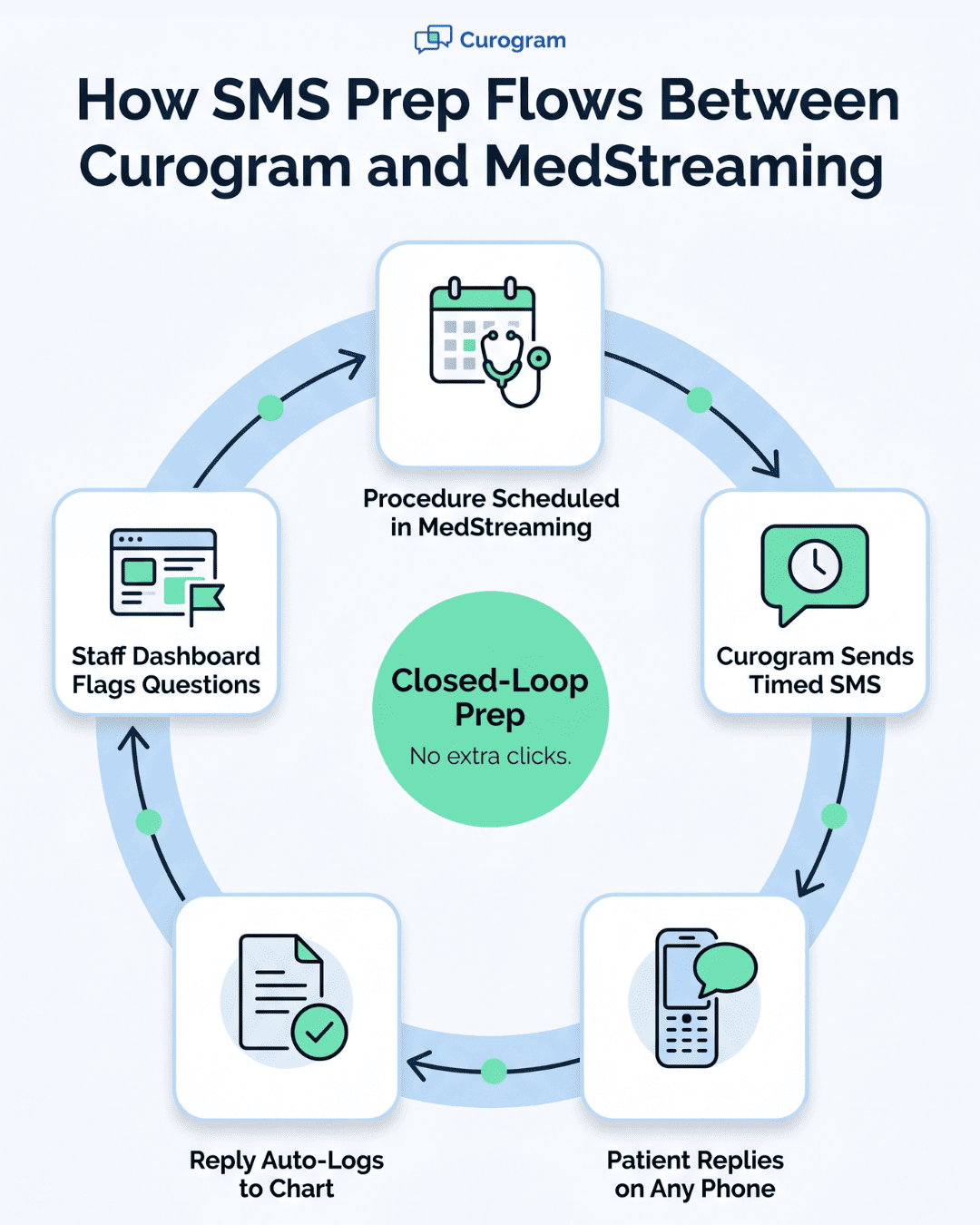
Circular flowchart showing how Curogram SMS prep loops through MedStreaming

Medication Hold Confirmation and Safety

For elderly cardiac and vascular patients, medication hold steps are the riskiest part of prep. A missed instruction can cause bleeding, low blood sugar, or a blood pressure spike during the procedure.

SMS turns these high-stakes steps into a clear, two-way checklist that staff and patients both confirm in writing.

This is where vascular patient texting for elderly users — with no app download and a direct link to Medstreaming — really earns its keep. The text thread becomes the safety record.

The Medication Complexity Problem

Most patients in their 70s take 8 to 12 medications a day. Cardiac patients often take more. A typical pre-angioplasty stop list looks like this:

  • Hold warfarin 5 days before
  • Hold clopidogrel 5 days before
  • Hold aspirin 3 days before (sometimes continue, depends on cardiologist)
  • Hold metformin 24 hours before
  • Hold NSAIDs (ibuprofen, naproxen) 7 days before
  • Continue blood pressure pills with a sip of water

Reading this on a printed sheet is tough. Reading it after a long workday, with poor eyesight, is harder. Add memory issues or a recent hospital stay, and errors are almost guaranteed.

The risk is not in theory. A patient who takes warfarin two hours before an arterial puncture can bleed at the access site. A patient who skips a blood pressure pill can spike to 190 systolic on the table. A patient who keeps taking metformin can develop lactic acidosis after contrast dye.

These are exactly the cases that delay or cancel procedures. They also drive up post-procedure admissions, which hurt both patients and the lab's bottom line.

How SMS Medication Hold Confirmation Works

The Curogram and Medstreaming flow is built around three short messages. Each one is timed to a specific point in the prep window.

  • Message 1, sent 7 days out: "Hi Mrs. Lopez. Your angioplasty is set for July 12. Important: stop ibuprofen and naproxen today. We will text more details closer to the date. Reply OK if you understand."

  • Message 2, sent 5 days out: "Stop warfarin and clopidogrel starting tonight. Keep taking your blood pressure medicine. Reply YES to confirm."

  • Message 3, sent 24 hours out: "Final reminder: stop metformin today. No food or drink after midnight. Take your blood pressure pill at 6 AM with a sip of water. Reply YES to confirm. Reply HELP if you have questions."

Each reply is logged in the patient's chart. If the patient does not reply, the system flags the case for a staff phone call. If the patient replies with a question, a nurse answers within 1-2 hours.

This is what makes SMS-based prep safer than the old voicemail or portal approach. Every step is confirmed, in writing, by the patient's own thumb.

Real Example: The Warfarin Catch

Here is a real-style scenario from an OBL using SMS prep. A 74-year-old man scheduled for a femoral angiogram replied to his Day 5 message:

"Stopped warfarin tonight. But I still took my blood thinner shot."

The "blood thinner shot" was enoxaparin — a separate anticoagulant the front desk did not know about. Staff caught it because the patient typed it out. They added a quick reply:

"Thanks for sharing. Please hold the shot too. We will call to confirm dose details."

In the old voicemail world, this fact would not have surfaced. The patient would have shown up, the team would have started, and a bleed would have followed. SMS surfaced the risk because it asked for a reply, not just a read.

Documentation and Safety Audit

Every text thread becomes part of the patient's Medstreaming chart. This is more than a nice-to-have. It is a real audit trail.

Picture a chart entry like this:

"July 7, 2:14 PM — Patient confirmed via SMS: warfarin STOP, clopidogrel STOP, metformin STOP, BP medication CONTINUE, aspirin CONTINUE per cardiologist. Confirmed by patient direct reply."

If a patient later claims they were not told to stop a medication, the thread is right there. If a state surveyor asks how the lab confirms patient understanding, staff can show the SMS log. If a malpractice issue ever arises, the timestamped, patient-typed reply is strong proof of informed consent.

Based on our internal data, facilities that use Curogram for SMS confirmation see fewer day-of cancellations and faster turnaround on prep questions.

The same internal research shows phone call volume drops by up to 50% when SMS handles routine confirmations. Staff productivity also climbs by 30% or more, because the team is no longer stuck on hold or chasing voicemails.

For OBL patient engagement, elderly users gain the most. Patients feel cared for. Staff have proof of communication. The chart tells a complete story without anyone digging for it.


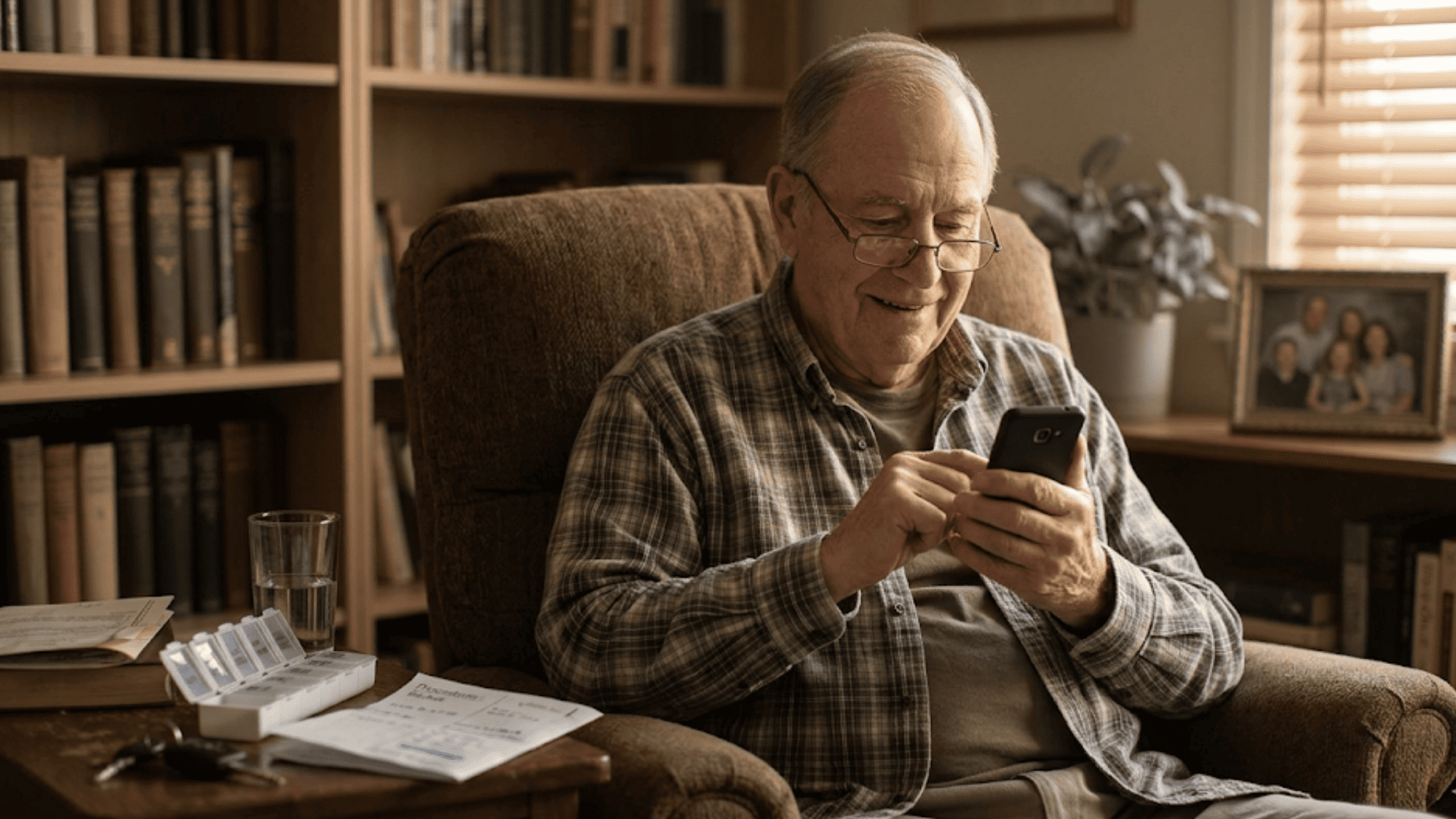
Elderly man in reading glasses smiles while reading a text reply at home

How Curogram Brings SMS Prep Directly Into Medstreaming

Curogram is built to plug into Medstreaming so SMS becomes part of the chart, not a side tool. Staff do not toggle between two systems. Every text sent and received shows up in the patient's record, tagged with date, time, and sender.

The setup is simple. When a procedure is scheduled in Medstreaming, Curogram pulls the patient's mobile number and procedure type. It then triggers the right SMS template — angioplasty prep, stent follow-up, vascular ultrasound prep — without staff having to write each message from scratch.

Replies come back to a single inbox the team already knows. Nurses and front-desk staff can answer in seconds. If a patient asks something clinical, the message routes to a nurse. If they need a ride, it routes to scheduling. The chart syncs as everyone works.

The platform is also fully HIPAA-compliant. Patient data stays encrypted, consent is captured at the first message, and access is role-based. No personal phone numbers are exposed to staff or patients.

Based on our internal data, practices using Curogram have cut phone call volume by as much as 50% and lifted staff productivity by more than 30%.

One client lab dropped no-show rates from 14.20% to 4.91% in just three months — about 3 times better than the industry average. Another multi-location group saw 35% of patients re-book after a single SMS recall message, leading to over 1,200 reactivated visits.

For Medstreaming-based OBLs, cath labs, and vascular imaging centers, this means less voicemail, fewer canceled procedures, and a much calmer prep day. Most teams are trained on Curogram in 10 minutes. Patients do not need any training at all — they just text back, the way they already do every day.

Conclusion

Elderly vascular and cardiac patients are not against technology. They use phones every day to talk to family, send photos, and check in on friends. What they avoid is friction — passwords, apps, menus, and screens that feel built for someone else.

That is why patient portals fall short for the 65-75 age group. Less than 15% of these patients log in regularly. The other 85% are reachable, but only on the channel they already trust: SMS.

Two-way texting solves three big problems at once. It cuts portal friction. It eases prep anxiety through fast replies. It adds a written safety layer for medication holds. Each of these wins comes without asking patients to download a thing.

For Medstreaming-based labs and OBLs, the shift to SMS-first prep is not just a tech choice. It is a patient experience choice. It says, "We will meet you where you already are, in a language your phone already speaks."

Based on our internal data, the results show up fast. Reply rates climb. Phone call volume drops by up to 50%. No-show rates fall, sometimes by more than half within three months. Patients show up calmer, better prepped, and more sure of their medication plan.

The takeaway is simple. If you are losing 85% of your patient communication to portal friction, the fix is not a better portal. It is a channel that works on the phone they already hold in their hand.

Curogram makes that channel real for vascular and cardiac labs. The platform connects to Medstreaming, keeps data HIPAA-safe, and turns prep into a calm, two-way chat. For elderly patients, that change can be the difference between a canceled Saturday and a smooth one.

Watch a full angioplasty prep happen entirely through SMS in Medstreaming. Schedule a demo and see the closed-loop workflow in 20 minutes.


Frequently Asked Questions

How does SMS work for elderly patients who don't own smartphones?
SMS works on any phone, including basic flip phones from the early 2000s. There is no app to install and no login required. Patients just read the text and reply, exactly like they would with a family member.
Why do elderly patients trust SMS more than patient portal logins?
SMS feels familiar because they already use it with grandchildren and friends. There is no password to remember, no menu to navigate, and no app to find. Trust comes from reduced friction, not from extra security promises.
How does Curogram keep SMS HIPAA-compliant for cardiac patients?

Curogram encrypts every message, captures patient consent at the first text, and uses role-based access for staff. Personal phone numbers stay hidden, and every thread logs to MedStreaming with timestamps for full audit support.

Why is SMS confirmation safer than verbal confirmation for medication holds?

Verbal calls are not always documented well. SMS replies are written, timestamped, and saved in the chart. If a patient says, "I stopped my warfarin," that proof lives forever in the patient record.

How fast do elderly patients usually reply to procedure prep texts?

Based on observed reply patterns across MedStreaming-based labs, most patients aged 65 and up reply within two hours. Many reply within 15 minutes. Compare that to portal logins, which often take days or never happen.