12 min read

Reduce the Cost of Manual Appointment Confirmations for MD Systems

Reduce the Cost of Manual Appointment Confirmations for MD Systems
💡 The cost of manual appointment confirmations for MD Systems practices often tops $15,000 per year in wasted wages alone.
  • A solo practice spends roughly 2 hours each day on confirmation calls.
  • At $20 pear hour, that adds up to $10,000–$15,000 a year.
  • Most of those calls go straight to voicemail.
  • Texts get read 98% of the time, while calls get answered less than half.
  • Automated reminders also catch 30% more confirmations than phone calls.
Curogram's automated reminders plug right into MD Systems and handle the full confirmation cycle. Staff can then shift their time to billing, intake, and patient care instead of sitting on hold.

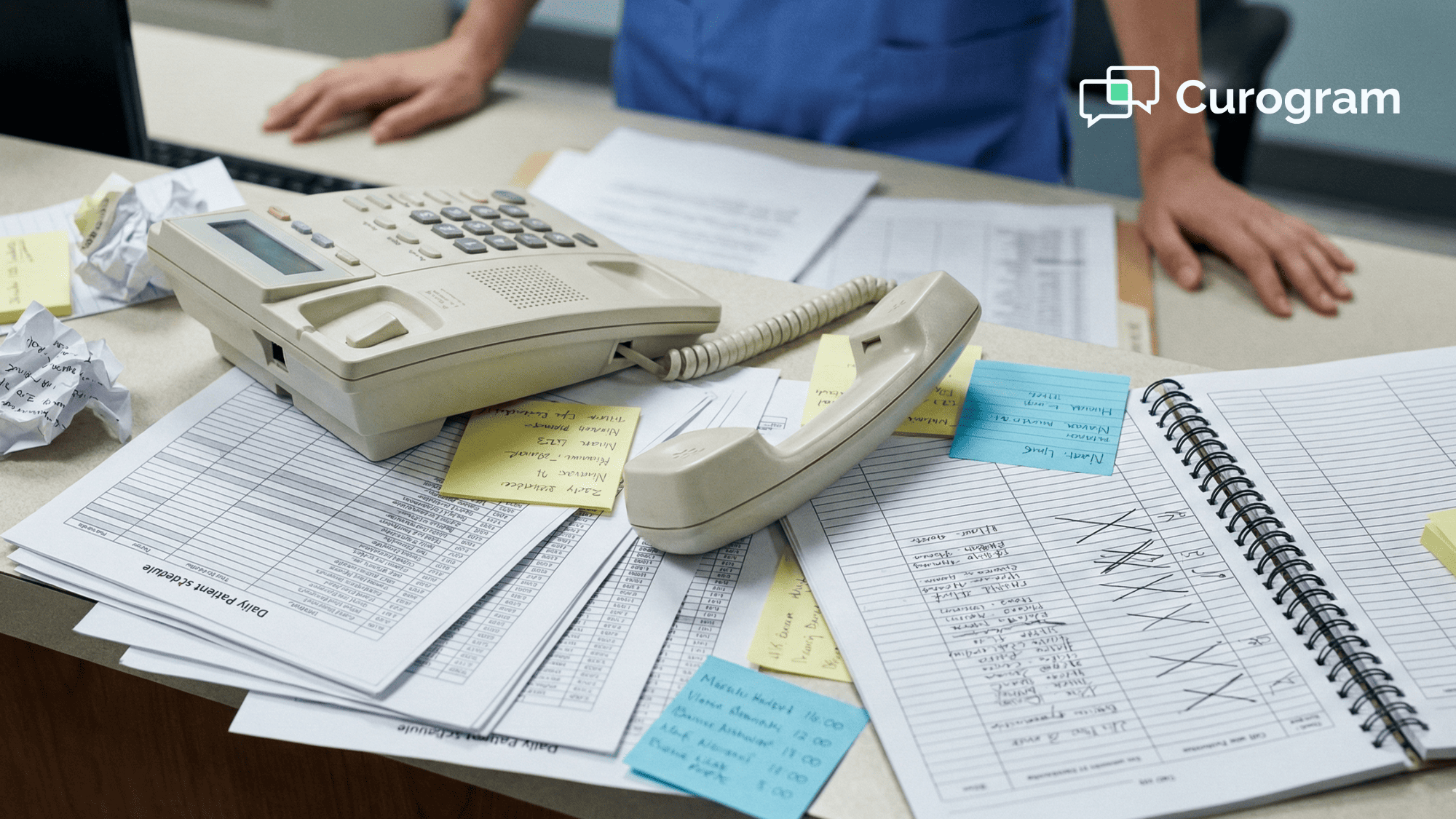
Picture your front desk right now. There's a line of patients waiting to check in. The phone is ringing. And somewhere behind that counter, a trained team member is dialing through a printed list of tomorrow's patients — leaving voicemail after voicemail.

This scene plays out in medical offices all over the country. It looks normal. It feels normal. But it's one of the most costly habits in practice management today.

The cost of manual appointment confirmations for MD Systems practices is far higher than most owners think. We're not talking about a minor time drain. We're talking about thousands of dollars in wages spent each year on a task that software can handle for pennies.

Think about it this way. You hired your front desk staff to greet patients, handle intake, and support your care team. Instead, they spend hours each week acting as human auto-dialers. That's a poor use of their skills and your budget.

This kind of administrative waste in medical practices often hides in plain sight. It shows up as overtime costs, high turnover, and staff burnout. It also shows up as no-shows — missed visits that never got confirmed because the team ran out of time to call everyone.

The good news? This problem has a clear fix. Automated text reminders from Curogram connect to your MD Systems schedule and do the work for you. No printing. No dialing. No voicemails.

In this article, we'll break down the real numbers behind manual confirmation calls. You'll see exactly where the money goes, how to get it back, and why practices that make the switch see ROI within the first 30 days. If your practice runs on MD Systems, this is the budget leak you can't afford to ignore.

The Villain: The $20/Hour Auto-Dialer

Let's start with a simple question. How many visits does your practice schedule per day? If you're a solo or small group practice on MD Systems, the answer is likely 20 to 30.

Now, ask yourself how long it takes to confirm each one by phone. Even a quick call — dial, wait, leave a message — takes about 3 to 4 minutes. Multiply that by 25 patients and you're looking at roughly 2 hours of nonstop phone work every single day.

That's 2 hours of a skilled team member's time. Someone you're paying $20 or more per hour. Someone who could be handling billing, scanning charts, or helping the patient standing right in front of them.

Here's the math:

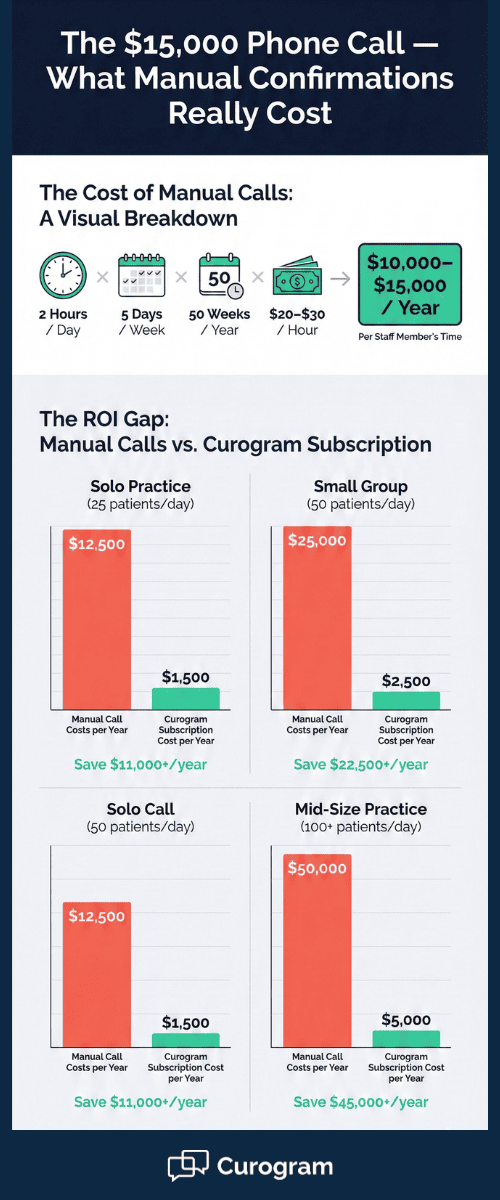
Two hours a day, five days a week, across 50 working weeks comes out to 500 hours a year. At $20 per hour, that's $10,000. If your staff earns closer to $25 or $30 per hour — which is common in metro areas — you're spending $12,500 to $15,000 annually on confirmation calls alone.


And what do you get for that money? Mostly voicemails. Studies show that less than half of phone calls get answered. That means your team is spending the bulk of those 500 hours talking to machines, not people. The whole point of the call — getting a live "yes, I'll be there" — rarely happens.

This is the single biggest source of administrative waste in many medical practices. It's not dramatic. It doesn't look like a crisis. But it quietly drains your budget month after month.

Here's an example scenario:

Say, your practice has two front desk staffers. One opens the office and handles check-ins. The other prints the next day's schedule from MD Systems and starts dialing at 2 PM. By the time the office closes, she's made it through about 80% of the list. The rest get called the next morning — if there's time.

On busy days, there isn't time. Some patients never get a call at all. Those unconfirmed visits are the ones most likely to no-show. A single missed visit can cost your practice $150 to $300 in lost revenue, depending on the type of appointment.


So the real MD Systems practice overhead from manual calls isn't just the wage cost. It's also the revenue you lose from the patients who never got confirmed and didn't show up.

Now, layer on the hidden costs. Overtime hours when the team falls behind. Higher turnover because the job feels tedious. Training costs when you have to replace someone who burned out from repetitive phone work.

It adds up fast. And the worst part? Most practice owners don't even track it. They see it as "just part of running the office." But it doesn't have to be.

No one went to school to become a human auto-dialer. Your staff didn't either. They want to do meaningful work — not leave 25 voicemails before lunch. When you keep them stuck on the phone, you're not just wasting money. You're wasting talent.

The bottom line: if your practice still relies on manual calls to confirm appointments in MD Systems, you're paying a premium for a process that barely works. And every hour your staff spends dialing is an hour they're not spending on tasks that grow your practice.

Cost comparison infographic of manual confirmation calls versus Curogram automated reminders by practice size

The Guide: Reallocating Your Talent

So what happens when you stop using your team as a phone bank? You free them up to do what they were hired for — and that changes everything.

Curogram's automated reminders plug directly into MD Systems. Once connected, the system pulls your daily schedule and sends text confirmations to patients on your behalf. No printing. No dialing. No chasing voicemails.

Here's how it works in practice:

Let's say you have 28 visits booked for tomorrow. Instead of printing that list and handing it to a team member, Curogram sends each patient a text message the day before. The message is simple: "You have an appointment tomorrow at 2:30 PM. Reply C to confirm or R to reschedule."


Most patients respond within minutes. The ones who don't get a second reminder the morning of. Your staff doesn't lift a finger.

Now, think about what your team can do with those two extra hours each day. That's 10 hours a week — more than a full extra shift — that opens up for high-value work.

For example, your front desk can focus on patient check-in and make the waiting room experience smoother. They can process insurance forms without rushing.

They can follow up on unpaid balances or handle prior authorizations. These are tasks that directly impact your bottom line.

This kind of front desk salary optimization isn't about cutting staff. It's about getting more value from the people you already have. You're not asking anyone to work harder. You're just removing the low-value tasks that eat up their day.

There's also a patient experience benefit that's easy to overlook. When your front desk isn't glued to the phone, they can give more attention to the people in the room. Patients notice when the person at the window is calm, present, and helpful. They also notice when that person seems rushed or distracted.

This shift matters for staff retention, too. Turnover at the front desk is a real issue in medical practices. A big reason people leave is burnout from repetitive, low-reward tasks. Eliminating confirmation calls removes one of the biggest sources of daily tedium.

Let's put a dollar figure on this:

Say, you save 10 hours per week in staff time. At $22 per hour, that's $220 a week — or roughly $11,400 a year. But the real return goes beyond wages. When staff spend those hours on billing or collections, they're actively bringing money in instead of burning it on calls.


Staff productivity tools like Curogram don't replace people. They let people focus on the work that needs a human touch. Filing claims, answering complex patient questions, managing referrals — these tasks need brains, empathy, and training. Leaving voicemails does not.

The shift from manual calls to automated texts is more than a tech upgrade. It's a change in how your practice uses its most valuable resource: your people. When you stop treating your staff like auto-dialers, you start running a smarter, more efficient office.

And your team will thank you for it. Fewer repetitive calls mean less stress, more focus, and a better work day for everyone behind that front desk.

The Success: ROI in 30 Days

The biggest question most practice owners ask before switching to any new tool is simple: "How fast will this pay for itself?" With automated reminders from Curogram, the answer for most MD Systems practices is within the first month. Let's walk through the numbers so you can see exactly how the return stacks up:

The Salary Savings Alone Cover the Cost

Start with the labor math from the last section. If your team spends 2 hours a day on confirmation calls at $22 per hour, that's $44 per day. Over a month with 22 working days, that comes to $968.

Curogram's subscription for a solo or small group practice runs well below that figure. So before you even count any other benefit, the staff time savings alone are enough to cover the cost.

In most cases, practices only need to save about 5 hours of overtime per month to break even. That's a low bar when the average office saves 10 hours per week.

Think of it this way: You're not adding a new expense. You're swapping an expensive, manual process for one that costs a fraction of the price and works around the clock.

Texts Beat Calls — By a Wide Margin

Here's where things get even more interesting: Manual calling doesn't just cost more. It also works less. When your staff dials a patient, the call goes to voicemail more often than not. Even when someone picks up, the conversation takes time. And there's no written record of what was said.

Text messages flip this equation. They get read almost instantly, and they make it easy for patients to respond with one tap.

Because of this, automated text reminders catch about 30% more confirmations than phone calls. That means fewer gaps in your schedule and more patients who actually show up.

Let's say your practice averages 25 visits a day:

With manual calls, you might confirm 15 to 18 of them. With automated texts, that number jumps to 20 or more. Each visit that shifts from "unconfirmed" to "confirmed" is less likely to become a no-show.


The No-Show Revenue Shield

No-shows are one of the most expensive problems in any medical practice. When a patient doesn't show up, you lose the revenue from that visit. But you still pay for the room, the staff time, and the provider's schedule slot.

A single no-show can cost anywhere from $150 to $300, depending on the type of visit and your fee schedule. If your practice sees even two preventable no-shows per week, that's $15,600 to $31,200 in lost revenue per year.

Eliminating confirmation calls the old way and replacing them with texts won't stop every no-show. But it closes the biggest gap — the patients who simply forgot or didn't check their voicemail. Texts meet patients where they already are: on their phones.

Here's a scenario:

Let's say switching to Curogram helps your office prevent just three extra no-shows per month. At $200 per visit, that's $600 a month — or $7,200 a year — in saved revenue.

Combine that with the $11,000 or more you save in staff wages, and the total return jumps past $18,000 annually. That's a strong ROI for any size practice.


Real-Time Schedule Visibility

There's another win that doesn't show up directly on a balance sheet but matters a lot in daily operations. When patients confirm by text, that response can be tracked in real time. Your team sees right away who confirmed and who didn't.

With manual calls, your staff has to jot down notes or mark a printed schedule by hand. It's slow, it's messy, and things get missed.

Automated confirmations create a clean, current picture of your day at a glance. This helps your team plan for gaps, fill open slots, and manage the flow of the day with more control.

Less Stress, Lower Turnover

We touched on this earlier, but it's worth repeating because it's a real cost driver. Front desk turnover in medical offices is a well-known problem. Hiring, training, and getting a new team member up to speed can take weeks and cost thousands.

One of the top reasons front desk staff leave is burnout from repetitive work. Spending hours on the phone every day is draining. It's boring. And it leaves no room for the parts of the job that feel rewarding.

When you remove the phone grind, your team gets to do more of the work they enjoy. Patient interaction. Problem solving. Supporting the care team.

This leads to better morale, better performance, and longer tenure. Lower turnover means fewer hiring costs and a more stable office overall.

Smiling medical receptionist handing a clipboard to a patient at a clean organized front desk

A 30-Day Snapshot

Here's what a typical first month looks like for an MD Systems practice that switches to Curogram:

Week 1 The system connects to your MD Systems schedule and begins sending text reminders. Staff notice an immediate drop in call volume.
Week 2 Confirmation rates climb. The team starts using the reclaimed time to catch up on billing, intake forms, and follow-ups.
Week 3 No-show numbers begin to drop. Open slots get filled faster because the team can spot gaps earlier in the day.
Week 4 The practice owner reviews the month. Overtime is down. Revenue from completed visits is up. Staff report feeling less stressed.


By the end of 30 days, most practices see a clear net positive. The subscription pays for itself, and the ripple effects — better flow, happier staff, more revenue — keep building over time.

Your Team Isn't a Call Center

Right now, someone on your team is dialing a number, waiting through five rings, and talking to a machine. They'll do it again in four minutes. And again. And again. For two hours straight. That's not a job. That's a penalty.

Your front desk was hired to run your office, not to read names off a printed schedule and press redial. Every minute they spend on confirmation calls is a minute stolen from check-ins, billing, and the patient standing at the window.

The fix isn't complicated. Curogram sends a text. The patient replies. Done. No ringing. No voicemail. No wasted hour.

And here's what changes when you make the switch. Your staff stops dreading 2 PM. Your confirmation rate jumps by 30%. Your no-show numbers shrink. Your overtime bill drops. Your team actually has time to do the work that keeps your practice running.

The practices still making manual calls aren't saving money. They're spending $10,000 to $15,000 a year on a process that texts can replace for a fraction of the cost.

You hired good people. Let them do good work. Let the software handle the phone calls nobody wants to make.


How Curogram Replaces Your Confirmation Calls in Days


Curogram isn't a one-size-fits-all tool. It was designed to work with the real-world needs of medical practices — including those running on MD Systems.

The platform connects directly to your existing MD Systems schedule. There's no need to export data, upload files, or enter patient info twice. Once linked, Curogram reads your upcoming visits and sends reminders at the right time, with the right message.

You stay in control of how those reminders look and sound. Want to include prep instructions for a specific procedure? You can. Want to send a second nudge the morning of the visit? That's built in, too.

One thing that sets Curogram apart is its two-way texting feature. Patients don't just receive messages — they can reply. If someone needs to reschedule, they can say so right in the text thread. Your front desk sees the reply in real time and can act on it without picking up the phone.

This is more than a staff productivity tool. It's a full communication layer that sits on top of your current system. You get the benefits of automation without having to change how your office runs day to day.

Curogram also supports features beyond reminders, including electronic patient forms, text-to-pay, and automated review requests. But for practices focused on front desk salary optimization and cutting the cost of manual calls, the reminder feature alone delivers a strong return.

The setup is fast. Most practices go live within a day or two. And because the system runs on data and internet — not phone lines — you'll see a drop in your phone bill, too.

If your team is still stuck making 25 calls a day, Curogram offers a better path. One that saves time, saves money, and lets your people do the work that matters.

Conclusion: Stop Burning Cash

Manual confirmation calls are a leftover habit from a time before text messaging existed. Back then, calling was the only option. Today, it's a choice — and an expensive one.

If your practice still runs on printed schedules and phone calls, you're spending thousands of dollars a year on a method that barely works. You're burning through staff time, missing confirmations, and leaving revenue on the table.

The numbers are hard to ignore. At $20 or more per hour, a single team member's time on the phone adds up to $10,000–$15,000 a year. And most of those calls go straight to voicemail. Meanwhile, patients respond to texts almost every time.

Curogram gives MD Systems practices a simple way to end this cycle. The platform takes over the full reminder process — sending texts, collecting responses, and giving your team a clear view of who's confirmed and who isn't. There's nothing to print, nothing to dial, and nothing to track by hand.

This isn't just about saving money, though the savings are real. It's about running a smarter office.

It's about letting your staff focus on the patients in front of them instead of the ones on the phone. And it's about protecting the revenue your practice earns by making sure confirmed patients actually show up.

Practices that switch to automated reminders through Curogram typically see a return within the first month. That return includes lower overhead, fewer no-shows, and a team that's less burned out and more engaged.


Let software handle the reminders so your people can handle the care. Book a demo today to see how easy it is to start building a practice that runs smarter.


Frequently Asked Questions

Will older patients use text reminders?
Yes. Patients over 65 adopt simple SMS confirmations at a high rate. A one-tap text reply is far easier than checking voicemail or calling back. Most practices see strong engagement across all age groups within the first week.
Can we still call specific patients if we want to?
Of course. You keep full control. You can flag specific patients in MD Systems for manual calls and let Curogram handle the rest. Most practices find that only about 5% of patients need a personal phone call.
How does this affect our phone bill?

It cuts it noticeably. Curogram runs on data and internet, not phone lines. Fewer outbound calls means fewer voice minutes used, fewer lines tied up, and a lower monthly telecom bill overall.

How can practices track which patients have confirmed through Curogram?

Curogram logs every response in real time. Your front desk sees a live view of who confirmed, who declined, and who hasn't replied yet — all without writing anything down or marking a printed list.

Why should practices factor in no-show costs when measuring the value of automation?

Each no-show costs $150 to $300 in lost revenue. When reminders go out by text instead of phone, more patients confirm and actually show up. Even preventing a few extra no-shows per month can recover thousands of dollars a year.


Stop the Call Grind with Automated Confirmations in CollaborateMD

Stop the Call Grind with Automated Confirmations in CollaborateMD

💡 Automated appointment confirmations in CollaborateMD let medical practices eliminate manual reminder calls and free up front-desk staff for...

Read More
How to Maximize Cerbo EMR ROI for Automated Reminders

How to Maximize Cerbo EMR ROI for Automated Reminders

💡 Cerbo EMR ROI for automated reminders comes from cutting no-shows and saving staff time. For integrative and functional medicine practices, this...

Read More
The Cost of No-Shows for Lytec Practices | Stop Losing Revenue

The Cost of No-Shows for Lytec Practices | Stop Losing Revenue

💡 The cost of patient no-shows for Lytec practices can exceed $150,000 per provider each year. This acts as an invisible tax on small clinics that...

Read More