11 min read

Watch Lytec Patients Pay Their Bill by Text in Two Taps, No Portal

Watch Lytec Patients Pay Their Bill by Text in Two Taps, No Portal
💡 Lytec patients pay their bill by text in two taps. The balance arrives as a secure link, not a paper statement. Curogram texts each patient a payment link tied to their Lytec balance. They tap, pay, and move on in seconds.

This clears the paper statement trap for patients of every age:

  • No envelope to open and no checkbook to find
  • No portal login and no password to reset
  • No app to download before paying
  • A secure, HIPAA-compliant link they can trust
  • Payment that syncs back into your Lytec billing flow
The result is simple. Patients pay sooner, and balances clear in days instead of weeks.

A medical bill lands in the mailbox. It sits on the kitchen counter for a week. The patient means to pay it. Then life gets busy, and the envelope slips under a stack of mail.

This is how most balances go unpaid. It is rarely because patients refuse to pay. They simply lose the bill, or dread the steps it takes.

Paper statements ask a lot. Open the mail. Find a checkbook or a stamp. Or log into a portal, reset a lost password, and give up.

There is a faster way. Lytec patients pay their bill by text in two taps when the balance arrives as a secure link. No envelope. No portal. No new account to set up.

Curogram texts each patient a payment link tied to their Lytec balance. The patient taps it, pays, and moves on. The whole task takes seconds, not days.

This matters because timing drives payment. A bill paid while it is top of mind beats one buried under junk mail. Industry research shows nearly a third of patients pay within five minutes of a text or email link. Speed turns a forgotten paper bill into a paid one.

It also matters for every age group. A 25-year-old and an 80-year-old can both tap to pay. There is no app to learn and no form to print. With less friction, more patients finish the task.

For your front desk, that means fewer calls about lost bills. For your patients, it means far less hassle. For your practice, it means balances clear much faster.

This guide breaks down three things. First, why mailed bills sit unpaid. Second, how two-tap text-to-pay fixes the problem. Third, the real results your practice can expect to see.

Let us start with why paper statements stall for so long.

The Villain: The Mailbox Black Hole

The trap is not the bill itself. It is the work the bill demands. A paper statement asks patients to do extra steps just to hand you money they already owe.

Think about what those steps look like. The patient opens an envelope. They read a page full of codes they do not understand. Then they hunt for a checkbook, a stamp, and the right address.

Many give up before the check is in the mail. Others try the online portal instead. That path comes with its own walls.

To pay through a portal, the patient must first create an account. They pick a username. They set a password. Weeks later, when the bill lands, they cannot recall any of it.

So they click "forgot password." They wait for a reset email. It drops into spam. The patient sighs and closes the tab. The balance stays open.

The Cost of the Paper Statement Trap

Each step is a small reason to quit. Stack them up, and most bills sit unpaid for weeks. The lack of patient-friendly billing in Lytec practices is what costs you here, not the patient's intent.

The cost is real, and it adds up fast. Most practices send more than one statement before a bill gets paid. Industry research shows more than 7 in 10 providers must mail a second or third notice.

Each mailing carries a price. A printed statement runs around $1 to $3 to produce and send. Mail three, and you have spent up to $9 chasing a single balance. Now multiply that across hundreds of patients each month.

Here is a simple example:

Say your practice sends 500 statements a month at $2 each. That is $1,000 just in print and postage. Send second notices to half of them, and you add $500 more. The bill for chasing bills grows every single month.


Time Working Against You

A first paper statement often goes out 30 to 45 days after the visit. By then, the patient barely recalls the appointment. The bill feels distant, and easy to push aside.

There is no fast way to pay medical bills by text in a Lytec setup that leans only on paper. The patient has no link to tap. They must dig out a card, then call your office during open hours. Most will simply wait, and waiting turns into forgetting.

The portal was meant to fix this. In practice, it built a new wall. With no portal bill pay in Lytec, patients face a login screen before they can pay a cent. That screen stops far more people than practices expect.

Consider a real patient to see the trap in action:

Maria is 68 and pays her bills on time. Her statement arrives, but the portal asks her to register first. She tries twice, fails, and sets the bill aside. A willing payer becomes an unpaid balance, all because of one login screen.


Now think about your busiest patients. A working parent juggles two jobs and three kids. The mailed bill is real, but it is never urgent enough to act on today. So it waits, and "today" never comes.

This is the quiet cost of paper. You are not losing money to bad patients. You are losing it to good patients stuck behind needless steps. Clear the path, and the same people pay with ease.

To the patient, none of this feels fair. They want to clear the balance. The path you handed them just gets in the way. Every extra step quietly tells them, "pay us later."

And "later" is where balances go to die. The longer a bill sits, the less likely it ever gets paid. What starts as a simple charge can end up written off as bad debt.

The trap, then, is built from friction. Not refusal. Patients are willing. The system makes saying "yes" harder than it needs to be. Remove the friction, and most of these balances clear on their own.

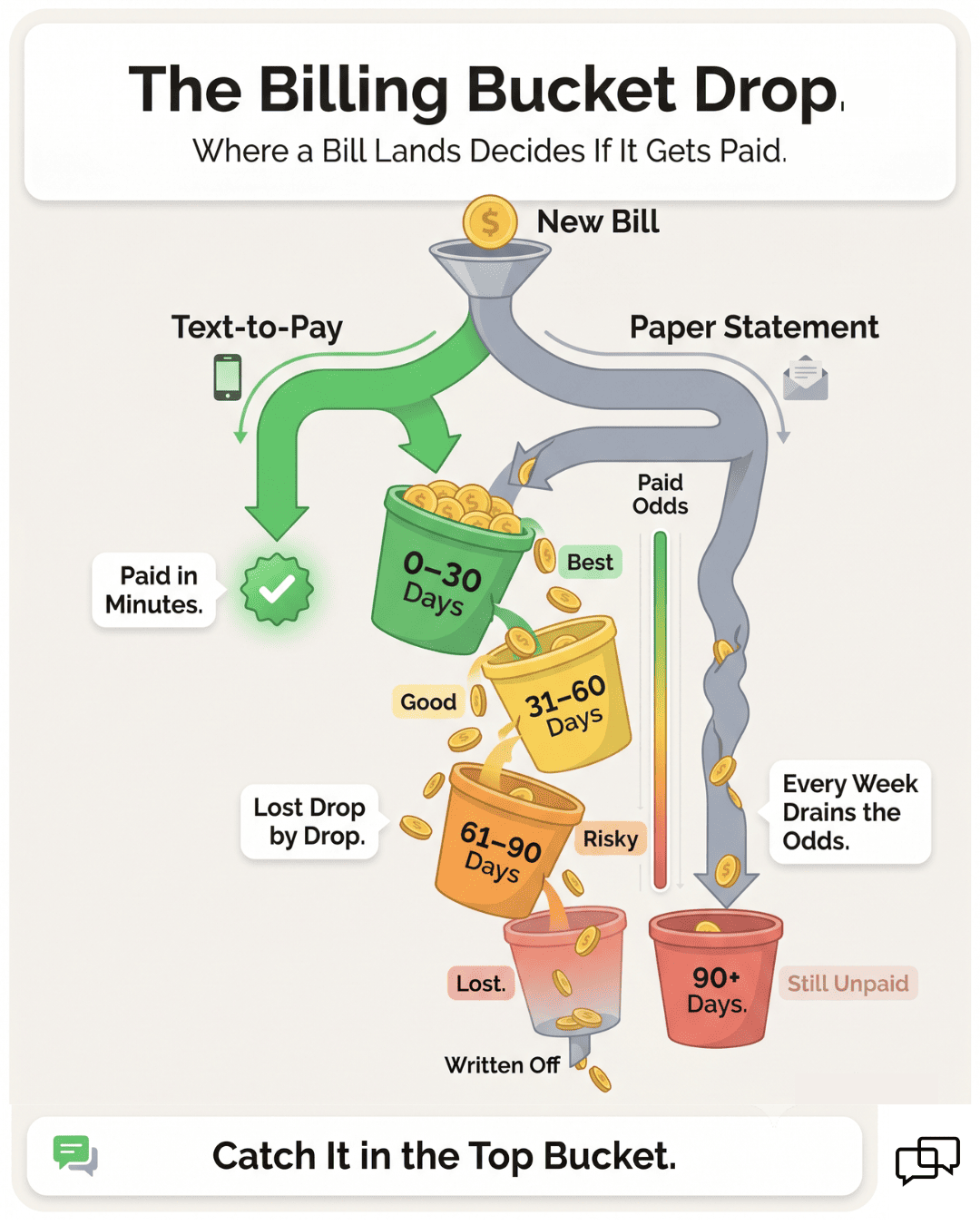
Visual of patient payment odds draining over time

The Guide: The No-Login Link

The fix is short to say and powerful in practice. Let patients pay the moment they get the text. This is the two-tap checkout. Curogram texts the patient a secure payment link tied to their Lytec balance. The patient taps the link, then taps to confirm the payment. Done.

That is the heart of two-tap patient payment for Lytec practices. The first tap opens the link. The second tap clears the bill. There is nothing else to learn.

Curogram Text-to-Pay

It is a secure, link-based checkout. The patient never installs an app. They never join a portal. The link does all the work.

Security sits at the core of the flow. The payment link is PCI-handled, the standard for safe card data. The full process is HIPAA compliant. Patients can pay without a second of worry.

Now picture the same bill, paid the new way. A patient leaves your office with a $75 balance. An hour later, a text arrives with a secure link. They tap, enter a card once, and confirm. The bill is paid before they reach home.

Compare that to the paper path. With a mailed statement, that same patient waits days for the envelope. Then they search for a checkbook they rarely use. Two taps replace all of it.

The link also fits how people already live. They pay for rides, food, and groceries by phone. SMS bill pay for Lytec patients simply brings the doctor's bill into that same easy habit. The behavior is not new to them.

What About the Practice Side?

The payment does not vanish into a separate system. It syncs back into your Lytec billing flow. Your staff sees the balance marked paid without retyping a thing.

This keeps your books clean and your team free. No one matches receipts by hand. No one chases a patient who already paid. The record updates on its own.

The fit reaches every patient, not just the young. A 25-year-old taps to pay in seconds, the way they pay for coffee. An 80-year-old taps the very same link, with no login wall to block them. Both finish in two taps.

That last point matters more than it seems. Older patients often own the largest balances. They are also the ones most likely to stall at a portal screen. Give them a plain link, and they pay just like everyone else.

Meeting Patients Where They Already Are

The two-tap checkout also runs on a channel patients already check. Texts get read within minutes, while mail can sit for days. A link in a text meets the patient where their attention already is.

You can send that link right after the visit, while the care is fresh. Or you can send it the moment a balance posts in Lytec. Either way, the patient pays while the visit still feels real and worth paying for.

You can also stack a gentle reminder on top of the link. If a balance goes unpaid, Curogram can send a soft nudge by text. The patient taps the same link and clears it. No staff call is needed.

Here is a second quick example:

A clinic sends a $120 balance by text on a Friday afternoon. The patient is at a soccer game, sees the text, and taps to pay. The bill is closed before the weekend even starts. A mailed version would have sat in a pile until the next paycheck.


The takeaway is plain. You are not asking patients to learn a new system. You are letting them pay the way they already pay for everything else.

So the fix is not a bigger billing machine. It is a smaller ask. Two taps instead of an envelope or a login. Remove the work, and patients do the rest.

The Success: Balance Paid in Minutes

When you cut the friction, the math changes in your favor. Balances stop sitting in limbo. They start clearing on their own, often within days of the visit.

Call this the self-collecting balance. The bill goes out as a text link, and many patients pay before you ever follow up. The work that used to fall on your staff now happens on the patient's phone.

Let us look at why speed matters so much. A bill paid in the first week is far more likely to be paid in full. The longer a balance ages, the harder it gets to collect. Every week of delay chips away at your odds.

Text-to-pay attacks that delay head-on. The link arrives fast, and patients act fast. Industry research shows nearly a third of patients pay within five minutes of a text or email link. That is payment at the speed of a single text.

Now compare the two paths side by side.

Step

Paper statement

Two-tap text-to-pay

First contact

Mailed 30–45 days after visit

Texted same day or next day

Patient action

Find checkbook or log in

Tap link, tap to confirm

Steps to pay

Five or more

Two

Typical speed

Weeks

Minutes

Cost per send

$1 to $3

Far lower, no postage


The table makes the gap clear. Paper adds steps, cost, and delay at every turn. Text-to-pay strips all three down to near zero.

The Dollar Impact

Imagine 200 unpaid balances a month at an average of $80 each. That is $16,000 sitting idle in accounts receivable.

Move even half of those to fast text payment, and you free $8,000 sooner. That cash funds payroll and supplies instead of waiting in limbo.

The savings are not only about collections. Think back to the cost of paper. Fewer mailed statements means lower print and postage bills.

Fewer unpaid balances means fewer hours lost to phone calls. The line where you spend less and collect more is the goal.

It helps to think in terms of accounts receivable aging. Bills are often grouped by how old they are: 0–30 days, 31–60, 61–90, and beyond. The older the bucket, the lower the odds of full payment. Text-to-pay pulls more bills into that healthy first bucket.

Here is what your practice can stop paying for over time:

  • Stacks of second and third paper notices
  • Postage on bills that get ignored anyway
  • Staff hours spent on "did you get my bill" calls
  • Portal password resets that lead nowhere
  • Old balances handed off to a collection agency

Each line above is a cost that text-to-pay quietly shrinks. None of them help patient care. All of them drain time and money from your front desk.

Beyond One Bill: The Patient's Year

A patient who pays easily once will expect that ease again. The next balance gets paid just as fast. Over a year, that habit means far fewer aged balances per patient.

There is also a trust loop at work here. A smooth payment leaves a good last impression. That impression shapes whether the patient returns and refers a friend. In healthcare, a respectful, simple bill is part of good care, not separate from it.

One More Practical Angle: Staff Focus

Every hour your team spends chasing money is an hour off the floor. Shift even five of those hours a week back to patients, and your waiting room runs smoother. The same staff handles more people with less stress.

There is a staff win woven through all of this. Front-desk teams field fewer "I lost my bill" calls. They reset fewer portal passwords. They spend more of the day on patients in the waiting room, not on the phone with billing.

The Shift for the Patients

When paying is simple, the whole visit feels smoother. The last thing they remember is not a hassle, but a two-tap finish. That ease builds trust, and trust brings them back.

It also lowers the chance of an awkward money conversation. No one likes calling a patient about an old bill. With easy patient payments in your Lytec workflow, most of those calls never need to happen. The link did the asking for you.

The outcome stacks up in three plain results. Patients pay sooner, while the visit is still fresh in mind. They carry fewer late balances, so less debt ages into the red. And they walk away feeling that you valued their time.

For your practice, that means steadier cash flow. Balances that once took weeks now clear in days. Money moves from "owed" to "collected" with far less effort on your end.

For your team, it means breathing room. The chase shrinks. The manual work fades. Your staff can focus on care, not collections.

And for the patient, it means respect. You met them where they are, on the phone in their hand. You asked for two taps, not an afternoon of work. That is what a self-collecting balance really looks like in daily practice.


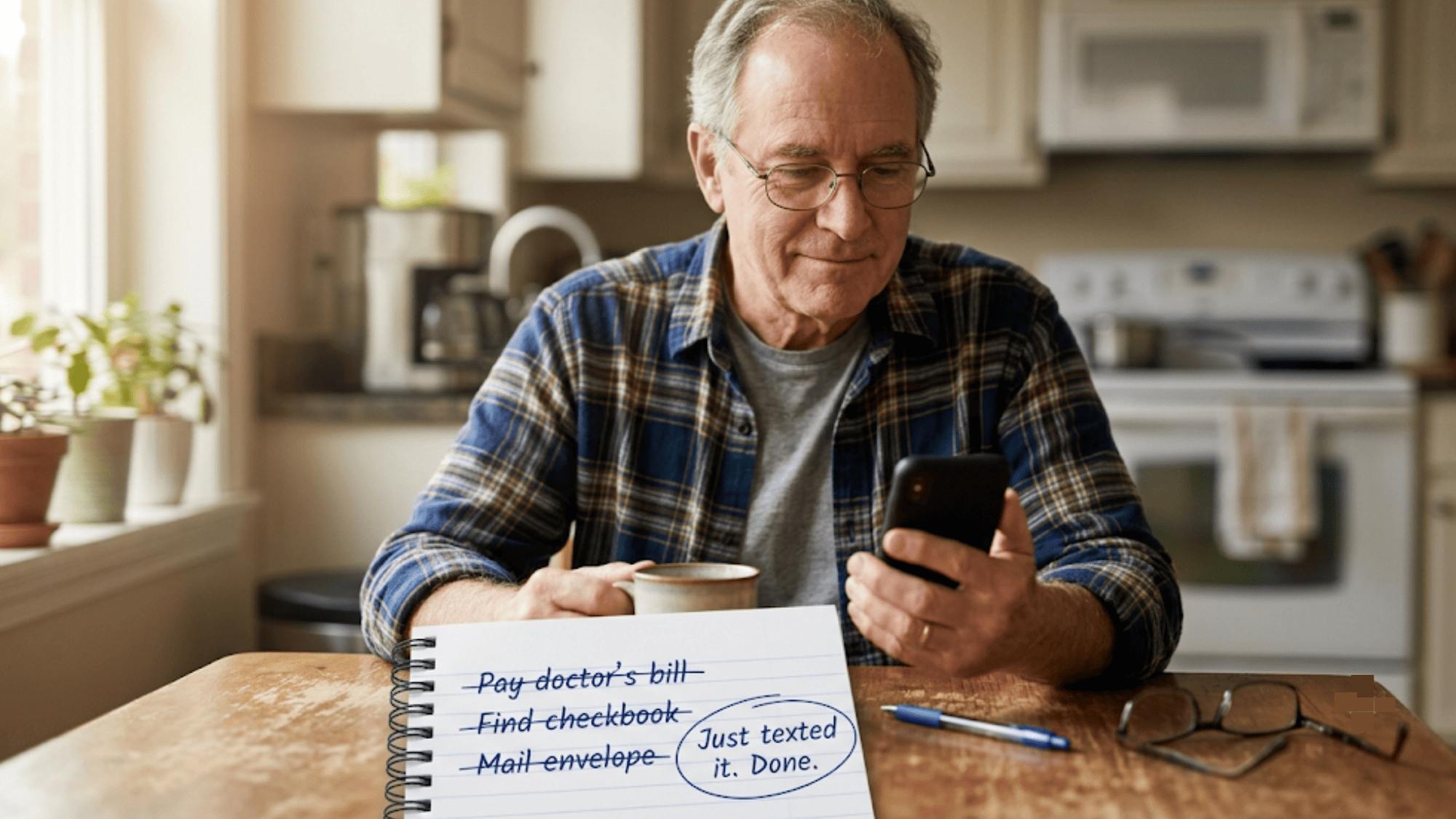
Senior patient showing how two-tap text-to-pay replaced finding a checkbook and mailing an envelope to pay a medical bill

How Curogram Turns a Lytec Balance Into a Two-Tap Payment

Here is how the flow runs. Once a balance is ready in Lytec, Curogram sends the patient a text. The text holds a secure payment link. The patient taps it, enters card details once, and confirms. The bill is paid.

The feature behind this is Curogram Text-to-Pay. It is a secure, link-based checkout with no app and no portal to join. The link is PCI-handled, and the whole flow is HIPAA compliant. Patients can pay with full confidence.

The fit works for every patient. A younger patient pays in seconds, the way they pay for rides or food. An older patient skips the login wall that often stops them cold. Both reach the same finish line with two taps.

The payment then syncs back to your practice. Staff do not retype numbers or match receipts by hand. This keeps your books clean and frees your front desk for patient care. It also logs each paid balance for you.

You can also pair text-to-pay with other Curogram tools. Send an appointment reminder, then a balance link after the visit. Run both on the same two-way text thread your patients already use and trust.

The point is reach without friction. Most patients now prefer to pay digitally. Few patients ignore a text the way they ignore the mail. A text meets them where they already are, on the phone in their hand.

That is what makes this easy patient payments for Lytec practices. No portal hurdles. No mailing delays. Just a secure link your patients can tap and clear in moments. Paying you becomes the simplest part of their day.

Conclusion: Make Paying as Easy as a Text

Paper bills make patients work to pay you. They open mail, find a checkbook, or fight a portal login. Most of them quit before the bill is ever paid.

Two-tap text-to-pay removes that work. The balance arrives as a secure link. The patient taps, pays, and moves on. No paper. No login. No delay.

This shift is small for the patient but large for your practice. Lytec holds the balance and tracks what each patient owes. Curogram lets the patient clear it from the phone in their hand.

The win shows up in three ways. Patients pay sooner, while the visit is still fresh. Fewer balances drag on as late, unpaid debt. And your patients feel that you respect their time.

Your front desk feels it too. Fewer calls come in about lost bills or portal passwords. Staff spend less time chasing payments and more time helping patients. That time saved really adds up across a busy week.

The setup is light. Curogram adds a payment link on top of your current Lytec flow. Your billing steps stay the same, but the last step gets far easier for everyone.

Best of all, text-to-pay does not lock patients into one method. It simply adds the easiest option. Patients who prefer to mail a check or call the office still can.

So stop making patients work to pay you. Meet them on the channel they check most, which is text. Let them clear a balance in the time it takes to read this line.

Give every patient, age 25 or 85, a bill they can pay in seconds. Book your demo now and try the no-portal, no-app payment link firsthand.


Frequently Asked Questions

How do Lytec patients pay their bill by text in two taps?

Curogram texts a secure link tied to the patient's Lytec balance. The first tap opens the link, and the second tap confirms payment. No portal login or paper check is required.

Why do mailed paper statements get paid so slowly?

Paper bills arrive weeks after the visit and demand extra steps. Patients must find a checkbook, a stamp, or a portal password. Each added step gives them a reason to set the bill aside.

How does text-to-pay keep a patient's payment secure?

The payment link is PCI-handled, the standard for safe card data, and the full flow is HIPAA compliant. Patients enter card details on a protected page, so they can pay with real confidence.

Why can patients of every age use two-tap payment?

There is no app to install and no account to create. A patient just taps a link and taps to confirm. That simple path works for a 25-year-old and an 80-year-old alike.

How does a text payment update our Lytec billing?

Once the patient pays, the balance syncs back into your Lytec billing flow. Staff do not retype amounts or match receipts by hand. The record marks the bill paid on its own.


Fix Your Cerbo EHR Patient Payment Experience With Text-to-Pay

Fix Your Cerbo EHR Patient Payment Experience With Text-to-Pay

💡 A great patient payment experience for Cerbo EHR means patients can pay fast. Text-to-pay makes billing frictionless by skipping the portal...

Read More
Pay Your AdvancedMD Bill via Text | Two Taps, Done

Pay Your AdvancedMD Bill via Text | Two Taps, Done

💡 You can pay your AdvancedMD bill via text in two taps. No portal login. No paper. No phone call to billing.Here is how it works.Your practice...

Read More
Text-to-Pay Patient Billing for Azalea Health

Text-to-Pay Patient Billing for Azalea Health

💡Text-to-pay patient billing for Azalea Health practices lets patients clear a balance in one tap from a text. No portal. No mailed check. No phone...

Read More