
 Aubreigh Lee Daculug

Patients don't need an app, a portal account, or a password to remember. They only need to tap a link, which is why text-based intake succeeds where patient portals often stall.
This communication channel already has proven results. Curogram clients average a >75% appointment confirmation rate by text, and Atlas Medical Center reduced no-shows from 14.20% to 4.91% in three months.
"Please arrive 30 minutes early to complete your paperwork."
Your patients have heard that instruction so often they could recite it. They've also learned what it means: a clipboard, a pen on a string, and page after page of questions they already answered during their last visit.
Nobody ever designed that experience intentionally. Lytec keeps your schedule, charges, and patient accounts running, and it does that job well. Still, the patient's first real interaction with your practice happens on paper, in a lobby chair, while the clock keeps ticking.
That moment matters more than most practice owners realize, because a new patient decides how they feel about your office before they meet a provider. If the first 20 minutes feel like a trip to the DMV, that impression sticks long after the visit ends.
There's a better alternative, and it begins with the phone patients already carry. With Lytec patient forms completed by text before the visit, paperwork moves out of the lobby and into the patient's evening routine. A secure link arrives by text, the patient answers whenever it's convenient, and everything returns before they leave the house.
It sounds minor, but the ripple effects are surprisingly significant: the patient skips the clipboard, your front desk skips the handwriting puzzle, and the visit can actually start on time.
This guide explores that change from the patient's side.
You'll see what the clipboard is costing your practice, how text-based intake works on a patient's phone, and what your lobby looks like once forms arrive early. You'll also get honest answers about what Curogram does with Lytec today and what to confirm during setup.
If you built your practice around knowing patients personally, this one's for you. Let's begin where your patients do: standing at the reception desk, holding a pen.
When Your First Hello Is 19 Pages Long
Let's start by being fair to your practice. The problem isn't your staff, and it isn't Lytec, which was built to manage the business side of care and does that dependably.
The patient-facing side of intake, however, has stayed stuck on paper, and patients notice it at every single visit.
It Starts Before They Arrive
The frustration begins with a voicemail asking patients to come in early.
For a working parent, that request means 30 more minutes away from their job.
For an older patient, it means arranging one more ride with a family member or neighbor.
Then they finally reach the lobby and the real work begins. They dig through a wallet looking for an insurance card, squint at tiny boxes designed for medication names, and write the same address on four different pages.
Then the Front Desk Does It All Again
Here's the part patients notice most, and the part our front desk guide to Lytec new patient paperwork covers in depth. After all that writing, patients watch someone at the desk type everything into the computer anyway.
Meanwhile, the scheduled appointment time quietly slides past.
The process is slow and frustrating for everyone involved. Your staff members decipher messy handwriting while the phones keep ringing and the next patient waits in line.
The Friction Shows Up on Your Schedule
Paperwork dread doesn't stay politely in the lobby. Some patients arrive late because of it, and others decide not to come at all.
Missed appointments were already an expensive problem before paperwork entered the picture.
A large systematic review of no-show research found an average no-show rate of about 23% across the studies it examined. Every bit of friction you remove before the visit gives patients one less reason to skip it.
Patient portals were supposed to solve this, but they often fall short. Accounts go unactivated, passwords get forgotten, and the patient ends up back on the clipboard anyway.
The Human Cost
Think about the people actually sitting in your lobby.
There's the new patient who chose your practice because it felt small and personal, and the 80-year-old squinting at page 11. There's also the parent filling out forms one-handed while balancing a toddler on their hip.
None of these patients came in to complete paperwork. They came in because they wanted to see you.
Intake That Lives on the Patient's Phone
Now imagine the same patient and the same forms on a very different evening. Instead of sitting in your lobby at 7:50 a.m., they're relaxing on the couch on Tuesday night. That's the idea behind what we call "The Pre-Visit Packet."
Curogram makes CGM Lytec pre-visit forms by text simple and convenient for patients. Because Curogram already connects to Lytec for patient and appointment information, the right form can reach the right patient well ahead of the visit.
The link travels through the same two-way text thread patients already use for reminders, so your practice communicates with one consistent voice from booking to follow-up.
Here's what the experience looks like from the patient's perspective:
- A text message arrives. It contains a secure link, and no health details appear in the message itself.
- The patient taps the link. The forms open directly in the phone's browser, with no app store and no account creation.
- The patient completes the forms. Every field is designed for a phone screen, so questions are easy to read and simple to answer.
- The patient taps submit. They walk into your office already finished.
That's the real appeal of no-portal-login patient forms:
There's nothing to remember and nothing to reset. Text link intake forms for patients work because texting is something almost everyone already does every day.
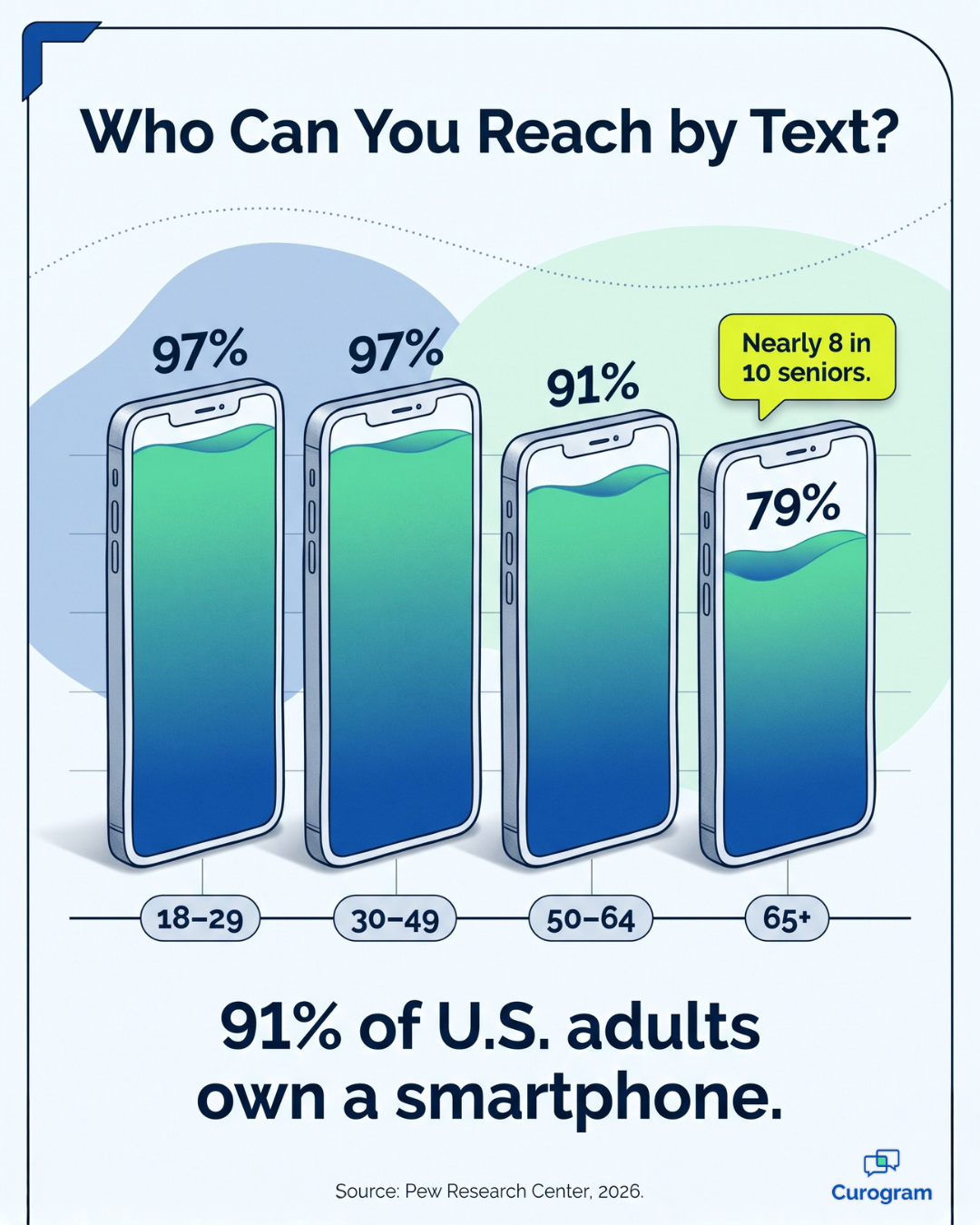
The research supports that confidence. According to the Pew Research Center, 91% of U.S. adults owned a smartphone in 2026, including 97% of adults ages 18 to 29 and 79% of adults 65 and older. Your grandmother patients and your graduate student patients are both within easy reach.
So what does the patient's effort earn your team?
Their completed answers reach your staff in Curogram before the visit, already typed and easy to read. For the complete workflow view, see our guide to Lytec digital intake forms.
Security is usually the next question patients ask, so give them a simple and honest answer. Curogram is a HIPAA-compliant platform, and the forms are encrypted. That's one confident sentence your staff can repeat without hesitation.
There's also a quieter benefit worth mentioning. Digital intake makes visits more personal, not less, because providers can review a patient's history before walking into the exam room. The first few minutes then go to the patient's concern instead of chart assembly.
What Changes When Forms Arrive Early
Think of this shift as "The Empty Clipboard." The forms still get completed, but they get completed before the patient ever walks through your door.
Patients have already shown that they'll respond to texts from their practice. Curogram clients average a >75% appointment confirmation rate by text, and Atlas Medical Center, a Curogram client, reduced its no-show rate from 14.20% to 4.91% in just three months.
That result is 3X better than the industry average.
The same reminder thread now carries the forms link. When patients are already comfortable responding there, completing intake becomes a natural next step instead of another chore.
Here's how a typical morning changes when patients can fill out medical forms before visit day:
| Moment | With the Clipboard | With the Empty Clipboard |
|---|---|---|
| The reminder | "Arrive 30 minutes early" | A link to finish forms at home |
| Check-in | A stack of paper changes hands | A friendly greeting and one quick confirmation |
| The lobby | A study hall for paperwork | A shorter wait before the visit |
| The front desk | Typing up handwritten pages | Reviewing answers that arrived overnight |
| The provider | Reading the history in the exam room | Walking in already knowing the story |
To put the difference in perspective, here's an illustrative example rather than a measured result. Suppose paperwork adds 15 minutes of lobby time for 20 patients each day.
That adds up to 300 minutes, or five full hours of patient time, spent on clipboards every single day.
Now picture the improved version of that morning. The patient walks in, gets greeted by name, confirms one detail, and sits down for a brief wait. The visit starts on schedule, and later that week the patient tells a friend your practice "really has it together."
A Practical Rollout Plan for Lytec Practices
Moving intake to text doesn't require a major overhaul, but a little planning makes the first week much smoother.
Here's what Lytec practices should know before the first forms link goes out.
- The connection is ready. Curogram's integration records list Lytec as ready, using an integration agent that connects to your Lytec database server.
- Access comes first. Setup requires database server access along with the database login credentials, so involve your IT contact or Lytec reseller early.
- The timeline is short. Curogram's records list a typical setup window of 2 to 5 days for Lytec.
- Appointment data drives the timing. Curogram brings in patient and appointment information from Lytec, which helps the right forms reach the right patients before each visit.
- Ask about form data. During setup, confirm how completed answers will move into your Lytec records, so your front desk understands its role from day one.
Once the connection is live, start with new patients, since they face the longest paperwork stack. Update your reminder script so it no longer asks people to arrive 30 minutes early. Keep paper forms available during the transition for anyone who prefers them.
Finally, give your team a simple routine for reviewing submitted forms each morning. Once staff members see a full schedule of finished intake, expanding text-based forms to every patient becomes an easy decision.
Your First Five Minutes Start on the Patient's Phone
Patients form opinions about your practice before they see a provider. For years, that first impression has come from a clipboard, but it doesn't have to anymore.
Lytec patient forms completed by text before the visit turn that first impression around completely. Instead of facing 19 pages in the lobby, patients receive a link they can finish comfortably at home. It's the mobile patient intake experience small practice owners have wanted for years, without forcing patients to learn a new app.
Here's a helpful way to understand how the two tools fit together. Lytec manages your schedule, your charges, and your patient accounts. Curogram focuses on patient convenience, meeting people on the phone they already use for nearly everything else.
Each tool handles its own responsibilities well. Lytec takes care of the business side of your practice, while Curogram supports the patient experience that happens before and after the visit.
Patients accept this change easily, too. Completing patient intake forms on their phone before an appointment feels natural, because texting already feels natural. There's no portal to set up and no password to forget.
Your staff benefits as well. Answers arrive before patients do, the morning rush becomes calmer, and the lobby stops doubling as a study hall.
So here's a small challenge for tomorrow morning. Sit in your own lobby and watch a new patient meet the clipboard for the first time. Then ask yourself whether that's the first impression you built your practice to make.
If the honest answer is no, the alternative is worth seeing side by side. In a quick 15-minute walkthrough, you can view the patient's phone screen and your Lytec workflow together, from the first text to the finished form.
Schedule a Demo and see how one simple text can replace a 19-page stack.
Frequently Asked Questions