
 Jo Galvez

Curogram links to the Lytec database and pulls in patients and visits. When a patient confirms or cancels by text, the Lytec schedule updates. Staff answer every text from one shared inbox, and setup takes 2 to 5 days.
Curogram is HIPAA-compliant and SOC 2 Type II certified. On its texting workflows, Atlas Medical Center cut no-shows from 14.20% to 4.91% in three months.
Most Lytec practices didn't pick their software for patient messaging. They picked it for clean claims, a schedule the front desk can read at a glance, and a price a three-provider office can carry. Lytec still does that job well. It just never came with a way to text a patient and get a reply.
So the texting gap gets filled one of two ways. Some offices buy a separate messaging tool, often Updox, and run it on a second monitor with its own login. Others skip texting and push everything through the phone, which means one line, one voice, and a queue.
Both paths end in the same place. A patient's question about tomorrow's visit turns into a hold, a callback, or a sticky note. The answer rarely makes it back to the patient's account, and the next staffer has no idea the question was ever asked.
Our view: texting for a Lytec office should run from one screen, tied to the records Lytec already keeps, under one vendor that's built for HIPAA. Two screens for one conversation is a cost most small practices have stopped noticing.
Below, we walk through where the two-screen setup drains a small front desk. Then we cover how one-screen texting connects with Lytec, what it syncs, and what it leaves alone.
Last, we follow one patient reschedule from the first text to a filled slot on the Lytec schedule. Your office manager is probably also your IT department, so we've kept it specific.
Why Lytec Practices End Up Juggling Two Screens
Where Texting Falls Off the Lytec Screen
For a practice with one to five providers, Lytec holds most of the business: the schedule, the charges, the patient ledger. CGM sells and supports it through local resellers. Many of those resellers fill the texting gap with a messaging add-on.
That's usually where the CGM Lytec patient texting add-on question starts. The add-on is its own product, with its own login, support line, and monthly bill. Your staff now has two places to look for one patient.
One Patient Question, Four Handoffs
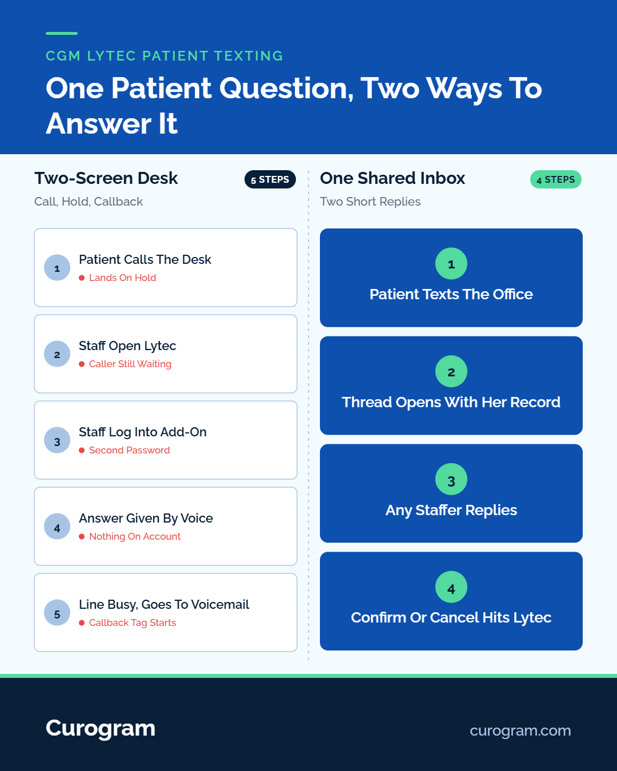
Follow one routine question through a two-screen desk:
- A patient calls to ask whether she should bring her new insurance card.
- Staff put her on hold and pull up her visit in Lytec.
- They switch monitors and log in to the messaging tool to see if she texted earlier.
- The answer goes out by voice, and nothing about the exchange lands on her account.
Offices without an add-on skip step three and go straight to voicemail and callbacks.
What the Shuffle Costs a Small Front Desk
Count the calls your desk takes on a Monday. Multiply by the minutes each one runs, hold time included. For a desk of one to three people, that total often eats a big share of a shift.
Scheduling is a large slice of it. In a March 2026 MGMA Stat poll, 31% of practice leaders named scheduling as the most time-consuming phone task for their staff. Every swap between Lytec, the add-on, and the phone is one more chance to key the wrong date.
The Office Manager's Side of It
Think of an office manager who has run Lytec for 15 years. She chose it because it was simple to learn and fairly priced.
Now she turns between two monitors with a caller on hold, logging in to a second system to find one text. The add-on bill comes from a different vendor, than the people who support her schedule.
How One-Screen, HIPAA-Compliant Texting Works With Lytec
One-screen texting means every patient conversation sits in one inbox, matched to the patient Lytec already knows. Curogram's Lytec integration is built for exactly that.
What the Lytec Connection Syncs
|
What moves |
Direction |
What it does for the desk |
|---|---|---|
|
Patients and mobile numbers |
Lytec to Curogram |
Texts match the right account |
|
Appointments |
Lytec to Curogram |
Visits drive reminders and replies |
|
Recalls |
Lytec to Curogram |
Patients due back get a recall text |
|
Confirmed and canceled statuses |
Curogram to Lytec |
A patient's reply updates the Lytec schedule |
|
Preferred language |
Lytec to Curogram |
Messages go out in the patient's language |
Curogram reaches Lytec through an agent that connects to your Lytec database server, using database credentials your practice provides. Setup usually takes 2 to 5 days, and Lytec adds no integration fee. Lytec stays the system of record for the schedule, the charges, and patient accounts.
Is Lytec 2-Way Patient Texting HIPAA Compliant?
It is when the setup is right. HIPAA lets practices text patients when safeguards are in place, as a 2023 legal review in Psychiatric News from the American Psychiatric Association lays out.
In practice, HIPAA-compliant texting for small medical practices comes down to three things. You need a vendor built for health care, limits on what goes in a plain text, and control over who can read each thread.
Curogram is HIPAA-compliant and SOC 2 Type II certified. Routine texts carry times, directions, and form status, while anything clinical goes through Curogram's encrypted secure messaging.
Curogram Highlight: 2-Way HIPAA-Compliant Texting2-Way HIPAA-Compliant Texting gives the whole front desk one shared inbox. Any staffer can open a thread, answer it, or hand it to a coworker, and the thread stays tied to the patient. Staff text patients from Lytec patient records already synced into Curogram, so nobody hunts for a phone number. It's Lytec secure patient messaging in one dashboard, behind one login. Patients reply from the texting app already on their phone, with nothing to install. Staff usually learn it in about 10 minutes. |

What a Quieter Phone Line Looks Like at a Lytec Front Desk
Curogram is built to cut phone volume by as much as 50%. The clearest way to see where those calls go is to follow one patient through one week.
A Worked Example: One Reschedule, Start to Finish
This walkthrough is illustrative, based on a typical family medicine schedule.
- Monday, 9:00 am. Lytec shows Dana booked for Thursday at 2:30. Curogram sends her a reminder text she can reply to.
- Monday, 12:15 pm. Dana answers from her lunch break: "Can I move to Friday?"
- Monday, 12:20 pm. A staffer sees the reply in the shared inbox, checks Friday in Lytec, and offers 10:00 or 3:30.
- Monday, 12:40 pm. Dana picks 10:00. Staff move the visit in Lytec, and Thursday at 2:30 opens for another patient.
- Thursday. No call, no voicemail, and no empty chair at 2:30.
Had Dana replied to confirm instead, Curogram would have marked the visit confirmed in Lytec with no staff step at all.
Why the Text Version Takes Less Staff Time
By phone, that same change means a call, a hold, often a voicemail, and a callback. By text, the staffer spent about two minutes on two short replies.
Two-way SMS for the Lytec front office lets one person keep several threads moving while the waiting room still gets full attention.
Answers also stay in the thread. When the next shift starts, nobody has to ask who talked to Dana. For the full staff routine, see our Lytec front desk texting workflow.
What the Numbers Say
Atlas Medical Center cut its no-show rate from 14.20% to 4.91% in three months on Curogram's reminder and two-way texting workflows. Across clients, Curogram averages a confirmation rate above 75%, based on Curogram client data from clinical settings.
Pew Research Center's 2026 mobile fact sheet puts cellphone ownership at 98% of U.S. adults, so reach isn't the hurdle. For the patient side, see how to text Lytec patients with no app downloads or logins.
Confirmations are this channel's biggest use, which is why appointment reminders tend to come next, then secure online forms sent in the same thread.
Conclusion: Trade Two Screens for One Conversation
A Lytec front desk shouldn't need two vendors to answer one patient. Lytec runs the schedule, the charges, and the accounts. Curogram runs the conversation from one inbox that reads the same patient records Lytec keeps.
Call it consolidation: one texting vendor, one login, one bill for messaging. A 30-second text takes the place of a five-minute call, and the second monitor goes back to real work. Lytec handles billing and scheduling well, and Curogram handles the patient conversation it was never built for.
Before you talk to anyone, pull two numbers: Monday's call count and this month's add-on invoices. They'll tell you more about your front desk than any feature list.
See how Curogram works with your Lytec system in 15 minutes. Bring both numbers and book a demo.
Frequently Asked Questions