
 Jo Galvez
Curogram links to the Lytec database, so each thread opens with the right patient and visit. Any staffer can answer, hand off, or close a thread. When a patient confirms or cancels by reply, the Lytec schedule updates.
Staff usually learn the inbox in about 10 minutes. The routine below runs from the morning voicemail check to the last follow-up of the day.
Most small practices treat a ringing phone as a staffing problem. When the queue backs up, the answer is another hire, a tighter lunch rotation, or a voicemail box that's full by 9:00. Hiring takes months, and the calls keep coming while you wait for the right person.
We see it as a routing problem first. A big share of front desk calls are short questions with short answers: "Is my visit at 2:00 or 2:30?" "Did you get my forms?" "Where do I park?"
None of those questions need a live voice to answer. Yet each one ties up the single line your whole desk shares, while the patient at the window waits for the ringing to stop.
In a Lytec office, the fix is a change in workflow more than a new system. Routine questions move into one shared text inbox that reads the same patient records Lytec keeps. Calls stay for the conversations that need them, and staff answer each routine question once, in writing.
This guide is for the office manager and the front desk lead, the two people who feel every missed call first. We'll show where the day goes now and how a shared inbox fits next to Lytec. Then we'll lay out the hour-by-hour routine that lets a desk of two finish on time.
We'll also name the calls that should stay calls, because some always will. Nothing here needs new hardware or a new phone system, only a new habit for where routine questions go.
Where the Lytec Front Desk Day Goes
Lytec keeps the schedule, the charges, and patient accounts in one place. That's why many practices have trusted it for a decade or more. Patient conversations run somewhere else.
The Morning Pileup
The desk opens to a voicemail light that's been blinking since 6:30. Two patients are already at the window. The phone rings before the first message is played back.
One caller wants to move her visit, so a staffer pulls up Lytec and puts her on hold to check in the patient at the window. By 9:30, that same kind of reschedule has come in four times. Each one arrived by phone, and each one got answered from scratch.
Two Systems, No Shared Record
Practices with a messaging add-on have a second place to check. A patient who messaged yesterday calls today, because nobody saw the reply. Staff switch to the add-on login, find the thread, then switch back to Lytec to make the change.
Then the phone tag starts. The patient leaves a message, the desk calls back, the patient misses it, and the loop runs again.
Run Your Own Numbers
The figures below are illustrative. Swap in your own counts from one normal week.
|
Input |
Illustrative desk |
Your desk |
|---|---|---|
|
Calls per day |
60 |
|
|
Minutes per call, hold time included |
5 |
|
|
Phone time per day |
300 minutes (5 hours) |
Five hours of phone time is most of one person's shift. In a March 2026 MGMA Stat poll, practice leaders named the phone tasks that eat the most staff time. Eligibility and prior authorization led at 45%, and scheduling came next at 31%. Scheduling is the part texting can take over.
Who Covers Lunch
At a small Lytec practice, the office manager is often the IT department too. When she steps away, calls roll to voicemail and the afternoon starts behind.
Patients who called at noon call again at 1:00, and the queue doubles. Slots left unconfirmed at 10:00 can turn into empty chairs by 3:00.
One Shared Inbox for Every Patient Conversation
Curogram puts every patient text in one inbox the whole front office can see. Its Lytec integration keeps each thread matched to the right patient and visit. That makes it the most practical medical front desk phone tag solution we know of, since the patient's answer waits in the thread.
How the Inbox Sits Next to Lytec
Curogram's agent connects to your Lytec database server and syncs patients, appointments, and recalls. Staff text from Curogram, while Lytec stays the system of record for the schedule and charges.
A reply that confirms or cancels updates the visit status in Lytec, so nobody types it twice.
Setup usually takes 2 to 5 days, using database credentials your practice provides. That's CGM Lytec front office texting in practice: two systems, one job each.
Curogram Highlight: 2-Way HIPAA-Compliant Texting2-Way HIPAA-Compliant Texting gives every staffer the same view of every patient thread. With a shared team texting inbox for Lytec staff, a question never waits on the one person who saw it first. Anyone can pick it up, answer it, or pass it to a coworker with a note. Saved replies cover the answers your desk gives all day: parking, prep reminders, form links, office hours. Curogram is HIPAA-compliant and SOC 2 Type II certified. |
One Less Login for the Desk
Staff usually learn Curogram in about 10 minutes, because it works like the texting app on their own phone. It takes over the job a separate messaging add-on does today, so the vendor list your desk manages gets shorter.
Your reseller relationship stays the same, and SMG Systems already offers Curogram as a Lytec add-on.

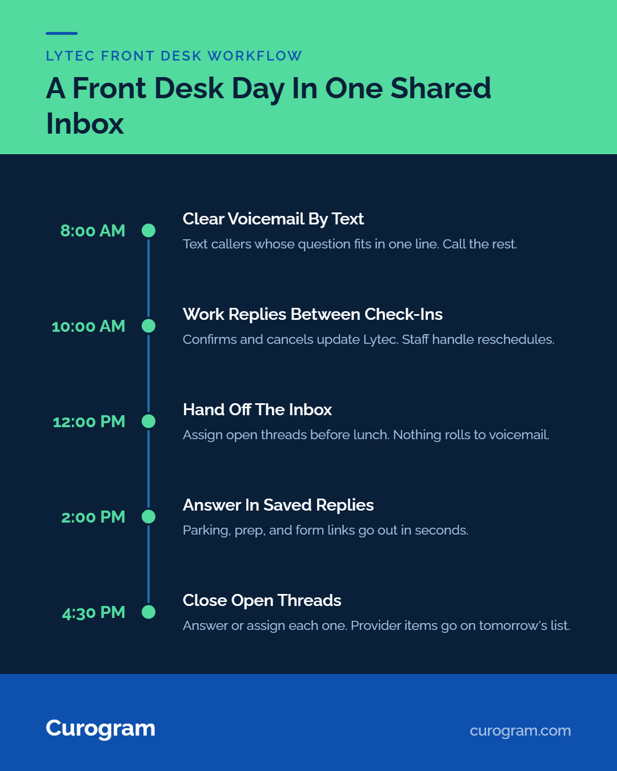
The Texting Workflow, From Morning Voicemail to Close
We'd set up the day like this for a Lytec desk of one to three people. Times are illustrative.
8:00 am: Clear Voicemail by Text
Rather than calling back every voicemail, staff text the callers whose question fits in a line. "Got your message. Your visit is Thursday at 2:30. Reply here if you need a different time."
Callers with billing or clinical questions still get a call, so the callback list shrinks to the ones that need a voice. A text also leaves a record, so the next staffer can see the caller got an answer.
Mid-Morning: Work the Inbox Between Check-Ins
Reminder replies come in overnight and all morning. Confirms and cancels update Lytec on their own, so staff only touch reschedule requests. For those, they check Lytec for open slots, offer two times, and move the visit once the patient picks.
One person can keep four or five threads going while checking patients in at the window. A text can wait until she's free, and a ringing phone can't.
Lunch: Hand Off the Inbox
Before the office manager steps out, she assigns her open threads to a coworker. Nothing rolls to voicemail. A patient who texts at 12:10 gets an answer by 12:20, and the coworker sees the whole thread, so nobody asks the patient to repeat herself.
That coverage is the piece most Lytec office manager communication workflow plans leave out, since it no longer depends on who's at the desk.
End of Day: Close Open Threads
Before close, staff filter the inbox to open threads and answer or assign each one. Anything that needs a provider goes on the morning task list.
A patient who asked at 4:50 finds the answer in writing the next morning. Threads that sat all day without a reply get a short follow-up before the desk closes.
What Changes in the Numbers
Curogram is built to cut call volume by as much as 50%, and confirmations are the biggest single piece of that. Across clients, Curogram averages a confirmation rate above 75%.
Atlas Medical Center cut no-shows from 14.20% to 4.91% in three months, based on Curogram client data from clinical settings.
MGMA's 2025 no-show poll points the same way. Practices that held no-show rates steady credited frequent digital reminders, and MGMA advises two-way texting so patients can confirm or reschedule by reply.
What to Add Next
To reduce front desk call volume in a medical office further, add two pieces. Appointment reminders take most confirmation calls off the phone, and text-to-pay handles the billing calls that follow a visit.
Conclusion: Give Your Front Desk One Screen Back
The fastest way to cut patient phone calls at a small practice on Lytec is to move the routine ones into one shared, HIPAA-compliant text inbox. There's no second platform and no second login, and Lytec stays exactly where it is.
Lytec is for your schedule and your charges. Curogram is for the 30-second questions patients would rather text, and for the staff hours now spent relaying answers between systems.
Try one thing this week. Count tomorrow morning's voicemails and this month's add-on invoices, then ask what one inbox and one vendor would change.
See how it works with your Lytec system in 15 minutes. Bring your daily call count and we'll map your front desk workflow live when you book a demo.
Frequently Asked Questions