
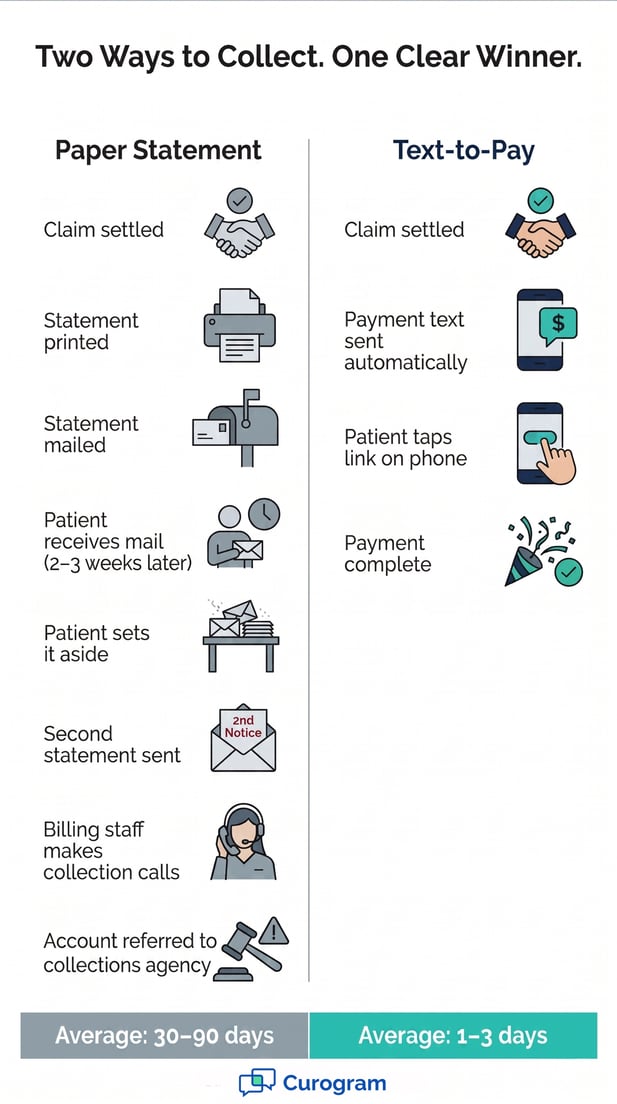



Curogram connects to Exa RIS and Exa Billing, picks up patient responsibility data, and sends a payment text with no manual steps. The patient taps the link, pays, and the balance is closed. No login required. No envelopes. No waiting.
Imaging center AR days can drop from 90 days to as few as one to three. Based on Curogram client data from clinical settings, practices see a 10-20% improvement in patient collection rates and can eliminate $1,500 to $4,000 per month in statement costs. For a center managing $150,000 in monthly patient balances, that's real, measurable revenue recovered every month.
Your billing team works fast. Exa Billing processes a claim, calculates the patient balance, and the system updates. But then the collection process slows to a crawl.
A statement gets printed. An envelope gets stuffed. The patient gets mail, maybe, in two to three weeks, if nothing goes wrong in transit. This is the 90-day paper trail. It isn't just slow. It's expensive.
Each paper statement cycle costs between $3 and $8 per patient. For an imaging center with hundreds of open balances, that adds up fast. And while the paper makes its way to patients, your cash doesn't make its way to the bank.
Worse, time is working against you. Patient balances under 30 days collect at rates between 70 and 80%. Once those balances hit 90 days, the collection rate drops to 20 to 30%. Every week of waiting is a week of lost revenue that you may never recover.
Radiology revenue cycle text payment collection changes the equation.
It sends a payment link directly to the patient's phone within hours of billing. No portal login. No paper to wait for. The patient taps, pays, and the balance is resolved before your first statement would even have been printed.
For imaging centers using Exa RIS and Exa Billing, Curogram acts as the connection between billing and actual cash collection. The moment Exa settles a claim and calculates what the patient owes, Curogram sends a payment text. Imaging center AR days drop from 90 to as few as one to three.
Based on Curogram client data from clinical settings, imaging centers using text-based collection see a 10-20% lift in patient collection rates.
For a center managing $150,000 per month in patient balances, that translates to $15,000 to $30,000 in recovered monthly revenue, plus $1,500 to $4,000 saved on paper statement costs.
This article breaks down why the old system fails, how Curogram fixes it, and what the change looks like in practice.
The Villain: The 90-Day Paper Trail
The billing cycle at most imaging centers runs well up to the point where Exa Billing calculates what a patient owes. After that, the process slows down. Statements get printed, mailed, and then the waiting begins.
Revenue cycle managers watch balances age across four buckets: 30 days, 60 days, 90 days, and 120 days or more. Each bucket isn't just a time marker. It's a sign that collection is becoming harder and more costly.
The Aging Bucket Spiral
Imaging center AR days reduction matters because collection rates fall sharply over time. A balance under 30 days collects at 70 to 80%. The same balance over 90 days collects at only 20 to 30%. That's not a small gap.
It's the difference between recovering most of what you're owed and writing off a large chunk of your revenue.
The bottleneck isn't the billing itself. Exa Billing processes claims quickly and correctly. The delay is in patient contact. By the time a statement arrives, days have already passed.
By the time a second or third statement goes out, weeks have passed. With each passing week, the chance of collecting drops further.
What the Aging Buckets Cost Your Center
These numbers reflect patterns seen across imaging centers and specialty practices. When a balance ages past 90 days, collection almost always requires outside help, and that comes at a steep cost.
|
Aging Bucket |
Typical Collection Rate |
|
0–30 Days |
70–80% |
|
31–60 Days |
50–65% |
|
61–90 Days |
30–45% |
|
90+ Days |
20–30% |
Why Paper Keeps the Cycle Slow
A paper statement takes one to two weeks to arrive after it's printed. Many patients set it aside. Others have moved or changed addresses. Some ignore it. The imaging center sends a second statement, then a third.
Meanwhile, your billing team spends hours managing the print queue, tracking what's been sent, and chasing callbacks. All of that activity costs staff time. And it still doesn't guarantee payment.
The Statement Economics
The math of radiology billing collection is stark. Each paper statement costs between $3 and $8 per patient, factoring in printing, paper, envelopes, postage, and staff time.
An imaging center with 500 open balances that sends three statement cycles can spend around $7,500 on paper. For multi-location networks, that cost multiplies across every site.
This is the imaging center statement cost elimination opportunity. The money being spent on paper could be redirected to higher-value work. And when text-based billing takes over, that cost doesn't just shrink. It disappears.
The Collection Call Trap
When statements don't work, billing staff turn to phone calls. Each call costs the center between $5 and $10 in staff time. Most patients don't pick up unknown numbers, so the cycle repeats: call, voicemail, wait, call again.
The front desk is already fielding 80 or more calls per day. It can't absorb a full collection calling schedule on top of routine work. The result is a backlog of unanswered calls and unresolved balances.
When Balances Go to Collections
Balances that survive 90 to 120 days of statements and calls often end up with a collections agency. Those agencies take 25 to 40% of whatever they recover. A $350 balance becomes $210 to $260 in actual revenue.
Beyond the financial hit, collections activity damages the patient relationship. The patient who had a smooth imaging experience now associates your center with debt collection.
For imaging centers that compete on referrals and direct patient choice, that reputation damage is hard to walk back.

The Guide: The AR Compression Engine
Curogram doesn't change how Exa Billing works. It changes what happens after. When Exa Billing determines what a patient owes, Curogram automatically picks up that data and sends a payment link by text.
The patient gets a message on their phone, taps it, and pays. That's radiology billing collection automation in action: no paper, no phone tag, no waiting. The imaging center gets paid faster. The billing team gets its time back.
How Automated Payment Texts Work
After a claim is settled and the patient responsibility is calculated, Curogram generates a payment link with the exact balance amount.
That link is sent to the patient's phone by text, no app needed and no login required. The payment page is mobile-optimized and works on any device.
If the patient doesn't respond, the system sends a follow-up text at set intervals. Revenue cycle managers configure the schedule once, and it runs on its own. Most patients pay the same day they receive the text.
How the Follow-Up Sequence Works
The follow-up cadence is fully set by your team. Larger balances can trigger a different sequence that includes payment plan options.
Revenue cycle managers can adjust messaging and thresholds without changing anything in Exa Billing.
|
Day |
Action |
|
Day 0 |
Payment text sent after claim is settled |
|
Day 3 |
Reminder text for unpaid balances |
|
Day 7 |
Second reminder for unpaid balances |
|
Day 14 |
Final reminder before manual review |
What Changes for Your Billing Team
Nothing changes in the Exa Billing workflow. Your billing team keeps processing claims the same way. Curogram works alongside it: receiving patient responsibility data via the Exa API, sending payment texts, and logging responses.
The billing team's job shifts from managing statement print cycles to handling exceptions: insurance denials, payment disputes, and complex cases that need a human touch. Routine patient responsibility collection runs on its own.
Exa Billing + Curogram Integration
Curogram connects to Exa's API platform to receive patient responsibility data in real time. When a claim is settled and Exa Clear calculates what the patient owes, Curogram generates the payment link and sends the text.
Payment confirmations flow back to the revenue cycle system, and AR aging reports update without any manual steps.
This is the core of Exa RIS revenue cycle patient payment automation. The imaging center doesn't manage data transfers or trigger any process manually. The integration does it. The only thing the revenue cycle team manages is the exception queue.
Supporting Payment Plans by Text
For larger balances, Curogram can present installment options alongside the full-payment choice. The patient sees both on the payment page and picks the one that works for them. Payment plan activity syncs back to Exa for tracking.
This feature is especially useful for imaging centers with higher average patient balances or patients who need a flexible way to pay.
Revenue cycle managers set the plan terms once, and the system applies them automatically to qualifying balances.
Two-Way Texting for Billing Disputes
Curogram supports two-way texting, so patients can reply directly to a payment text with questions. The message routes to your billing staff, who can respond via text with itemized details or a balance adjustment.
This is faster than phone-based dispute resolution and leaves a text record for compliance. It also tends to feel less confrontational for patients than a call from a billing department, which improves the chance of a positive outcome.
The Success: AR That Matches Your Claims Processing Speed
When text-based payment replaces paper statements, the impact on the AR aging report is immediate. Balances that used to sit in the 60 and 90-day buckets start clearing in one to three days.
The 90+ day bucket shrinks. Cash flow becomes more predictable. The revenue cycle team spends less time chasing payments and more time on higher-value work.
The Measurable Outcomes
Based on Curogram client data from clinical settings, imaging centers using text-based payment collection see a 10-20% improvement in patient responsibility collection rates.
For a center managing $150,000 per month in patient balances, that's $15,000 to $30,000 in recovered monthly revenue.
Add to that the $1,500 to $4,000 per month in eliminated statement costs, and the financial case becomes clear. Collections agency referrals also drop.
When most patient balances clear in the first week, fewer accounts age past 90 days, which means fewer accounts go to agencies and fewer 25-to-40% agency fees eating into your revenue.
Revenue Impact at a Glance
The table below shows what a 10-20% improvement in collection rates means in dollars, based on Curogram client data from clinical settings. Results vary by center, but the direction is consistent: faster collection, lower costs, and fewer write-offs.
|
Monthly Patient Responsibility |
Collection Improvement (10-20%) |
Statement Cost Savings |
|
$100,000 |
$10,000–$20,000 |
$1,500–$4,000 |
|
$150,000 |
$15,000–$30,000 |
$1,500–$4,000 |
|
$200,000 |
$20,000–$40,000 |
$1,500–$4,000 |
What Happens to AR Days
The average imaging center without text-based billing sees balances resolve in 30 to 90 days. With Curogram, most payments come in within one to three days. The AR aging report looks different within the first billing cycle.
The 30-day bucket clears faster. The 90-day bucket stops growing. Revenue arrives when expenses are due, not weeks after..
That timing matters for a center managing equipment leases, staff payroll, and operating costs.
The Shift in Day-to-Day Operations
The change isn't just in the numbers. It's in how the revenue cycle team spends its time. With paper statements, billing staff manage a print cycle: pull the report, print, mail, wait, repeat. With Curogram's automated texts, that entire cycle goes away.
Staff shift from statement processing to exception management: insurance denials, billing disputes, and payment plan setups.
This is what text-based billing for radiology operations looks like in practice. Less paper. More focus.
From Statement Processing to Digital Collection
The workflow shift is significant. Before text-based payment: print statements, mail, wait, send second statements, wait, call, repeat, then possibly refer to collections. After Curogram: claim settles, text goes out, patient pays, balance is closed.
The difference in speed is measurable. The difference in staff workload is felt immediately.
Billing staff no longer spend hours managing print queues or tracking statement cycles. They review the exception queue and handle cases that need real attention.
What Revenue Cycle Managers See
The AR aging report is the clearest sign. Within the first billing cycle, the 90-day bucket shrinks. Balances that used to age for months now clear in days.
Equipment lease payments, staff salaries, and operating costs are covered by revenue that arrives on a predictable schedule. Exa Billing determines what's owed. Curogram collects it. The revenue cycle finally moves at the same speed as claims processing.
Conclusion: Stop Mailing Statements. Start Collecting Revenue.
Paper statements were never a billing solution. They were a delay. Every statement mailed was money that might arrive weeks later, or migerht not arrive at all.
The 90-day wait isn't a feature of the revenue cycle. It's a flaw. And for imaging centers running on tight margins, it compounds every single month.
Text messages have an open rate of 98%, far above what paper statements or email can reach. A patient who gets a payment link on their phone can act on it right away, from anywhere, without logging into a portal.
Paper statements require printing, mailing, and waiting. They put the effort on the patient. Digital billing removes every step between billing and payment except the payment itself.
Exa Billing and Exa Clear are built for determining what's owed. They handle claims processing, eligibility checks, and patient responsibility calculations.
Curogram handles what comes next: the communication channel that turns a billing number into actual cash.
Together, they form a complete revenue cycle. Claims get processed by Exa. Payments get collected by Curogram.
The imaging center AR days shrink, the statement budget disappears, and the billing team focuses on exceptions rather than routine follow-up.
Imaging centers that stick with paper statements face a compounding problem. Statement costs don't shrink over time.
Patient balance volumes grow as more patients carry higher deductibles. Staff costs for manual follow-up increase.
Text-based billing radiology operations scale well. As patient volume grows, the automated text workflow handles more balances without adding staff time or postage costs. The system adjusts because it doesn't depend on manual steps.
If your AR aging report shows balances in the 60, 90, or 120-day buckets, the delay isn't a billing problem. It's a collection channel problem. Text-based payment is what closes the gap.
See how Curogram connects to your Exa billing workflow. Schedule a demo and watch the process in action, from claim settlement to payment confirmation.
Frequently Asked Questions
Curogram connects to Exa's API platform and receives patient responsibility data in real time when a claim is settled. When Exa Billing calculates what a patient owes, Curogram picks up that data and sends a payment text with the exact balance amount.
Payment confirmations sync back to the revenue cycle system, and AR aging reports update automatically. Your billing team doesn't need to trigger any part of this process manually.
Text messages have an open rate of 98%, compared to much lower rates for paper mail or email. A patient who receives a payment link on their phone can act on it immediately, without logging into a portal or waiting for a bill.
Paper statements require printing, mailing, and waiting, which adds weeks to the collection window. Text-based payment removes every step between billing and payment except the payment itself.
Curogram supports two-way texting, so patients can reply directly to the payment text if they have a question or dispute. The message routes to your billing staff, who can respond via text with itemized details, insurance notes, or a balance correction.
This approach is faster than phone-based dispute handling and leaves a text record for compliance. It also tends to feel less confrontational for patients than a call from a billing department.
If a patient's balance exceeds a threshold your team sets, the payment link can show installment options alongside the full-payment choice. The patient selects their preferred option from a mobile-optimized payment page, with no need to call your office.
All payment plan activity syncs back to Exa for revenue cycle tracking. Revenue cycle managers set the terms once, and the system applies them automatically to qualifying balances.
Most patients who receive a payment text act on it the same day. Because the link goes out within hours of billing, the collection window starts immediately rather than after a statement mailing cycle.
There's no two-to-three week wait for mail delivery, and no second or third statement needed for patients who simply needed a convenient way to pay. The result is that balances clear in one to three days instead of 30 to 90.