

10 min read

AdvancedMD A/R Recovery | From 90-Day Cycles to Same-Week Collection

AdvancedMD A/R Recovery | From 90-Day Cycles to Same-Week Collection
💡 AdvancedMD A/R recovery via text, powered by Curogram, lets billing teams send secure payment links to patients with open balances. Instead of waiting 30 to 90 days for a paper statement cycle to run, the patient gets a text, taps the link, and pays, often the same day.

The A/R Acceleration Dashboard tracks every link sent, opened, and completed in real time. Billing managers can view delivery rates, open rates, payment completion, and total revenue recovered by aging bucket, all without waiting for the next statement run.

For a typical AdvancedMD practice, paper statements cost $800 to $1,000 per month and collect about 20% of balances. Text-to-pay cuts the collection timeline from months to days, reduces statement costs, and gives the billing team live data to manage A/R proactively. This article covers how the process works, what the dashboard shows, and why independent practices are switching from paper to text.


The paper statement has been a fixture of patient billing for decades. Print it. Mail it. Wait. Print it again. Every billing manager at an AdvancedMD practice knows this routine, and so does the outcome.

After two or three statements and 90 days on the clock, the chance of collecting that balance drops fast.

The core problem is that the collection channel no longer fits how patients behave. Patients ignore mail. They skip calls from numbers they don't know.

But they do open text messages. Open rates for SMS top 90%, while direct mail rarely clears 20%. That gap represents real money sitting untouched in your A/R aging report.

Most AdvancedMD practices spend $800 to $1,000 per month on printing and postage alone. Each statement cycle costs $2 to $3 per patient.

By the third mailing, the practice has spent $6 to $9 chasing a balance that may never be paid. Staff hours are lost to collection calls that rarely convert. The write-off rate climbs.

Text-to-pay changes the math. Curogram sends a secure payment link straight to the patient's phone. No envelope, no postage, no voicemail.

The patient taps the link, sees their balance, and pays. It often takes just minutes. The A/R Acceleration Dashboard gives the billing team a live view of every step, from link delivery to payment completion.

This article breaks down why the 90-day statement cycle fails, how a text payment link can accelerate AdvancedMD A/R recovery, and what real results look like for independent practices making the switch.

The Villain: The 90-Day Collection Cycle

Most billing teams at AdvancedMD practices did not choose the paper statement cycle. They inherited it. And while the process is familiar, it carries hidden costs that compound with every aging bucket. Understanding exactly where the cycle breaks down is the first step toward fixing it.

The Statement Treadmill

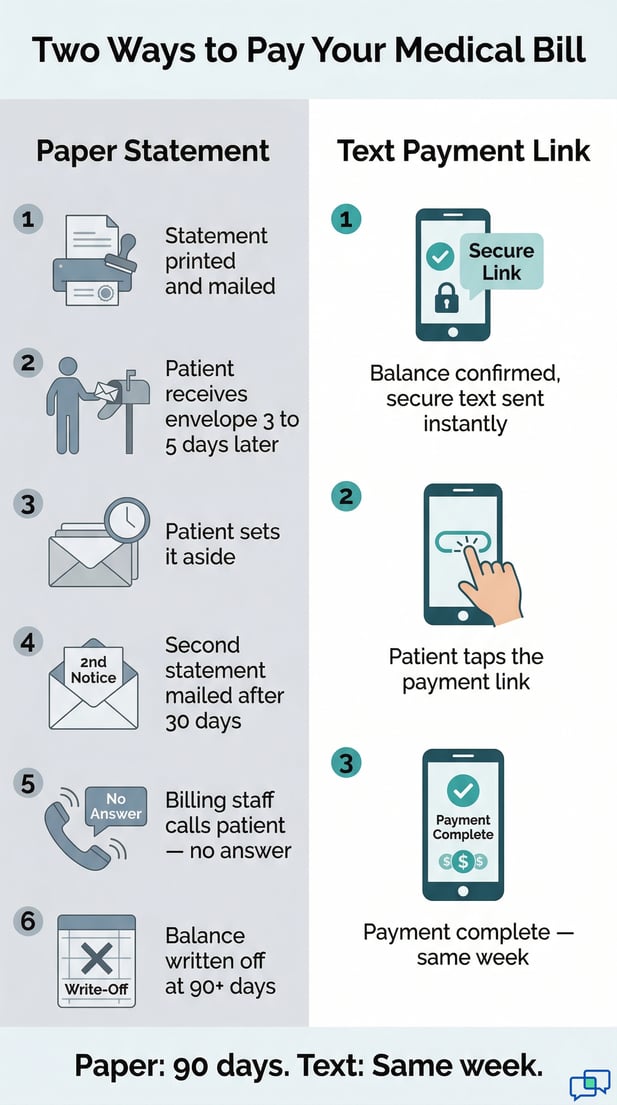
After insurance processes a claim and the patient's balance is set, the billing team generates a statement. It gets printed, stuffed, stamped, and mailed.

The patient receives it three to five business days later, if they check their mail. The practice waits 30 days for a response.

Most patients do not respond to the first statement. So the cycle repeats. Second statement. Another 30-day wait. Another $2 to $3 per patient in printing and postage.

By the third mailing, 90 days have passed since the original visit, and the balance is in the aging zone where collection probability drops hard.

Why Paper Statements Fail

The fundamental flaw in a paper-based billing system is friction. The patient has to open an envelope, find a return envelope, write a check or log into a portal, and mail it back.

That is four steps most people will delay. Text-to-pay removes all of them. One tap, one payment, done.

The Real Cost Per Patient

The numbers add up fast. Three statements at $2 to $3 each means $6 to $9 spent per patient before any follow-up calls.

For a practice with 200 open balances in any given month, that is $1,200 to $1,800 in statement costs alone. And that figure does not include staff time, which is its own line item.

Paper Statements vs. Text Payment Links: A Side-by-Side Look

Factor

Paper Statements

Text Payment Links

Cost per patient

$2 to $3 per statement

Cents per text

Time to patient

3 to 5 business days

Seconds

Collection timeline

30 to 90+ days

Same day to same week

Open/read rate

~20%

90%+

Real-time tracking

None

Full dashboard visibility

Staff effort required

High (calls, follow-ups)

Low (automated sequences)

Monthly cost (typical)

$800 to $1,000

Fraction of that


When Staff Time Becomes a Liability

Between statement cycles, billing staff makes collection calls. They pull open-balance lists, dial numbers, navigate voicemail trees, leave messages, and log attempts in notes.

For a practice with hundreds of open balances, this takes hours every week that could go toward claim follow-up or denial management.

The calls themselves have low conversion. Patients do not answer unknown numbers. Voicemails go unreturned.

Patients who do pick up often say they will pay online but never follow through. The billing team invests time in a method that rarely pays off and cannot scale.

The Conversion Rate Problem

Collection calls from medical billing staff convert at a low rate. Patients are more likely to pay on their own schedule than on a call they did not expect.

A text with a direct payment link meets patients where they are, at a moment they choose, removing the pressure that can cause them to delay even longer.

The Write-Off Math

After 90 to 120 days of statement cycles and calls, the billing team faces the write-off calculation. A $75 balance with $9 to $12 already spent on statements, plus 20 to 30 minutes of staff time, may cost more to chase than it is worth.

Sending it to external collections takes 25 to 50% of whatever is recovered and can harm the patient relationship. The balance gets written off. Multiply that by dozens of patients per month, and the lost revenue becomes significant.    

Infographic comparing 90-day paper statement vs same-week text payment for medical bills

The Guide: The A/R Accelerator

Curogram's text-to-pay is built to replace the multi-cycle statement process with something faster and more transparent.

Rather than waiting for patients to act on paper mail, the billing team takes the initiative, sends a text, and tracks every outcome in real time. The shift is not just in speed. It is in visibility.

How Text-to-Pay Works in AdvancedMD Billing

When a patient's balance is confirmed after insurance adjudication, the billing team sends a secure payment link via text. The text arrives on the patient's phone in seconds. The patient taps the link, sees their balance, and pays through a secure portal. No app. No account. No friction.

This single billing moment replaces a 30 to 90-day statement cycle. To reduce AdvancedMD A/R aging through a text payment link, the patient only needs one thing: their phone. Most people have it in their hands. That is what makes this channel work when paper does not.

The Payment Link Journey

The patient receives a short, clear text with their balance and a secure link. They tap it, land on a branded payment page, and pay with a card or saved payment method.

The whole process takes about the same amount of time as buying something online. That is by design. The easier the step, the more patients complete it.

Inside the A/R Acceleration Dashboard

Curogram's A/R Acceleration Dashboard gives billing managers a real-time view of text payment performance. It tracks payment links sent by date, amount, and patient segment. It shows delivery confirmations, link open rates, payment completion rates, and average days from text to payment.

Billing managers can filter by aging bucket to see exactly which segment responds best to text outreach. The result is data that billing teams have never had from paper: not just whether they collected, but how fast and at what cost.

The New Billing Workflow

The billing team's day-to-day changes when text replaces paper. Instead of printing and mailing statements and then waiting, the staff sends payment links as soon as patient balances are confirmed.

The A/R Acceleration Dashboard shows which patients have pending links, which have opened but not yet been paid, and which have completed payment.

End-of-day reconciliation shows total collections via text. End-of-month reporting lets the billing team compare text collection rates against the old paper statement numbers. The team can see, in real time, how this approach is compressing their aging cycle and cutting statement costs.

Proactive vs. Reactive Collection

Paper billing is reactive by nature. The team mails a statement and waits for the patient to act. Text-to-pay flips that. The billing team sends the link the moment the balance is ready.

They can see within hours if it was delivered and opened. If it was opened but not paid, they know to follow up. That shift, from waiting to watching, is what makes same-week collection possible.

Automated Follow-Up Sequences

Not every patient pays on the first text, and the system accounts for that. Curogram supports automated follow-up sequences tied to patient behavior.

If a payment link goes unopened after a set time, a follow-up text goes out. If it was opened but not completed, a gentle reminder follows.

Patients who still do not respond can be flagged for a personal call. The billing team's manual work is reserved for the small group who need it, not the majority who just need an easy way to pay.  


The Success: A/R That Moves

The shift from paper statements to text payment links produces results that show up in the numbers quickly. Balances move out of the aging report faster.

Staff hours are freed up. Statement costs drop. And the billing team finally has real data to show what is working and what is not.

What the Numbers Show

Practices that use text-to-pay see real compression in their A/R aging. Balances that once sat at 30, 60, or 90 days under a paper statement cycle get collected within days of the first text.

Based on our internal data, billing teams using Curogram have reported significant shifts in both collection speed and statement spend.

The 30-plus day aging bucket shrinks as more balances are captured before they have a chance to age. Every balance collected via text is a statement that does not need to be printed and mailed.

For a practice spending $800 to $1,000 per month on statements, even a 50% reduction in statement volume saves $400 to $500 per month in direct costs, plus the added revenue from higher collection rates.

Faster Collections, Fewer Write-Offs

Write-offs happen when balances age past the point where collection is cost-effective. By compressing the collection timeline, text-to-pay reduces the number of balances that reach that threshold.

Fewer balances at 90 to 120 days means fewer decisions about whether to write off or send to collections. Based on our internal research, practices using text-based billing consistently report lower write-off rates compared to paper-only billing workflows.

Statement Costs Drop Right Away

One of the fastest wins with text-to-pay is the reduction in statement costs. When a text payment link collects the same week, that patient never needs a second or third statement.

Each successful text replaces at least two to three mailings per patient. The savings compound quickly. A practice that sends 300 statements per month could reduce that number significantly within the first billing cycle after switching channels.

From Monthly Reports to Real-Time Visibility

Paper billing runs on a 30-day feedback loop. The team mails statements and waits. There is no tracking, no open rate, no way to know if the patient received the statement or set it aside on a counter.

With text-to-pay, the billing team can see within hours whether a link was delivered, opened, and paid. The speed of feedback changes how the team manages A/R.

Instead of reviewing the aging report once a month and reacting to balances that have already moved deep into the cycle, the team monitors collections daily. The dashboard becomes the operational view that the billing team checks every morning.

The Daily Dashboard View

Each day, the billing team can see how many links were sent, how many payments came in, and what the same-day conversion rate looks like. They can identify which aging buckets respond best to text outreach and adjust their approach from there.

This level of visibility was simply not available with paper-based billing, where the only feedback was whether a check arrived.

Long-Term Impact on A/R Aging

Over time, the shift from paper to text reshapes the entire A/R aging report. Balances stop stacking up in the 60-day and 90-day buckets because more of them are collected early.

The billing team spends less time chasing old balances and more time managing current ones. The practice's financial picture improves month over month, and the billing team has the data to prove why.

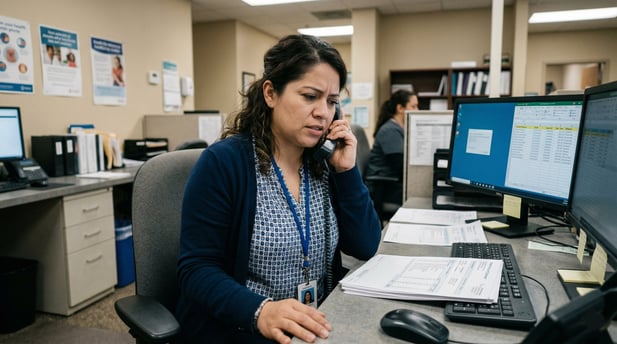
Medical billing staff member manually processing and sorting paper patient statements

Stop Chasing Balances. Text Them.

Paper statements cost $800 to $1,000 per month, take 30 to 90 days per cycle, and collect only about 20% of balances.

That is a high price for a low return. The billing team spends time and money on a process that is outpaced by something far simpler.

Your A/R aging report is not a measure of whether your patients want to pay. It is a measure of how easy or hard your collection channel makes it for them.

Remove the friction. Send a text instead of a statement. Most patients will pay quickly when paying is quick.

The math is clear. A text payment link costs cents. A statement cycle costs dollars. Same-week collection beats 90-day aging every time.

Curogram's A/R Acceleration Dashboard gives your billing team the tools and the data to make that shift. Real-time tracking. Automated follow-ups. And a live view of how your AdvancedMD billing A/R recovery is performing, day by day.

Schedule a demo to see how Curogram's A/R Acceleration Dashboard tracks text payment collection in real time for your AdvancedMD practice.


Frequently Asked Questions

How does text-to-pay fit into an existing AdvancedMD billing workflow?

Text-to-pay works alongside your existing AdvancedMD billing setup. Once patient balances are confirmed after insurance adjudication, your billing team sends a secure payment link via text rather than printing a paper statement. No changes to your claims process are needed. The only shift is in the collection channel, and the A/R Acceleration Dashboard handles the tracking from there.

Why does text-to-pay outperform paper statements in patient balance collection?

The difference comes down to friction. A paper statement requires patients to open mail, find a payment method, and take action on their own timeline, usually days or weeks later. A text message arrives in seconds and includes a direct link to pay. Patients can complete the payment in about the same time it takes to check a notification. Less friction means faster action and higher collection rates.

How does Curogram handle patients who have questions about their balance before paying?

When a patient receives a payment link and has a question, they can reply to the text directly. That reply flows into Curogram's two-way texting inbox, where billing staff can answer questions, explain charges, and resolve any dispute, all by text, without a phone call. Once the patient is satisfied, the staff can resend the payment link in the same conversation thread. The billing question and the payment happen in the same place, which reduces the time between a concern and a completed collection.

How can a billing manager measure the return on switching from paper to text?

Curogram's A/R Acceleration Dashboard makes the comparison straightforward. Billing managers can run side-by-side reports showing collection rate, average days to payment, and cost per collection for both paper statements and text payment links.

The dashboard filters by aging bucket so you can see exactly which segment of your A/R responds best to text outreach. That data gives you a clear picture of the ROI, not just a general sense of improvement.

What happens if a patient does not respond to the first text payment link?

Curogram supports automated follow-up sequences based on patient behavior. If the link is not opened after a set number of hours, a follow-up text goes out. If it is opened but not completed, a gentle reminder follows. Patients who still do not respond after the text sequence can be flagged for a personal call. This tiered approach means the billing team's manual effort is reserved for the small group who need direct outreach, not patients who simply need a second prompt.