

Online Patient Forms in Veradigm with Curogram
💡 Online patient forms in Veradigm enable imaging centers to transition away from paper-based intake that causes delays and errors. Patients...
Table of Contents
Front desk staff know the morning rush well. Patients arrive early, clipboards pile up, and the phone keeps ringing. Someone forgot their insurance card. Another person needs help with the forms. Meanwhile, the waiting room fills up and appointments fall behind.
This chaos happens daily in practices that rely on paper intake. Staff juggle check-in tasks, phone calls, and form review all at once. The work feels endless, and errors creep in when things get busy.
Digital intake workflows for Meditab IMS teams change this pattern. These systems move forms online and send them to patients before visits. Patients complete intake on their phones or computers at home. Staff receive complete information before patients arrive.
The shift from paper to digital intake creates real benefits. Check-in times drop. Staff handle fewer phone calls. Errors decrease when patients enter their own data. Practices run smoother and patients wait less.
This guide explores how teams using Meditab IMS build effective digital workflows. You'll learn about automation triggers, patient preparedness, compliance needs, and scaling methods. Each section includes practical steps that work in busy ambulatory settings.
Manual intake creates a bottleneck that slows down every part of the practice. Paper forms stack up at the front desk. Staff split their attention between greeting patients, answering phones, and checking forms for missing data. This approach wastes time and leads to mistakes.
Traditional intake also frustrates patients. They arrive early to fill out forms, only to wait while staff process the paperwork. Some forms go missing. Others contain errors that require follow-up calls. The entire process feels outdated and inefficient.
Digital workflows solve these problems by moving intake online. Patients receive forms through text or email before their visit. They complete the intake at home on their schedule. Staff review submissions ahead of time and flag any issues.
This shift creates structure and predictability. Every patient follows the same intake process. Staff know what to expect. The practice operates more smoothly, and patients appreciate the convenience.
Paper forms create multiple problems that compound over time. The issues start with illegible handwriting and incomplete sections. Staff spend extra time deciphering answers or calling patients for missing information.
After collecting forms, someone must scan or file each one. This task alone consumes valuable staff hours. The scanned documents then need proper naming and storage. Misfiled forms cause delays later when providers need patient history.
Re-entering data represents another major time sink. Staff type information from paper forms into the EMR system. This double entry increases the chance of errors. A wrong date or misspelled name can cause billing issues or clinical errors.
Front desk staff can spend up to 40% of their time on intake tasks. This includes distributing forms, answering questions, collecting clipboards, and data entry. In a busy practice, this translates to hundreds of hours per month spent on paperwork instead of patient care.
Successful digital intake requires a clear structure. Random or inconsistent form delivery confuses patients and staff alike. A well-designed workflow ensures every patient receives the right forms at the right time without manual intervention.
Standardization means creating repeatable processes that work across all providers and locations. Staff shouldn't need to remember which forms each specialty requires. The system should handle these details automatically based on appointment type or patient characteristics.
Automation eliminates the ad hoc approach where staff manually send forms to some patients but forget others. Digital workflows trigger form delivery based on specific events, like appointment scheduling. This consistency improves both staff efficiency and patient experience.
Intake triggers determine when patients receive their patient forms. The most common trigger fires when staff schedule an appointment in Meditab IMS. The system automatically sends forms to the patient's phone or email immediately after booking.
Pre-visit reminders serve as a secondary trigger. If a patient hasn't completed intake within a few days, the system sends a gentle reminder. These reminders typically go out 48 hours before the appointment to give patients enough time to respond.
Some practices add additional triggers for specific situations. New patients might receive forms immediately upon scheduling. Established patients might only get updates to insurance or contact information. The key is matching trigger timing to patient needs.
Choosing the Right Trigger Timing
Timing affects completion rates significantly. Forms sent too early may be forgotten. Forms sent too late leave patients feeling rushed. Most practices find success sending initial forms within an hour of scheduling, then following up 2-3 days before the visit if needed.
Standardizing Form Templates
Form templates ensure consistent data collection across the practice. Every patient in a specific category receives identical questions in the same order. This standardization makes it easier to compare information and reduces confusion for repeat visitors.
Templates also reduce variability across multiple locations. A patient visiting any clinic in a healthcare network encounters familiar forms. Staff training becomes simpler because everyone works with the same templates regardless of location.
Good templates balance completeness with brevity. Include only necessary fields that support clinical care or billing. Remove redundant questions that frustrate patients. Use clear language at an 8th-grade reading level. Test templates with actual patients before rolling them out practice-wide.

Patient preparedness transforms the appointment experience. When patients complete intake before arriving, they understand what to expect and what to bring. This preparation reduces anxiety and helps visits start on time.
Prepared patients also provide more accurate information. At home, they can check insurance cards, gather medication lists, and verify contact details. In the waiting room, patients rush through forms and make mistakes. The quality of data improves when patients have time to be thorough.
Digital intake workflows support this preparedness by giving patients control over when and where they complete forms. Some patients prefer to fill out forms right after booking. Others wait until the night before. The flexibility accommodates different preferences while ensuring forms get done.
Access from any device makes advanced completion possible. Patients can use their smartphone, tablet, or computer to fill out forms. They don't need to download special apps or create accounts. A simple link in a text message or email opens the forms in a web browser.
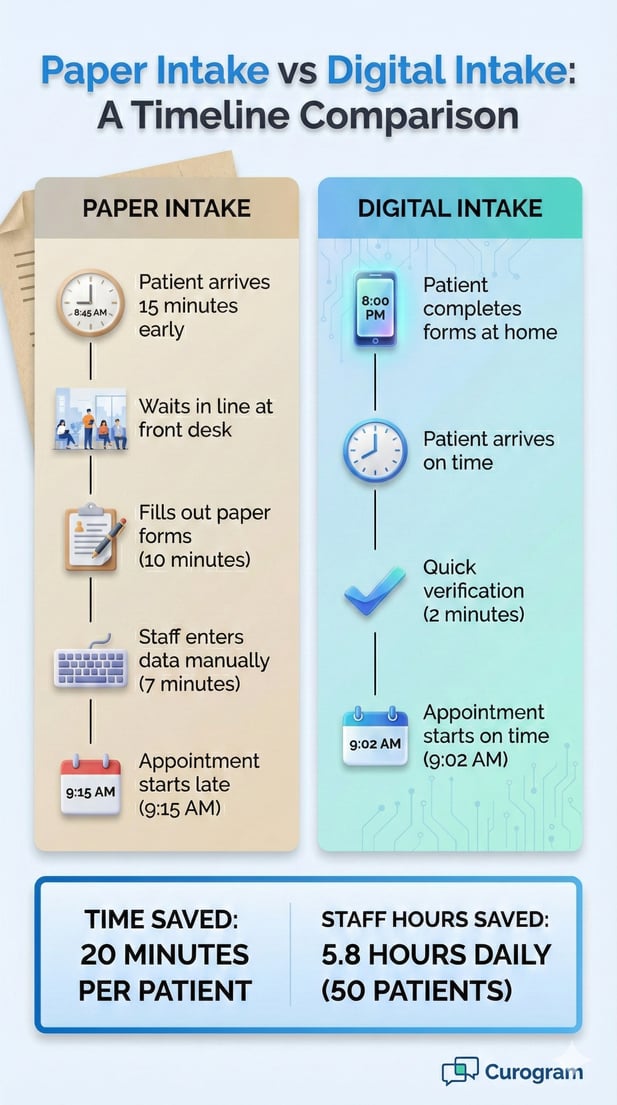
This convenience changes how patients approach intake. Instead of arriving 15 minutes early to handle paperwork, they spend 10 minutes at home the night before. Morning appointments no longer require extra wake-up time for forms. Parents can complete pediatric intake after the kids go to bed.
The system saves progress automatically as patients work through forms. If someone gets interrupted, they can return later and pick up where they left off. This feature particularly helps patients dealing with long medical history sections or complex insurance questions.
Patients also benefit from better information gathering at home. They can check medication bottles for exact names and dosages. They can call family members about medical history. They can locate insurance cards and verify policy numbers. These tasks prove difficult or impossible in a waiting room.
Over 70% of patients complete intake on smartphones. Forms must work well on small screens. This means large buttons, clear text, and questions that don't require extensive scrolling. Dropdown menus work better than long lists. Date pickers simplify birthday entry. These design choices directly impact completion rates.
Delays at check-in frustrate both patients and staff. Traditional check-in requires collecting forms, reviewing for completeness, making copies of insurance cards, and updating the EMR. This process takes 8-12 minutes per patient, even when everything goes smoothly.
Digital intake dramatically cuts this time. When patients arrive with completed forms, check-in becomes a quick verification step. Staff confirm identity, scan insurance cards if needed, and direct patients to the waiting area. The entire process takes 2-3 minutes.
Faster check-in creates a ripple effect throughout the day. Appointments start on time more often. Providers see patients at the scheduled hour rather than playing catch-up. The waiting room empties faster. Staff handle more patients without feeling rushed.
This improved flow also helps practices fill last-minute cancellations. When check-in only takes a few minutes, staff can confidently reach out to patients on the waitlist. Those patients can arrive on short notice, knowing they won't spend 15 minutes on paperwork before being seen.
Track the average check-in time before and after implementing digital intake. Most practices see reductions of 60-75%. Monitor how many patients complete forms in advance. Completion rates above 80% indicate strong workflow design and good patient communication about the new process.
Front desk staff handle countless tasks beyond intake. They schedule appointments, answer phones, verify insurance, collect payments, and respond to patient questions. Manual intake adds hours of work to an already full day.
Digital workflows shift intake tasks away from staff and toward patients. This redistribution doesn't increase patient burden because forms remain the same. The difference is timing and method. Patients spend the same 10 minutes on forms but do so at home instead of at check-in.
Data entry represents one of the most time-consuming aspects of paper intake. Staff must read handwriting, interpret unclear answers, and type everything into Meditab IMS. This work takes 5-8 minutes per form and requires sustained concentration.
Digital forms eliminate this step entirely. Patient responses flow directly into the system without manual typing. This automation prevents transcription errors that occur when staff misread handwriting or make typing mistakes.
A practice seeing 50 patients daily saves 4-6 hours of staff time by eliminating manual entry. Over a month, this adds up to 80-120 hours. That's equivalent to having two additional part-time employees without the payroll cost.
When staff spend less time on paperwork, they can focus on activities that truly require human interaction. This includes helping patients with complex questions, resolving insurance issues, and providing emotional support during difficult visits.
Staff consistently report higher job satisfaction after digital intake implementation. They appreciate spending time on meaningful work rather than tedious data entry. This satisfaction translates to lower turnover and better patient interactions.
Complete and accurate intake information supports better clinical decision-making. Providers need current medication lists, recent test results, and updated medical history before each visit. Incomplete intake creates gaps that compromise care quality.
Digital workflows make patient information available to the care team before the appointment starts. Providers can review intake forms during morning huddles or between patients. This advance review helps them prepare questions and plan the visit efficiently.
In team-based care models, multiple staff members need access to intake information. Nurses might review forms before rooming patients. Medical assistants might verify medications. Providers read the complete history. Digital systems make this shared access simple and immediate.
Missing information triggers extra work. Staff must call patients after visits to collect pharmacy phone numbers or insurance details. These calls interrupt workflows and delay care processes like prescription refills or referrals.
Digital forms can mark critical fields as required. Patients cannot submit incomplete forms, which ensures staff receive all necessary information. However, use required fields carefully. Too many required fields frustrate patients and lower completion rates.

Patient intake collects protected health information that requires careful handling. Forms ask about medical conditions, medications, and treatment history. This sensitive data must stay secure throughout the entire workflow from collection to storage.
HIPAA regulations demand specific protections for electronic health data. Practices must use encrypted systems, control access carefully, and maintain audit logs. These requirements apply to all digital workflows, including intake forms.
HIPAA-compliant forms encrypt data during transmission and storage. Patients enter information into secure web forms that use SSL/TLS encryption. This protection prevents unauthorized access if someone intercepts the data during transmission.
Access controls limit who can view completed forms. Only authorized staff members can open patient intake data. The system tracks every access attempt and maintains logs for compliance audits. These controls protect patient privacy while allowing necessary clinical access.
Any vendor handling patient health information must sign a Business Associate Agreement. This legal document outlines how the vendor will protect data and what happens if a breach occurs. Review these agreements carefully before implementing any digital intake solution.
HIPAA compliance requires documentation of how practices protect patient data. Centralized digital intake systems make this documentation simpler. All forms flow through one system with consistent security measures.
Audit logs show who accessed each form and when. If a compliance officer needs to investigate a potential breach, these logs provide clear accountability. Paper systems offer no such tracking capability.
Keep documentation of security measures, staff training, and access controls. During audits, demonstrate how digital workflows protect patient data better than paper alternatives. Show how encryption, access logs, and secure storage meet or exceed HIPAA requirements.
Growing practices face challenges maintaining consistency across multiple locations. Each site might develop its own intake processes and forms. This variation creates confusion for patients who visit different locations and complicates staff training.
Digital workflows enable standardization at scale. Central administrators create form templates and workflow rules that apply across all locations. Updates happen instantly organization-wide rather than requiring individual site updates.
Multi-location practices benefit from shared intake standards. Patients receive the same forms whether they visit the main campus or a satellite clinic. This consistency improves the patient experience and builds trust in the organization.
Staff training becomes more efficient with standardized workflows. New employees learn one intake process that works everywhere. Experienced staff can float between locations without learning different systems. This flexibility helps organizations manage staffing challenges.
While standardization matters, some customization helps. Specialty clinics might need additional forms. Pediatric locations might adjust language for parents. Digital systems allow these variations while maintaining core consistency across the organization.
Central administrators need visibility into intake workflows across all locations. Dashboard reporting shows completion rates, common errors, and patient feedback by site. This oversight helps identify locations that need additional support or training.
Establish organization-wide benchmarks for intake metrics. Track completion rates, time to complete, and data accuracy. Share best practices from high-performing locations. This approach drives continuous improvement while respecting local autonomy.
Curogram builds intake solutions specifically for ambulatory and community care settings. The platform understands how busy practices operate and designs workflows that fit real-world front desk needs.
Integration with Meditab IMS happens through standard connections that work reliably. Form responses flow directly into the EMR without manual import or export steps. This seamless integration eliminates the double work that defeats the purpose of digital intake.
Curogram centralizes form management in one platform. Administrators create templates, set triggers, and monitor completion rates from a single dashboard. Staff access patient responses directly in their workflow without switching between systems.
The platform handles form delivery reliably through text messages and email. Patients receive clear instructions and easy-to-use mobile-friendly forms. Automatic reminders ensure high completion rates without requiring staff intervention.
As practices grow, Curogram scales effortlessly. Add new locations, providers, or form types without complex configuration. The infrastructure supports organizations of any size while maintaining the simplicity that makes staff adoption easy.
Digital intake workflows transform how practices handle patient information collection. The shift from paper to online forms creates benefits that extend throughout the entire organization.
Front desk staff save hours each day by eliminating manual data entry and form management. They focus on meaningful patient interactions instead of paperwork. This change improves job satisfaction and reduces burnout.
Patients appreciate the convenience of completing forms on their own schedule using their own devices. They arrive prepared and informed. Check-in takes minutes instead of creating delays. The entire visit experience improves from the first touchpoint.
Clinical teams benefit from complete and accurate information available before appointments start. This preparedness supports better care coordination and reduces follow-up work. Providers can focus on clinical decision-making rather than chasing missing data.
HIPAA compliance becomes more manageable with digital systems that enforce security standards automatically. Encrypted transmission, controlled access, and audit logs protect patient privacy while simplifying oversight requirements.
Organizations scaling across multiple locations maintain consistency through centralized workflow management. Standard templates and triggers ensure every patient receives the same quality experience regardless of which clinic they visit.
The key to successful implementation lies in thoughtful workflow design. Start with clear triggers that send forms at the right time. Use standardized templates that collect necessary information without overwhelming patients. Monitor completion rates and gather feedback to refine the process.
Teams using Meditab IMS find digital intake workflows integrate naturally with their existing systems. The technology supports clinical workflows rather than disrupting them. Staff adoption happens quickly because the benefits become obvious within the first few days of use.
Consider how digital intake could improve your current processes. Calculate the time staff spend on manual entry. Measure check-in delays. Ask patients about their experience with paper forms. These insights will guide your workflow design and help demonstrate ROI after implementation.
Book a demo to see how Curogram supports better care workflows with Meditab IMS.
Digital workflows let patients complete forms before arrival. Staff verify information instead of collecting and processing paperwork. This reduces check-in time from 10-12 minutes to 2-3 minutes. Faster check-in helps appointments start on schedule.
Automated triggers send forms when appointments are scheduled without staff action. This ensures every patient receives the necessary forms regardless of how busy the front desk gets. Triggers also send reminders if patients haven't completed forms, maintaining high completion rates.
Digital systems encrypt data during transmission and storage. They control access through permissions and maintain detailed audit logs. These security measures protect patient information better than paper forms. The centralized approach also simplifies compliance documentation during audits.
Most practices achieve 75-85% completion rates for pre-visit intake. Success depends on clear communication, mobile-friendly forms, and well-timed reminders. Completion rates typically improve over the first few months as patients become familiar with the process.
Central administrators create standard templates and workflow rules that apply across all sites. Updates happen instantly organization-wide. This standardization ensures patients receive consistent experiences. Local sites can add specialty-specific forms while maintaining core consistency.
💡 Online patient forms in Veradigm enable imaging centers to transition away from paper-based intake that causes delays and errors. Patients...
💡 Online patient forms for Meditab IMS practices help clinics move faster and work smarter. These digital tools let patients fill out intake forms...
💡 Digital intake workflow, along with Veradigm solutions, helps imaging centers eliminate delays and errors from paper-based processes. Patients...