8 min read
Patient Texting Options for GE Centricity Practices, Compared (2026)
Aubreigh Lee Daculug
:
August 20, 2026
Curogram is our top pick. It covers the whole workflow, runs beside Centricity, and moves with you if you change systems.
Centricity is now sold as athenaPractice and athenaFlow. Check any vendor's Centricity claim against your version first.
Search for a texting tool for your own practice and you get the same page every time. A list of 12 platforms. Generic feature grids. Not one mention of the system you actually run.
That is the trouble with most roundups. They rank vendors in the abstract, and what you needed was a judgment about fit.
If you run Centricity, fit is the whole question. Your EHR has its own way of storing appointments and marking a confirmation. It also carries an unusual ownership history, which shapes who bothered to build for it in the first place. A tool can be excellent everywhere else and still be wrong for you.
So we built the list we wanted to read. We checked each option against a single question. What does this vendor actually claim about Centricity, and can we verify that claim?
The answers were uneven. One vendor has a Centricity page that spells out how confirmations flow back into your appointment status. Several rank well for Centricity searches while publishing nothing about Centricity at all.
That gap matters more than it looks. A general EHR claim and a Centricity claim are simply not the same promise, and the difference shows up after you sign.
We also flag the naming issue that trips up half of these comparisons. The Centricity line left GE years ago and now carries different product names. Any vendor still describing it as a GE product may be working from old notes.
Below you get what Centricity already gives you, the six things we measured, honest entries on eight options, a side-by-side table, and the questions to ask before you commit.
No vendor paid to be listed here, and nothing below is a paid placement. Where a claim could not be verified, we say so plainly.
What You Already Have Before You Buy Anything
Start here, because a surprising number of practices end up buying a tool that they already partly own today.
Centricity is now sold as athenaPractice and athenaFlow under athenahealth. It handles scheduling, charting, and practice management. Patient-facing contact has mostly run through the portal. That portal has often come from partner products, not one built-in module.
That difference matters more than it sounds, because it changes what you are asking of the patient.
A portal asks them to log in. A text asks them to reply.
Federal survey data shows that 77% of people were offered online access to their records in 2024, and about 65% of them used it at least once. A portal still asks more of the patient than a text does. For a simple yes-or-no confirmation, that gap decides whether your schedule fills.
What you do not get is a full two-way texting layer. Nothing native covers reminders, recalls, intake, and payments from your own office number, and that is the gap every vendor below is selling into.
One caution before you shop. What you have varies by version and by how you are hosted, and older versions have already passed their support dates. Check your own setup before you assume a gap exists.
The Six Things We Measured
Feature lists are easy to pad.
These six points separate real fits from vendors who say yes to everything.
- Centricity fit. Is there a published claim about Centricity, or just a general EHR promise?
- Two-way texting. Can patients reply and reach a person, or is it one-way only?
- Confirmations. Does a patient reply update your schedule, or does someone type it in?
- Breadth. Reminders alone, or reminders plus recalls, intake, payments, and reviews?
- HIPAA and BAA. Will they sign a business associate agreement, and what backs it up?
- Portability. If you change systems, does the tool come with you or start over?
That last one carries extra weight here. Given the platform's history, and the live talk about moving customers to newer systems, it is not a hypothetical.
The Options, Compared
Eight entries, ranked by fit for a Centricity practice. Strengths and gaps both.

1. Curogram
Curogram runs the whole layer beside your EHR. That means two-way texting from your main office number, reminders and confirmations, mass recalls, digital intake, text-to-pay, and review requests. It runs alongside Centricity and replaces none of it.
The numbers hold up. Clients average more than 75% confirmation rates. No-shows run 53% below the industry average. Atlas Medical Center went from 14.20% to 4.91% in three months, and phone volume often drops by half.
Portability is what earns the top spot. The layer is not built on any one EHR. So a future platform change does not mean starting your patient texting over.
Verdict: best overall fit for multi-site Centricity practices that want one system for everything.
2. DoctorConnect
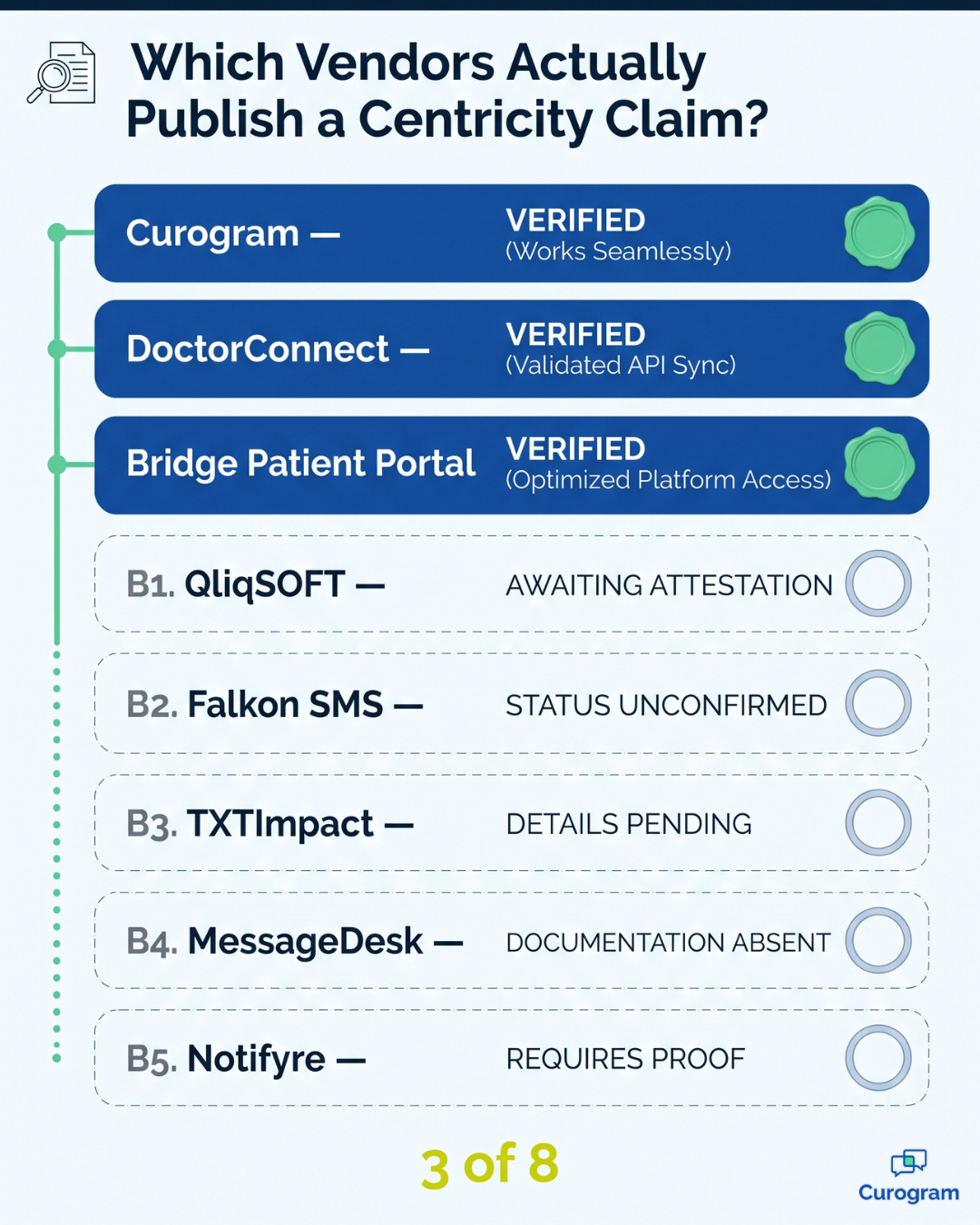
DoctorConnect is the only vendor here that publishes Centricity-specific pages.
They describe reminders pulling from your Centricity schedule. Confirmations and reschedule requests are then written back, so the appointment shows as confirmed inside Centricity.
That write-back claim is the most useful thing a vendor can offer, because it kills manual re-keying. The company reports 150+ EHR links, a long compliance record, and reminders by text, email, and voice.
The gap is age. The Centricity pages we found predate the athenahealth renaming. Confirm it still works on your version.
Verdict: the strongest verified Centricity claim in this list, and worth a direct call.
3. Bridge Patient Portal
Bridge is a vendor-neutral portal that publishes a Centricity interface. It links to the main Centricity products. If you run Centricity next to another system, it can put both behind one front door for patients.
It is portal-first, not texting-first. If your goal is replacing phone confirmations with texts, a portal is a different tool for a different job.
One accuracy note. Some of Bridge's product naming does not match what we verified elsewhere. Treat it as needing a check.
Verdict: good for portal cleanup across mixed systems, not for a texting-led workflow.
4. QliqSOFT
QliqSOFT's Quincy platform covers secure patient texting, chatbots, forms, and virtual visits. It has HIPAA safeguards, audit trails, and app-less delivery. It links through HL7, FHIR, and REST APIs, and it publishes a named Epic link.
Here is the honest gap. We found no published Centricity link at all.
The platform also leans toward health systems and post-acute care, not ambulatory front desks. It ranks for Centricity searches without documenting Centricity support.
Verdict: a capable platform, unproven for Centricity. Ask for a named reference first.
5. Falkon SMS
Falkon SMS text-enables your current landline, VoIP, or toll-free number. Patients text the number already on your website. You get HIPAA compliance with a signed BAA, SOC 2 certification, a shared inbox, and managed 10DLC signup.
The EHR side is the weak point, and their own reviews show it.
A verified G2 reviewer calls the EHR link limited, with some manual syncing and workarounds. Published links center on Microsoft Teams and Webex, not practice management systems.
Verdict: a solid tool for conversations, not a confirmation engine tied to your schedule.
6. TXTImpact
TXTImpact is a low-cost messaging platform. It offers mass texting, reminders for visits and refills, and general EHR and portal links.
The claims are generic, not Centricity-specific. Pricing includes a free trial, which tells you how the product is pitched. If you mainly need outbound reminders on a budget, it may be enough.
Verdict: budget pick for outbound messages. Check any write-back claim closely.
7 and 8. General business texting tools
Tools like MessageDesk and Notifyre text-enable a business line. You get a shared inbox, scheduled messages, and templates. Notifyre publishes BAA availability and API access. MessageDesk keeps things simple.
Neither is built around clinical scheduling. You get a channel, not a workflow. Confirmations will not update your schedule on their own.
Verdict: fine for small practices that want texting only, with staff filling the gaps by hand.
Everything Side by Side
Ratings reflect what each vendor publishes, not what a salesperson may tell you.
| Option | Centricity-specific claim | Two-way texting | Confirmations write back | Workflow breadth | Portable if you migrate |
|---|---|---|---|---|---|
| Curogram | Works alongside; verify scope | Yes | Yes | Full layer | Yes |
| DoctorConnect | Yes, published | Yes | Claimed; verify currency | Broad | Vendor-dependent |
| Bridge Patient Portal | Yes, published | Portal messaging | No | Portal-focused | Vendor-neutral |
| QliqSOFT | None found | Yes | Not documented | Moderate | API-dependent |
| Falkon SMS | None found | Yes | No | Texting only | Number stays with you |
| TXTImpact | None found | Yes | Not documented | Reminders only | Limited |
| MessageDesk / Notifyre | None found | Yes | No | Texting only | Number stays with you |
The pattern is hard to miss. Only three options publish anything Centricity-specific, and only two of those are built around texting.
Choosing by the Shape of Your Practice
Single location, mostly reminders? A simple texting tool may be enough. Someone will still update the schedule by hand.
Multi-site group with a shared front desk? You need confirmations writing back and one thread per patient. Otherwise your staff rebuild the same workflow at every site.
Weighing a platform change soon? Portability jumps to the top of your list. A tool welded to your current EHR becomes a second migration project.
Whatever your shape, take these questions into every demo:
- Do you have a published Centricity link, and which product and version does it cover?
- Does a patient reply update the appointment status by itself, or does staff type it in?
- Which Centricity naming do your pages use, and when were they last updated?
- Will you sign a BAA, and which security certifications do you hold?
- Can you name a current Centricity customer at our size?
- What happens to our number, templates, and history if we change EHRs?
Question five sorts real links from marketing copy faster than anything else here. Question six is the one most practices forget until it costs them.
Start With the Question That Narrows the Field
In the end, most of this decision comes down to something fairly simple. Do you want a texting channel, or do you want a communication workflow?
A channel gets messages out to patients. A workflow gets confirmations back into your schedule, fills gaps from a recall list, collects intake before arrival, and takes payment in the same thread.
Those are two different purchases at two different prices.
For a multi-site Centricity practice, the workflow is almost always the better buy. Your staff are not short on ways to send a message. They are short on hours, and every manual step you leave in place costs some of them.
The comparison above should also make the verification point obvious. Three of these eight options publish anything Centricity-specific. The rest ask you to take a general integration claim on faith, which is a fine thing to do right up until your confirmations stop syncing.
So ask the hard questions early in the process. Ask which product name the vendor uses, when their pages were last updated, and whether a customer on your version will take your call. Vendors who have done the work answer these quickly.
Curogram earns our top spot for a straightforward reason. It covers the full workflow, runs beside Centricity instead of depending on it, and follows your practice if the platform underneath ever changes.
For a system with this ownership history, that last part is worth real money.
Verified results back that up. Clients average more than 75% confirmation rates, and no-show rates run 53% below the industry average.
Schedule a demo and we will walk through your appointment types, your locations, and exactly what our Centricity scope covers. You will get a straight answer, including where the limits are.
Frequently Asked Questions
Not as a full two-way texting layer. Centricity is now sold as athenaPractice and athenaFlow. It has handled patient contact mainly through portal tools, and those have often come from partner products. What you have varies by version and hosting, so check your own setup first.
Curogram, for most multi-site practices. It covers reminders, confirmations, recalls, intake, and payments in one layer. It runs beside Centricity and stays with you through a platform change. DoctorConnect is the strongest alternative, and the only other vendor publishing a specific Centricity write-back claim.
That depends on how each one is built. Tools that sit beside your EHR usually carry over, keeping your number and history. Tools built on one integration often need rebuilding. Ask every vendor directly, because the answers differ a lot.
Ask which product and version it covers, and when the pages were last updated. Then ask them to name a current customer on your version. Real links get quick answers. Vague talk about supporting all major EHRs usually means a generic connection.
It can be, with the right safeguards. Standard SMS from a personal phone is not. Compliant texting needs encryption, access controls, audit logs, and a signed business associate agreement. Ask for the BAA in writing before any patient data moves.