
1 min read
HIPAA-Compliant Texting for NextGen Users: The Complete 2026 Guide
💡HIPAA-compliant texting for NextGen users means sending patient messages through an encrypted platform that connects with NextGen, keeps an audit...
10 min read

Automated appointment reminders and confirmations
Secure pre-visit instructions and online intake forms
Post-visit follow-ups and care management messages
Automated review requests and feedback collection
After-hours auto-reply and escalation workflows
Learn how Curogram enhances structured messaging for patient intake, follow-ups, and compliance automation.
Two clinics can both text their patients and get completely different results.
The first sends reminders whenever someone at the front desk finds a spare minute. Confirmations get typed by hand. Nobody is quite sure who replied yesterday, or what was said.
The second clinic sends the same reminder at the same hour, two days out, every time, and patient replies update the schedule on their own.
Same phones. Same patients. Same NextGen system underneath.
The difference is not the texting. It is the workflow behind it.
That distinction gets glossed over constantly. Practices adopt secure texting, use it for a few months, and quietly conclude it did not move the needle. Then the tool gets blamed.
What actually happened is that they added a channel without adding a process. Messages went out inconsistently. Replies landed in someone's personal queue, and nothing connected back to the chart.
A workflow fixes that. It defines what gets sent, when it goes out, who sees the reply, and where the record lives. Once those four things are settled, the messaging stops being a favor your staff does when they have time and starts being infrastructure.
This matters more in 2026 than it did two years ago. Opt-out rules tightened in April 2025, and federal regulators have signaled that encryption and access controls are heading from optional to required.
Clinics running unstructured texting are carrying risk they cannot easily see, and most of them do not know it yet.
What follows are the specific HIPAA-compliant texting workflows in NextGen clinics use today, with the compliance safeguards each one needs and the results practices have measured.
If you already run secure texting, treat this as a checklist for what to tighten. If you are starting from scratch, start at the top and pick one.
Before the workflows themselves, it helps to be precise about what makes one compliant in the first place.
A texting workflow is HIPAA compliant when every automated message is encrypted, logged in an audit trail, sent only to consented patients with an opt-out path, and handled by a vendor under a signed Business Associate Agreement.
That definition is the bar every example below has to clear. Most clinics already have the tool that can meet it. What they lack is the process that makes it happen the same way every time.
Our complete guide to secure messaging for NextGen users covers the case for adopting it at all. This piece picks up at the point where you have the tool and need the process. If you are still evaluating Curogram's NextGen setup, start there and come back to workflow design.
Patients learn your patterns faster than you think.
When a reminder always arrives two days before a visit, they start expecting it.
When it arrives sometimes on Tuesday and sometimes not at all, they stop reading any of it.
Structured HIPAA-compliant communication workflows take out the guesswork. Every reminder, form link, and update follows the same format. It also goes out on the same schedule. Response rates climb because patients know the message on sight.
Manual confirmation calls are the quiet budget line nobody tracks. Run the math for a mid-sized practice and it gets obvious fast.
| Practice size | Appointments per week | Minutes per confirmation call | Staff hours per week | Staff hours per year |
|---|---|---|---|---|
| Solo provider | 90 | 3 | 4.5 | 234 |
| Three providers | 250 | 3 | 12.5 | 650 |
| Ten providers | 800 | 3 | 40 | 2,080 |
For a three-provider group, that is 650 hours a year spent dialing patients who mostly do not pick up.
At a loaded front-desk cost of roughly $25 an hour, the annual figure lands near $16,250 — and that is before anyone counts the calls that go to voicemail and get repeated.
Texting workflows in NextGen absorb that work. Confirmations, form links, and follow-up notes go out automatically, and staff only touch the exceptions. In practice, that means a clinic can grow its schedule without adding a front-desk hire.
Compliance failures rarely come from bad intent. They come from improvisation — a staff member texting from a personal phone because the system felt slow that morning.
Defined workflows close that gap. When encryption, audit logging, and role-based access are built into the path a message travels, staff cannot accidentally step outside it.
The safe option becomes the fastest option, which is the only version of a policy that actually holds.
These are the workflows that show up again and again across primary care, specialty, and multi-location groups. Most practices start with one, prove it works, then layer on the rest.
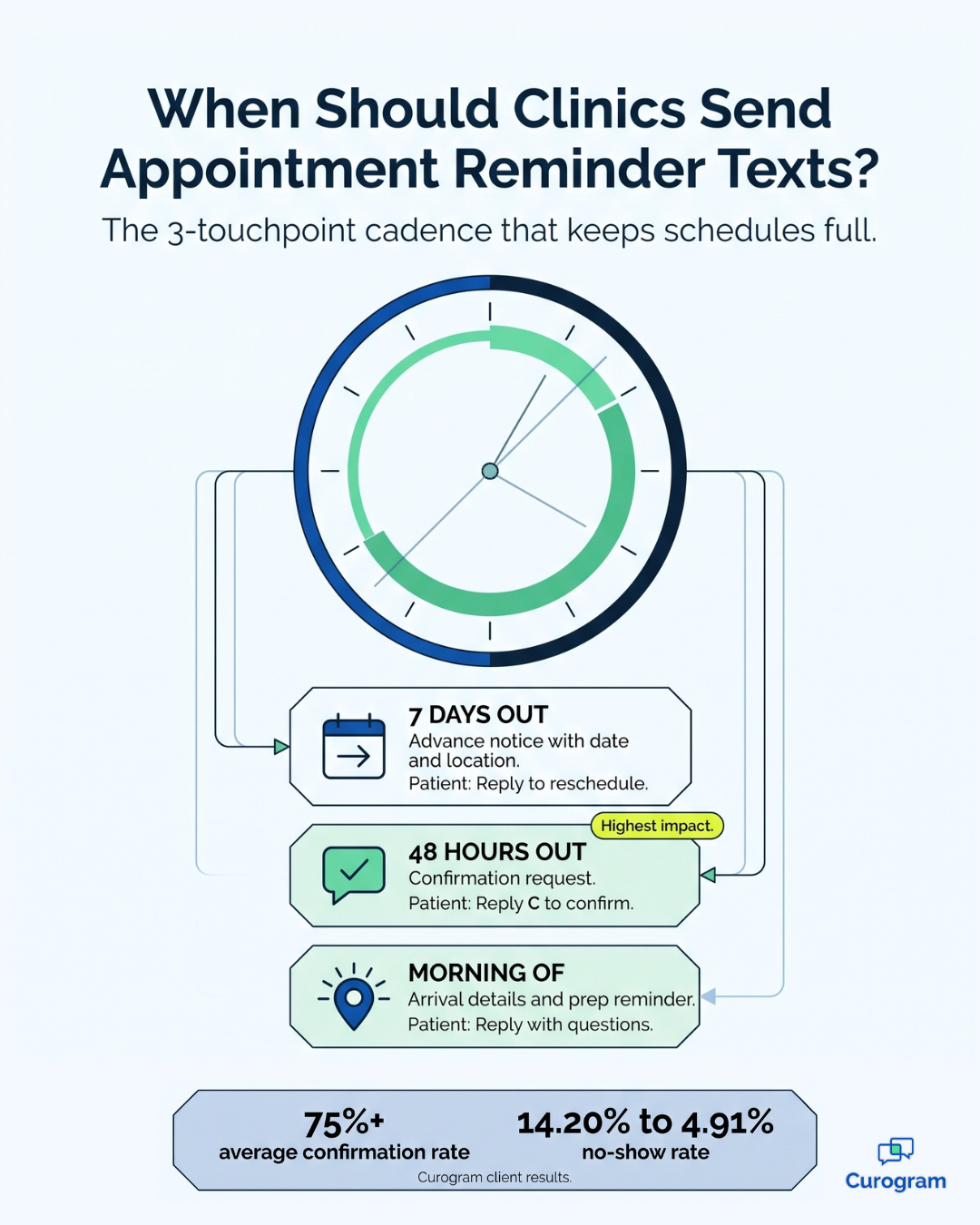
This is the workhorse. Reminders sync from the NextGen scheduling module and go out on a fixed cadence, with a reply option that writes the response straight back to the appointment.
A cadence that works well for most clinics looks like this:
| Timing | Message purpose | Patient action |
|---|---|---|
| 7 days out | Advance notice with date and location | Reply to reschedule |
| 48 hours out | Confirmation request | Reply C to confirm |
| Morning of visit | Arrival details and prep reminder | Reply with questions |
The 48-hour message does the heavy lifting. It gives your team a full business day to refill a slot if someone cancels, which is the difference between a recovered appointment and an empty chair.
Structured messaging for patient intake is where clinics see the fastest change in waiting room flow. A secure link goes out with the confirmation, and patients complete forms, upload insurance cards, and add photo ID from their phone before they arrive.
The compliance piece matters here. Because the link is authenticated and the submission maps to the correct chart in NextGen, nothing travels over unsecured SMS and nothing gets keyed in twice.
The practical result is a check-in that takes two minutes instead of twelve, and a front desk that is no longer transcribing handwriting from a clipboard.
After a visit, follow-up text workflows in NextGen keep care moving without a phone call.
Common triggers include:
Recall messaging deserves its own mention. When a patient is overdue, an automated recall text asks them to book. That helps continuity of care. It also fills slots you would otherwise lose.
These messages also cut inbound volume. Patients who get a proactive update do not call to ask for one, which is worth more to a busy phone line than almost anything else you can automate.
Reputation management works best when it runs on a trigger, not a reminder note. A short survey goes out after the visit. Positive responses route to a Google review link. Anything negative routes internally to a manager instead of a public page.
This keeps the workflow HIPAA-safe. The message never names a diagnosis, a procedure, or a provider note. It just asks how the visit went.
Google search is the first place most new patients encounter a practice, and profiles with recent, plentiful reviews rank higher in local map results. A steady trickle of reviews compounds in a way that a one-time push never does.
Patients text at 9 p.m. That is not going to change. What you can change is what happens next.
An after-hours workflow replies right away. It tells the patient when to expect a real answer. It also spells out what to do if the issue cannot wait.
Messages then queue in a shared inbox. In the morning, the right department picks them up. Nothing sits unread on one person's phone.
Larger groups pair this with smart routing. Inbound texts go straight to billing, scheduling, nursing, or pharmacy. No one has to pick up a phone to sort them.
All HIPAA-compliant texting workflows in NextGen rely on encryption to secure PHI. Data is encrypted both in transit and at rest, preventing unauthorized access. Whether sending pre-visit forms or follow-up reminders, encryption ensures that only verified users can view or respond to messages.
This foundation protects clinics from accidental disclosures and maintains patient trust.
Audit logs track every message sent, received, or deleted. In a compliant workflow, these logs are automatically generated and stored securely within NextGen or its integrated messaging partner.
This transparency allows administrators to trace communication histories and verify compliance during audits or internal reviews.
Under HIPAA, any vendor handling PHI must sign a Business Associate Agreement (BAA). This agreement clearly defines data protection responsibilities between the healthcare provider and the technology partner.
NextGen users should confirm that any texting solution used—such as Curogram—has a signed BAA in place to ensure full regulatory compliance.
Consent and Opt-Out Management
This section has moved more than any other in the past two years, and a lot of clinic policies are out of date.
Since April 11, 2025, patients can revoke consent by any reasonable method — not just by replying STOP.
Your workflow needs to recognize and process all of the following:
Two more requirements come with it. Opt-outs must be honored within 10 business days, down from the previous 30-day window. And you may send only one clarification text after a revocation to confirm scope.
One more rule is coming. Global revocation would apply a single opt-out to every kind of message you send, on any topic. It has been delayed again, to January 31, 2027.
Build toward it anyway. The delay is a waiver, not a repeal.
Secure User Access and Authentication
Access to patient messaging must be restricted to authorized staff. HIPAA-compliant texting workflows include user authentication, role-based access, and automatic logouts after inactivity. These controls protect sensitive information while maintaining accountability
Integration with Secure Messaging Platforms
Meeting all of the above with in-house tooling is possible and almost never worth it. Most NextGen users integrate a purpose-built platform, which handles compliant routing and storage while the clinical record stays where it belongs.
Not every platform connects the same way, and the differences show up in daily use rather than in a demo.
If you are still shortlisting vendors, it is worth reading how EMR-integrated texting platforms compare on integration depth, write-back behavior, and compliance posture before you commit.

The case for HIPAA-compliant texting workflows is not abstract. It shows up in three places on a practice's books.
| Outcome | What changes | Why it matters |
|---|---|---|
| Fewer no-shows | Confirmation rates rise above 75% across Curogram clients | Each recovered visit is direct revenue, and freed slots can be rebooked same-day |
| Lower phone volume | Inbound calls drop by as much as 50% | Front-desk staff shift from dialing to patient-facing work |
| Stronger retention | Recall and follow-up messages bring overdue patients back | Continuity of care improves alongside schedule density |
Curogram clients see no-show rates roughly 53% below the industry average, which translates to a 10% to 20% revenue increase for many practices. For a group billing $2 million a year, the low end of that range is $200,000.

That number deserves a plain-language translation. It is not new patients or new services. It is revenue you were already scheduled to earn and were losing to empty chairs.
A large enterprise clinic implemented secure pre-visit workflows using online forms and insurance uploads. This reduced intake time by half and minimized waiting room congestion. Patients appreciated the convenience and security of completing paperwork ahead of time
Specialty Clinic Boosting Reviews with Automated Requests
A specialty practice used automated review request workflows after each visit, improving Google ratings by 40% within three months. Secure feedback routing prevented PHI exposure while maintaining compliance.
Multi-Provider Group Improving Care Coordination
A multi-provider group leveraged HIPAA-compliant messaging for lab follow-ups and chronic care management. This improved care coordination and reduced unnecessary phone calls by 35%, freeing staff to focus on direct patient care.
Curogram is not a replacement for NextGen. It is the communication layer that runs on top of it, which is exactly the distinction that makes implementation straightforward.
Curogram ships with pre-built HIPAA-compliant texting workflows. They cover reminders, intake, follow-ups, reviews, and after-hours replies. Each one is editable, so you can match your practice's voice without starting from a blank screen.
Most clinics go live in weeks, not quarters. Front-desk training typically takes under 10 minutes, because the interface behaves like the texting your staff already does every day.
Curogram connects directly to NextGen scheduling. Appointments, patient profiles, and message history all sync on their own. Confirmations update the calendar. Conversations write back to the chart.
That sync is what prevents the double-entry problem that kills most bolt-on tools. Nobody retypes anything, so nothing drifts out of date.
Every Curogram workflow carries encryption, audit logging, and role-based access by default. The company signs BAAs with its clients. It also holds SOC 2 Type II certification alongside HIPAA compliance.
You still own your policies and your consent capture. What you do not own is the burden of proving the messaging layer itself is secure. For clinics also weighing mass texting for outreach and recalls, the same safeguards apply at scale.
The clinics that get the most from secure messaging rarely launch everything at once. They pick the workflow tied to their most expensive problem, get it running properly, then add the next one.
That sequencing matters more than the tool you choose. It is also the difference between a rollout that sticks and one that quietly stalls.
If no-shows are your pain point, start with confirmations. Setup is straightforward, results show up within a month, and the revenue math is easy to bring to whoever approves the budget.
If your waiting room is the bottleneck, start with digital intake instead. If the phones never stop ringing, after-hours auto-replies and smart routing will give you the fastest relief.
All five workflows rest on the same idea. Messaging that follows a defined path — encrypted, logged, access-controlled, and synced to the chart — beats messaging that depends on who is working that day.
The rules are pushing the same direction, with opt-out duties tightened in 2025 and encryption and multi-factor login moving from optional to expected. A practice running structured workflows is already most of the way there.
None of this requires replacing your EMR. NextGen stays the system of record, and the workflow layer sits on top of it. It reads from your schedule, writes back to your charts, and handles the repetitive messaging your staff should not be doing by hand.
The outcomes hold up across practice types: fewer empty slots, shorter check-ins, lighter phone queues, and more patients who return when they should.
Ready to see how HIPAA-compliant texting workflows in NextGen would run in your clinic? Schedule a demo and we will map your first workflow against your real schedule and appointment volume.

1 min read
💡HIPAA-compliant texting for NextGen users means sending patient messages through an encrypted platform that connects with NextGen, keeps an audit...
1 min read
💡 NextGen clinics can improve their patient communication with secure text messaging. It comes down to secure, compliant, and efficient workflows....

1 min read
💡 HIPAA-compliant texting in Cloud 9 Software empowers orthodontic and pediatric dental practices. It's a secure means to securely communicate with...