12 min read

Automated Google Reviews for CollaborateMD: Get More 5-Star Ratings

Automated Google Reviews for CollaborateMD: Get More 5-Star Ratings
💡 Automated Google reviews for CollaborateMD practices boost local search rankings and bring in more new patients by sending review requests right after each visit.
  • Curogram links to the CollaborateMD scheduler and sends SMS review requests when patients check out
  • Happy patients (4-5 stars) are sent to Google to post a public review
  • Unhappy patients (1-3 stars) are routed to a private form so the practice can fix the issue
  • Review volume can grow by 200% within 60 days, pushing the average star rating to 4.8
  • Higher ratings lead to "Map Pack" results on Google, which drives free patient traffic
This CollaborateMD patient feedback automation system runs in the background with zero staff effort, turning your silent base of happy patients into a 5-star wall around your practice.

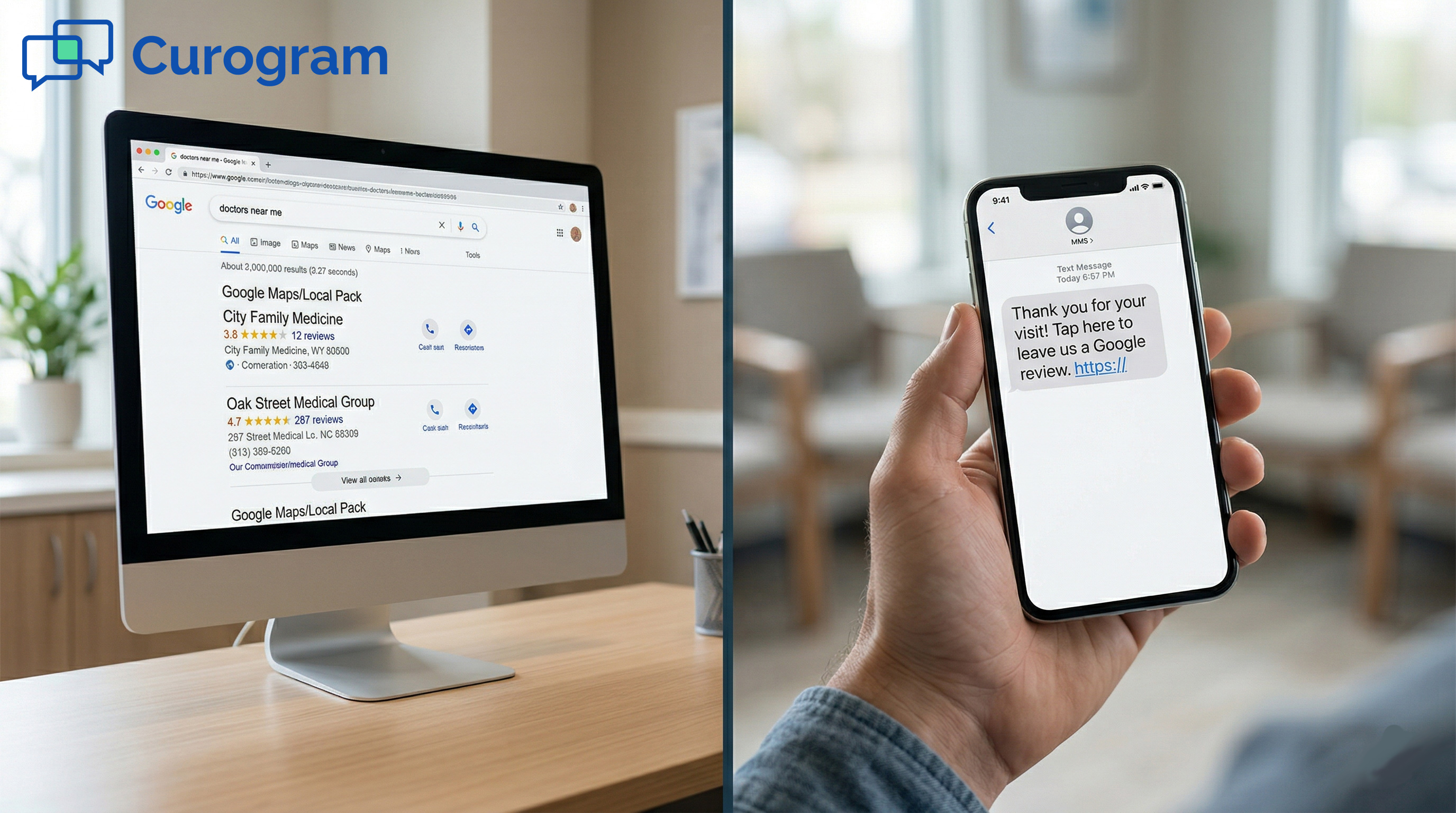
Think about the last time you chose a new doctor. Chances are, you opened Google, typed "doctors near me," and picked the one with the most stars. Your future patients do the same thing every day.

Here is the problem: Most of your patients are happy. They leave the office feeling good about their visit. But they never post a review. The ones who do leave reviews? They are often upset about a bill or a long wait. That one angry post can drag your star rating down for months.

This is the "unfair 1-star" problem. It does not reflect the true quality of your care. It just means the loudest voices are the only ones being heard. Meanwhile, the silent group of happy patients says nothing online.

Automated Google reviews for CollaborateMD solve this gap. Instead of hoping patients leave a good word, you build a system that asks every single patient right after their visit.

Curogram plugs into your CollaborateMD scheduler and sends a quick text message at the perfect moment. No front desk effort. No awkward asks. Just a smooth, hands-off process that works around the clock.

The result is a flood of 5-star reviews that tell the real story of your practice. Your Google star rating climbs. Your local search ranking rises. And new patients start finding you instead of your competitor down the street.

In this guide, we will walk through why most practices struggle to get more patient reviews, how the system works step by step, and real results from a practice that used it to dominate their local market.

If you run a medical practice on CollaborateMD and want to protect your online brand, this article is for you.

The Villain: The "Unfair 1-Star" and the Silent Majority

Every medical practice deals with bad reviews. But in healthcare, the review problem is worse than in most other fields. That is because of a pattern called the "billing complaint" bias.

When a patient has a great visit, they feel relieved and go about their day. They rarely stop to open Google and leave a glowing review.

But when that same patient gets a surprise bill three weeks later, they are angry. They open Google and type a furious 1-star review right from their phone. The visit itself may have been perfect. The doctor may have been kind and thorough. None of that matters when the bill feels wrong.

This means the reviews on your Google profile are often skewed. They lean toward the worst moments, not the best. Your actual care might deserve a 4.9 rating, but your Google listing shows a 3.5 because the only people talking are the upset ones.

Now, here is where it gets costly: A 3.5-star rating on Google is like being a ghost. Patients searching for a new doctor scroll right past low-rated options.

They pick the practice with 4.8 stars and 200 reviews, even if that practice is further away. In a world where 72% of patients use online reviews as their first step to find a new doctor, a low rating is not just a bruise to your ego. It is lost revenue.

Think about it this way:

If your practice sees 20 new patients per month and your average revenue per patient is $300 per year, even a small drop in new patient volume adds up fast. Losing just five new patients a month costs $18,000 per year. A bad Google rating can easily cause that kind of loss, and most practice owners never trace the problem back to reviews.


Then there is the manual struggle. Many offices try to solve this by asking patients at the front desk. The receptionist says, "Would you mind leaving us a review?" after checkout.

It sounds simple, but it almost never works. Patients nod and forget. Staff feel awkward asking and stop doing it after a week. Some practices print cards with QR codes. Those cards end up in the trash.

The truth is, manual review requests have a response rate of about 5% to 10%. That means if you see 100 patients a week and ask every one of them in person, you might get five to ten reviews. In practice, you get even fewer because staff do not ask every patient. Some weeks, they ask no one.

This is why CollaborateMD reputation management cannot rely on human effort alone. The front desk is already busy with check-ins, phones, and insurance issues.

Adding "please ask for reviews" to their task list is a recipe for failure. It does not work at scale, and it does not work with any kind of consistency.

What practices need is a system that removes the human from the loop. A system that asks every patient, at the right time, in a way that feels natural. That is what turns the silent group of happy patients into your biggest source of new leads.

The good news is that your practice already has the tool to make this happen. If you use CollaborateMD, you already track when patients check in and check out.

That check-out moment is the trigger point for a smart, hands-off review process. All you need is the bridge between your schedule and a review request, and that is where things get exciting.

The Guide: Automating Your Reputation Defense

The idea behind automated review requests is simple. When a patient checks out, a text goes to their phone asking about their visit. But the details of how this works make all the difference.

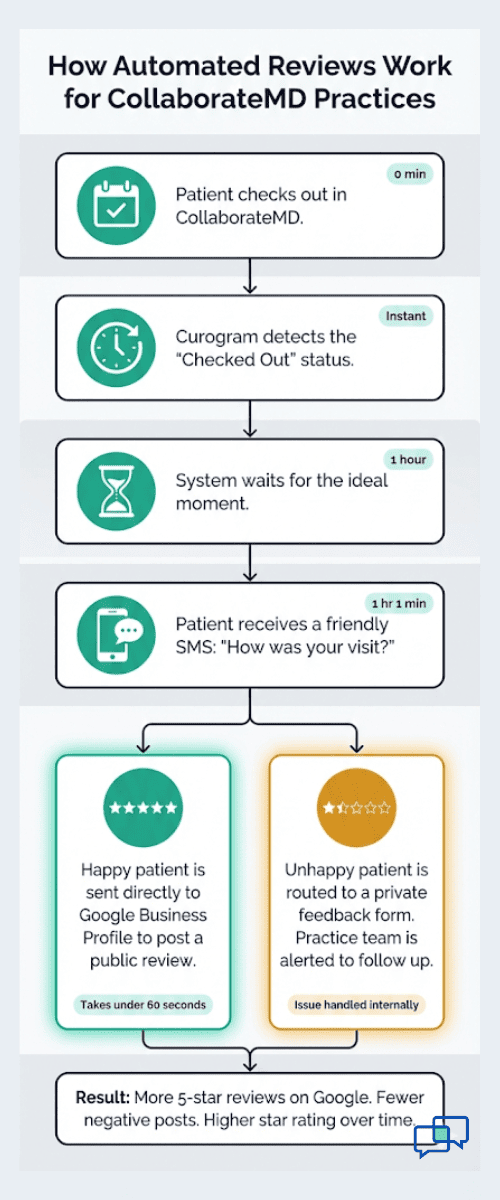
Curogram connects to your CollaborateMD scheduler and watches for a key signal: The "Checked Out" status. Once a patient is marked as checked out, the system waits about one hour.

That one-hour gap is on purpose. It gives the patient time to leave the office, get in their car, and settle back into their day. They are still feeling good about their visit, but they are no longer in a rush.

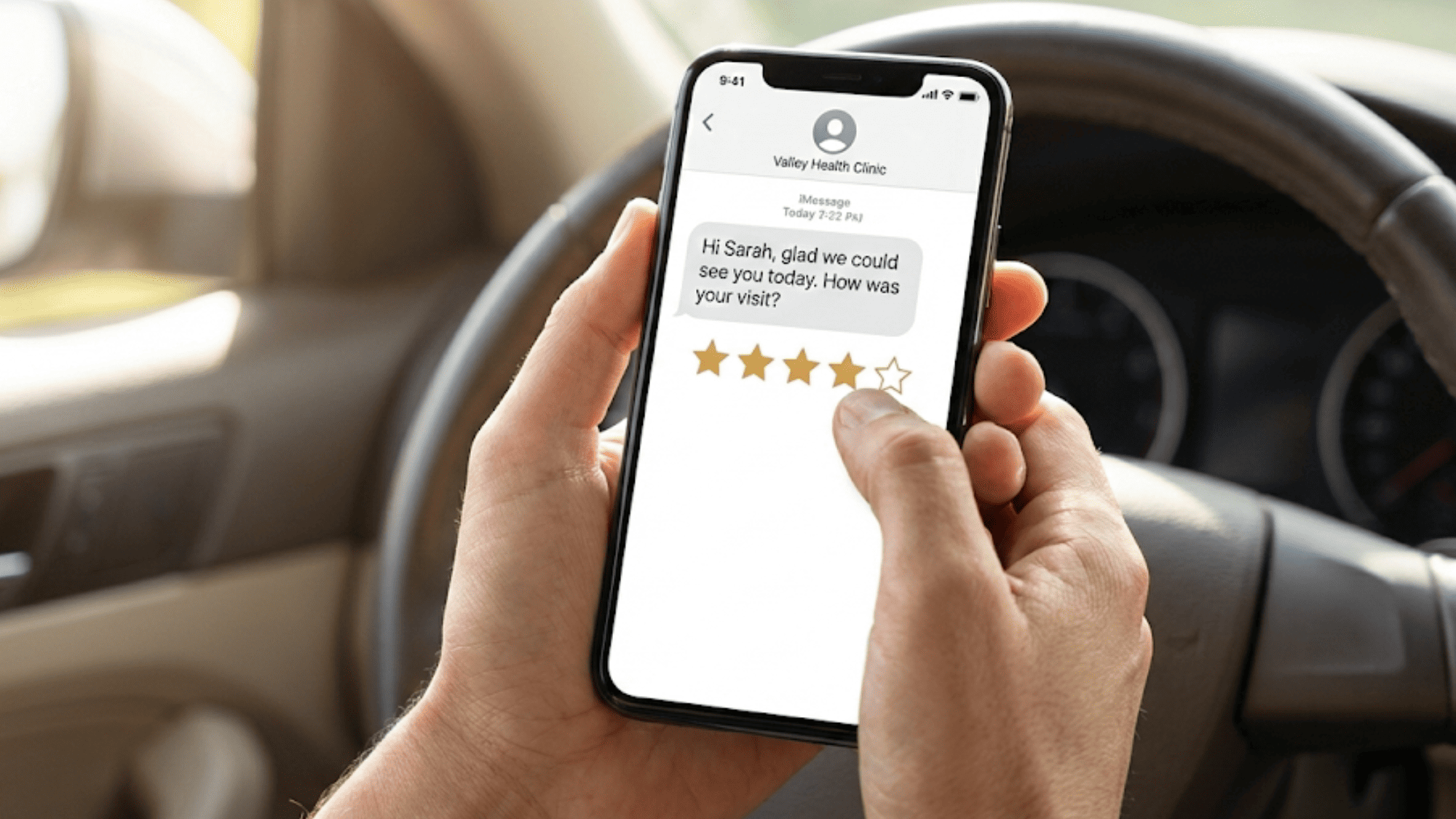
At that point, the patient gets a short, friendly text. It says something like, "Hi Sarah, glad we could see you today. How was your visit?" The patient taps a star rating right from their phone. It takes about five seconds.

Now, here is where the "gatekeeper" logic kicks in. This is the part that makes the system smart rather than risky.

If the patient taps 4 or 5 stars, they get a direct link to your Google Business Profile. They land right on the review box, ready to type. Most of these patients leave a short, positive comment in under a minute. This is how you get more patient reviews without chasing anyone.

If the patient taps 1, 2, or 3 stars, they do not see the Google link. Instead, they are sent to a private feedback form.

This form lets the patient explain what went wrong. Maybe the wait was too long. Maybe the billing was confusing. Your office gets that feedback right away and can follow up to fix the problem. But the negative comment stays off Google.

This is not about hiding bad reviews. It is about giving unhappy patients a real way to be heard while also giving satisfied patients a fast path to share their praise. Both groups get what they need. Your practice gets to handle complaints behind the scenes and let the good reviews shine in public.

The volume game is what makes this system so powerful. When you only ask a few patients for reviews, one bad review can tank your rating.

But when you ask every patient, the math changes. If 80% of your patients are happy and you ask all of them, those 4- and 5-star reviews pour in and push the average up. The few 1-star reviews from billing disputes get buried under a wave of positive feedback.

Let us put real numbers to it:

Say, your practice sees 400 patients per month. With a 30% response rate on text-based review requests (which is common for SMS), you get about 120 reviews per month. If 85% of those are 4 or 5 stars, that is roughly 100 positive Google reviews every month. That level of volume is what it takes to increase your Google star rating to 4.8 or higher and keep it there.


This kind of CollaborateMD patient feedback automation runs without anyone on your team lifting a finger. Once you set the rule in Curogram, such as "send review request one hour after checkout," it runs in the background 24/7.

That is the core of a reputation defense strategy. You are not reacting to bad reviews. You are flooding your Google listing with the real voice of your practice, which is the satisfied patients who never had a reason to speak up before.

Flowchart showing how automated Google reviews work for CollaborateMD practices step by step

Proven Metrics: The Atlas Medical Center Case Study

Numbers tell the story better than promises. Let us look at how one real practice used this system and what happened to their online presence, patient flow, and even their ability to hire staff:

Atlas Medical Center is a multi-provider primary care practice that runs on CollaborateMD. Before they started using Curogram for automated reviews, their Google profile told a story that did not match reality.

They had a handful of reviews, most of which were complaints about wait times or billing mix-ups. Their star rating sat around 3.4. For a practice that provided strong care and had loyal patients, this was a painful gap between perception and truth.

The practice manager knew they had a review problem, but the front desk team was already stretched thin. They had tried printed cards with QR codes. They had tried emailing patients after visits. Nothing moved the needle. The response rate on emails was under 3%, and the printed cards were mostly ignored.

When they turned on Curogram's review system, the change was fast and dramatic.
Within two months, Atlas Medical Center saw a 200% increase in review volume.

They went from getting one or two reviews per month to getting new 5-star reviews almost every day. The system was sending a text to every patient who checked out, and the response rate jumped to over 25%.

Here is why that matters in practical terms:

Before Curogram, the practice had about 40 total Google reviews built up over several years. After 60 days, they had over 120. And the vast majority were 4 and 5 stars. This massive jump in fresh, positive reviews sent a strong signal to Google's search engine.


The impact on medical practice local SEO was clear. Within three months, Atlas Medical Center moved from page two of local search results to the Google Maps "Map Pack," which is the top three results that show up with a map when someone searches "doctors near me" or "primary care near me."

This is the most valuable real estate in local search because it sits above the regular website results. Practices in the Map Pack get the lion's share of clicks and phone calls.

Getting into the Map Pack is driven by three main factors:

  • How close your practice is to the person searching

  • How many reviews you have and how recent they are

  • How complete your Google Business Profile is

Atlas Medical Center could not change their location, but they could control review volume and recency. That is exactly what automated Google reviews for CollaborateMD gave them.

The financial impact followed. More visibility meant more calls. More calls meant more new patients.

The practice reported a steady increase in new patient bookings in the months after their review volume climbed. They did not run a single paid ad during this period. The new patients came from organic Google search.

To put a rough figure on it:

Each new patient at a primary care practice generates somewhere between $250 and $500 in first-year revenue, depending on insurance and visit frequency.

If the Map Pack ranking brought in even 10 extra new patients per month, that translates to $30,000 to $60,000 in added yearly revenue. For a practice that pays nothing extra for this traffic, that is a strong return.


But the benefits did not stop at patient volume. There was a surprise side effect that the practice had not expected: better job applicants.

Healthcare hiring is tough right now. Clinics compete for nurses, medical assistants, and front desk staff in a tight labor market. Atlas Medical Center found that after their Google rating climbed to 4.8 stars, the quality of job applicants went up.

People looking for work in healthcare check Google reviews just like patients do. A 4.8-star practice looks like a great place to work. A 3.4-star practice looks like a place with problems.

The practice manager noted that candidates during interviews started mentioning the reviews. They said things like, "I saw your patients really love this place."

That kind of social proof is hard to buy with a job posting alone. It shows that a high star rating does not just attract patients; it builds your brand in the broader community.

Let us break down the full picture of what changed for Atlas Medical Center:

Before Curogram, they had about 40 reviews total, a 3.4-star rating, a page-two Google ranking, flat new patient numbers, and a hard time filling open staff roles.

After 60 days with the system, they had over 120 reviews, a 4.8-star rating, a Map Pack position, growing new patient volume with no ad spend, and stronger job applicants drawn by the ratings.


Phone screen showing a star rating prompt sent by a medical practice after a patient visit

The case study shows what happens when you stop leaving your online reputation to chance. Most patients are happy.

The system just gives them a simple, fast way to say so. That volume of positive feedback does the heavy lifting for your search ranking, your patient flow, and even your team.

The key takeaway is that this was not a one-time campaign. It is an ongoing, automatic process. Every day, new patients check out and new review requests go out.

The review stream stays fresh, which is exactly what Google wants to see. Recency is a ranking factor, so a practice that got 100 reviews two years ago and then stopped will lose ground to a practice that gets 10 new reviews every week.

That is the difference between a one-off effort and a reputation defense system. Atlas Medical Center did not just boost their rating once. They built a machine that keeps it high month after month.

Turn Your Patient Base into a Marketing Team

Your patients are happy. The internet just does not know it yet. That is the core issue for most practices using CollaborateMD.

The care is solid, the staff is friendly, and patients come back year after year. But the Google profile does not reflect any of that.

The fix is not a new marketing campaign. It is not a social media push or a fancy website redesign. It is something much simpler: let your patients speak for you.

When you set up automated Google reviews for CollaborateMD through Curogram, you turn every checkout into a chance for a real patient to share a real experience.

Think of it as building a wall of 5-star reviews around your practice. Each new review is another brick.

Over time, that wall gets so tall that the few angry 1-star posts barely make a dent. A couple of billing complaints cannot hurt a profile with 300 positive reviews. The math protects you.

Stop letting a handful of upset voices define your brand online. Your practice has earned a strong reputation through years of good care.

Curogram tells that real story on autopilot. It connects to your CollaborateMD system, sends the texts, routes the feedback, and fills your Google listing with the truth about your practice.


Why Curogram Is Built for CollaborateMD Practices


Curogram is not a generic review tool bolted onto your workflow. It was built to plug directly into practice management systems like CollaborateMD, which means the setup is smooth and the results are fast.

The platform reads real-time data from your CollaborateMD scheduler. When a patient checks out, Curogram knows.

It waits the right amount of time, then sends a simple text from your practice's name and number. Patients see a message from their doctor's office, not from some unknown software. That trust leads to higher response rates.

Beyond reviews, Curogram gives your practice a full HIPAA-compliant texting platform. You can use the same SMS engine for appointment reminders, intake forms, payment links, and two-way chats with patients.

That means you are not adding another tool to your stack. You are adding one system that handles patient engagement from booking to billing to reviews.

Staff training takes about 10 minutes. The front desk does not need to learn a complex dashboard. The review system runs in the background, and the texting tools work like a simple messaging app.

This is why practices using Curogram report a 30% or greater boost in staff output. Less time on the phone means more time helping patients in the office.

For CollaborateMD users, the value is clear. You already have the patient data and the schedule. Curogram turns that data into a stream of positive reviews, better search rankings, and more new patients walking through your door. It is the bridge between great care and a great online reputation.

Conclusion

Your reputation is one of your most valuable assets. It shapes whether new patients call your office or scroll past to the next listing.

It affects whether top talent wants to work for you. And right now, if you are not actively managing your reviews, a few billing complaints may be telling a story that does not match reality.

The solution is not to work harder. It is to work smarter. Automated Google reviews for CollaborateMD take the guesswork and manual effort out of the equation. Every patient who checks out gets a friendly text.

Satisfied patients go to Google. Unhappy patients get heard privately. The system runs every day without your staff touching a thing.

The practices that win in local search are not always the best clinics. They are the ones with the most visible proof. A 4.8-star rating with hundreds of reviews is that proof. It tells every person searching "doctors near me" that your practice is trusted, active, and worth their time.

Atlas Medical Center proved it. They went from a stale 3.4-star profile to a thriving 4.8-star listing in just two months. New patients came in. Better staff applied. Revenue grew without a single ad dollar spent.

You can do the same. Your patient base is already full of happy people. All you need is a way to let them share that online. Curogram does exactly that for CollaborateMD practices.

Build a 5-star wall around your practice. Schedule a demo now to see how Curogram can turn your patient base into a marketing team.


Frequently Asked Questions

How does "review gating" work, and is it a fair practice?
Curogram does not block or delete any reviews. It segments feedback by asking patients about their visit first. If a patient is unhappy, they are sent to an internal form so the practice can fix the issue. This is standard customer service, similar to a hotel asking "How was your stay?" before checkout. 
How can we direct reviews to sites other than Google?
Yes, you can choose where to send patients. Curogram supports Facebook, Healthgrades, Vitals, and other platforms. However, we suggest putting 90% of your focus on Google. You can split the remaining 10% across other sites based on your specialty and local market.
Why does this system not require any action from staff?

Once the review rule is set in Curogram, such as "send one hour after checkout," it runs on its own 24/7. The system reads the checked-out status from CollaborateMD and triggers the text without any clicks, reminders, or manual steps. Your front desk never has to ask a patient for a review again.

How does Curogram know when to send a review request to a CollaborateMD patient?

Curogram reads the "Checked Out" status from your CollaborateMD scheduler in real time. Once a patient is marked as checked out, it waits a set period (usually one hour) and then sends an SMS review request. No manual trigger is needed.

How does a higher Google star rating directly affect new patient volume for a medical practice?

Patients trust star ratings as social proof. A practice with a 4.8 rating and 200 reviews will get more clicks and calls than one with 3.5 stars and 30 reviews. Higher visibility in the Google Map Pack means more organic traffic, which reduces your need for paid ads and lowers patient acquisition costs.


Google Review Automation for Cerbo: Build a 5-Star Reputation at Scale

Google Review Automation for Cerbo: Build a 5-Star Reputation at Scale

💡 Google review automation for Cerbo helps integrative medicine practices build a strong online reputation without extra work. Sends text review...

Read More
Boost Google Reviews with Ramsoft

Boost Google Reviews with Ramsoft

💡 Boost Google reviews with Ramsoft so radiology practices build trust with patients. Most patients look at online ratings first, especially when...

Read More
Boost Google Reviews with Exa

Boost Google Reviews with Exa

💡 Online reviews play a major role in how patients and referring providers choose radiology centers. Strong ratings improve search results,...

Read More