
 Mira Gwehn Revilla

- CharmTeleHealth runs the video room as an add-on, listed at $20 per provider per month.
- Reminder texts draw from your plan’s monthly SMS allotment, and CharmHealth bills $0.08 for each text past the limit.
- Secured CharmHealth texts make patients open a link, enter a two-hour code, and confirm a birth date.
- Curogram sends the reminder, logs the patient’s reply as a confirmation, and drops the video link into that same text thread.
- Covina Arthritic Clinic confirms more than 1,100 appointments a month with no manual calls, based on our internal data.
Count the screens your front desk touches for one CharmHealth video visit: the schedule, the reminder settings, the Messages tab, the CharmTeleHealth room, and the billing screen. That’s five stops for a visit that may last 15 minutes. Your staff are the only thing linking them.
Our position is plain. A virtual visit workflow for CharmHealth front office staff should run as one text thread, from one dashboard, with a person stepping in only when a patient needs one.
CharmHealth does the clinical side well. It holds the schedule, the chart, and the claim, and CharmTeleHealth gives providers a working video room. Trouble shows up in the gaps between the add-ons. A reminder fires from one setting, the reply lands in another inbox, and the join link goes out from a third place.
When any link in that chain slips, the patient calls. We call this the Tech-Support Visit. Someone at the front desk drops a callback, finds the right link, resends it, and talks a nervous patient through the join screen while the next caller sits on hold.
Every one of those calls is a sign the workflow depends on staff memory. And it gets worse on the days your telehealth column is full, which is exactly when the phones are busiest.
Covina Arthritic Clinic, a Curogram client, confirms more than 1,100 appointments a month with no manual follow-up calls, based on our internal data. That same chain of reminder, reply, and link can carry a 2:00 p.m. video slot from booking to payment, with one text to one unconfirmed patient as the only staff touch.
The Tech-Support Visit
CharmHealth earns its place in a lot of small and multi-specialty practices. Scheduling, charting, e-prescribing, and claims sit in one system, and the price is easy to explain to an owner. CharmTeleHealth adds a working video room, so providers can see patients from the same chart they use in clinic.
Trace a single virtual visit from booking to payment, and each step depends on a different tool. Reminders run through the Text and Voice Notifications settings, while two-way texts live under Messages, then Text Messages, then All.
CharmTeleHealth is its own add-on. Billing waits on a patient portal.
None of these pieces were built as one pipeline. So your front desk becomes the pipeline, carrying each patient from one screen to the next by hand.
Why the Reminder Step Breaks First
Most rescue calls trace back to the reminder. CharmHealth’s $200 Provider Plan includes 1,000 texts a month, and each text past that costs $0.08, according to CharmHealth’s pricing FAQ. Reminders, confirmations, and staff texts all draw from that same pool.
So a practice watching its overage bill often trims the reminder sequence to one text, or moves some reminders to email. One text sent two days out is easy to forget. An email reminder can land in a spam folder or an inbox the patient checks once a week.
Replies cause their own trouble. A patient who answers “yes” to a plain reminder has replied, but someone still has to see that reply and mark the visit as confirmed.
CharmHealth offers a separate booking assistant for reply handling. Without it, confirmations become a list on a sticky note, worked between calls.
One Video Slot, Minute by Minute
Follow a single 2:00 p.m. telehealth slot on a busy Tuesday.
- 1:45 p.m. Staff check whether the patient confirmed. The reminder went out, but no reply shows, and nobody knows if the text landed.
- 1:52 p.m. The patient calls. She has the visit on her calendar but can’t find the link.
- 1:56 p.m. Staff resend the link while a second line rings. They read the join steps aloud.
- 2:07 p.m. The visit finally starts, seven minutes late. The 2:15 slot is now behind too.
- 2:30 p.m. The invoice posts to a portal the patient hasn’t logged into since last spring.
By 2:30, the front desk is three callbacks behind, and nobody sends a review request.
Run that pattern across eight virtual slots and the afternoon belongs to the phone.
What the Rescue Calls Cost
Two costs stack up here: staff minutes and empty slots. The table below uses illustrative numbers. Swap in your own schedule and fee.
|
Illustrative Math |
Per Month |
|
Virtual visits on the schedule |
160 |
|
Rescue calls at 1 in 4 visits, 7 minutes each |
40 calls, about 4.7 staff hours |
|
No-shows at 12% of virtual visits |
19 empty slots |
|
Lost revenue at $150 per visit |
$2,850 |
|
CharmTeleHealth for 4 providers at $20 each |
$80 |
Staff time hides on this sheet. Nearly five hours a month goes to resending links and reading join steps aloud, and those hours come out of callbacks, prior auths, and the check-in line.
Empty slots hurt more. A missed video visit can’t be backfilled in the last five minutes, since a waitlist patient won’t be ready to join that fast. Our clients see no-show rates 53% lower than the industry average, based on our internal data.
The Administrator Who Chose CharmHealth to Keep Things Simple
Most office administrators we talk to picked CharmHealth because it promised fewer systems. One login, one chart, one bill. Telehealth was supposed to slot into that.
In practice, they now work four or five screens for each virtual visit. They end the day with a stack of callbacks still open. On Mondays, they scan for the telehealth column first. A full one means an afternoon of telehealth tech support calls front desk staff can’t plan around.
Their workflow was assembled one add-on at a time over several years. Telehealth came last, and it inherited every handoff the others left behind.
One Dashboard for the Whole Visit
Five messages make up a virtual visit from the patient’s side: a reminder, a confirmation, a join link, a bill, and a review request. Curogram sends all five from one place, in one text thread, to the phone the patient already checks.
The Chain, Step by Step
- Reminder. An automated text goes out on the schedule you set, such as two days before and again the morning of the visit.
- Confirmation. The patient replies to the text. Curogram reads the reply and marks the visit as confirmed, so nobody works a manual call list.
- Video link. Close to the visit time, the join link arrives in that same thread. The patient taps it, and the visit opens in the browser with no app to download.
- Payment. After the visit, a payment link follows by text, so the balance doesn’t wait on a portal login.
- Review request. Every patient gets the same short ask to share feedback, with no screening for happy patients first.
Staff only step in when a patient replies with a question or a reschedule. Everything else moves on its own, which is what one dashboard for reminders and video visits means in daily use.
Where Each Step Lives Today
Read the middle column as a list of places your staff have to check. Each row is a separate screen, setting, or add-on, and each one is a point where a patient can drop out and call.
|
Step |
Typical CharmHealth Setup |
With Curogram |
|
Reminder |
Text and Voice Notifications settings |
Automated text in one thread |
|
Confirmation |
Reply checked by staff, or a separate booking assistant |
Reply logged as confirmed |
|
Video link |
CharmTeleHealth add-on, $20 per provider per month |
Link sent in the same thread |
|
Payment |
Statement or portal login |
Text-to-pay link |
|
Review request |
Often skipped |
Sent to every patient |
How Curogram Connects With CharmHealth
CharmHealth stays your system of record. Charting, the master schedule, and claims don’t move. Curogram works alongside it and syncs appointment data, so reminders and confirmations match the real schedule.
In daily use, that sync does three jobs. A new virtual appointment booked in CharmHealth picks up its reminder sequence on its own. A patient’s “C” reply shows as confirmed on your Curogram dashboard within seconds.
When a patient texts back to reschedule, staff see the request in the same thread and move the slot in CharmHealth, with the full message history on screen.
CharmHealth gates its API access. A practice has to request access, agree to its terms, and have an admin approve the connection inside the account settings.
Our team handles that paperwork and the setup with you, so your office manager isn’t reading API terms between check-ins. Full integration typically takes one to two weeks.
Two Kinds of Texting, and Why Patients Notice
Staff often ask how this differs from CharmHealth’s own two-way texting. CharmHealth’s texting is an EHR-side tool. Staff work it from Messages, then Text Messages, then All, and a secured message reaches the patient as a link.
To read that secured message, the patient opens the link, enters a one-time code, and confirms a birth date. The code expires after two hours. For a patient trying to join a video visit in the next ten minutes, each extra step is one more reason to call your front desk.
Curogram is a patient-facing texting platform. The confirmation request and the video link arrive as ordinary texts, with no code or birth date check in the way. That single difference removes most of the join-link calls.
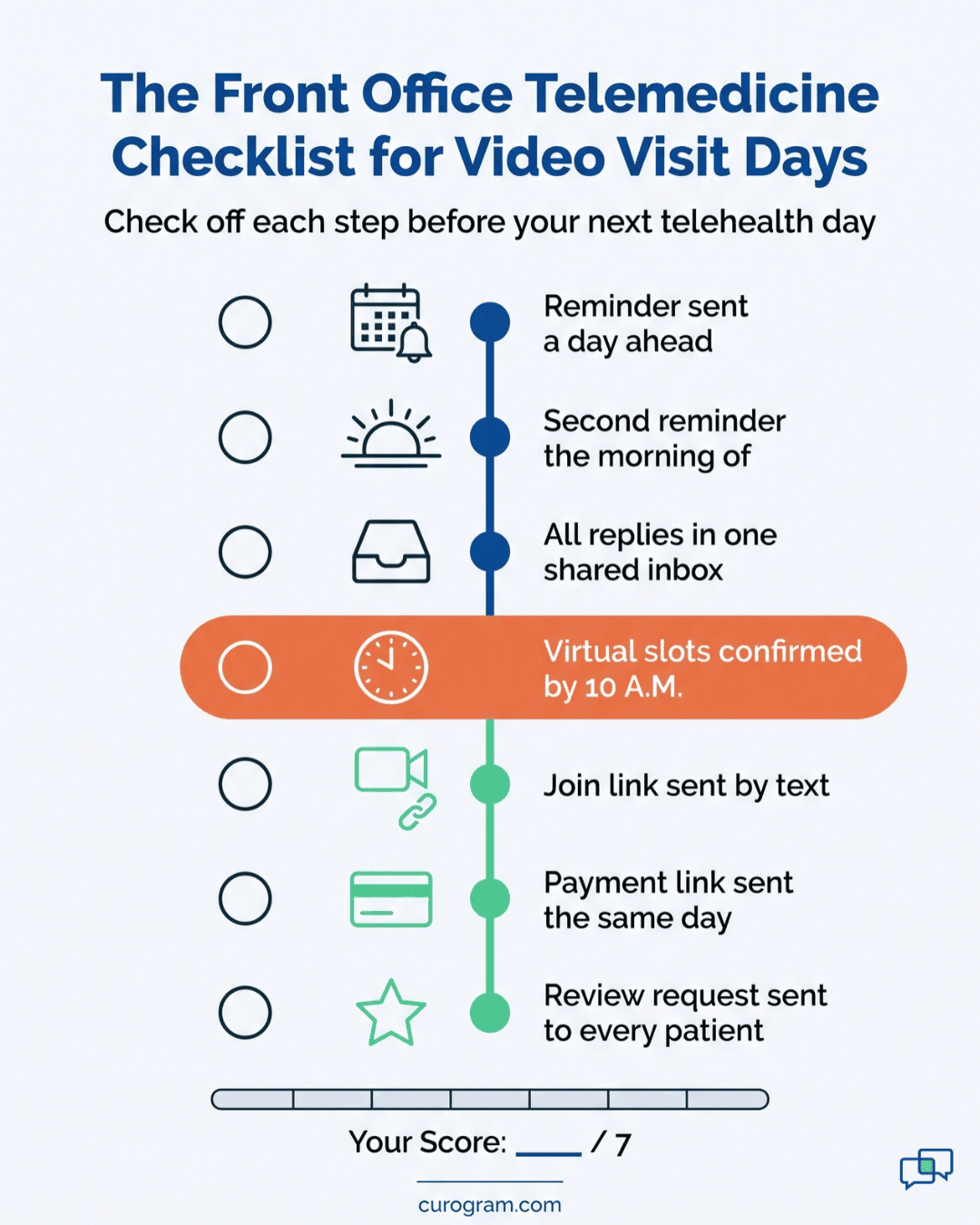
A Front Office Telemedicine Checklist for a Multi-Specialty Practice
Multi-specialty and primary care desks run in-person and virtual columns side by side. One dashboard means one triage screen for both. Before your next telehealth day, check these:
- Every virtual slot has a reminder scheduled at least a day out.
- Patient replies post to one inbox your whole team can see.
- The join link reaches the patient by text, on the phone they answer.
- Payment requests go out the same day as the visit.
- Each provider’s virtual column shows confirmed or unconfirmed at a glance by 10 a.m.
Staff learn the Curogram dashboard in under 10 minutes. If someone on your team can send a text, they can run it, so there’s no new learning curve on top of the tools they already manage.

The Front Office That Stops Doing Tech Support
Covina Arthritic Clinic used to confirm appointments with manual follow-up calls. With Curogram, the clinic now confirms more than 1,100 appointments a month without staff dialing out, based on our internal data. Across our clients, the average confirmation rate sits above 75%.
Atlas Medical Center saw the same effect on no-shows. Its rate fell from 14.20% to 4.91% in three months, based on our internal data. A drop that size means the schedule you build in the morning is close to the one your providers actually see.
Both figures come from full schedules. Video slots lean on the same confirmation step, and a virtual patient who confirmed by text the day before has already read your message on the device she’ll use to join. That’s why the confirmation step and the link step belong in one thread.
|
Metric |
Result |
|
Covina Arthritic Clinic, monthly confirmations |
1,100+ |
|
Average confirmation rate, Curogram clients |
Above 75% |
|
Atlas Medical Center no-show rate |
14.20% to 4.91% in 3 months |
|
No-show rate vs. industry average |
53% lower |
Walkthrough: The 2:00 P.M. Video Slot, Rebuilt
Take the same Tuesday slot from earlier and run it through one dashboard.
- Monday, 2:00 p.m. A reminder text goes out with the date, time, and provider name. She replies “C” from her kitchen.
- Monday, 2:01 p.m. Curogram logs the reply. On the dashboard, the slot turns to confirmed, and no one adds it to a call list.
- Tuesday, 8:30 a.m. Your front desk lead opens the dashboard. Seven of eight virtual slots show confirmed. She texts the eighth patient one question and moves on.
- Tuesday, 1:50 p.m. The join link arrives in the same thread as Monday’s reminder. One tap opens the visit in her browser.
- Tuesday, 2:00 p.m. The visit starts on time. The phone stays quiet.
- Tuesday, 2:25 p.m. A payment link follows by text. She pays from her phone before lunch the next day.
- Tuesday, 3:00 p.m. A short review request goes out, the same one every patient receives.
Now take the exception. If a patient replies “R” to reschedule on Monday, the request lands in the same thread your team already watches.
Staff offer two open times by text, move the slot in CharmHealth, and the reminder sequence resets for the new date. Nobody plays phone tag, and the original 2:00 slot opens up a day early, while there’s still time to fill it.
Count the front desk touches: one text to one unconfirmed patient. In the old flow, the same slot took a status check, a rescue call, a resend, and a paper statement.
Curogram Highlight: One Thread From Reminder to Review
Curogram Telehealth puts the full virtual visit inside one text thread your front desk manages from one dashboard. The patient never downloads an app, creates a login, or types a code. They get texts on the phone they already use, and each text does one job.
For a CharmHealth practice, the pieces fit like this:
- Reminders go out on a schedule you set, with no monthly message cap.
- Replies are read and logged as confirmations, so your team works only the exceptions.
- The video link arrives in the same thread as the reminder, and it opens in the phone’s browser.
- A text-to-pay link follows the visit, so the balance doesn’t wait on a portal login.
- Review requests go to every patient, which keeps you in line with the FTC’s 2024 rule on consumer reviews and Google’s ban on review gating.
For the front desk, that changes the shape of the day. Your pre-visit scramble becomes a glance at the dashboard. Join-link calls fade, because the link sits where patients already look. And the telehealth column stops being the part of the schedule staff dread.
Curogram is HIPAA-compliant and signs a Business Associate Agreement with your practice. Messages, video visits, and payment links run under one set of safeguards, and every interaction is logged for audits.
CharmHealth keeps doing what it does well: the chart, the schedule, and the claim. Curogram handles everything the patient sees between booking and payment. Our team sets up the CharmHealth connection with you, and full integration typically takes one to two weeks.
Conclusion: Run the Whole Visit From One Screen
A telehealth scheduling workflow medical front desk teams can trust starts with fewer screens. Every add-on you stack on the EHR adds a handoff, and every handoff is a place where a patient ends up on the phone.
CharmHealth is built for your clinical work: the chart, the schedule, and the claim. Curogram is built for the patient’s side of the visit, and for the staff hours that side eats up today.
Start with a quick count. Pick one virtual visit from last week and list every screen your team touched, from the first reminder to the final payment. Most offices land on four or five.
Then do the math. At an illustrative $200 a visit, preventing just three video no-shows a month brings back $600. Use your own fee schedule. Add the staff hours that go back to callbacks, and the CharmTeleHealth line item you may no longer need.
Book an integration demo. Bring your telehealth day sheet, and we’ll map your virtual visit workflow live, add-on by add-on, so you can see exactly where the phone calls come from.