
 Aubreigh Lee Daculug

Curogram's integration with Azalea Health EHR lets health centers run recall measure-first. Pick one measure, pull the overdue group, and send one SMS campaign. The result shows up in the measure, not just in an outreach report.
In Curogram client data from clinical settings, 35% of existing patients who got an SMS recall booked an appointment within a month.
A UDS measure has no column for good intentions. It doesn't count the reminder letters your team mailed, the calls your front desk made, or the voicemails nobody returned. It only counts the care that actually happened and was documented in the patient's chart.
That's the quiet frustration behind many quality meetings at community health centers. Your team already knows which patients are overdue, and the list might even be printed and sitting on someone's desk. But a list of names isn't a completed colorectal screening, and it won't change your rate on Table 6B.
The gap is rarely about effort; it's about reach. Phone outreach consumes staff hours that most health centers simply don't have, and many patients ignore calls from unfamiliar numbers. Mailed letters disappear when patients relocate, so the same individuals remain overdue year after year.
There's a newer layer of pressure, too. The UDS+ transition health center quality teams are working through adds de-identified, patient-level data to what HRSA receives. That makes every missing visit a little more visible.
So how do you close the gap without launching an entirely new program? You narrow the target. An FQHC patient recall campaign tied to UDS reporting outreach works best when it focuses on one measure, one overdue group, and one clear request: come in and get this done.
This guide walks through that exact approach for community health centers using Azalea Health EHR.
You'll learn how recall moves a measure, what UDS and UDS+ each require, and how to design a campaign your quality lead can realistically run this quarter. You'll also see how to track the results, so you know the campaign actually worked rather than simply knowing it went out.
Let's begin with the question most outreach plans overlook: what does the measure actually count?
Why Recall Moves the Numbers Your UDS Report Counts
Completed visits, not attempted contacts
Here's the direct answer.
Most UDS clinical quality measures patient outreach can influence are scored on care that was delivered and documented. A text that went out doesn't count. A screening that was done and recorded does.
That changes how you judge recall. The goal isn't more messages. It's more completed visits from the right patients. That's the idea behind Measure-Based Recall Segments: start from one measure's gap, list the patients inside that gap, and aim your outreach only at them.
Here's a hypothetical example.
Two health centers each send 1,000 recall texts and each brings back 200 patients.
The first center invited patients who were overdue for a specific screening, so its measure moves. The second invited its whole overdue panel for general visits, so the same 200 visits may barely touch any single measure.
Which measures recall actually moves
Recall helps most where a patient has to come back for something specific.
That usually means three families of measures:
- Cancer screenings, such as cervical, breast, and colorectal cancer screening
- Chronic care follow-up, such as controlling high blood pressure and diabetes glycemic status
- Measures that ride on well-child visits, such as childhood immunization status and weight assessment for children and teens
Measure specs, look-back periods, and exclusions change from year to year. Check each one against the current UDS Manual before you build a list. For the wider panel view, see our guide to panel outreach for community health centers.
UDS vs. UDS+: What Each Asks Health Centers to Submit
Aggregate tables, submitted through EHBs
Your quality team already understands the core requirement. Each year, health centers report calendar-year data to HRSA in aggregate tables, submitted through the Electronic Handbooks (EHBs).
The report is due February 15, and HRSA's UDS reporting FAQ covers the details.
Those tables consolidate individual patients into totals, with Table 6B covering quality of care and Table 7 covering health outcomes. One patient's missed screening becomes one small dip in a rate. That's useful for comparing performance across years, but it hides the individual patients behind each gap.
What UDS+ adds
This is where many articles get it wrong, because UDS+ does not replace the UDS report. It adds a second stream: de-identified, patient-level data sent to HRSA through an HL7 FHIR R4 implementation guide. The aggregate tables stay in place alongside it.
HRSA is clear on this point:
| HRSA states that the full legacy UDS Report submitted in EHBs "is the submission of record." |
For the current timeline and minimum data rules, read HRSA's own description of the UDS+ transition. Because UDS+ runs on FHIR, there's also a practical side effect. Care recorded in clear, consistent fields is easier to send at the patient level than care buried in free-text notes.
Why patient-level reporting raises the cost of an absent patient
In an aggregate table, a gap blends into an overall rate, but at the patient level it appears record by record. A patient who came in once for a sore throat but never came back for a colorectal screening is now a visible row, not a rounding error.
That doesn't change what the measure counts, but it does make each missed follow-up harder to overlook.
For your team, the practical takeaway is simple: every patient you bring back for the right care improves both the aggregate rate and the patient-level record.
How to Run a Recall Campaign Against a Single Measure
Choosing the measure and building the segment
Start with the measure where you lost the most ground in your last submission.
Then build your FQHC overdue patient recall list from your Azalea Health records, using four filters in this order:
- Service line: patients who fit the measure's age and clinical criteria for this period.
- Care gap: no qualifying screening, test, or result on file inside the measure's look-back window.
- Recency: months since the last completed visit. Start with the most recent group, since they still know your clinic.
- Status: active patients only. Remove anyone who moved, transferred care, or died.

Next, clean the contact information, keeping only patients with a valid mobile number and removing anyone who has opted out of texts. That cleaned list becomes the audience for your recall texts in Curogram.
Segment size matters here. A segment of a few hundred patients is usually easier to manage than several thousand, because your scheduling team needs to answer replies the same day. If your gap is large, split it into waves by recency and start with the most reachable group.
The send window that works for a health center panel
Here's a schedule we recommend as a starting point:
Send wave one Tuesday through Thursday, in the late morning, roughly 10 a.m. to noon. Mondays typically bring a surge of weekend phone calls, and Friday replies often wait until the following week, when the momentum is gone.
Send wave two seven days later, to non-responders only, in the same window, and close with a short final reminder in week four. Keep each text brief, give one clear way to book, and follow your health center's privacy policy on what details belong in a text.
A simple message might read:
"Hi Maria, this is Riverside Community Health. You're due for a preventive visit with us. Reply YES and we'll help you book a time."
It's short and personal, and it gives the patient one easy next step.
Tracking who booked, so the campaign is measurable
Patient replies arrive as two-way texts, so your scheduling team can book appointments directly inside the conversation.
With Curogram's Azalea Health integration, appointments booked through Curogram can be written back to Azalea Health. Confirmed and canceled statuses can sync back too, depending on how your integration is set up.
There's an honest limitation here: Curogram can show who replied and who booked, but it can't mark a visit complete. To credit the campaign, staff need to mark the visit complete in Azalea Health and document the screening before you re-pull the measure.
The table below shows one way to organize the work. It's illustrative, a recommended design rather than a required process.
| Step | What you filter on | Timing | Owner |
|---|---|---|---|
| Pick the measure | Lowest-performing CQM in last submission | Week 1 | Quality lead |
| Build the overdue segment | Service line, months since last completed visit, active status | Week 1 | Quality lead |
| Clean the contact data | Valid mobile on file, opt-out status | Week 1 | Front desk |
| Send wave one | Tuesday to Thursday, late morning | Week 2 | Automated |
| Work the replies | Booking requests routed to scheduling | Weeks 2 to 4 | Scheduling |
| Re-pull the measure | Completed visits in the period | Week 8 | Quality lead |
Timing Your Recall Before the February Reporting Deadline
Working backwards from February
February 15 is the submission date, but it isn't your real deadline; the visit is. UDS covers the calendar year, so the screening has to be done and documented by December 31.
Count backwards from there, keeping one rule in mind. In HRSA reporting, preventive visits only help once they're finished and in the chart. Allow a week to build the list, three to four weeks for texts and replies, and then the wait for an open slot.
Some screenings also need a referral and a returned result before they count, and that can add weeks.
That's why we suggest starting four to six months before year end. If you're reading this in late fall, choose a measure that can close in a single visit, like a blood pressure check. If a short measure is already costing you, read what a short measure costs at reporting time.
35% reconversion at measure level
Curogram client data from clinical settings, from one multi-location practice:
- 35% of existing patients who got an SMS recall booked an appointment within a month
- 1,240 patients were seen from recall messages alone
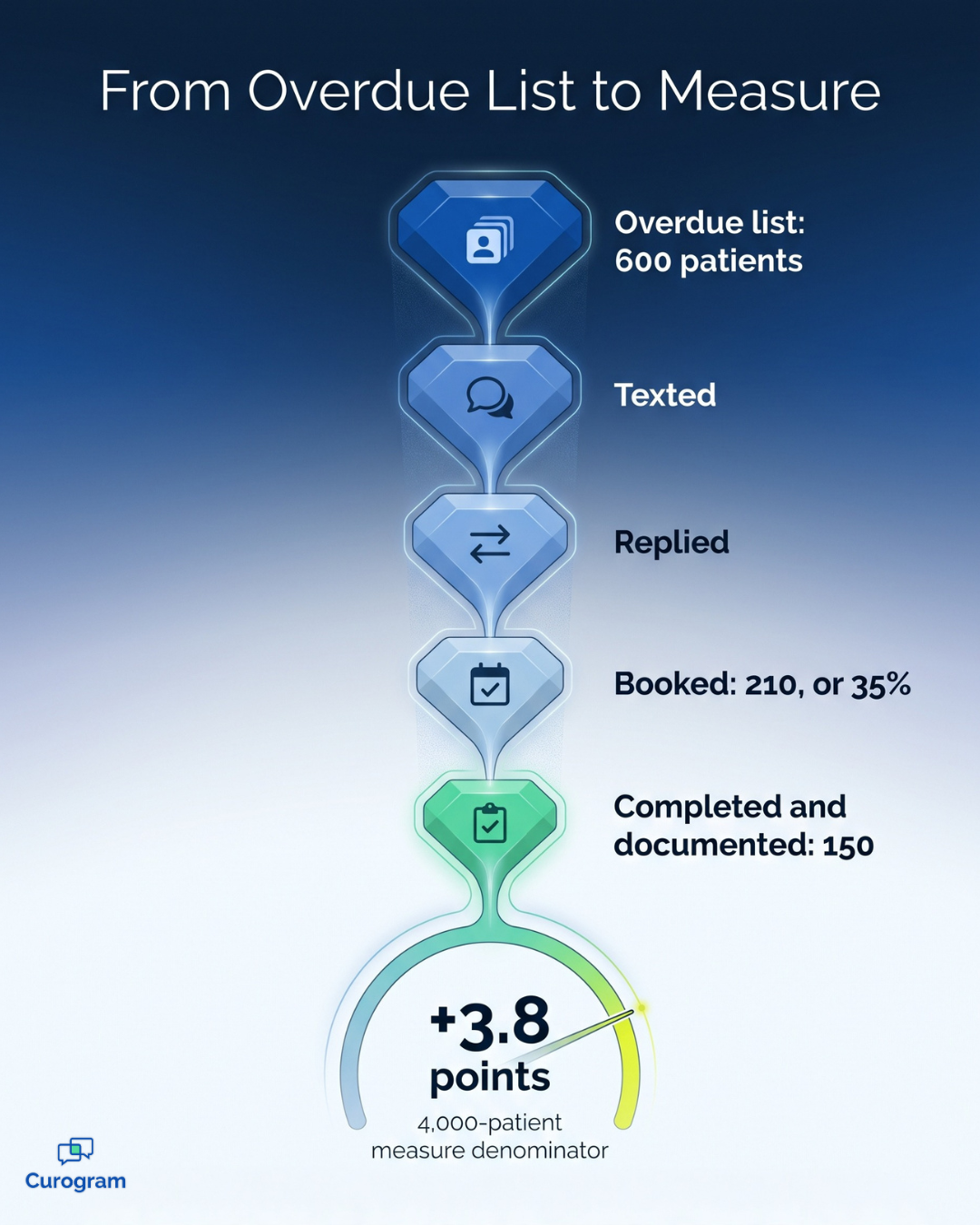
Now apply that rate to a single measure, as an illustrative example rather than a forecast. Say you have 600 patients overdue for colorectal screening and a measure denominator of 4,000.
At 35%, about 210 would book;
If 150 complete the screening, your measure rate rises by roughly 3.8 points (150 ÷ 4,000).
Pick One Measure and Start This Quarter
You don't need a bigger outreach program to move a UDS measure. You need a smaller, more focused one, built around one measure, one overdue group, and one clear request.
That focus benefits everyone involved. Your quality lead gets a list short enough to manage. Patients receive a message that feels relevant to their own care instead of generic. And your leadership team gets a result they can see in the measure itself, not just in a report on texts sent.
Timing matters just as much, because every visit that counts toward this reporting year has to happen and be documented before December 31. The sooner your first wave goes out, the more room patients have to book, show up, and complete the care they're due for.
UDS+ provides another reason to start immediately. With de-identified, patient-level data flowing to HRSA alongside the aggregate tables, each missed follow-up becomes considerably easier to spot. Recall won't change how a measure is defined, but it can change how many of your patients meet it.
Curogram works with Azalea Health EHR to make this approach practical for busy health centers. Your team builds the overdue list, Curogram sends the recall texts, and staff handle replies through two-way conversations. Booked appointments can flow back to Azalea Health, depending on your integration setup.
After patients book, SMS-delivered intake forms can help shorten check-in, while mass text messaging for patient alerts covers broader panel updates.
The best starting point is the measure that hurt most in your last submission, so choose it, pull the gap, and send the first wave. Then monitor the measure itself, not the message count.
Pick one measure. We will build the recall segment with you. Schedule a consultation with the Curogram team, and bring your latest UDS report to the conversation.
Frequently Asked Questions