


12 min read
Curogram vs. Your EHR's Built-In Analytics: What's Actually Different?
Jo Galvez
:
May 24, 2026
Curogram Insight Suite adds an operational analytics layer on top of your EHR. It pulls data from reminders, patient replies, and your EHR into one view. You get real-time fill rates, no-show heatmaps, reminder timing reports, and specialty benchmarks.
This guide offers a Curogram vs EHR analytics comparison medical practice teams can act on. It walks through seven dimensions where the two diverge. It also shows when EHR analytics are enough and when they hit a ceiling. By the end, you'll know which tool answers which question.
"My EHR already has analytics." That single sentence has stalled more upgrades than any pricing objection in the cycle.
It sounds reasonable on the surface. Your EHR sends reports, and reports are a form of analytics. Case closed.
Except it isn't. Most EHR reports were designed for billers and auditors, not operations leaders. They tell you what happened, in dollars and clinical codes. They struggle to explain why your Tuesday afternoon slots keep going empty.
This is the core of why EHR analytics are not enough for many growing practices. The data scope simply stops at the EHR's edges.
Reminder send times, patient replies, and staff response speed all live in other systems. Without a way to link them, you get a financial photo, not an operational dashboard.
That gap is the point of this guide. We're doing a clear Curogram vs EHR analytics comparison medical practice leaders can use without a vendor pitch.
No hype, no buzzwords. Just what each tool does well, and where each one runs out of road.
You'll see a side-by-side look across seven dimensions. We'll cover real-time fill rates, no-show heatmaps, reminder timing, cross-system data, automated EHR updates, no-code reports, and specialty benchmarks.
We'll also flag cases where your EHR's built-in reports really are the right tool for the job. Sometimes they are, and that's worth knowing.
By the end, you'll know which questions belong in the EHR and which belong in an operational platform. You'll also know what to look for if your practice is sitting at the edge of "good enough."
Because the cost of using the wrong tool isn't just bad reports on a screen. It's missed revenue, tired staff, and big decisions made on instinct alone.
The Objection Every EHR Vendor Invites
Almost every demo starts the same way. A practice manager hears about Curogram Insight Suite and says, "But my EHR already has analytics."
It's the single most common objection in the sales cycle. It's also the most expensive misunderstanding in healthcare IT today.
Why This Objection Sounds Reasonable
The objection has a tidy logic to it. Your EHR vendor uses the word "analytics" all over its sales decks and demo flows. You see reports, charts, and a tab clearly labeled "Reporting."
If the EHR has analytics, why pay for another tool to do what you've already bought?
The answer hides inside that single word. "Analytics" means very different things to different people in your building.
To a biller, it means revenue cycle reports and aging reports. To an operations lead, it means fast insights that drive next-day decisions.
When your EHR vendor says "robust analytics," they usually mean robust reports for billing and compliance teams.
When you hear "analytics," you may be picturing live dashboards, trend lines, and what-if views. Same word. Different products entirely.
Where It Actually Breaks Down
The trouble starts when you try to use EHR reports for operational decisions they were never built for. You can pull last month's no-show rate with a few clicks.
You can't see which time slots concentrate those no-shows. You can confirm the rate, but not the cause behind it.
Same Word, Different Purpose
EHR analytics and operational analytics share a name and almost nothing else of substance. They were built for separate jobs, by different teams, at different times.
They sit on separate data sets that rarely overlap. They answer separate questions for separate readers in your practice.
Think of it like a thermostat and a weather forecast. Both deal with temperature in some way. Only one helps you plan tomorrow's run. That gap, small as it sounds, decides whether your no-show patterns ever get fixed.
A Costly Assumption
When teams assume the two are the same, they spend years working around gaps in the EHR. Schedulers guess at reminder timing windows.
Front desk staff manually transcribes text confirmations. Leadership runs blind on no-show patterns by day, provider, and time slot.
This is a classic EHR analytics vs practice analytics software question, and it gets answered every day by accident in clinics across the country. Most teams don't realize they made a choice.
They just kept using what was already paid for and budgeted. That's how operational performance plateaus while billing reports stay green.
Curogram doesn't replace your EHR. It sits next to it and fills the operational gap that's been there from day one. Your EHR continues to be the source of truth for billing and clinical records. Insight Suite becomes the source of truth for daily performance.
What EHR Analytics Are Designed to Do — and Where They Stop
EHRs are excellent at one job. They track and report on the clinical and financial life of every appointment that flows through your schedule.
That's what they were built for, and they do it well. The gap shows up only when you ask them to do something else entirely.
What EHRs Do Well
Your EHR knows what was scheduled, what was completed, what was billed, and what was paid. It tracks documentation rates by provider with detail.
It rolls up production by day, week, month, and year. For payer audits, quality reporting, and month-end close, it's the right tool, every time.
If a payer wants proof that 95% of your visits included a required note, your EHR has it ready. If your leadership needs a clean view of monthly revenue by service line, the EHR delivers without much fuss. These are core reports, and they run reliably across every modern platform.
That's also where the design effectively stops. EHR reports tell you what already happened in clear detail.
They're great for tracking the past month or quarter. They're not designed to suggest what to do next on Monday morning.
Where The Data Scope Ends
The structural limit is data scope, plain and simple. The EHR can only report on what lives inside the EHR itself. That's appointments, charts, claims, and bills. Everything else is essentially invisible to it, no matter how much you wish otherwise.
Missing Reminder Data
Your reminder platform, whether built into the EHR or bolted on later, sends messages all day. But the EHR rarely captures when those messages went out or which send times got the strongest replies. So you can pull a no-show rate, but you can't link it to reminder timing at all.
This is exactly why teams researching a Curogram vs Practice Fusion analytics fit, or a Curogram vs Athenahealth reporting upgrade, run into the same wall.
The EHR doesn't see the reminder layer. The reminder system doesn't see the EHR. The two never really talk to each other inside a single report.
Missing Response And Staff Data
The EHR also doesn't track how long staff took to reply to a patient text. It doesn't know which patients were confirmed by phone, text, or email.
It doesn't know what time of day your team is most responsive. These signals drive operational performance, and they live outside the EHR by design.
The result is predictable for any practice trying to push beyond billing. A clinic can use EHR reports to learn it had an 18% no-show rate last month.
It can't use them to learn that Friday afternoons run 22 points higher. It can't use them to find which reminder window confirmed the most appointments.
EHR analytics are useful for backward financial reporting. They're not useful for forward operational tuning. That's the line.
Recognize the line, and you stop fighting your EHR for answers it was never built to give your team.
The 7-Dimension Capability Comparison
Once you see EHR analytics and operational analytics as different categories, the next step is a clean comparison.
Seven dimensions reveal where each tool fits and where each falls short. This is the heart of any honest medical practice analytics platform comparison worth doing.
Real-Time And Visual Gaps
Real-time visibility is the first gap, and it shows up fast. EHRs can show appointment counts by day, but it's a static, after-the-fact view.
Curogram updates fill rate live on a daily dashboard. If a slot pattern slides, leadership can see it the same day, not three weeks later.
No-show heatmaps are the second gap. EHRs spit out one number, like 18%, and call it done. Curogram shows that 18% as a grid across days and hours. Suddenly, Friday PM lights up red, and a fix actually has somewhere to start.
Reminder timing correlation is the third dimension to weigh. Curogram analytics show confirmation rate by reminder send window in clear detail.
A 48-hour reminder might confirm 78%, while a 24-hour reminder confirms 45%. EHRs have no visibility into reminder send times because that system sits outside their core architecture.
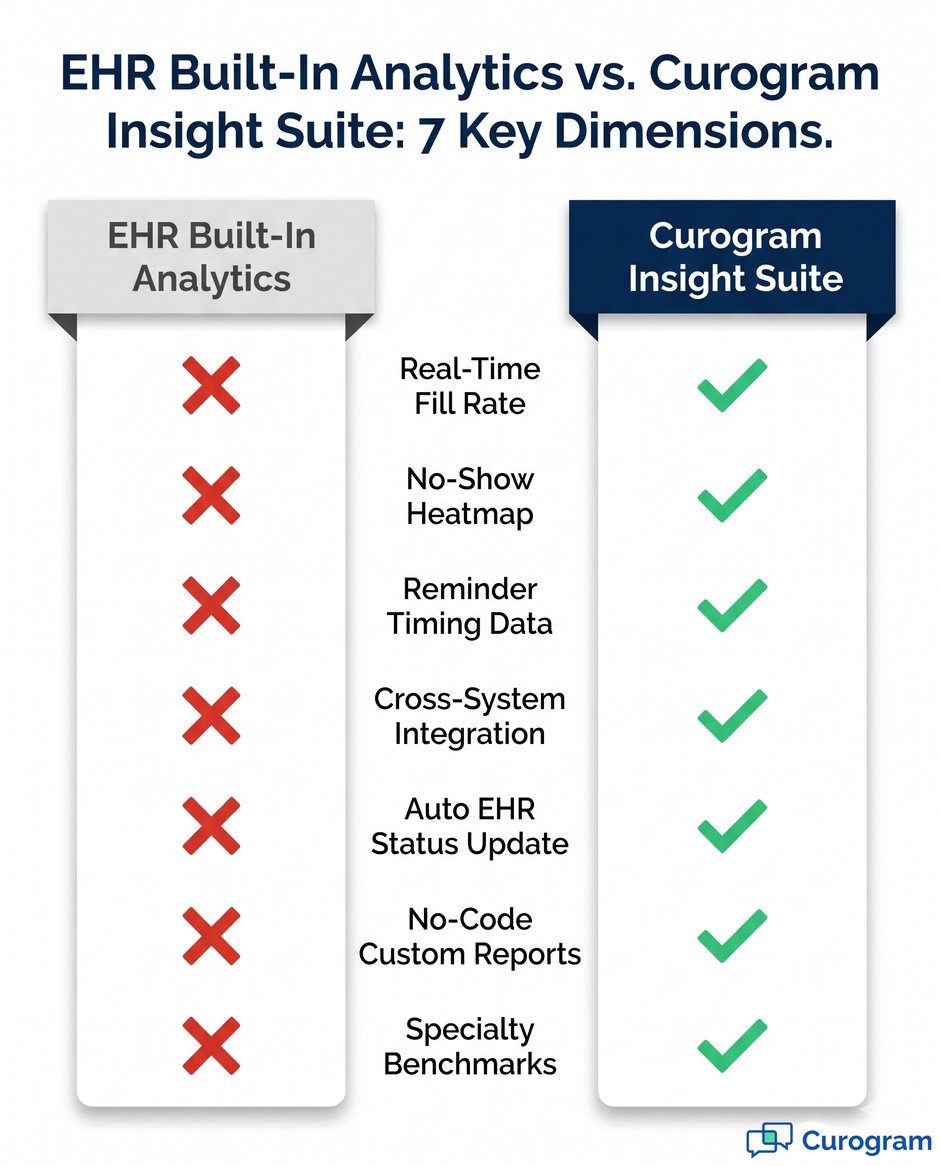
Side-By-Side: 7 Dimensions At A Glance
|
Dimension |
EHR Built-In Analytics |
Curogram Insight Suite |
|
Real-time fill rate |
Static historical view |
Live daily dashboard |
|
No-show heatmap |
Aggregate % only |
Day-by-hour grid |
|
Reminder timing data |
Not captured |
Confirmation by send window |
|
Cross-system data |
Single source |
EHR + reminders + replies |
|
Auto EHR status update |
Manual transcribing |
Auto status sync |
|
Custom reports |
IT-supported, slow |
Drag-and-drop, no IT |
|
Specialty benchmarks |
Not available |
Built-in comparisons |
Integration, Automation, And Benchmarks
The next four dimensions cluster around connections between systems. Curogram pulls data from the EHR, the reminder system, and the patient engagement layer into one view.
EHRs are single-source by design, so this kind of cross-system view sits well out of scope for them.
Automation is dimension five, and it punches above its weight. EHR reminders are one-way: they send a text and then wait.
Curogram captures the reply, updates the appointment status in the EHR, and saves staff the manual entry work. That saved time compounds quickly across a high-volume schedule.
Custom Reporting Without IT
Custom reports are dimension six on the list. In most EHRs, a new report means an IT ticket and a two-to-four-week wait. Curogram includes a Metabase-powered drag-and-drop builder for everyday users.
Based on Curogram client data from clinical settings, one practice COO built a referral report in under 10 minutes without help from IT.
Specialty Benchmark Visibility
Specialty benchmarks are the seventh dimension, and many teams overlook them. EHRs don't compare your performance to peers in your specialty.
Curogram does, in plain numbers. So when your no-show rate hits 12%, you know if that's strong, average, or trailing the field for your practice type.
Across these seven dimensions, the pattern is clear and consistent. EHR analytics are full-strength on billing, partial on schedule basics, and absent on the rest.
Curogram fills the operational side without overlap. You don't really pick one over the other. You let each do its actual job.
The 19-Page Problem and the No-Code Solution
Most EHRs make a clinic manage around 19 pages of paper forms for a new patient intake. Demographics, history, insurance, HIPAA consents, clinical questionnaires, and more.
Much of it could be captured digitally on a phone. Much of it isn't, because the EHR and the patient engagement layer never quite learned to talk.
The Paper Trail That Won't Quit
The 19 pages aren't a documentation choice. They're a system choice in disguise. The EHR is great at clinical notes and billing, but weak at front-end data capture from patients. The reminder platform sends texts, but doesn't feed structured data back into the chart.
So the work falls on the staff. Patients print forms at home or fill them out on paper at check-in. The front desk transcribes the data into the EHR by hand, page after page.
Errors creep in, time gets lost, and patient feedback never updates contact preferences in the system.
Each transcription seems small on its own. Multiplied across 50 daily intakes, it's hours of staff time per week, every week.
That's hours not spent on phones, payments, recalls, or patient questions. The cost shows up in payroll and in patient experience scores.
This friction is one of many reasons a serious EHR analytics vs practice analytics software conversation has to include workflow, not just reports.
A tool that only shows reports doesn't help with the transcribing problem. A tool that also captures patient input and pushes it into the EHR does, in real time.
A 10-Minute Report Build
Curogram approaches both sides of the problem at once. Patients fill forms on their phones before the visit, and the data flows straight in.
Then the analytics layer turns that workflow data into reports leaders can actually use to make decisions.
The headline feature is no-code custom reporting. A practice COO at a large multi-specialty group needed a referral conversion report.
The EHR couldn't make it without an IT ticket and a multi-week wait. Curogram's drag-and-drop builder let the COO finish it in under 10 minutes, per Curogram client data from clinical settings.
From IT Request To Drag-And-Drop
The shift from "wait for IT" to "build it yourself" changes who gets answers in the building.
A scheduler can build a no-show report by day-of-week in minutes. A billing lead can build a payer mix view by service line on the fly. Each report runs daily without engineering help.
Why This Matters Daily
When a custom report takes minutes instead of weeks, you build more of them. You ask sharper questions, more often.
You stop guessing on staffing for Monday morning rushes. You catch a referral conversion dip in week two instead of quarter two.
The 19-page problem and the IT-ticket problem are the same problem in two costumes. Both happen because tools were never asked to work together as one system. Pair them, and the daily grind softens fast for staff and leadership alike.
When EHR Analytics Are Enough — and When They Aren't
Not every practice needs operational analytics on day one. Some teams really do get what they need from the EHR alone, at least for now.
Others outgrow it within months of opening more locations. Knowing which group you're in saves time and money down the road.
Where The EHR Truly Delivers
For pure compliance work, the EHR is the right home base, full stop. Payer audits, quality measure reporting, attestation packages: these all live in the EHR by design. You don't want them anywhere else, and you shouldn't try to move them.
Month-end production tracking, collection rate by payer, and write-off trends are EHR jobs too. The data is already there in clean tables. The reports already exist, or take a few clicks to build from a template.
Documentation completion rates, signed encounter ratios, and chart lock turnaround belong in the same bucket. The EHR sees all of this clearly.
It tracks who signed what and when, down to the minute. For a quality team, that visibility is genuinely hard to replicate anywhere else.
Where You'll Hit A Wall
The wall shows up the moment your questions turn forward-looking instead of backward-looking.
Why are no-shows clustering on certain days? What reminder timing produces the highest replies for our patient base? How does our specialty stack up against benchmarks across the country?
Based on Curogram client data from clinical settings, one primary care group brought its no-show rate from 14.20% to 4.91% in three months once it added operational analytics on top of the EHR.
The EHR didn't get worse. It just stopped being the answer for those questions. The team needed reminder timing data, heatmaps, and confirmation tracking to act.
Operational Questions Left Unanswered
The list of unanswered questions piles up quickly inside a busy practice.
Which patients sit in the highest-risk no-show segment for next month?
When is our staff slowest to reply to patient texts?
Are we understaffed on Mondays compared to Thursdays?
These questions shape revenue and culture, and the EHR has nothing to say about them.
This is the heart of the EHR analytics vs practice analytics software call. The EHR keeps the books and the chart.
The operational platform keeps the rhythm of daily work. Both are needed once a practice cares about both at the same time.
The Decision Point
If your goals are billing accuracy and compliance reporting, you may already be set with what you have. If your goals include no-show reduction, smarter staffing, or faster patient response times, EHR reports will fall short. That's the line, plain and clear.
Most teams sit on the second side without realizing it. Curogram client data from clinical settings shows over 75% appointment confirmation rates and no-show rates 53% lower than industry averages for clients on Curogram.
Those numbers don't come from better discipline alone. They come from data that the EHR was never designed to produce or surface in real time.

Conclusion
The "my EHR already has analytics" objection isn't wrong. It's incomplete.
Your EHR does have analytics, and those reports do real work for your billing, compliance, and clinical teams every month. They just weren't built to answer operational questions like why no-shows cluster on Friday afternoons.
That's the whole shape of this Curogram vs EHR analytics comparison medical practice leaders need. Two tools, two jobs, side by side.
Your EHR keeps the financial and clinical records clean. Curogram Insight Suite handles real-time fill rates, heatmaps, reminder timing, and the daily decisions that drive performance.
The numbers back it up clearly. Curogram client data from clinical settings shows no-show rates 53% lower than industry averages and over 75% appointment confirmation rates across the client base.
One primary care client moved from 14.20% no-shows to 4.91% in three months on the platform. Another clinic logs more than 1,100 automated confirmations per month with no manual follow-up from staff.
When teams treat this as a medical practice analytics platform comparison, the math gets simple to walk through. Either you let the EHR do the work it's good at and add a layer for the rest, or you keep asking the EHR for answers it can't give.
The second path costs more over time, just in places that don't show up on a monthly invoice.
If you've been weighing a Curogram vs Practice Fusion analytics review or a Curogram vs Athenahealth reporting upgrade, the question isn't which tool wins.
It's whether your practice has outgrown what reports alone can deliver. Most have, even if leadership hasn't said it out loud yet.
Want to see how it works on your data? Book a free practice data walkthrough and see your EHR and Curogram Insight Suite side by side.
Frequently Asked Questions
Your EHR's analytics focus on billing, compliance, and clinical records. Curogram Insight Suite focuses on operational performance, like fill rates, no-show patterns, and reminder timing. The two don't compete; they cover different jobs. Most clients keep their EHR and add Curogram on top.
EHR reminders are one-way: they send messages but don't capture replies in usable detail. Curogram logs every reply, links it to the appointment, and updates the EHR automatically.
It also tracks which send times got the highest reply rates. That's how clients hit over 75% confirmation rates, based on Curogram client data from clinical settings.
Confirmation rate data becomes useful within the first 1 to 2 weeks. Heatmap patterns settle around the 30 to 45 day mark for practices with 40 or more appointments daily. Provider-level and specialty-specific trends keep sharpening past day 60. By day 90, you have enough signal to start targeted no-show fixes.
It can, and it should. Curogram doesn't try to replace billing and compliance reporting; the EHR remains the source of truth for those. Curogram sits next to your EHR and adds the operational view that your reports can't produce. Each tool keeps doing what it does best.
Custom reports in most EHRs need an IT ticket and a 2 to 4 week wait. Curogram's drag-and-drop builder lets non-technical staff build the same kind of report in minutes.
Based on Curogram client data from clinical settings, one practice COO built a referral report in under 10 minutes. That speed turns ad-hoc questions into daily habits.