10 min read

TigerConnect Alternatives for Small and Mid-Size Practices (2026)

TigerConnect Alternatives for Small and Mid-Size Practices (2026)
 💡 TigerConnect is clinical communication software built for hospitals. It handles staff-to-staff messaging, on-call routing, and alarm escalation across large care teams.

Most groups searching for TigerConnect alternatives for medical practices want something different: texting that reaches patients. The strongest options in 2026 are Curogram, Klara, Spruce, OhMD, and Weave.

Your best pick depends on the gap you are filling. Curogram fits practices that want HIPAA-compliant two-way patient texting layered onto the EMR they already use, with reminders, forms, and payments in one shared inbox.

The demo looked sharp. Role-based messaging. On-call schedules. Alarm routing across units, floors, and transfer teams.

Then someone from your side asked the only question that mattered: can it text our patients about tomorrow's schedule?

The pause after that question is why you are reading this. It is the exact moment a perfectly good tool meets the wrong job.

TigerConnect is good software. More than 7,000 acute, post-acute, and ambulatory facilities use it, and it holds HITRUST certification for security and privacy. It solves a real problem — getting the right clinician on the right message fast, inside a hospital.

But that is not the problem sitting on your front desk right now. Not even close.

Your problem is the voicemail queue. The 40 unconfirmed visits for tomorrow. The intake forms nobody filled out. The patient who no-showed and never got a follow-up call because your scheduler was on hold with an insurance line.

Hospital-grade coordination tools were never designed for that. They were designed for staff talking to staff. You need your practice talking to patients.

That gap costs real money. One study in BMC Health Services Research found an average no-show rate of 19%, with each missed appointment costing about $196. Two missed slots a day works out to roughly $2,000 a week. Across a year, that is close to $100,000 walking out the door.

Here is the good news. The market has plenty of platforms built for exactly your size and shape.

Some do texting. Some bundle a phone system. Some plug into the EMR you already run.

This guide walks through five of them, what each one is genuinely good at, what they cost, and how to tell which one matches the job in front of you.

No takedowns. Just an honest read on fit.

Why Hospital-Grade Software Feels Oversized in a 12-Room Clinic

There is nothing wrong with TigerConnect. The mismatch is about category, not quality.

Hospitals buy clinical communication tools to solve coordination at scale. A nurse needs the on-call cardiologist at 3 a.m. A bed manager needs transport, a bed, and a receiving team lined up in one thread. Alarms need to escalate when nobody answers.

Those are serious problems. They are also problems a 12-room clinic does not have.

Your version of urgent looks different. It is a patient who wants to move a Thursday visit to Friday. It is a mom asking whether her son needs to fast before labs. It is a balance that has aged 60 days because nobody sent a payment link.

Those are patient conversations, not staff conversations.

This is exactly why interest in TigerConnect for small practices tends to fade once buyers get past the feature list and into the workflow. The tool is aimed at a different user on the other end of the message. Hospital staff will download an app because IT tells them to. Your patients will not.

That single difference — app versus no app — quietly decides whether a platform works for you.

Staff Messaging and Patient Texting Solve Two Different Problems

This is the distinction most buyers miss, and it is worth slowing down for. Clinical messaging vs patient texting is not a feature comparison. They are two separate product categories that happen to share the word "messaging."

Here is how they differ in practice:

  Clinical messaging Patient texting
Who is on the other end Nurses, physicians, on-call teams Patients on personal cell phones
App required Yes, on both sides No, plain SMS works
Core jobs On-call routing, escalation, transfers, alarms Reminders, confirmations, forms, payments, recalls
What "success" looks like Faster clinician response times Fewer no-shows, fewer inbound calls
Who signs the contract Hospital IT or the CMIO Practice administrator or owner
How it is priced Per licensed user Per location or per provider

Read that middle row again. It carries most of the weight.

Patients open text messages at a rate near 98%. They do not download apps, remember portal passwords, or check a secure inbox they set up once in 2022. Any platform that requires a download before a patient can confirm a Tuesday appointment has already lost most of your panel.

For your team, that means the winning tool is the one with the lowest bar to reply.

A text that says "Reply C to confirm" beats a beautifully designed app nobody installs.

Four Questions to Ask Before You Sign Anything

Feature lists all start to look the same by the third demo. These four questions cut through faster:

  1. Can patients reply without downloading anything? If the answer involves an app or a portal login, expect low response rates no matter how good the software looks.
  2. Does it talk to the EMR you already run? A platform that reads your schedule and writes confirmations back saves hours a week. One that does not just adds a second system to check.
  3. Who does the work — your staff or the software? Sending reminders manually is not automation. Ask what happens with zero human clicks.
  4. What does year one actually cost, all in? Setup fees, per-user charges, taxes, and add-ons routinely add 20% to 40% on top of the quoted monthly rate.

Write down your answers before the next demo. It turns a sales conversation into a scoring exercise, and it keeps you from buying capability you will never staff.

Five TigerConnect Competitors Worth Shortlisting in 2026

Most roundups of TigerConnect alternatives for medical practices rank tools by feature count. That is the wrong axis. Each of these solves a real problem well, and the trick is matching the tool to your gap.

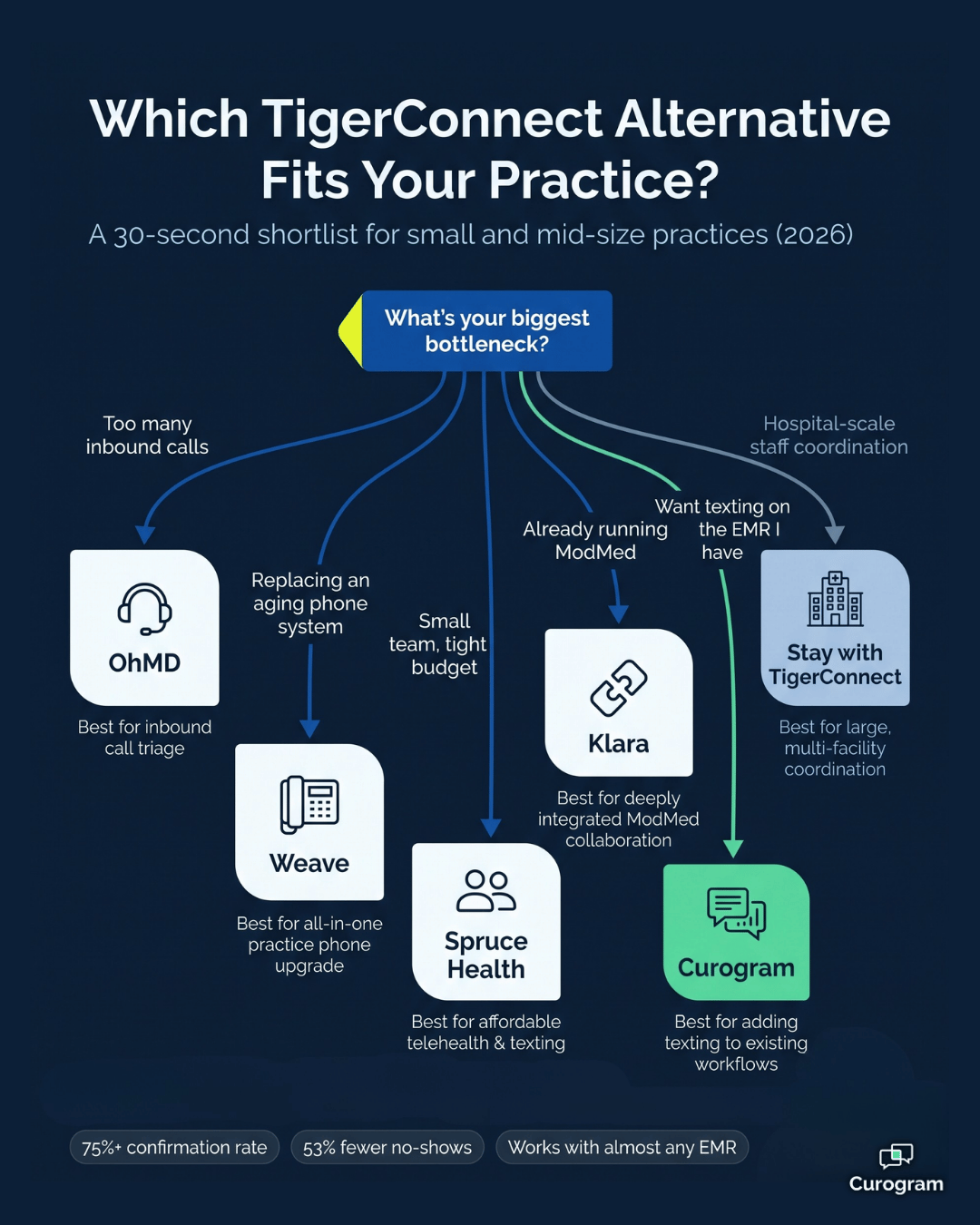
Decision tree infographic matching TigerConnect alternatives to medical practice needs

Curogram

Best for:

Practices that want patient-facing texting layered onto the EMR they already use.

Curogram is a HIPAA-compliant two-way patient texting platform that integrates with almost any EMR. It is built as a complement to your clinical system, never a replacement, so you are not migrating charts to fix a front desk problem.

The platform is SOC 2 Type II certified alongside HIPAA compliance.

The feature set covers the daily grind: two-way texting, mass texting, customizable smart reminders, electronic patient forms, online booking, multi-user telehealth, and automated review requests.

The results are where it gets concrete. Curogram clients average a confirmation rate above 75%, and no-show rates run 53% lower than the industry average.

Atlas Medical Center cut no-shows from 14.20% to 4.91% in three months. Covina Arthritic Clinic went from 369 confirmations a month to more than 1,300. One multi-location practice collected 1,064 new five-star reviews in a single quarter.

For your team, that is the difference between chasing confirmations and reading them.

Klara

Best for:

Specialty practices already inside the ModMed ecosystem.

Klara centralizes text, web chat, call-to-text, and voicemail transcription into one thread, with shared inboxes and AI-assisted routing for the care team. It integrates with 50-plus EHR and practice management systems.

ModMed acquired Klara in 2022, and ModMed's own patient engagement module now runs on it. If you are already a ModMed shop, that tight coupling is an advantage. If you are not, you are buying a communication layer from an EHR vendor you do not otherwise use.

Pricing is not published. Expect a custom quote scoped to your specialty and provider count.

Spruce Health

Best for:

Solo providers and small teams who want phone and text living in one app.

Spruce puts calls, voicemail, texts, secure messages, fax, and video in a single inbox.

The Basic plan runs $24 per user per month and covers app-based messaging, two-way SMS, team chat, and video visits. The Communicator plan at $49 per user per month adds VoIP desk phones, bulk messaging, payments, and API access.

The trade-off is structural. Per-user pricing is friendly at three users and much less friendly at eighteen. Spruce also passes federal, state, and local taxes and surcharges through to you, so the number on the pricing page is not the number on the invoice.

OhMD

Best for:

Practices where the phone is the bottleneck.

OhMD is built around call deflection — turning inbound phone volume into text threads your staff can work through a shared inbox. It includes two-way SMS, a text-enabled landline, web chat, video visits, voicemail transcription, and broadcast messaging, plus an AI voice assistant that answers calls.

Its Communicate plan starts around $300 per month, priced by practice rather than by seat. That flat structure works in your favor if you have a large support staff and a small provider count.

Weave

Best for:

Single-location practices replacing an aging phone system at the same time.

Weave bundles VoIP, two-way texting, appointment reminders, review requests, and patient payments into one subscription. Entry pricing starts near $249 per month per location, though practices commonly report all-in costs in the $300 to $700 range once add-ons and setup fees land.

Two things to weigh. Weave's user base skews heavily toward dental and small-business practices, and the phone system is the foundation — which is great value if you need one, and money spent twice if you just renewed a VoIP contract.

How the Five Options Stack Up Side by Side

Platform Best for Patients reply without an app Pricing model Main trade-off
Curogram EMR-connected patient texting Yes Quote-based Complements your EMR rather than replacing it
Klara ModMed specialty practices Yes Quote-based Strongest fit inside the ModMed ecosystem
Spruce Health Solo and small teams Yes $24–$49 per user, monthly Cost climbs fast as headcount grows
OhMD High inbound call volume Yes From ~$300 per month Lighter on scheduling automation
Weave Practices replacing phones too Yes From ~$249 per location Phone-first bundle, dental-heavy user base
TigerConnect Hospitals and large systems App-based, staff-first Per licensed user Built for staff coordination, not front desk work

The pattern is hard to miss. Every option in that table beats TigerConnect on patient reach, because every one of them was designed for it.

Clinical pager and radio beside a smartphone and appointment cards on a light surface

What a Five-Provider Group Actually Pays

If you are hunting for a TigerConnect pricing alternative, the real question is not the monthly rate. It is how that rate scales with your team.

Run the same five-provider group through both models. Say you have 5 providers and 9 support staff — 14 people who need access.

  • Per-user model at $24 a seat: about $336 a month, or $4,032 a year
  • Per-user model at $49 a seat: about $686 a month, or $8,232 a year
  • Per-location model at $300 to $500: about $3,600 to $6,000 a year, no matter how many staff log in

In practice, per-user pricing rewards small teams and punishes growth. Add three medical assistants and a biller, and the per-seat option jumps roughly $1,150 a year at the Basic tier. The per-location option does not move at all.

Now put that against what the tool recovers. Say your group schedules 1,200 appointments a month with a 12% no-show rate. That is 144 empty slots. At $196 each, you are losing about $28,000 a month.

Cut no-shows by 53%, the average across Curogram clients, and roughly 76 of those slots come back. That is about $14,900 a month, or near $178,000 a year, against a software cost in the low thousands.

Even if your practice recovers a quarter of that, the math still clears the subscription several times over. This is why fit matters more than sticker price — an inexpensive tool your patients ignore returns nothing.

Switching Without Blowing Up Your Front Desk

Most rollouts fail on change management, not technology. A few habits keep it clean:

  1. Pull your baseline first. Record your current no-show rate, confirmation rate, and daily call volume before go-live, or you will never prove the win.
  2. Launch one workflow, not nine. Appointment reminders and confirmations first. Forms, payments, and recalls once the team has rhythm.
  3. Map your EMR fields early. Confirm which appointment types sync, and who owns the fix when one does not.
  4. Train on the inbox, not the feature list. Your staff needs to know where messages land and who answers them. Everything else can wait.
  5. Check in at 30, 60, and 90 days. Compare against your baseline and adjust send times before you judge the platform.

One more thing worth saying plainly. The goal is not to add a system. It is to remove phone calls from your day. If your staff is doing the same work in a nicer interface after 90 days, something in the setup needs fixing.

Match the Tool to the Job in Front of You

TigerConnect is not the wrong software. It is software built for a different building.

Hospitals need clinicians reaching clinicians in seconds, across departments and shifts, with alarms that escalate when nobody picks up. Your practice needs patients reaching you — and you reaching them — without a phone tree, an app download, or a portal password nobody remembers.

That is the whole distinction. Once you see it, the shortlist gets short fast.

If your gap is inbound call volume, look hard at OhMD. If you are replacing a phone system anyway, Weave earns a look. If you are a three-person team, Spruce is easy to start. If you live inside ModMed, Klara is the path of least friction.

And if what you want is a patient-facing texting platform physician groups can hand to a front desk team on day one — one that works alongside almost any EMR instead of asking you to replace it — that is the space Curogram was built for.

The results speak in numbers your administrator already tracks. Confirmation rates above 75%. No-show rates 53% below the industry average.

One clinic moving from 14.20% no-shows to 4.91% in three months. Another going from 369 monthly confirmations to more than 1,300.

None of that requires a migration, a new chart system, or a six-month implementation. It requires a texting layer that speaks to the EMR you already run, and patients who can reply with one tap. For most teams, that is a far smaller lift than expected.

Your front desk has spent enough years playing phone tag. Give them a tool that answers first.

See what two-way patient texting looks like inside your own workflow. Schedule a Demo and we will walk through your EMR, your appointment volume, and the numbers you would actually move.


Frequently Asked Questions

Does TigerConnect text patients?

Yes, but that is not its center of gravity. TigerConnect offers patient engagement features, including appointment and follow-up reminders and secure patient messaging. The platform's core design and pricing, however, revolve around staff-to-staff clinical collaboration — on-call scheduling, role-based routing, and alarm management. If patient outreach is your main need, tools built patient-first will usually fit your workflow and budget better.

How much does TigerConnect cost?

TigerConnect does not publish pricing. Third-party estimates put it in the range of $15 to $20 per user per month, with final cost depending on user count and which modules you buy. The vendor works through demos and custom quotes rather than self-serve signup. Because it is priced per licensed user, cost scales with headcount, which is one reason the model suits hospitals more comfortably than small practices.

What fits a five-provider group best?

Look for per-location or per-practice pricing rather than per-seat, since a five-provider group usually carries 10 to 15 total staff logins. Prioritize plain SMS that works without an app, automated reminders and confirmations, and a live connection to your existing EMR. Curogram, OhMD, and Weave all price in ways that stay predictable as your support staff grows.

Is patient texting actually HIPAA compliant?

It can be, with the right setup. A compliant platform signs a business associate agreement, encrypts protected health information, controls access by user, and keeps an audit trail. Curogram is HIPAA compliant and SOC 2 Type II certified. Standard consumer texting apps are not compliant, which is why practices need a healthcare-specific platform rather than a staff cell phone.

Do we have to replace our EMR to add patient texting?

No. The strongest patient communication platforms are built as a layer on top of your clinical system, not a substitute for it. Curogram integrates with almost any EMR, pulling your schedule and writing confirmations back without changing where your charts live. That matters because an EMR migration is a months-long project, while a texting layer typically goes live in weeks.

Spruce Health Alternatives for Medical Practices (2026)

Spruce Health Alternatives for Medical Practices (2026)

💡 The top Spruce Health alternatives in 2026 are Curogram, OhMD, Klara, Weave, and TigerConnect. Curogram connects with more than 20 EMR and...

Read More
Best Secure Texting Platforms for Small Clinics (2026)

Best Secure Texting Platforms for Small Clinics (2026)

💡 The best secure texting platforms for small clinics in 2026 are Curogram, OhMD, Spruce Health, Klara, Weave, Falkon SMS, TigerConnect, and...

Read More
Best Patient Texting Platforms for Large Practices

Best Patient Texting Platforms for Large Practices

💡 The best patient texting software for multi-location practices, ranked for central routing and fewer inbound calls, is Curogram, then Klara,...

Read More