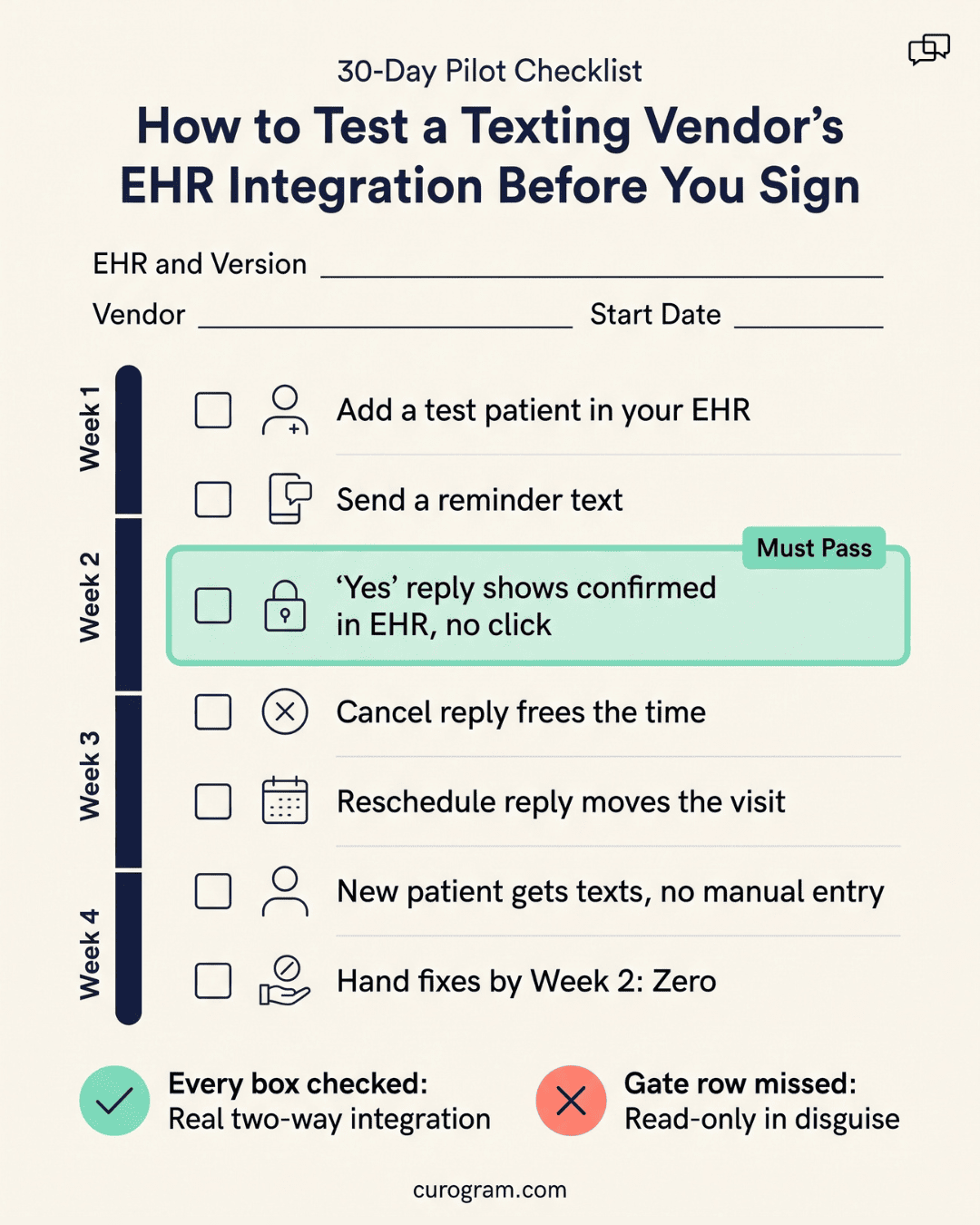
Integration comes in three grades: read-only, one-way write, and two-way write-back. Only two-way write-back turns a patient's "Yes" reply into a confirmed slot in the EHR with no one clicking.
Before you sign, ask who builds the interface, since a build by your EHR company usually adds a fee and extra weeks.
Cloud EHRs like athenahealth and DrChrono offer appointment APIs, while older server systems usually need an HL7 interface. Thirty days of live confirmations will prove or disprove any vendor's claim.
A patient texts "Yes" to confirm her Thursday 10:40 visit. If your texting tool only reads from the EHR, that reply sits in an inbox. Someone at the front desk has to open the schedule, find the slot, and mark it confirmed by hand. At 60 replies a day, an illustrative count for a three-provider office, that's an hour of clicks.
Miss one, and the MA calls a patient who already said yes.
That repeat call is the real test of HIPAA texting platforms with EHR integration. All of them can send a secure text.
What separates them is what happens to the reply. Our view: for a small practice, integration depth should decide the shortlist, and texting features should only break ties.
A wrong pick tends to surface in month two. The contract is signed and reminders are going out.
Then the vendor says write-back for your system needs a custom interface and a quote from your EHR company. Meanwhile, your team keeps copying replies into the schedule by hand.
Secure patient communication is the baseline we expect from every vendor on this list. Next, you'll see how "integration" gets used on sales pages and how we scored it. The ranked results follow, along with the exact questions to email a vendor before you sign.
What Integration Means on a Vendor's Website
Nearly every vendor page says "integrates with your EHR." That phrase can mean a nightly file drop or a live link that updates your schedule in seconds.
EHR integration is the link that lets a texting platform read from, and write to, your practice's records. How much it can write varies by vendor and by EHR.
Most healthcare texting solutions fall into one of three grades. Knowing which grade a vendor sells tells you how much manual work stays with your staff.
Read-Only, One-Way Write, Two-Way Write-Back
These three grades describe how far data can travel between the texting tool and your EHR. Each has one behavior you can check in a demo.
Read-Only
A read-only integration is a feed that pulls appointments out of the EHR so the texting tool knows whom to remind. It sends the reminder. When the patient replies, the answer stays in the texting inbox, and staff update the chart by hand.
One-Way Write
A one-way write integration is a link that pushes one kind of data into the EHR, usually a copy of the text thread. The note lands in the chart. The appointment status stays the same, so the schedule still shows the visit as unconfirmed.
Two-Way Write-Back
Two-way write-back is a live link that reads the schedule and writes patient actions back into it. A "Yes" reply flips the slot to Confirmed. Cancel replies open the slot, and reschedules move it, with no retyping.
The 4 Objects a Real Integration Syncs
A full integration keeps four things in sync: patient demographics, appointment slots, appointment status, and the message record. When one is missing, your staff fill the gap by hand.
|
Object |
What it carries |
What goes wrong when it's missing |
|
Patient demographics |
Name, mobile number, date of birth, language |
Reminders go to the old number the patient updated at check-in |
|
Appointment slots |
Provider, time, location, visit type |
The tool can't offer open times, so reschedules turn into phone calls |
|
Appointment status |
Confirmed, canceled, arrived, no-show |
The schedule says "unconfirmed" for patients who already replied |
|
Message record |
The text thread, saved to the chart |
No record to check when a patient disputes what they were told |
Status is the object vendors skip most often. It's also the one your front desk touches most, because every reply changes it.
How We Scored Integration Depth
We used three criteria, and we weighted the first one most because your front desk feels it every hour. Each vendor was checked against its own public documentation in October 2026.
|
Criterion |
Top mark |
Partial credit |
Low mark |
|
Sync scope and write-back |
All four objects synced; status written back in minutes |
Write-back on some EHRs only |
Read-only feed |
|
Who builds the interface |
Texting vendor builds and maintains it |
Middleware partner builds it |
Your EHR company must build it |
|
Renewal risk |
Vendor owns upgrades; no EHR fees |
Fees or rework possible |
Year-two fees likely |
Sync Scope and Write-Back
Sync scope is how many of the four objects a platform keeps current, and write-back is whether it can change them.
A top mark went to platforms that sync all four and write status back on their own, within minutes, on the EHR you already run. Read-only feeds scored lowest, even ones that refresh every few minutes. A fast read still leaves staff to make every status change.
We gave partial credit when write-back exists for only some systems. A vendor with write-back on 20 EHRs still scores low for you if yours isn't one of them. Your EHR name and version matter more than the size of a logo wall on the vendor's site.
We also checked that each vendor offers a business associate agreement and describes the safeguards in the HHS guidance on the HIPAA Security Rule.
That rule sets national standards for protecting electronic patient data through administrative, physical, and technical safeguards. Access controls and audit logs are the two we asked about by name.
Who Builds the Interface, and What It Costs
Three parties can build the link, and each one changes your wait and your bill.
|
Who builds it |
Your wait |
Cost you'll see |
Who you call when it breaks |
|
Texting vendor |
Shortest; the vendor controls the queue |
Usually inside the subscription |
The texting vendor |
|
Your EHR company |
Longest; set by the EHR company's project queue |
A build fee, often plus a recurring interface fee |
Two companies, who may blame each other |
|
Middleware partner |
In between |
A third contract |
Three companies |
A vendor-built link is the best case for a small office. When your EHR company has to build it, the work enters a queue you don't control. The quote also arrives on a separate invoice.
Run the numbers before you compare subscription prices. As an illustrative example with made-up round figures, a $1,500 build fee plus a $100 monthly interface fee adds $2,700 to year one.
A texting plan that's $50 a month cheaper saves $600 a year, so that fee wipes out the savings more than four times over. Our complete guide to HIPAA texting ROI shows how to fold that interface fee into your payback math before you compare prices.
What Breaks at Renewal
Integration problems often show up in year two. Three causes come up again and again.
-
EHR upgrades. A major version update on a server-based EHR can reset interface settings or require the HL7 feed to be retested. Ask who schedules that retest and who pays for it.
-
API changes. When an EHR retires an old API version, any texting tool built on it has to rebuild. Until the rebuild ships, write-back can stop while reminders keep going out, so replies pile up unseen. Ask the vendor what happened to its customers on your EHR during the last change.
-
Fees that start later. Read your EHR contract for any interface or connector fee. That cost never shows up on the texting vendor's quote, so it's easy to miss until the first renewal invoice.
6 Platforms, Ranked by Integration Depth
We ranked six platforms using the rubric above and each vendor's public documentation, reviewed in October 2026. Confirm current details with each vendor for your exact EHR and version.
|
Rank |
Platform |
Write-back to schedule |
Who builds the interface |
Typical setup |
|
1 |
Curogram |
Two-way: confirm, cancel, reschedule |
Curogram |
Days |
|
2 |
Solutionreach |
On supported PM and EHR systems only |
Solutionreach |
Confirm for your EHR |
|
3 |
Klara |
Tightest with ModMed's own EHR; ask for others |
Klara (owned by ModMed) |
Confirm for your EHR |
|
4 |
Updox |
Schedule sync; write-back not detailed in public docs |
Updox |
Confirm for your EHR |
|
5 |
Spruce |
Contacts and demographics; no appointment sync listed |
Spruce, or your team via its API |
Confirm for your EHR |
|
6 |
TigerConnect |
Patient list sync; supported EHRs not named in its product sheet |
TigerConnect with your IT team |
Confirm for your EHR |
Curogram at the Top of the Integration Axis
Curogram earns the top spot because it writes patient replies back to the schedule on its own, across a long list of EHRs. That list includes eClinicalWorks, athenahealth, AdvancedMD, Practice Fusion, Elation Health, and CureMD.
A single confirmation moves through five steps:
- Curogram reads tomorrow's appointments from the EHR, with provider, time, and mobile number.
- It sends the reminder at the time your office set.
- The patient replies "Yes," "Cancel," or asks to move the visit.
- Curogram writes the new status to that exact slot, and the thread is saved for the chart.
- A canceled slot shows as open, so staff can fill it from the waitlist.
Your staff see each change in the EHR schedule view they already use. Nobody has to keep a second screen open to check who replied.
Covina Arthritic Clinic used to chase confirmations with manual follow-up calls. Based on our internal data, the clinic now confirms more than 1,100 appointments a month. Each reply is processed in real time.
What 1,100 Confirmations a Month Means at a Smaller OfficeSpread across 22 working days, 1,100 confirmations comes to about 50 a day. Now run illustrative math for a read-only setup: if each reply takes 30 seconds to find and mark by hand, that's 25 minutes a day. Over a month, it's roughly 9 hours of one person's time. A one-provider office with 15 replies a day still loses about 8 minutes daily on the same task. Those minutes tend to land during check-in, when the phone is also ringing. |
Klara, Spruce, Solutionreach, Updox and TigerConnect
Solutionreach lists more than 400 PM and EHR integrations, the widest list in this group. Its own site says confirmed appointments write back "when supported by your system," so ask about yours by name.
Klara's tightest link is with ModMed's EHR, since ModMed owns the company. Practices on other EHRs should ask which fields write back and how fast.
Updox syncs patient and schedule data with many EHRs. In the public pages we reviewed, confirmation write-back isn't described in detail, which makes it the first thing to test in a demo.
For practices on DrChrono, athenahealth, or Elation, Spruce syncs patient contacts and demographics well. Its help center doesn't list appointment sync, so status updates likely stay manual.
TigerConnect is built for hospital care teams, and its patient engagement product syncs patient lists for outreach. A practice with one to five providers rarely needs that much enterprise setup.
Matching Integration Depth to Your EHR
Your EHR sets the ceiling on integration depth before any texting vendor shows up. A cloud system with an open API makes write-back cheap. An older server install can make the same feature slow and costly.
If You Run a Cloud EHR With an Open API
On a cloud EHR with appointment endpoints, a texting vendor can usually build write-back without your EHR company doing custom work. DrChrono and athenahealth are two clear examples.
DrChrono publishes a developer API with appointment endpoints, and its own sample code shows an outside app setting a visit's status to "Arrived." The same pattern lets a texting tool mark a slot Confirmed.
athenahealth's API supports booking, rescheduling, and canceling, and it can alert a vendor when an appointment changes.
Production access runs through the athenahealth Marketplace, where a vendor must pass a security review and sign a BAA. One practical step: search the Marketplace for the vendor's listing before your demo.
Kareo, now part of Tebra, and AdvancedMD are cloud systems too. When you compare HIPAA texting platforms with EHR integration on any cloud EHR, ask whether the link writes status or only reads the schedule.
If You Run a Server-Based or Older System
Server-based EHRs usually connect through HL7, a VPN, and an interface fee. Plan for weeks, and ask for a dated plan in writing.
The work tends to run in this order:
- Your IT person or MSP sets up a VPN between your server and the vendor.
- Your EHR company turns on HL7 scheduling messages, called SIU messages, and quotes the fee.
- The vendor maps your visit types and providers to its system.
- Both sides test on dummy patients before go-live.
Inbound status updates are the step many older systems limit. Some on-premise installs send schedule data out readily but restrict what comes back in. Ask your EHR company directly whether it accepts appointment status updates from an outside system.

Questions to Ask Before You Sign
A vague answer to a precise question is the clearest warning sign in any sales cycle. Put the questions in writing so the answers sit in your inbox when renewal comes around.
Five Questions That Expose a Shallow Integration
Copy these into an email to each vendor and fill in your EHR name and version. A vendor with real write-back can answer all five in one reply.
- "When a patient replies to confirm, which field in [our EHR and version] changes, and how many minutes does that take?"
- "Can you show write-back working live on a test patient in our own [EHR], during the demo?"
- "Who builds and maintains the interface, and will [EHR company] bill us anything for it now or at renewal?"
- "What happened to your [EHR] customers the last time that EHR changed its API or shipped a major update?"
- "Which of these write back on their own: confirmations, cancellations, reschedules, new patients, and the message thread?"
Watch how the answers come back. A list of logos in reply to question 1 tells you the vendor can't name the field.
What a Thirty-Day Pilot Should Prove
A thirty-day pilot should prove one thing: a confirmation sent, replied to, and shown as confirmed in the EHR without a human touching it. Everything else in your medical practice messaging setup can be tuned later.
|
Week |
What to test |
What a pass looks like |
|
1 |
20 reminders to staff and willing patients |
Every "Yes" shows as Confirmed in the EHR within minutes |
|
2 |
Cancel and reschedule replies |
Slots open or move with no staff click |
|
3 |
A new patient added in the EHR |
Patient gets reminders with no manual entry |
|
4 |
Full live volume |
Confirmed count in the EHR matches replies in the inbox |
Keep a simple tally each day: replies received, slots confirmed in the EHR, and slots someone fixed by hand. The third number should be zero by week two.
Based on our internal data, Curogram clients average a confirmation rate above 75%. That gives you a fair benchmark to hold any vendor to by week four.
Conclusion: Replies That Update Your Schedule on Their Own
Integration depth is the one gap your front desk can't cover with extra effort. Without write-back, staff pay for it on every reply, every day, for the life of the contract.
So buy for the schedule first. When you shortlist HIPAA texting platforms with EHR integration, keep only the ones that write status back on your EHR and version.
Then compare texting features among those left. For most offices with one to five providers, that cuts the list to two or three names fast.
Get every answer in writing. Ask who builds the interface, what your EHR company will bill, and what happened at the last API change. Then run a thirty-day pilot with one clear pass rule: a "Yes" reply shows as Confirmed in the EHR with no human touch.
Good patient communication efficiency comes from fewer handoffs. Each manual step you remove is one less chance for a confirmed patient to get a second call.
Book a demo with Curogram. Bring your EHR name and version, and we'll send a test reminder during the call so you can watch the reply land in your schedule.
Frequently Asked Questions
An EHR connection is any data link between two systems, and it's often a one-way feed that only reads your schedule. EHR integration, in the full sense, means the texting platform also writes back to the EHR. Only that second kind changes the schedule itself, turning a patient's "Yes" into a Confirmed slot without a staff click.
The easiest path runs through a cloud EHR with an open API, such as DrChrono or athenahealth. On those systems, the texting vendor can usually build write-back itself, so your EHR company has nothing to charge for. Server-based systems are harder. They often need an HL7 interface that the EHR company builds and bills for.
HIPAA treats a vendor as a business associate when it creates, receives, maintains, or transmits patient data for you. A texting platform transmits that data and, once integrated, reads it from your EHR. The narrow "conduit" exception covers carriers like the postal service. Use the sample business associate agreement provisions published by HHS as a starting checklist.
Timing depends on who builds the link. When the texting vendor already supports your cloud EHR, setup can take days. When your EHR company must turn on an HL7 interface, the work joins that company's queue, and weeks are common. Either way, ask for a dated plan in writing that names each step and who owns it.
Status is the field your team checks all day. If a reply doesn't change it, someone opens the EHR and updates it by hand. Every missed update can trigger a repeat call to a patient who already confirmed. With write-back, each reply removes a manual step, so the savings grow with your volume.

Mira Gwehn Revilla