
12 min read

Curogram vs. Demandforce: EHR Integration Architecture

Curogram vs. Demandforce: EHR Integration Architecture
💡 When comparing Curogram vs. Demandforce for EHR integration architecture, the core difference comes down to how patient data moves. Curogram uses a bi-directional API write-back model, pushing discrete field-level data into the EHR in real time with no manual steps.

Demandforce relies on localized sync extraction, a desktop-based method that pulls data from a practice management system on a set schedule. This gap affects reminder accuracy, intake data fidelity, and how much staff time gets spent fixing sync errors. For practices using complex medical EHR systems, the integration method defines what automation can realistically do.

Your front desk staff sends appointment reminders. But do those reminders reflect today's schedule, or yesterday's?

That question matters more than most practices realize. When a patient gets a reminder for an appointment that was canceled hours ago, the problem is not the messaging tool. It is the data path behind it.

The way a communication platform connects to your EHR determines whether the data it acts on is current or stale.

Most vendors list EHR integration as a feature. What they do not explain is how that integration works. Two systems can both claim to integrate with your EHR, yet operate in fundamentally different ways. One may write data back in real time. Another may extract data on a schedule and never write back at all.

This article looks at the architectural differences between Curogram's bi-directional API approach and Demandforce's localized sync extraction model. The goal is not to compare feature lists.

It is to show how the integration method itself shapes what your practice can automate, how reliable that automation is, and what happens when data does not move the way you expect it to.

Why the Data Path Between Your Platform and Your EHR Defines Operational Reliability

The connection between a patient communication tool and your EHR is not a background detail. It is the engine behind every automated reminder, every intake form, and every confirmation that fires from your system.

When that connection is slow or one-sided, the automation built on top of it becomes unreliable.

What Practices Actually Evaluate When Comparing Integration Methods

When a practice evaluates patient communication tools, it usually looks at features: reminders, two-way messaging, and online forms. These lists often look similar across vendors. What those lists do not show is how each vendor's platform gets and sends data.

There are two questions worth asking. First, does the platform receive live data from the EHR, or does it work from a copy that syncs on a schedule? Second, does it write data back into the EHR, or does staff have to do that manually?

The answers to these questions determine whether automation can be trusted at scale.

Real-Time Access vs. Periodic Extraction

A platform with real-time EHR access fires reminders based on what the schedule says right now. A platform that extracts data on a set schedule works from a snapshot that may be hours old.

In a busy practice where appointments are moved or canceled throughout the day, that lag creates noise: reminders go out for slots that no longer exist, or confirmations go unrecorded because the sync has not run yet.

Real-time data synchronization removes that lag. The platform and the EHR share the same current state of the schedule, which means every automated action is based on accurate information.

Write-Back Capability and Why It Matters

Write-back means that when a patient submits an intake form or confirms an appointment, that information flows directly into the EHR without any staff involvement.

Without write-back, staff must manually transfer data from the communication platform into the patient record. That step takes time, introduces error, and creates an extra burden for every patient interaction.

Field-level write-back is the most precise version of this. Rather than attaching a PDF to the chart, the data goes directly into the right field in the right record. Insurance numbers go to the insurance field.

Demographics go to the demographics section. The EHR record stays clean, and staff do not have to sort through attachments to find what they need.

How Integration Depth Shapes What You Can Automate

Integration depth is a ceiling. The more tightly a platform connects to the EHR, the more it can automate without human intervention. A shallow connection, one that extracts surface data and pushes nothing back, limits automation to outbound tasks only.

A deep, bi-directional connection allows the full loop: data in from the EHR, action taken, result written back.

This matters most in high-volume practices where any manual step gets multiplied across hundreds of patient encounters each week. Staff time spent reconciling data is staff time not spent on patient care.

The Hidden Cost of Manual Reconciliation

When a platform cannot write data back to the EHR, staff become the bridge. Every intake form completed by a patient must be reviewed, downloaded, and re-entered by a staff member.

In practices that previously used paper intake forms, some were managing 19 pages of forms per patient. Replacing that with a digital form that still requires manual entry is a modest improvement at best.

True automation removes the bridge entirely. The platform handles the full cycle, and staff attention goes to tasks that actually require human judgment.

What Localized Sync Extraction Cannot Do

Localized sync extraction, the method used by Demandforce, is built on a desktop application installed on the practice's local server. It pulls data from the on-premise practice management system at scheduled intervals.

This model was designed for simpler environments, mainly dental and chiropractic practices with locally hosted PMS software.

What it cannot do is write discrete data back into complex medical EHR fields. It was not built for enterprise EHR environments. When a patient submits an intake form through Demandforce, that data does not flow into the EHR record automatically.

Staff must move it manually. That gap between the communication platform and the EHR record is where errors and delays accumulate.

Native API Architecture vs. Desktop Sync Extraction: Two Fundamentally Different Data Models

Curogram and Demandforce approach EHR integration from opposite directions. One was built for modern, enterprise medical EHR systems using REST API standards.

The other was built around a legacy desktop sync method designed for simpler practice management software. The gap between them is not a matter of degree. It is a structural difference that shapes every downstream workflow.

How Curogram's Bi-Directional API Works

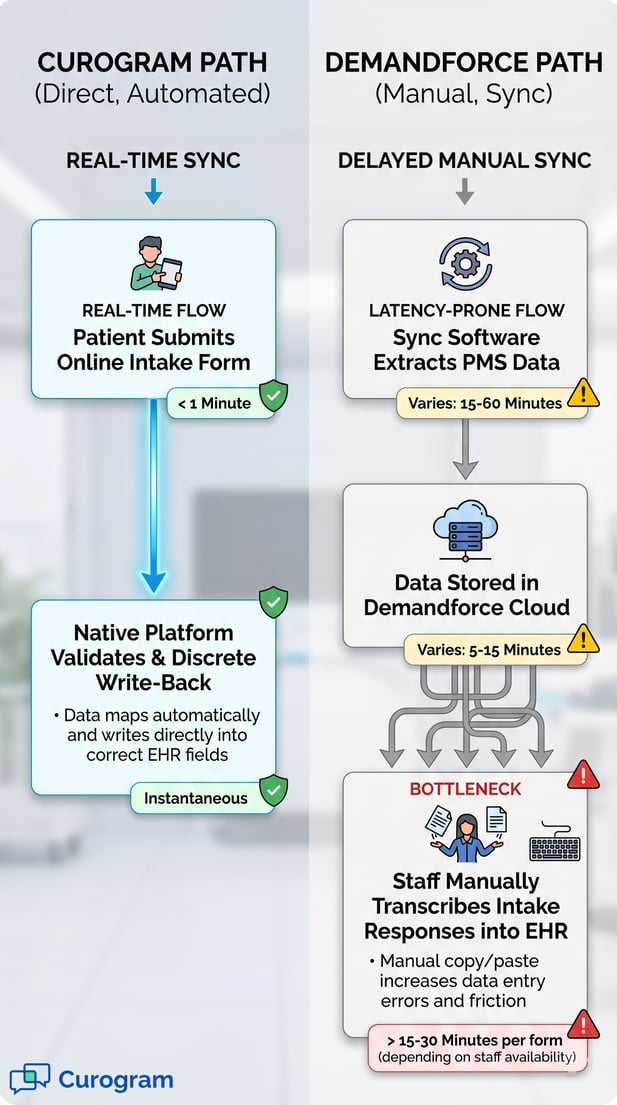
Curogram's integration is built on REST API standards. When a patient completes an intake form, the individual data fields write back directly to the corresponding fields inside the EHR through a single API call.

There is no intermediate file, no attachment to open, and no staff step required. The platform that collected the data is the same platform that delivers it to the record.

This model supports real-time data synchronization in both directions. Schedule changes in the EHR are reflected in the platform instantly.

Patient responses flow back into the EHR without delay. The result is a closed loop where each side always has the current state.

EHR Compatibility Range

Curogram's API architecture is designed for enterprise EHR environments. It connects with systems like Athena, eClinicalWorks, DrChrono, and Epic, among others.

These platforms require field-level data fidelity that only a true API integration can provide. Curogram was built with that requirement in mind from the start.

This means practices using complex, cloud-based medical EHR platforms can implement Curogram without worrying about whether the integration will hold. The architecture was designed for this environment, not adapted to it after the fact.

Cloud-Native vs. On-Premise Software

Curogram is cloud-native. There is no software to install on a local server, no updates to manage on individual machines, and no dependency on local network conditions.

The platform runs remotely, connects to the EHR through its API, and stays up to date without any IT involvement from the practice.

This matters for practices with multiple locations or limited IT resources. A cloud-native system scales without requiring on-site setup or maintenance at each location.

How Demandforce's Localized Sync Extraction Works

Demandforce uses a different approach. A desktop application is installed on the practice's local server. It runs on a schedule and extracts data from the on-premise practice management system.

That data is then uploaded to the Demandforce cloud, where it powers outbound communication tasks like appointment reminders and email campaigns.

This extraction model introduces a gap between what is in the PMS and what Demandforce is working from. If a patient cancels an appointment after the last sync, Demandforce does not know yet. A reminder may still go out. Staff may not realize until the patient calls.

Structural Latency and Sync Delays

Because Demandforce's sync runs on a fixed schedule, there is always some lag between the practice management system and the communication platform.

This lag can range from minutes to hours, depending on sync frequency and local server performance. In environments where schedules change often, that lag translates into outdated data driving automated actions.

Users have noted the need to manually trigger re-syncs when the local software encounters delays or errors. That is an extra step that a real-time API connection would eliminate entirely.

No Discrete Write-Back to Medical EHR Fields

Demandforce's extraction model was optimized for dental and chiropractic PMS systems. These are simpler environments with less demand for field-level data exchange. As practices move to enterprise medical EHR platforms, the limitations of this model become more visible.

When a patient completes an intake form through Demandforce, the data does not write back to individual EHR fields. Staff must manually transfer the information into the patient record.

This is the core limitation of the localized sync extraction approach when applied to complex medical EHR integration: it can pull from a PMS, but it cannot push discrete data back in.


Infographic comparing direct EHR data sync and manual transcription bottlenecks

Real-Time Write-Back: Curogram's Deterministic Data Fidelity in Practice

It is useful to see how these architectural differences show up in real practice settings. Curogram's bi-directional API write-back model produces measurable outcomes that are directly tied to integration quality.

The results below come from our internal data and reflect what happens when real-time data synchronization drives patient communication automation.

No-Show Rate Reduction at Atlas Medical Center

Atlas Medical Center deployed Curogram's automated reminder and confirmation system. Before implementation, their no-show rate sat at 14.20%. Within three months, it dropped to 4.91%. That is a reduction that outperforms the industry average by three times, based on our internal research.

This result is directly tied to integration quality. Reminders that fire from accurate, current schedule data reach patients before they miss an appointment. Reminders based on stale extraction data may arrive after a rescheduled slot has already been given to another patient.

Why Real-Time Sync Drives Confirmation Rates

Curogram clients see an average appointment confirmation rate above 75%, based on our internal data. That figure depends entirely on the integration layer delivering timely, accurate schedule data to the automation engine.

When a patient's slot is confirmed in the EHR, Curogram knows. When a slot is changed, Curogram adjusts. The automation reflects reality because the data behind it is live.

A periodic extraction model cannot guarantee this. If the sync runs every few hours, the automation engine is always working from a version of the schedule that may already be out of date.

The Revenue Impact of Accurate Reminders

Each recovered appointment has a direct financial value. Based on our internal research, practices using Curogram's automated reminders see a 10 to 20% increase in revenue as a result of fewer missed appointments.

When reminders are accurate and timely, patients show up. When they are not, appointments are lost, and slots go unfilled.

The integration architecture is what makes the difference. A bi-directional API means the reminder is always based on what is actually scheduled, not what was scheduled when the sync last ran.

Intake Form Write-Back: Eliminating the Manual Data Step

In practices that relied on paper intake forms, staff were handling up to 19 pages of forms per patient. That meant downloading, printing, scanning, and re-entering data. Every step in that chain created an opportunity for error and consumed staff time that could have gone elsewhere.

With Curogram's native smart forms and bi-directional write-back, the process collapses to one step. The patient completes the form digitally. The data writes directly to the EHR. Staff do not have to touch it.

Discrete Field-Level Data vs. PDF Attachments

The distinction between field-level write-back and PDF attachment is significant. A PDF attached to a chart requires a staff member to open it, read it, and decide where each piece of data belongs. A discrete write-back puts each value directly into the correct field without any human interpretation required.

Field-level data is also searchable and reportable. A PDF attachment is not. Practices that want to run population health queries or pull structured reports need discrete data in the EHR, not attached files.

How Covina Arthritic Clinic Used Curogram to Confirm Over 1,100 Appointments Monthly

Covina Arthritic Clinic's appointment confirmation process was heavily manual before Curogram. Staff handled individual follow-ups for each patient. After implementing Curogram's automated confirmation system, the clinic confirmed more than 1,100 appointments per month on average, with the entire process running without staff involvement, based on our internal data.

That outcome is only possible when the integration is reliable. If the system is working from delayed sync data, staff still need to check and correct. With a real-time API connection, the platform handles the process end-to-end.


Architecture Comparison: Integration Depth by Workflow

The table below shows how Curogram's bi-directional API model and Demandforce's localized sync extraction approach compare across common clinical workflows.

These differences are structural and affect every practice that relies on automation for patient engagement.

Workflow

Curogram (Bi-Directional API)

Demandforce (Localized Sync Extraction)

Intake Form Data Flow

Patient completes form → discrete data writes to EHR fields via API

Patient completes form → data stored in Demandforce → staff manually transcribes to EHR

Schedule Synchronization

Real-time, bi-directional. Changes reflected instantly

Periodic extraction. Sync delays of minutes to hours

Data Write-Back

Discrete field-level (demographics, insurance, clinical data)

Surface-level PMS extraction. No discrete EHR field write-back

Failure Diagnosis

Single platform pipeline. Trace within one system

Local server + sync app + cloud. Isolate across multiple layers

EHR Compatibility

Enterprise EHRs (Athena, eCW, DrChrono, Epic, etc.)

Primarily dental/chiropractic PMS. Limited medical EMR depth

IT Maintenance

Cloud-native. No on-premise software required

Requires local server install, updates, and troubleshooting


Failure Diagnosis and Troubleshooting

When something breaks in a single-platform API pipeline, the problem is in one place. When it breaks in a multi-layer extraction system, the problem could be in the local server, the sync software, the network, or the cloud platform. Each additional layer is another place to look.

Curogram's architecture keeps the integration path short. If data is not flowing correctly, the issue is identifiable within one system. That means faster resolution and less downtime for the practice.

Why Fewer Layers Mean Faster Fixes

In Demandforce's model, a sync failure could originate at any point in the chain: the local server, the sync application itself, or the connection to the Demandforce cloud.

Each layer requires a separate investigation. For practices without dedicated IT staff, this creates a real burden.

A cloud-native API platform removes the on-premise layer entirely. There is no local software to update, no server to restart, and no on-site troubleshooting needed. The practice is not responsible for maintaining the connection infrastructure.

Scalability Across Multiple Locations

For practices with multiple locations, local server-based sync software must be installed and maintained at each site. That means each location is a separate maintenance task. Cloud-native architecture scales across locations without any on-site component.

As practices grow, the architectural choice made early becomes more consequential. A model that requires local installation at every site creates overhead that compounds with each new location. A cloud-native model does not.

EHR Compatibility in Complex Medical Environments

Demandforce's sync extraction model was originally designed for dental and chiropractic PMS environments. These systems are simpler and more standardized than enterprise medical EHR platforms.

As a result, Demandforce's integration approach was not engineered to handle the complexity of systems like Athena, eClinicalWorks, or Epic.

Curogram's API architecture was built for this environment from the start. The integration handles the field-level specificity that enterprise EHRs require, which means practices operating in complex medical EHR ecosystems can rely on the connection to hold.

What Enterprise EHRs Require from Integration Partners

Enterprise EHR platforms like Athena and eClinicalWorks expose their data through structured APIs. To write data back into these systems at the field level, a communication platform needs to work within those API standards. That is not something a local sync extraction tool can do by design.

Curogram works within these API frameworks. That is what allows discrete write-back into specific EHR fields rather than attaching documents or requiring staff to enter data manually.

Why This Matters as Practices Grow

A communication platform that works well for a small single-location practice may not hold up as that practice grows, adds locations, or moves to a more capable EHR. The integration architecture determines how far the platform can scale with the practice.

Practices that start with a localized sync extraction tool may find they need to migrate to a deeper integration model as their EHR environment becomes more complex.

That migration takes time and creates transition risk. Choosing a bi-directional API platform from the start avoids that path.

Medical receptionist doing manual data transcription from intake form to computerIntegration Architecture Determines Clinical Automation Ceiling

The integration method a practice selects is not a technical detail to hand off to IT. It is a core decision that shapes how much automation is possible, how reliable that automation is, and how much staff time gets consumed filling gaps the system cannot close.

Curogram's bi-directional API write-back delivers real-time data synchronization between the communication platform and the EHR.

Appointment data is always current. Intake data flows to the right fields without manual steps. Every automated action is grounded in live, accurate information.

Demandforce's localized sync extraction operates on a different model. Data is pulled on a schedule, not updated in real time.

Write-back to complex medical EHR fields is not supported. Staff bridges the gaps. In simpler PMS environments, that may be manageable. In enterprise medical EHR settings, those gaps compound quickly.

The architectural ceiling of a localized extraction model is real.

If you are running a medical practice on an enterprise EHR and want automation that actually works, the integration layer is the place to start.

Ready to see how real-time EHR integration performs in your practice? Ask an expert.


Frequently Asked Questions

How does Demandforce's EHR sync compare to Curogram's native write-back?

Curogram uses a real-time, bi-directional REST API to write discrete data directly into EHR fields as soon as a patient submits a form or confirms an appointment. Demandforce relies on a localized desktop application that extracts data from the practice's on-premise server on a set schedule. That extraction approach introduces sync latency, does not support discrete field-level write-back to complex medical EHRs, and often requires manual re-syncs when the local software encounters delays.

How does integration architecture affect appointment reminder accuracy?

Reminders are only as accurate as the schedule data feeding them. Curogram's real-time API means reminders always reflect the current schedule state, which is a key reason Curogram clients see an average confirmation rate above 75%, based on our internal data. With periodic sync extraction, reminders may be generated from schedule data that is already hours old, which increases the risk of sending messages for canceled or rescheduled appointments.

Why does the number of integration layers matter for troubleshooting?

Every additional layer in an integration chain is another place a problem can hide. Demandforce's model involves a local server, a sync application, and the cloud platform, which means diagnosing a failure requires checking each component separately. Curogram's single API pipeline keeps the data path short, so issues are easier to find and faster to resolve, without requiring on-site IT resources.

How does write-back capability affect clinical staff workload?

Without write-back, staff must manually transfer patient intake data from the communication platform into the EHR record. In high-volume practices, this adds up quickly, with some managing up to 19 pages of intake forms per patient. Curogram's bi-directional write-back removes that step entirely, sending discrete field-level data straight to the correct EHR fields and freeing staff time for higher-value tasks.

Why does the integration method matter more for medical EHRs than dental PMS systems?

Dental and chiropractic PMS systems are generally simpler and more standardized, which is what Demandforce's localized sync extraction was originally designed for. Enterprise medical EHR platforms like Athena, eClinicalWorks, and Epic require field-level data fidelity that only a structured API integration can deliver. Applying an extraction-based sync model to these environments creates gaps that cannot be closed without significant manual work from staff.