12 min read

Curogram vs. Demandforce: Clinical Workflow Automation

Curogram vs. Demandforce: Clinical Workflow Automation
💡 Curogram is a healthcare-exclusive platform built for clinical workflow automation. Demandforce is a multi-industry marketing tool that originally served auto shops, salons, and vet clinics alongside medical practices.

While both send appointment reminders, the two platforms differ in a fundamental way: Curogram was built from the ground up for healthcare front desks, while Demandforce was designed for outbound marketing campaigns.

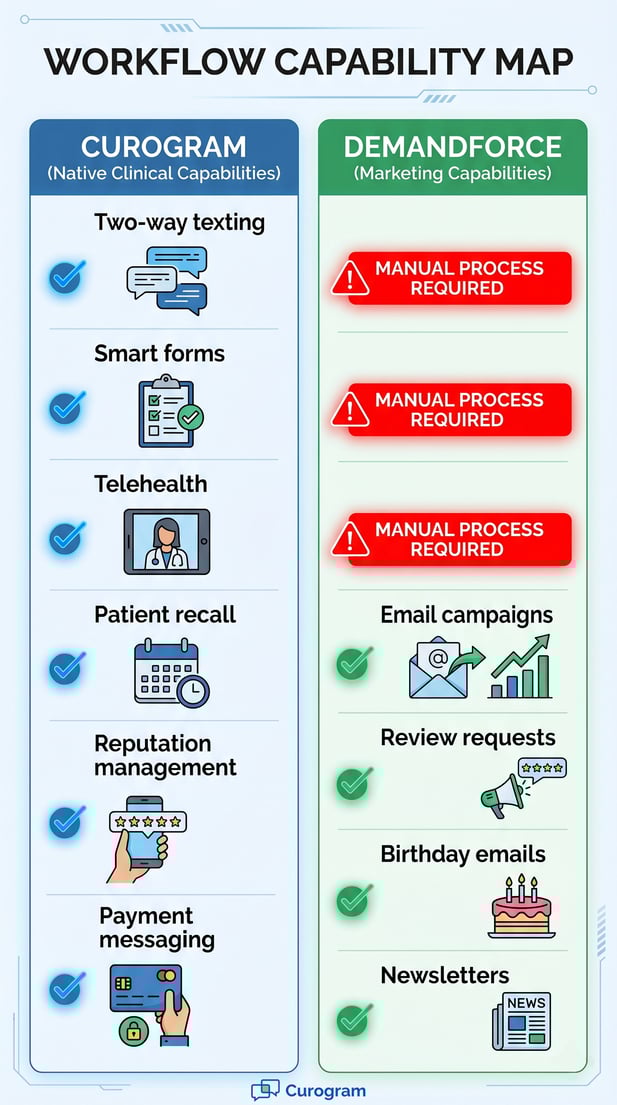
Curogram supports two-way patient messaging, smart intake forms with EHR write-back, native telehealth, and automated patient recalls. Demandforce focuses on email campaigns, review requests, and newsletter tools.

Based on our internal data, Curogram clients see no-show rates 53% lower than the industry average and over 1,100 confirmed appointments per month. For practices that need clinical workflow automation, not just reminders, the platform's core design matters. 

Most clinics start looking for a patient communication tool when they want to cut down on no-shows. They search for appointment reminders, pick a platform, and move on. But reminders are just the beginning.

What happens after a patient gets the reminder? They reply with a question. They need to fill out an intake form. They might want to switch to a telehealth visit. The front desk has to track all of it, often while fielding 80 or more calls a day.

That is where the real difference between platforms shows up. Not in whether they send reminders, but in how much they can handle beyond that.

Curogram was built specifically for healthcare. Every feature, from HIPAA-compliant two-way messaging to smart digital forms, was designed with medical front desks in mind.

Demandforce, on the other hand, started as a broad marketing tool for auto shops, salons, and vet clinics. It later expanded to serve medical practices, but its core design reflects its marketing roots.

This article looks at how the two platforms compare across clinical workflow automation. We will cover how each platform handles front-desk tasks, what the data says about real outcomes, and why the underlying design of a platform matters for day-to-day operations.

If your biggest challenge is operational, not just promotional, the type of platform you choose will determine whether automation makes your team's work easier or just adds a layer on top of it.

When a Marketing Tool Replaces a Clinical Workflow Platform

Choosing between platforms can be tricky when both seem to do similar things on the surface. But a healthcare-exclusive platform and a multi-industry marketing tool are built with very different goals. Here is what that difference looks like in practice.

The Core Design Difference

Curogram was engineered as a clinical communication and automation platform. Its data security model, patient routing logic, and interface were all built around the needs of a medical front desk.

Every feature connects back to the healthcare use case: HIPAA-compliant messaging, smart intake forms, EHR sync, telehealth, and patient recall.

Demandforce was founded in 2003 to serve a wide range of service businesses. Auto shops, salons, veterinary clinics, and medical practices all used the same platform.

Verified reviews on G2 and Capterra show that medical users often flag this as a problem: templates feel built for retail, reports lack clinical detail, and the interface does not reflect how medical scheduling actually works.

What Healthcare-Exclusive Design Actually Means

A healthcare-exclusive platform means more than just HIPAA compliance. It means the platform was designed around the workflow of a medical practice, not adapted to fit it.

That includes how patient replies are routed, how forms connect to EHR fields, and how confirmations sync back to the schedule in real time.

Demandforce's strength sits in its marketing features: outbound email campaigns, birthday messages, newsletter distribution, and review requests.

These tools work well for what they were designed to do. The issue arises when a medical practice needs the platform to manage clinical workflows, which it was not built for.

The Day-to-Day Impact on Front Desk Staff

For a front desk handling 19 pages of paper forms per patient, managing sync delays, and responding to complex patient inquiries through a tool built for auto shops, the mismatch shows up every single day. Staff end up working around the platform instead of relying on it.

The friction is not hypothetical. It adds up in every form that has to be re-entered manually, every reply that lands in the wrong inbox, and every confirmation that does not sync back to the schedule.

Why Multi-Industry Roots Limit Clinical Use

When a platform serves both a dental chain and a hair salon, its core features have to be broad enough to work for both.

That means clinical specifics get left out. There is no native telehealth module. There are no discrete EHR field write-backs. Intake forms are not part of the default workflow.

These are not minor gaps. For a medical practice, these are core front-desk functions. When the platform cannot handle them natively, staff have to manage them through third-party tools or manual processes, which adds cost and complexity.

Template Logic vs. Clinical Logic

Marketing tools run on template logic: design a message, send it to a list, track opens and clicks. Clinical workflows run on a different kind of logic: a patient confirms, the EHR updates, the front desk is notified, and the slot is marked. These are fundamentally different processes.

Demandforce's template-based framework works well for campaigns. But front desk automation in healthcare requires conditional logic tied to clinical data, and that is where a healthcare-exclusive platform holds a structural advantage.

The Hidden Cost of Workarounds

Every time a staff member has to step outside the platform to complete a task, that is a workflow gap. Those gaps add up quickly in a busy practice.

Staff capacity is limited, and time spent on manual data entry or toggling between systems is time taken away from patients.

This is why platform architecture, not just feature count, matters so much when evaluating clinical tools.

Healthcare-Only Architecture vs. Multi-Industry Marketing DNA

The difference between these two platforms goes deeper than a feature list. It comes down to what each platform was designed to optimize, and how that shapes what your team can actually do with it.

How Curogram's Architecture Is Built for Clinical Operations

Curogram's entire architecture was designed around the complexity of healthcare communication. Two-way patient messaging routes replies to the right staff member.

Smart intake forms collect data in discrete fields that write back directly to EHR records. Appointment confirmations sync in real time. Telehealth is built into the same platform, not bolted on from a third-party tool.

This design means front-desk staff work inside one system for the full patient interaction cycle: reminder, reply, form, confirmation, and follow-up. There is no switching between tabs or re-entering data.

EHR Integration Built for Medical Workflows

Curogram's integration was built for enterprise-level medical EHR systems, including Athena, eClinicalWorks, DrChrono, and Epic. It supports bi-directional, field-level data sync, meaning information flows both ways in real time. When a patient confirms, the EHR updates. When a form is completed, the data maps to the correct clinical fields, not just a notes field.

This is a meaningful distinction. Many platforms claim EHR integration, but the depth of that integration varies. Field-level write-back is what makes automation truly reduce front-desk workload.

HIPAA-Compliant Communication by Design

Every communication channel in Curogram was built with HIPAA compliance as a baseline, not an add-on. Two-way messaging, form submissions, and telehealth sessions all operate within a secure, compliant framework. Staff do not need to think about whether a channel is compliant because the platform was built that way from the start.

How Demandforce's Marketing DNA Shapes Its Capabilities

Demandforce's integration model relies on local sync software, which works well for the dental and chiropractic practice management systems it was originally built to support.

For complex medical EHR environments, this model has limitations. Field-level write-back is not part of the standard feature set, and the sync model can introduce delays.

The platform's review generation, email campaigns, and newsletter tools are strong. These features were built with care and work as intended. The limitation is not in what Demandforce does well, but in what it was not designed to do at all.

Outbound Marketing vs. Two-Way Clinical Communication

Demandforce's messaging model is primarily outbound: the platform sends reminders, campaigns, and review requests. When patients reply, the inbox experience can be fragmented because the platform was not designed to manage inbound clinical inquiries at scale.

Curogram's messaging is two-way by design. Replies are routed, tracked, and managed within the same system that sent the original message. For a front desk fielding dozens of patient replies per day, that difference is significant.

Review Generation: Same Goal, Different Context

Both platforms offer tools to generate Google reviews from patients. Demandforce uses multi-industry review request templates.

Curogram's review generation is tied to post-appointment surveys, with the ability to include clinical context such as appointment type, provider, and specialty.

Based on our internal data, one multi-location practice generated 1,064 new 5-star Google reviews in just three months using Curogram's automated post-appointment surveys. That result reflects how clinical context can improve response rates in a medical setting.


Comparison map of Curogram clinical and Demandforce marketing capabilities

Measurable Clinical Outcomes: What Healthcare-Native Automation Delivers

Real outcomes matter more than feature descriptions. Here is what healthcare-exclusive automation actually produces when it is used across live clinical environments.

No-Show Rates and Appointment Confirmation

No-shows are one of the most costly problems in medical scheduling. Based on our internal data, Curogram clients see no-show rates that are 53% lower than the industry average.

That is not a modest improvement. It means practices are recovering a significant portion of the revenue and capacity that would otherwise be lost.

The confirmation rate matters too. Curogram clients see an average appointment confirmation rate of over 75%, and the process is fully automated. Staff do not need to make manual follow-up calls to fill that gap.

Specialty-Level No-Show Data

The impact is especially visible in specialties where no-show rates tend to be high. Based on our internal research, psychiatry practices using Curogram average an 11.03% no-show rate, compared to an industry average of 23%.

For pediatrics, the Curogram average is 14%, against an industry average of 30%. That gap represents real appointments that stay on the schedule instead of falling through.

Specialty

Industry Average No-Show Rate

Curogram Average No-Show Rate

Psychiatry

23%

11.03%

Pediatrics

30%

14%

Overall (all specialties)

Baseline

53% lower

Source: Based on our internal data

Confirmation Volume at Scale

Covina Arthritic Clinic scaled from 369 confirmed appointments in May 2024 to over 1,300 by September 2024. That growth was possible because the reminder engine, confirmation logic, and EHR schedule sync all operate natively within the same healthcare platform. No separate tools, no manual reconciliation.

This is what front-desk automation looks like when the platform was built for the job.

Patient Recall and Revenue Recovery

Patient recall is one of the most direct paths to recovering lost clinical revenue. When patients miss follow-ups or go overdue for care, the practice loses both clinical continuity and scheduling capacity.

Based on our internal data, a multi-location practice using Curogram's native SMS recall achieved a 35% appointment reconversion rate. Of the patients who received a recall message, 1,240 scheduled an appointment within a month. That is a measurable revenue recovery from a single automated feature.

SMS vs. Email Recall

Demandforce's recall feature relies on email-based reactivation campaigns. Email has a lower open rate and response rate than SMS in healthcare contexts.

Patients who have not engaged with a practice in months are far more likely to respond to a text than to an email they may not open for days.

Curogram's recall uses native SMS, which is why the reconversion rate is as strong as it is. The medium matches the behavior.

Online Reputation and Review Generation

A strong Google presence is one of the top drivers of new patient acquisition. Based on our internal research, 90% of new patients check a clinic's Google Business Profile before visiting the website. Review volume directly affects how a practice ranks in local search.

Using Curogram's automated post-appointment survey flow, one multi-location practice collected 1,064 new 5-star reviews in three months. That kind of volume is only possible when the review request is tied to a clinical touchpoint and sent automatically right after the visit.


Workflow Comparison: Front Desk Staff Experience

Day-to-day, what does the difference look like for the people actually running the front desk? Here is a side-by-side look at how each platform handles the core tasks that define a clinical front desk.

Two-Way Messaging and Inbound Patient Communication

When a patient replies to an appointment reminder, what happens next? With Curogram, the reply lands in a centralized, secure inbox. Staff can respond directly within the platform. The conversation is tracked and routed based on clinical logic.

With Demandforce, the platform is built for outbound communication. Inbound replies go into a more fragmented inbox experience.

Staff handling complex patient inquiries through a tool designed for marketing campaigns face additional steps to resolve those inquiries efficiently.

Impact on Staff Time

Staff time is a finite resource. Every extra step a team member takes to manage an inbound message is time not spent on patients.

Platforms designed for two-way clinical communication reduce those steps by routing messages intelligently and keeping the full conversation in one place.

Secure Messaging and HIPAA Scope

Curogram's two-way messaging is HIPAA-compliant by design. Demandforce's messaging is primarily outbound, and the platform's HIPAA scope is shaped by its multi-industry foundation.

For practices sending or receiving messages with clinical content, the compliance architecture of the messaging system matters.

Intake Forms and Front Desk Automation

Paper intake forms are one of the largest sources of front-desk inefficiency. Each form has to be collected, reviewed, and entered into the EHR.

Curogram replaces this with digital smart forms that send automatically before the appointment and write discrete data directly to EHR fields.

Demandforce does not include native clinical intake forms. Practices using Demandforce that want digital intake need to source a separate tool and manage the data transfer manually.

EHR Write-Back vs. Manual Entry

The difference between discrete EHR write-back and manual data entry is not just about speed. It is about accuracy. When form data maps automatically to the correct EHR fields, there is less room for transcription errors. When staff have to enter the data by hand, errors are more likely and the process takes longer.

Telehealth Integration

Curogram includes a native telehealth module that is fully integrated with the rest of the platform. Patients can be moved to a telehealth visit from the same workflow that manages their appointment confirmation. Demandforce does not include a telehealth feature. Practices that need telehealth have to manage it through a separate vendor.

Full Feature Comparison

Clinical Workflow

Curogram (Healthcare-Exclusive)

Demandforce (Multi-Industry Marketing)

Two-way patient messaging

Native, HIPAA-compliant, clinically routed

Primarily outbound; fragmented inbound inbox

Intake forms

Smart forms with discrete EHR write-back

Not available natively; manual entry required

Appointment confirmations

Automated; 75%+ avg. rate; real-time EHR sync

Automated reminders; limited confirmation loop

Telehealth

Native, fully integrated module

Not available

Patient recall

Native SMS recall; 35% reconversion rate

Email-based reactivation campaigns

Reputation management

Native post-appointment survey to Google Reviews

Review request campaigns (multi-industry templates)

Payment messaging

Native patient billing communication

Not available as a native feature

Platform design context

Built exclusively for medical and healthcare

Built for auto, salon, vet, dental, and medical

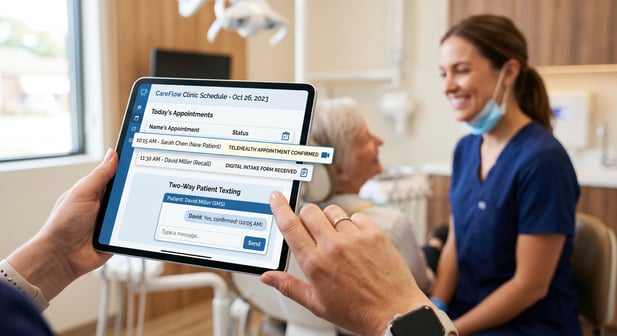
Hand holding tablet showing dental clinic scheduling and telehealth featuresClinical Operations Require Clinical Architecture
Choosing the right platform is not just about the feature list. It is about whether the platform's core design matches the work your team actually does. Here is why that distinction is worth understanding clearly.

The Gap Is Architectural, Not Just Functional

Marketing tools are built to send messages and track engagement. They do that well. The gap is not in what they can do, but in what they were designed to do.

When a practice needs two-way clinical communication, discrete form data tied to EHR fields, and real-time schedule sync, those are architectural requirements, not add-on features.

A multi-industry marketing tool can support some of those needs with workarounds, but workarounds add steps, increase the chance of errors, and put more load on already stretched front-desk teams.

Why Workarounds Cost More Than They Save

Each workaround has a hidden cost. A manual data entry step takes two to three minutes. Multiply that by every patient form per day.

A reply that lands in the wrong inbox takes time to redirect. A confirmation that does not sync requires a manual schedule check. These small inefficiencies add up fast in a busy practice.

Automation that requires manual corrections is not really automation. It is a partial solution that still depends on staff time to complete.

How Front Desk Automation Translates to Revenue

Based on our internal data, practices using Curogram see a 10 to 20% increase in revenue tied to recovered appointments alone. Each confirmed appointment that would have been a no-show is a direct contribution to the practice's bottom line. And each recalled patient who books within a month is revenue that would have been lost.

When front-desk automation is built on a clinical architecture, those gains are consistent and measurable.

What to Look for When Evaluating Platforms

When comparing patient communication platforms, the feature list is a starting point, not the full picture. Ask how each feature was built.

Does two-way messaging route replies intelligently? Do intake forms connect to EHR fields, or do they generate PDFs that staff still have to enter manually? Does the confirmation system sync in real time, or does it rely on a sync that runs every few hours?

These questions get to the architecture behind the features, and that is where the real operational difference between a healthcare-exclusive platform and a multi-industry marketing tool becomes clear.

Platform Fit and Long-Term Operational Health

A practice that chooses a tool built for its specific workflow will see compounding benefits over time. Staff spend less time on manual tasks. Errors decrease.

Patient communication becomes more consistent. And the data flowing through the system is accurate because it was captured and routed by a system designed to handle it.

A practice that forces a marketing tool to do clinical work will see the opposite: compounding friction as the gaps between what the platform does and what the practice needs continue to grow.

The Decision Comes Down to Operational Intent

If the primary goal is outbound marketing, email campaigns, and review generation, Demandforce has a well-built toolkit for that. If the primary goal is front desk automation, two-way clinical communication, intake management, and native EHR integration, the platform needs to have been built for healthcare from the start.

The right platform is not just the one with more features. It is the one whose core design matches what your front desk actually does every day.

See how healthcare-exclusive automation performs in a live clinical environment. See Curogram in action.


Frequently Asked Questions

How does Demandforce's patient messaging compare to Curogram's for medical practices?

Curogram offers native, HIPAA-compliant two-way messaging with clinical routing built in. Demandforce's messaging is set up primarily for outbound communication: appointment reminders, email campaigns, and review requests.

When patients reply with clinical questions, the platform's inbox and routing were not designed to manage that volume efficiently. The result is extra steps for front-desk staff who need to resolve those inquiries.

How does Demandforce's approach to EHR integration differ from Curogram's?

Demandforce uses local sync software that was originally built for dental and chiropractic practice management systems. It does not natively support discrete field-level write-back to complex medical EHRs.

Curogram's integration uses a bi-directional API built for enterprise systems like Athena, eClinicalWorks, DrChrono, and Epic, which means data flows in real time and maps to specific clinical fields rather than general notes.

Why does it matter that Demandforce was built for multiple industries?

A multi-industry platform has to make design choices that work across very different business types. For healthcare, that often means clinical specifics get left out: no native telehealth, no discrete intake forms, no clinical routing logic for inbound messages. These are not minor gaps for a medical practice. They are core front-desk functions that require manual workarounds when the platform cannot handle them natively.

How do the no-show rate outcomes compare between Curogram and the industry average?

Based on our internal data, Curogram clients see no-show rates that are 53% lower than the industry average across specialties. In psychiatry, the Curogram average is 11.03% compared to an industry average of 23%. For pediatrics, it is 14% versus a 30% industry average.

These outcomes reflect what happens when reminder logic, confirmation workflows, and EHR sync all operate within the same healthcare-built platform.

Why is SMS recall more effective than email-based reactivation for patient recovery?

SMS has a higher open rate and faster response time than email, especially for patients who have not engaged with a practice recently. Based on our internal data, a multi-location practice using Curogram's native SMS recall saw 35% of targeted patients book an appointment within one month, with 1,240 patients returning from recall messages alone. Email reactivation campaigns, like those offered by Demandforce, reach patients through a channel where engagement rates are generally lower in healthcare contexts.