
.jpg) Mira Gwehn Revilla
Mira Gwehn Revilla

Ask for two-way EHR sync. A patient who replies "C" should show as confirmed in your schedule without anyone retyping it. Keep one opt-out list for the whole group. A patient who texts STOP at one site shouldn't hear from another.
Pilot at two or three sites first. A bad template is far cheaper to fix at 3 clinics than at 12. Based on our internal data, Atlas Medical Center cut its no-show rate from 14.20% to 4.91% in three months with automated reminders.
At many group practices, the reminder a patient gets depends on which site booked the visit. One clinic texts two days ahead. Another texts the morning of, and a third still has staff calling patients between check-ins.
HIPAA-compliant patient texting fixes that only when you roll it out as one system. That means one set of rules, one opt-out list, and one EHR link that every site shares.
This guide is for practice managers and IT leads who run two or more outpatient sites. It covers what HIPAA asks of you, how to judge vendors, which policies to write first, and a ten-week rollout plan you can adapt.
What is HIPAA-Compliant Two-Way Patient Texting?
A front desk lead texting a patient from her own phone is using plain SMS. There's no unique login, no record of who sent what, and no contract with the phone carrier covering patient data. When she leaves the practice, those threads leave with her.
A compliant platform sends the same kind of text, but through a system you control. Each staff member signs in with their own account. Every message is logged, access is limited by role, and the vendor signs a Business Associate Agreement (BAA) with your practice.
One detail trips people up. HHS lets a patient ask to get messages by regular, unencrypted text, as long as you warn them about the risk first. That's the patient's choice to make. It doesn't let staff use personal phones to text patients on their own.
What Two-Way Texting Handles Day to Day
Two-way means the patient can reply. That turns a one-way reminder into a short exchange that ends with a confirmed, moved, or canceled slot.
In a typical outpatient week, secure patient messaging covers:
- Visit reminders with a "Reply C to confirm" prompt
- Reschedule requests that would otherwise land on hold
- Prep notes, such as "No food or drink after midnight"
- Balance-due notices with a payment link
- Follow-ups after a visit or a missed appointment
- Recall texts to patients who are overdue for care
Patients reply from the texting app already on their phone. They don't download anything or log in to a portal, which is why reply rates stay high. Based on our internal data, confirmation rates across our clients run above 75%.
Why Multi-Location Practices Need a Unified Approach
Site-by-site buying gets the first clinic live fast. The gaps show up once patients visit a second site.
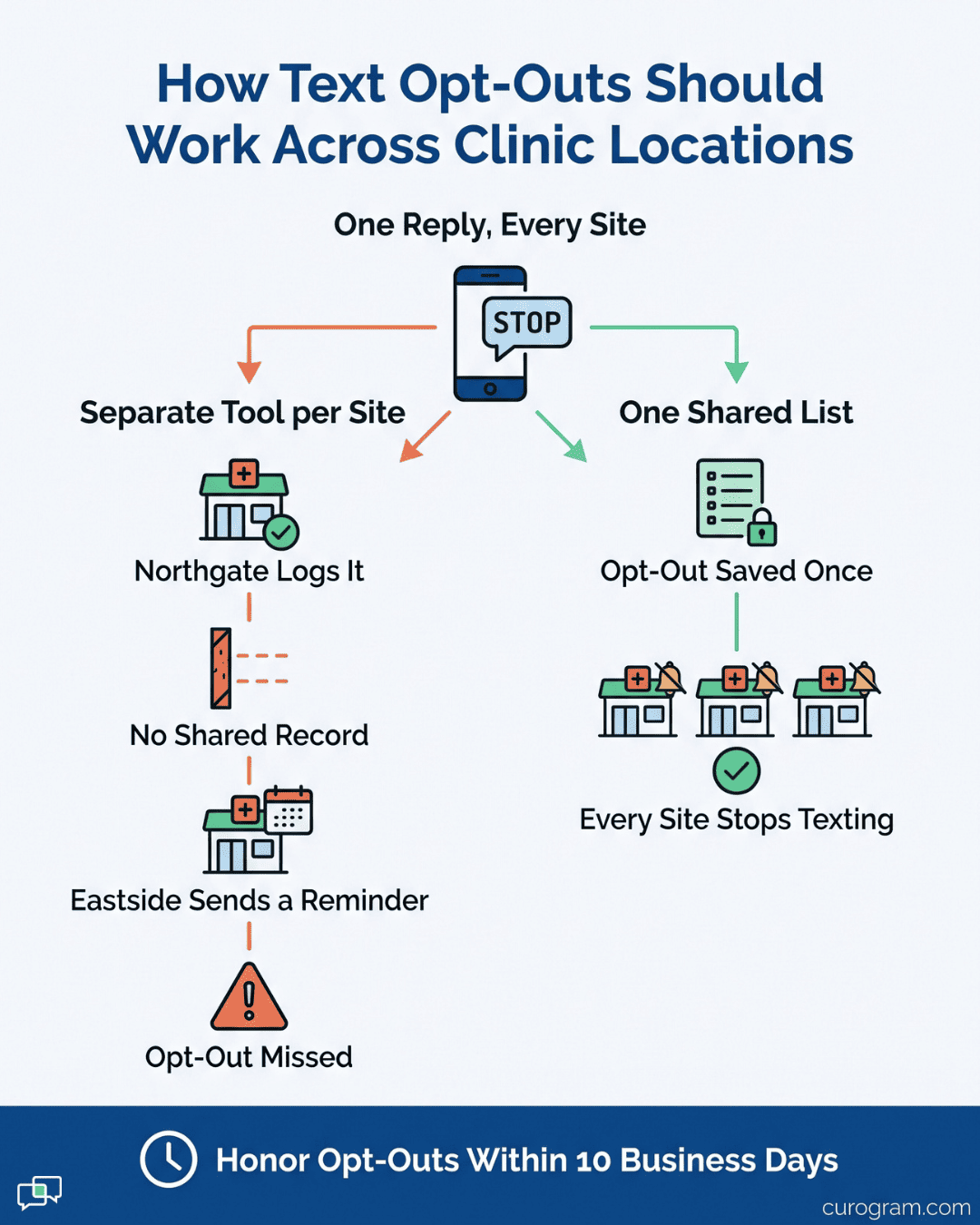
A patient texts STOP to your Northgate clinic's tool. Two weeks later, your Eastside site sends her a reminder from a different vendor that never got the message. Under FCC rules that took effect in April 2025, you have 10 business days to honor that request across your whole organization.
Audits expose the same split. If OCR asks for message logs, someone has to pull them from three systems. One of those vendors may never have signed a BAA. And leadership can't compare no-show rates across sites when each tool counts them differently.
What a Unified System Looks Like
A unified setup gives every site one shared inbox. Smart routing sends each reply to the right location, team, or provider, so no one has to sort a pile of texts by hand at 8 AM.
Templates and policies get set once at the group level. Each site then layers on its own details: hours, parking notes, or the suite number that patients keep missing.
Curogram is built this way. We give each site its own local phone number and staff logins, and all of them tie back to one dashboard for reporting and admin.
Curogram builds this kind of multi-location architecture into its platform. Based on our internal data, one multi-location practice sent SMS recall texts to overdue patients. Within a month, 35% of them booked a visit, and 1,240 patients were seen from those texts alone.
HIPAA Requirements for Patient Texting
Before evaluating platforms, you need to understand what HIPAA actually requires for text messaging. These are non-negotiables that any vendor must meet.
Encryption Standards
Under the current HIPAA Security Rule, encryption is an "addressable" item. That means you must use it or write down why an equal safeguard works instead. HHS has proposed making encryption required, but that rule isn't final. Federal planners now target July 2027 for final action.
Our advice is to treat it as required now. Encryption is cheap for a vendor to provide, and a breach of unencrypted texts is far harder to defend.
Ask each vendor two direct questions. Are messages encrypted while they travel, and while they're stored? Which standard do you use?
AES-256 is the common benchmark for stored data, though HIPAA doesn't name it. If a vendor can't answer both questions in writing, cross it off your list.
Access Controls and Audit Trails
HIPAA requires a unique user ID for every person who touches patient data. Shared front desk logins, like "frontdesk2," don't meet that bar.
The rule also requires audit controls. Your platform should record who read or sent each message, and when. That log is what you hand over during a compliance review or a patient complaint.
Role-based access keeps each team in its lane:
| Role | Typical access |
|---|---|
| Front desk | Scheduling and reminder threads for their site |
| Billing | Balance and payment threads |
| Nurses and providers | Clinical replies and follow-ups |
| Practice admin | All sites, plus reports and settings |
Offboarding matters just as much. If a staff member's last day is Tuesday, their access should end Tuesday. A good platform lets a manager do that in a few clicks.
Business Associate Agreements
A BAA is the contract that makes a texting vendor legally responsible for protecting your patients' data. HIPAA requires one before the vendor handles any patient information. No BAA means no launch.
Read it before you sign. A solid BAA spells out:
- What the vendor may and may not do with patient data
- The safeguards the vendor must keep in place
- How fast they'll tell you about a breach
- Whether their subcontractors agree to the same terms
- How your data is returned or destroyed when the contract ends
On breach notice, HIPAA gives a business associate up to 60 days after discovery to notify you. That's the outer limit. Many practices negotiate a shorter window in the BAA, such as 5 or 10 business days, so they have time to act.
Third-Party Security Reports
An outside audit tells you whether a vendor follows its own security rules.
Ask for the vendor's most recent SOC 2 Type 2 report. A Type 1 report checks controls on a single day. Type 2 tests them over a period, often 6 to 12 months, so it tells you more. HITRUST certification is another report you may see.
If the report is a few months old, ask for a bridge letter that covers the gap. Most vendors will share the report under a nondisclosure agreement. Treat a flat refusal as a reason to keep looking.
How to Evaluate Texting Platforms for Multi-Location Rollout
With compliance requirements in mind, you can start evaluating platforms. Focus on fit for your specific multi-location needs, not just general feature lists.
EHR Integration Depth
Without EHR integration, someone at each site exports the next day's schedule and uploads it to the texting tool. That step gets skipped on the busiest days, which are the days reminders matter most.
Most connections run on HL7 scheduling feeds, FHIR, or a vendor API. The standard matters less than one question: does data flow both ways?
A one-way link pushes appointments into the texting tool. It never sends the patient's "C" reply back, so the visit still shows as unconfirmed and staff call anyway.
Test it before you sign. Book a test patient, let the reminder go out, reply "C," and check that the status changes in your EHR within a few minutes. Curogram connects to nearly any EHR system, including athenahealth, Epic, NextGen, and eClinicalWorks.
Multi-Location Architecture
A tool built for one clinic starts to strain at the third site. These questions tend to expose that early:
| Question to ask | Weak answer to watch for |
|---|---|
| Does each site get its own local number? | "All sites share one number." |
| Can one admin see every location? | "Each site has its own login portal." |
| Where are templates set? | "Each site builds its own." |
| Is the opt-out list shared across sites? | "Opt-outs are tracked per number." |
| Can leadership compare sites in one report? | "You can export each site and combine them." |
One weak answer can be worked around. Two or more usually means you'll be running separate systems under one contract.
Patient Experience
Patient uptake decides whether any of this works. If a patient has to download an app or recall a portal password, most won't.
Look for a platform that works over standard SMS. Patients get a text from a local number they recognize, and they reply the way they'd text a friend.
That matters most for older patients. Based on our internal data, Covina Arthritic Clinic confirms more than 1,100 appointments each month through text replies.
Before you pick a vendor, send yourself a test reminder and read it on your phone. If it's hard to follow on a small screen, your patients will ignore it.
Building Your Texting Policy and Governance Framework
Before rolling out texting, you need written policies that define how your organization will use it. This governance framework ensures consistency across all locations and protects you during audits.
Define Message Types and Approval Workflows
Write down which texts can go out on their own and which need a person to review them. Without that line, one site auto-sends lab alerts while another holds every reminder for approval.
| Message type | How it's sent | Who owns replies |
|---|---|---|
| Appointment reminders | Automatic, from EHR data | Front desk |
| Reschedule requests | Staff reply | Front desk |
| Balance notices | Automatic, on a set schedule | Billing |
| Clinical questions | Staff reply after review | Nurse or provider |
| Lab result alerts | Automatic "log in to view" notice only | Nurse |
Keep this matrix in one shared document that every site manager has signed. When a new question comes up, update the matrix instead of letting each site decide.
Create Template Libraries
Build your core templates before launch, so no site writes its own on day one. Start with reminders, no-show follow-ups, balance notices, lab alerts, prep notes, and post-visit surveys.
Keep each one short and limited to the minimum patient information needed. A good reminder reads like this:
"Hi Maria, this is Eastside Family Clinic. You're scheduled Thu 6/12 at 2:00 PM. Reply C to confirm or R to reschedule."
It leaves out the visit reason, the provider's specialty, and any diagnosis. Anyone who glances at Maria's lock screen learns only that she has an appointment.
Let sites edit only marked fields, like hours or parking. Lock the rest at the group level.
Set Consent and Opt-Out Procedures
The TCPA uses tiers of consent. Informational texts, like reminders, need the patient's prior express consent. Marketing texts need prior express written consent.
Build a consent line into intake forms at every site, and have front desk staff mention texting when they hand over the clipboard.
Opt-outs need one shared list. Since April 2025, FCC rules let patients revoke consent by any reasonable means, including "STOP," "quit," or "please stop texting me." You have 10 business days to honor the request.
A central list lets you meet that deadline at every site. A patient who opts out at your Northgate clinic should stop getting texts from Eastside too.
Let patients choose message types as well, so someone who only wants reminders can turn off billing texts without dropping everything.
Establish Response Time Standards
Set a reply target and post it at every front desk. A two-hour window during business hours is a common place to start.
After-hours texts need an automatic reply that sets expectations. A clear version reads:
"Our office is closed. We'll reply by 10 AM on the next business day. If this is an emergency, call 911."
Decide who checks the inbox first each morning at each site. Without a named owner, Friday night messages sit until someone notices them Monday afternoon.
Track response times by site from the first week. If one location's average climbs past your target, check its staffing first. A missing morning inbox owner is the most common cause.
Planning Your Rollout: A Phased Approach
A ten-week plan gives you room to catch problems at a few sites before they reach all of them. Adjust the weeks to your size, but keep the order.
| Phase | Weeks | Main goal |
|---|---|---|
| Readiness assessment | 1 | Map workflows and confirm EHR fit |
| Pilot locations | 2 to 4 | Launch at 2 or 3 sites |
| Pilot validation | 5 to 6 | Fix what the pilot exposed |
| Full rollout | 7 to 10 | Add remaining sites in waves |
Phase 1: Readiness Assessment (Week 1)
Spend the first week measuring where you are. At each site, count daily inbound calls, average hold time, and the main reasons patients call. A tally sheet by the phone for three days is enough.
Record each site's current no-show rate from your EHR. You'll need it as your baseline later.
Then confirm the EHR connection with your IT lead and the vendor. Check your exact EHR version, which scheduling data will flow, and who at your practice approves the interface.
Phase 2: Pilot Locations (Weeks 2-4)
Pick 2 or 3 pilot sites. Include one team that's comfortable with new tools and one site that's buried in phone calls. We'd argue the busy site teaches you more, since problems surface there fastest.
During the pilot:
- Finish the EHR link and test it with fake patients.
- Set up local phone numbers and staff logins.
- Load your approved templates.
- Train staff with live practice sessions and test messages.
- Start with 50 to 100 real patients per site.
Hold a 10-minute huddle at each pilot site every day. Ask what confused patients, what confused staff, and which replies went unanswered.
Phase 3: Pilot Validation (Weeks 5-6)
Now check the numbers against your Week 1 baseline. Look at delivery failures, reply rates, and how many "C" replies actually updated the EHR.
Read a sample of real threads too. You'll spot problems numbers miss, like patients replying "yes" when the template asked for "C," or a prep note that left them with more questions.
Fix every issue here, while it touches only a few hundred patients. Rewrite unclear templates, adjust routing, and retrain any team that's still calling patients the old way.
Phase 4: Full Rollout (Weeks 7-10)
Add the remaining sites in waves of two to four, using the same setup as the pilot. Plan a few days per site for phone numbers, staff logins, and local template fields.
Start each new site with appointment reminders only. Add reschedule requests, then balance notices, then recall texts over the following weeks. Each new message type gives staff a chance to adjust before the next one starts.
Keep one pilot site's manager on call for new sites. Staff at new sites will ask the same questions the pilot teams asked, and that manager already has the answers.

Measuring Success: KPIs for Multi-Location Texting
Track metrics from day one so you can demonstrate ROI and identify areas for improvement.
Operational Metrics
Compare no-show rates from before and after launch. Practices using automated text reminders typically see no-show rates drop. Based on our internal data, Atlas Medical Center dropped from 14.20% to 4.91% in three months, and no-show rates across our clients run 53% below the industry average.
Next, track inbound calls per site. Based on our internal data, practices using automated texting see a 24% drop in inbound calls, and some cut phone volume by as much as 50%.
If calls aren't falling at one site, look there first. Often the local number isn't on the website, or staff are still telling patients to "just call us."
Patient Engagement Metrics
Watch three numbers each month: opt-in rate, opt-out rate, and confirmation rate.
Opt-ins should climb as more patients pass through intake. A flat line usually means one site's front desk skipped the consent step.
Opt-outs deserve a closer look by message type. If most come after balance notices, try a different send time or softer wording.
Confirmation rate shows whether your reminder wording works. Based on our internal data, confirmation rates across our clients run above 75%. A site sitting well below that often has a template problem, like a missing reply prompt.
Cross-Site Reporting
Curogram's analytics dashboard gives operations leaders a full view of communication metrics across all locations, with data that can be exported for use in your existing BI tools.
Keep the scorecard short enough to review in a monthly ops meeting:
| KPI | How to measure | Reference point from our internal data |
|---|---|---|
| No-show rate | Missed visits divided by booked visits | Atlas Medical Center: 14.20% to 4.91% |
| Inbound calls | Daily calls per site | 24% drop with automated texting |
| Confirmation rate | "C" replies divided by reminders sent | Above 75% |
| Response time | Minutes from patient text to staff reply | Set your own target, such as 2 hours |
Review 3-month trends before acting on any single month. When a site improves three months in a row, ask its manager to walk the others through what changed.
Common Pitfalls and How to Avoid Them
Even with a solid plan, certain traps catch many practices off guard. Here is how to avoid them.
Rushing the Timeline
Leadership often wants every site live by month's end. Skipping the pilot means the first bad template goes to your whole patient list instead of a few hundred people.
One example: a reminder that says "Reply Y" while your EHR sync only reads "C." At one site, a handful of confirmations fail and staff catch it by lunch. At twelve sites, thousands of visits show as unconfirmed, and the phones light up.
Phase 3 exists to catch mismatches like this one.
Insufficient Staff Training
A single 30-minute demo won't stick. Staff remember the button layout, then freeze the first time a patient texts something odd, like a photo of an insurance card.
Build practice into training. Have each person send test messages, handle a reschedule, and route a clinical question to a nurse. Pair staff who pick it up fast with those who don't, and schedule a 15-minute refresher two weeks after launch.
Ignoring Patient Preferences
Some patients want visit reminders and nothing else. Others want lab alerts but not balance notices.
If your only choice is "all texts or none," patients who dislike one message type opt out of everything. That includes the reminders that keep them from missing visits. Let them pick by type at intake, and let staff change it on request.
Inconsistent Implementation Across Sites
Six months after launch, drift sets in. One manager adds "arrive 30 minutes early" to every reminder. Another turns off after-hours replies because they "confused people."
Soon you're back to separate systems. Lock core templates and policies at the group level, and give sites only the fields they need. Review template changes monthly with every site manager in the same meeting.
How Curogram Supports Multi-Location Rollout
Curogram's 2-Way Texting gives multi-location practices one HIPAA-compliant inbox for every site. Smart routing sends each patient reply to the right location, team, or provider. Your Northgate front desk sees Northgate threads, and billing sees balance replies from all sites.
Each location keeps its own local number, so patients see a familiar area code. Templates, consent rules, and the opt-out list live at the group level, with local fields for hours and directions.
We sign a BAA with every client before any patient data moves. Our platform connects with most major EHRs, so reminders pull from your live schedule, and "C" replies update visit status without retyping.
Patients reply over regular SMS. No app, no portal login.
What Our Clients Have Measured
Based on our internal data, practices using our platform see results like these:
| Result | What we measured |
|---|---|
| No-show rate | Atlas Medical Center went from 14.20% to 4.91% in three months |
| Appointment confirmations | Covina Arthritic Clinic confirms more than 1,100 each month |
| Recall bookings | 35% of overdue patients at one multi-location practice booked within a month |
| Phone volume | Down by as much as 50% |
| Front desk output | Up 30% or more |
Across our clients, no-show rates run 53% below the industry average. Practices have used the freed slots to book more visits, growing revenue by 10% to 20%.
Conclusion: How to Implement HIPAA-Compliant Texting Across Your Locations
With HIPAA-compliant patient texting, most of the work happens before the first text goes out. Every front desk has to follow the same rules.
Get the BAA signed and the EHR sync tested first. Write the policies before launch, then prove them at two or three sites before you add the rest.
Six months out, run one test. Text STOP to one site from a test phone, then confirm no other site texts that number again.
Want to see how one shared inbox would work across your locations? Book a demo with Curogram and we'll walk through your EHR setup and site list with you.