
The Ultimate Guide to AI Workflow Automation for Medical Offices
Learn how AI workflow automation helps medical offices streamline scheduling, billing, patient communication, and daily operations.
20 min read

Most practices already run workflow automation. They just run it in pieces that don't talk to each other.
The reminder text goes out on Tuesday. A patient replies "can't make it." Then a staffer reads that reply, opens the scheduling system, deletes the appointment, and calls someone off the waitlist. Three manual steps hanging off one automated one.
That gap is where the actual cost sits. A tool that sends a message but doesn't change what happens next has moved the work, not removed it.
Workflow automation means the whole sequence runs on rules you set once: trigger, decision, handoff, log. The reminder fires, the reply updates the schedule, the open slot goes to the waitlist, and nobody touches a keyboard.
The same logic applies to a lab result routing to a physician, a referral carrying its records to a specialist, or a claim getting scrubbed before it reaches the payer.
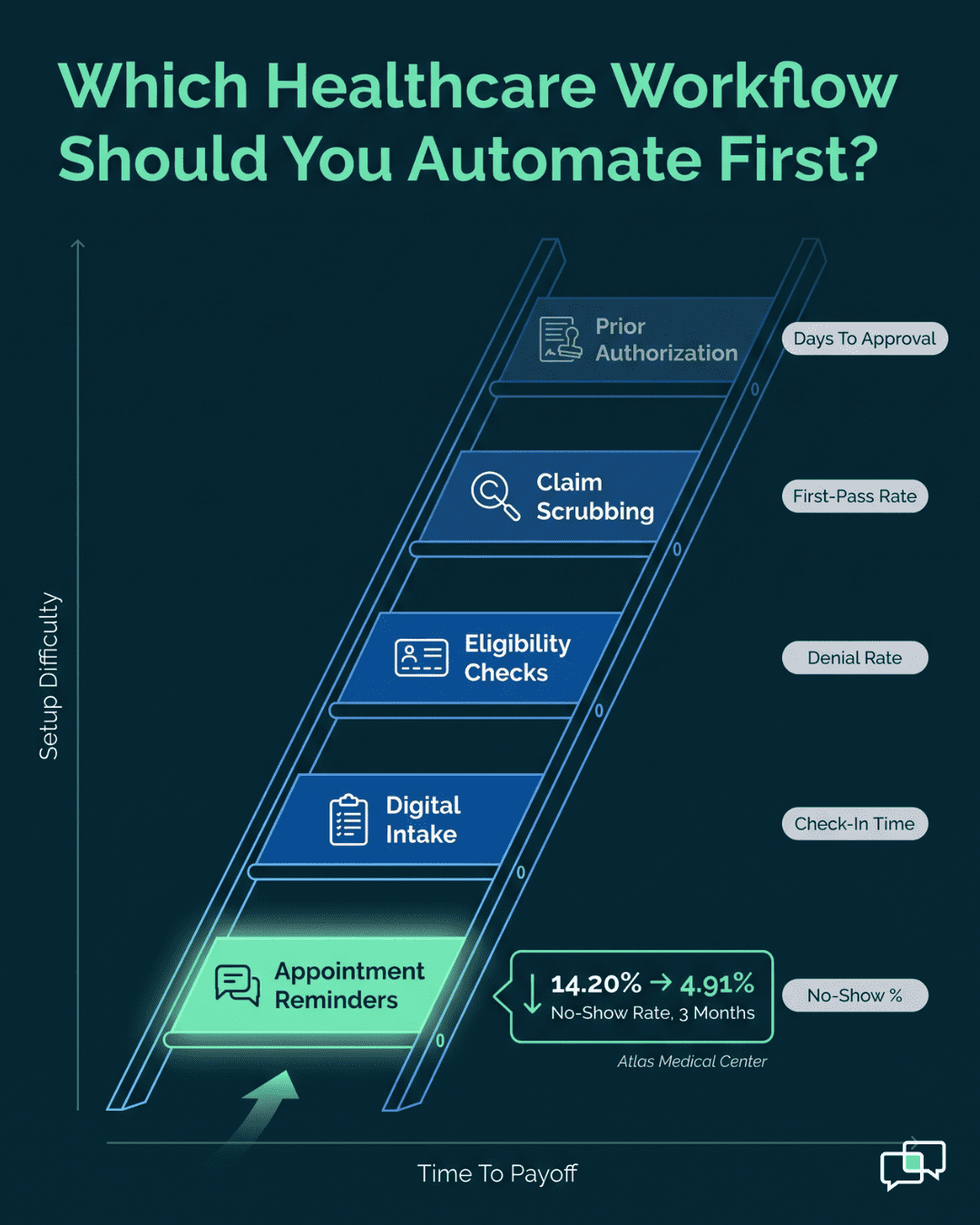
The gains are real and they're measurable. Based on our internal data, Atlas Medical Center brought its no-show rate from 14.20% down to 4.91% in three months. Covina Arthritic Clinic now confirms more than 1,100 appointments a month without anyone dialing a phone. Across Curogram clients, confirmation rates hold above 75%.
This guide covers what workflow automation in healthcare actually is, how the underlying pieces work, and 35 specific examples across front-desk, clinical, and back-office operations. It also covers the implementation steps most practices skip, the four things that kill these projects, and where the technology is heading.
Not every example here will fit your practice. The first ten usually pay back the fastest, and that's where we'd tell you to start.
Workflow automation in healthcare means software moves a task from one person or system to the next, based on rules you set once. No one walks a chart down the hall. No one retypes a form into billing.
The software connects your EHR, your lab system, and your billing platform. It watches for a trigger, like a new lab result. Then it routes the work to whoever needs to act, and logs every step.
Most practices already run pieces of this without calling it automation. The reminder text that fires 48 hours before a visit is one piece. The gap is that these pieces rarely talk to each other, so staff still stitch them together by hand.
People use these two terms as if they mean the same thing. They don't, and the difference changes what you should buy.
Process automation handles one task. A bot pulls insurance data from a payer portal and drops it in a field. Done.
Workflow automation runs the whole sequence, with branching logic and handoffs between people.
| Process automation | Workflow automation | |
|---|---|---|
| Scope | One task | Multi-step sequence |
| Example | Send an appointment reminder | Schedule → verify insurance → send intake form → alert clinical team at check-in → send post-visit survey |
| Logic | Fixed | Conditional (if/then branching) |
| Handoffs | None | Between staff and systems |
Buying a task tool and expecting sequence-level results is the most common mistake we see. A reminder that fires but doesn't update the schedule when a patient replies "cancel" just moved the work, it didn't remove it.
Clinical workflow automation applies the same idea to care delivery, where a dropped handoff costs more than a wasted hour.
Take medication orders. The manual version has a physician write the script, a nurse transcribe it, a pharmacist fill it, and a second nurse give it. That's four handoffs and four chances for a misread number.
The automated version: the physician enters the order in CPOE. It goes straight to the pharmacy, gets checked against the patient's allergy list, and updates the eMAR. At the bedside, the nurse scans a barcode to confirm patient, drug, and dose before anything is given.
Nothing gets retyped. The loop closes on its own, and the audit trail writes itself.
Four technologies do the actual work. You don't need all four to start, but you should know which one a vendor is selling you.
Integration engines and APIs. The plumbing. These let your EHR, billing, and scheduling systems pass data back and forth. Weak integration is the reason most automation projects stall — the workflow works fine, but it can't see the patient record.
Robotic process automation (RPA). Software bots that click, copy, and paste the way a person would. Useful for old systems with no API. A bot can log into a payer portal, pull an eligibility check, and paste it into the chart.
AI and machine learning. Prediction layered on top of routing. An ML model can flag a claim likely to be denied before you submit it, so a biller fixes the code instead of appealing it 45 days later.
Rules engines. The if-then logic. If a lab value comes back critical, then page the ordering physician's phone now. Your staff writes these rules, not the vendor.
Most practices we talk to expect automation to save money. It usually does. The bigger returns show up somewhere less obvious: fewer denied claims, fewer no-shows, and staff who stop dreading Monday.
Count how long check-in takes today. Paper form, clipboard, front desk retypes it into the chart, patient corrects the insurance ID they got wrong. Call it six minutes per patient, and the desk does that forty times a day.
Digital intake collapses that to a form the patient filled out at home. The data lands in the record before they park.
Billing sees the same effect. When a claim doesn't need a human to retype the payer ID, one biller can clear more claims per day without working later.
A mistyped insurance ID doesn't cause a crisis. It causes a denial six weeks later, a resubmission, and a patient calling about a bill they don't understand.
Automation removes the retyping step, which is where most of these errors live. Data moves from the EHR to the billing system without a person in between.
The rules also stop the workflow from advancing when something's missing. A referral can't sit in a "sent" folder if the system won't mark it sent until the records attach.
Clinical automation builds the check into the step instead of relying on someone remembering it.
A new medication order gets cross-referenced against the patient's allergy list before it reaches the pharmacy. If there's a conflict, it flags at the order screen, not at the bedside.
Remote monitoring works the same way. Vitals fall outside range, the care team gets an alert. No one has to be watching a dashboard at 2 a.m. for the alert to fire.
Critical lab results are the clearest case. The result lands, the ordering physician's phone buzzes, and the timestamp is on record.
The savings come from four places, and they're not equal in size.
| Source | Where the money shows up |
|---|---|
| Fewer admin hours | Staff reassigned to patient-facing work instead of data entry |
| Fewer claim denials | Faster reimbursement, less rework per claim |
| Fewer no-shows | Slots filled instead of empty |
| Inventory tracking | Less expired stock, fewer emergency orders |
No-shows are usually the fastest to move. Based on our internal data, Atlas Medical Center brought its no-show rate from 14.20% down to 4.91% in three months. Curogram clients average a 75%+ confirmation rate, with no-show rates 53% below the industry benchmark.
Empty slots cost the same whether you knew about them or not.
Clinician burnout is largely a paperwork problem. Physicians spend hours a day in documentation and clunky software, and that time doesn't feel like medicine.
Automation takes the tedious part. Not the charting judgment, the transcription and the chasing.
Retention follows. Replacing a burned-out biller or MA costs more than most practices budget for, and the ones who leave rarely cite pay first.
Referrals are where information goes to die. A PCP sends a patient to a specialist, the records get faxed, and no one knows if they arrived.
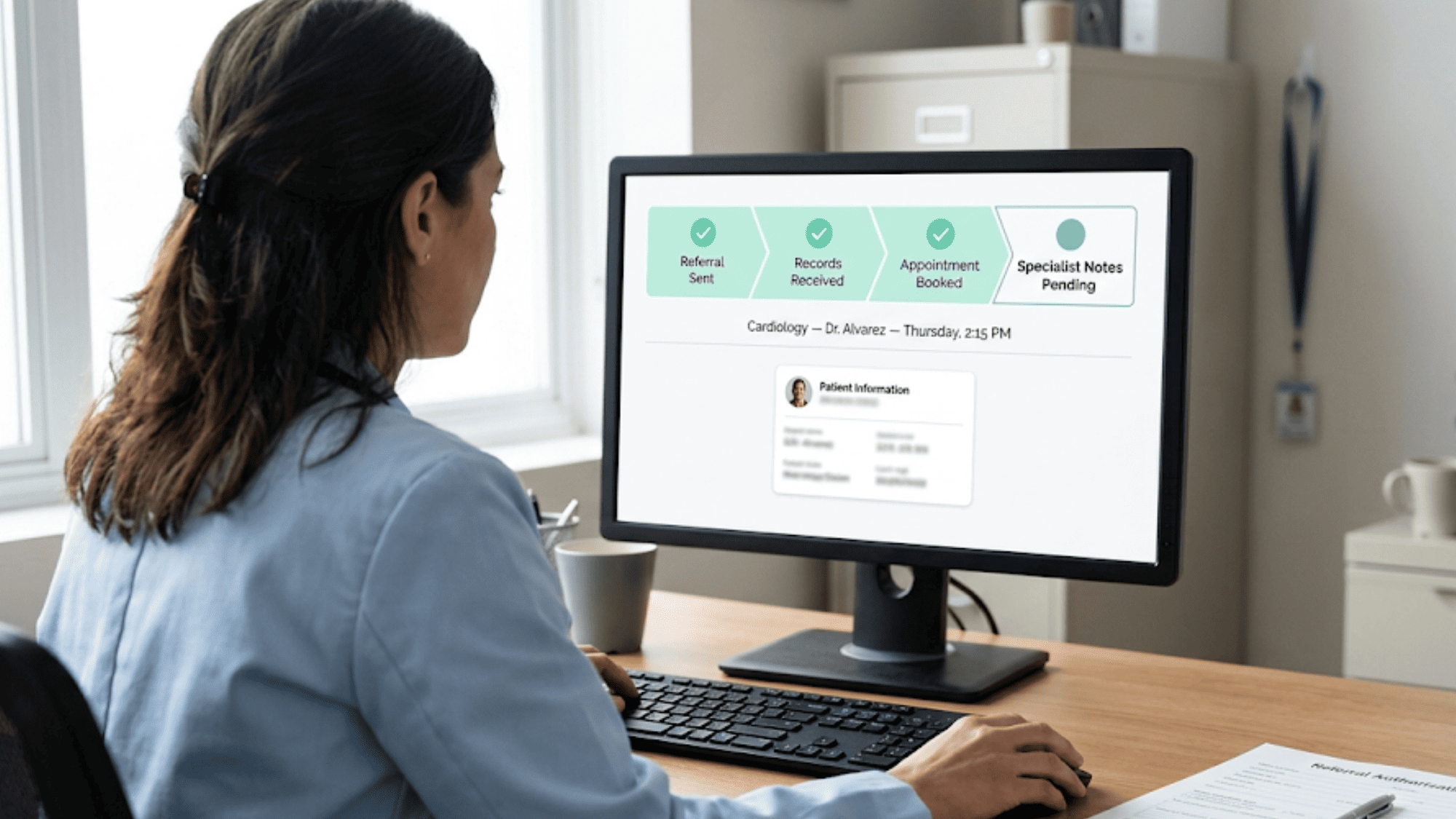
An automated referral workflow moves the records with the referral. The system tracks status, tells both offices when the appointment is booked, and routes the specialist's notes back to the PCP.
Patients notice this part most. They stop being the courier for their own chart.
HIPAA governs how you handle protected health information, and manual processes are where the exposure sits. A paper form left on a counter. An unsecured email with a chart attached.
Healthcare automation platforms use role-based access, so only the people who need PHI can see it.
Every action inside the workflow gets logged. During an audit, you pull the trail instead of reconstructing who did what from memory and sign-in sheets.
These 35 examples split into four groups: front-desk work, clinical care, back-office operations, and advanced programs. Not all of them will apply to your practice. The first ten usually pay back fastest, and most practices start there.
These are the workflows patients actually feel, and the ones your front desk lives inside all day.
Booking by phone means hold time for the patient and a tied-up staffer on the other end. Self-scheduling moves that to a portal with live availability, governed by rules you set: new patient vs. follow-up, visit length, which provider takes what. Nobody retypes a time slot they heard over a bad connection.
The clipboard is the problem. A patient writes out demographics and history by hand, then a staffer squints at it and types it in.
Digital intake sends a secure link a few days ahead. The patient fills the forms, photographs their insurance card, and signs consents from their couch. The clinical team has the history before the patient walks in.
Reminders fire on a schedule: text at 72 hours, email at 48, voice call at 24 if there's still no reply. The patient confirms or reschedules from the message, and the schedule updates itself.
Cancellations can push the slot to a waitlist. Based on our internal data, Atlas Medical Center dropped its no-show rate from 14.20% to 4.91% in three months, and Curogram clients average confirmation rates above 75%.
Paper surveys get thrown away. A short mobile survey sent after the visit closes gets answered. Questions can vary by visit type, and a negative response alerts a manager instead of sitting in a spreadsheet until the quarterly review.
Print, stuff, stamp, mail, wait, repeat in 30 days. Once insurance adjudicates, the workflow can calculate the patient's share and send a plain electronic statement with a pay link, then follow up on its own cadence. Payment plans live in the same message. Days in A/R come down and postage comes off the books.
A bot runs eligibility a few days before each appointment: coverage, copay, deductible, coinsurance, written straight into the record. Anything that looks wrong gets flagged. Bad coverage surfaces before the visit rather than as a denial six weeks later.
Every payer wants a different form, and care waits while the fax moves. When a physician orders something that needs auth, the system pulls the clinical documentation from the chart, fills the payer's form, submits it, and watches for the decision. Staff stop babysitting the request.
Discharge touches pharmacy, the case manager, patient education, and sometimes home health. Miss one and you get a readmission. The discharge order can trigger a task for each owner at once, so the process runs the same on a Friday at 7 p.m. as on a Tuesday morning.
The link, the consent, the copay, the "can you hear me now." One link can handle all of it: audio and video test, e-consent, payment, then a virtual waiting room that pings the provider when the patient is ready. The visit starts on time because the admin work finished first.
Requests come through the portal and get checked against your rules. Overdue for a follow-up? Controlled substance? Those route to a nurse with the chart data attached. Everything else goes straight to the pharmacy, so the exceptions are the only thing clinical staff see.
This category delves into the core of patient care: the diagnostic and treatment processes. Here a dropped handoff doesn't cost you a bad review. It costs a missed diagnosis.
Normal results release to the portal. Critical ones escalate: secure message to the ordering physician, SMS if unread at 15 minutes, a call to the charge nurse at 30. The loop closes, and you can prove who was told and when.
Prep instructions go out automatically. Images route to a radiologist by subspecialty and availability. The signed report lands in the ordering physician's inbox, and an urgent finding can book the follow-up itself instead of waiting for someone to check a queue.
Handwriting is how a decimal point becomes a dosing error. Orders entered electronically get checked against allergies, drug interactions, and duplicate therapies at the order screen. Transcription errors vanish because there's no transcription.
Templates pull vitals and lab values into the note. Ambient AI tools go further, listening to the visit and drafting a structured note for the physician to review and sign. Less typing after clinic, more of the note written while the visit is still happening.
The nurse scans the wristband and the medication. The system verifies the Five Rights — patient, drug, dose, route, time — and stops the administration on a mismatch. The check happens before the dose, not in a chart review afterward.
A diabetes or heart failure diagnosis enrolls the patient in a care pathway. Check-ins get scheduled, education goes out, and the patient is prompted to report glucose or blood pressure readings. Out-of-range values alert a care manager, so you reach the patient before the ER does.
Fax a referral and you spend two weeks wondering whether the patient ever called. An electronic referral carries notes, labs, and images with it, shows status to both offices, and routes the specialist's report back to the PCP. Fewer duplicate tests, and fewer patients lost between offices.
Symptoms and vitals go in, and the algorithm suggests a level using a protocol like the Emergency Severity Index. It can fire standing orders too, like a cardiac panel for chest pain. Sorting stays consistent across shifts, and the sickest patient isn't always the loudest one.
One case touches pre-op, OR scheduling, sterile processing, the surgical team, and recovery. A shared board shows each patient's status, pre-op checklists must clear before the case advances, and the team gets notified when the patient hits holding. Day-of cancellations drop.
Rules watch lab and EHR data continuously. A positive culture, a post-op fever spike, a pattern across a unit — any of these alerts the infection control team with the patient data already attached. Detection moves from weekly chart review to same-day.
This category covers the essential but often invisible administrative and operational tasks that keep a healthcare facility running. Nobody thanks you for these. They still determine whether payroll clears.
Credentialing verifies licenses, education, and work history, and it can take months while the provider sits unable to bill. Automated onboarding sends task lists to the new hire, IT, HR, and credentialing at once, then chases the verification requests on its own.
Spreadsheet scheduling collapses the moment someone calls out at 6 a.m. A workforce system builds around availability, credentials, and expected volume. Staff swap shifts from their phone, and open shifts broadcast to everyone eligible instead of a manager working the call list.
Overstock expires. Stock-outs delay care. Barcodes or RFID decrement inventory as items get used, and hitting a reorder point sends the purchase order automatically. Less capital on the shelf, fewer emergency orders at premium pricing.
A scrubber sits between the EHR and the clearinghouse, validating demographics, checking medical necessity against the codes, and applying payer-specific rules. Bad claims go back to a biller before they reach the payer. Billers spend their day on complex denials instead of typos.
Every action inside the workflow logs with a user ID and timestamp. When an auditor asks for the critical-result notification history, you run a report. You're not reconstructing who did what from sign-in sheets and memory.
Manual audits sample maybe 20 charts a quarter, and whatever's wrong in the other 2,000 stays wrong. NLP can read the documentation against every claim's codes and flag both unsupported and missed ones for a human auditor. You find the coder who needs training and the revenue you were leaving behind.
The system schedules maintenance by manufacturer interval, opens a work order for biomed, and keeps the service history for every device. Report one broken and it comes out of service automatically. The history is there when a surveyor asks.
On the AP side, OCR reads the invoice, matches it to a purchase order, and routes it for approval before payment gets scheduled. That's how you actually capture early-payment discounts. On the AR side, statements and reminders run themselves, and balances stop aging past 90 days by default.
A ticket that says "EHR down" and one that says "forgot my password" should not sit in the same queue. Keyword and category rules prioritize and assign automatically. Critical system alerts create a high-priority ticket and page the on-call tech without a human in the middle.
Moving patient data to a new EHR is where records get lost. Automated migration extracts, transforms, and loads with validation checks at each stage, then reports every record moved and every exception needing a human. The risk doesn't disappear, but it becomes visible.
This final category highlights more advanced and innovative applications of workflow automation, often leveraging AI and predictive analytics. These need more data and more setup. Most practices reach them in year two, not month two.
A chest X-ray gets analyzed by a model trained on millions of images before the radiologist sees it. Suspicious nodules come flagged. The radiologist still reads and still decides — the flag directs attention, it doesn't make the call.
A newly diagnosed 26-year-old diabetic and a 71-year-old who's managed it for two decades need different messages. Diagnosis, age, language, and engagement history can shape the sequence: which education goes out, when the medication reminder fires, what gets asked.
The system scans the panel against screening guidelines and finds who's overdue — women over 40 with no mammogram in the past year, for instance. Outreach goes out by text or email with a booking link attached. Based on our internal data, SMS recall campaigns have brought back 1,240 patients at a 35% reconversion rate.
Screening thousands of charts by hand against inclusion and exclusion criteria doesn't happen, which is why recruitment stalls. A tool that compares patient data against active trial criteria and alerts the coordinator on a match changes what's feasible.
RPM devices generate readings all day, and nobody can review all of them. A rules engine logs the stable ones and escalates the rest: a dangerous blood pressure reading, or a trend heading the wrong way. Care managers work by exception, which is the only way an RPM program survives past 50 patients.
Most failed automation projects didn't fail on the technology. They failed because someone bought a platform before deciding which workflow it was supposed to fix.
Get people in a room who actually do the work. Your billing manager knows which denials keep coming back. Your front desk knows which calls eat the morning. IT and finance need to be there too, but they're not the ones with the pain points.
Then map what happens today, honestly. Draw the steps, name who owns each one, and put a time on it. Most practices find something they didn't expect — a form that gets touched by four people, or a call that gets made twice because two staffers don't know the other did it.
Rank candidates against four questions:
| Question | Why it matters |
|---|---|
| Does it happen many times a day? | Volume is where the savings live |
| Is the logic clear if-then? | Fuzzy judgment doesn't automate well |
| Do mistakes here cost real money? | Denials, no-shows, safety events |
| Can we ship it in weeks, not quarters? | Early wins buy you the next project |
Start with reminders and confirmations. They're simple, the return shows up fast, and staff feel it immediately. Prior authorization is worth automating eventually, but it's a phase-two problem — the payer variation will eat your first attempt.
Write your requirements after Step 1, not before. Otherwise you'll be shopping for features instead of fixes.
HIPAA compliance. The vendor signs a BAA or the conversation ends. No exceptions, no "we're working on it."
Integration with what you already run. Ask specifically how it connects with your EHR and billing system. Pre-built connector, or a custom API build your IT team maintains? The answer changes your timeline by months.
Who can change a workflow. If every rule tweak requires a developer ticket, you'll stop tweaking. Low-code and no-code platforms let a trained office manager adjust a reminder window without filing a request.
Reporting. You need to see where work is stalling, not just that it ran.
When you take demos, make the vendor run your workflow, not their canned one. Then call two references at practices your size, in your specialty.
Automating a bad process gives you a fast bad process.
Ask why each step exists. That insurance verification form your staff fills out twice — why twice? Some steps can be deleted. Some can run in parallel instead of waiting in line.
Build the new map inside your platform's designer. Name the trigger, the rules, the automated steps, and the exact points where a human has to approve something.
Then decide how you'll know it worked. For reminders: no-show rate and staff hours on the phone. For claim scrubbing: first-pass payment rate. Write the number down before you go live, because nobody remembers the baseline afterward.
This is the phase that runs long. Plan for it.
APIs are the clean path. Your IT team and the vendor connect the platform to your EHR, lab system, and billing, and data moves natively.
Some systems won't cooperate. An old payer portal with no API can still be automated with an RPA bot that logs in and clicks through the interface the way a person would. It's less elegant and it breaks when the portal redesigns, but it works.
Test everything in a sandbox first. Run real-shaped data through the full path and check that it lands where it should. A misrouted lab result in production is not a bug you want to find in front of a patient.
Your staff will assume this is about headcount. Say otherwise out loud, early, and mean it.
Explain what they stop doing. The MA stops chasing refill calls. The front desk stops dialing 40 confirmations. That's the pitch, and it's true.
Train by role, not in one big session. Billers need different screens than nurses. Hands-on beats slides.
Pick a super-user in each department and train them deeper. When something breaks at 8:15 on a Monday, people ask the person next to them, not the vendor's help desk.
Pilot in one department. One clinic, one workflow, one month. If it breaks there, you've contained it.
Watch the KPIs you wrote down in Step 3. Based on our internal data, Atlas Medical Center's no-show rate moved from 14.20% to 4.91% within three months of going live with automated reminders — the kind of curve you should expect to see, not a straight-line drop on day one.
Then ask your staff what's still annoying. There will be something: a reminder that fires too early for a specific provider, an exception the rules don't cover. Fix those, and keep fixing them. The workflow you build in month one shouldn't be the one you're running in month twelve.

While the benefits are immense, the path to implementing clinical workflow automation is not without its obstacles. Four things kill automation projects. Two of them are technical. The other two are about people and money, and those are the ones that catch practices off guard.
Your staff will hear "automation" and think "layoffs." That assumption forms in about four seconds, and if you don't answer it out loud, it sits there.
The honest answer is specific, not reassuring. The MA stops fielding refill calls. The front desk stops dialing 40 confirmations before lunch. Nobody loses a job because a text message went out on time.
Bring frontline staff into the design. The person who books appointments knows why the 72-hour reminder needs to skip Monday-morning post-op patients. You will not know that, and neither will the vendor.
Then show the first win publicly. A no-show rate that moved, a queue that emptied. Skeptics move when they see the number, not when they hear the pitch.
PHI moving through an automation platform is PHI you're responsible for. A breach costs fines, patients, and a story in the local paper.
Four things to have in place:
| Control | What to verify |
|---|---|
| BAA signed | The vendor signs, or you walk |
| Role-based access | A biller can't open clinical notes they don't need |
| Encryption | In transit and at rest, both |
| Audit logs | Immutable, and someone actually reviews them |
The audit log is the one people set up and never look at. Put a monthly review on someone's calendar with a name attached to it.
Your EHR probably has a decent API. The payer portal your billers log into every morning probably doesn't.
Use APIs where they exist. They're stable, they scale, and they don't break when someone redesigns a login page.
Where there's no API, RPA bridges the gap. A bot logs into the old system and clicks through the interface like a person. It works, and it will break the next time that vendor moves a button. Plan maintenance time for it.
Integrate in phases. Pick the connection that unlocks the most workflow value first — usually the EHR — and prove it before touching the rest.
"It'll make us more efficient" gets a no from every CFO. Bring numbers.
Labor. Count the hours your staff spends on the task now. Multiply by loaded salary. That's your current cost, in dollars, on paper.
Revenue. For claim scrubbing, take your denial rate and the average value of a denied claim. A few points of first-pass improvement has a dollar figure attached.
The cost of doing nothing. Empty slots don't bill. Based on our internal data, Atlas Medical Center was running a 14.20% no-show rate before automating reminders, and brought it to 4.91% in three months. Put your own no-show rate against your average visit revenue and you have the number leadership needs to see.
Ask for a pilot, not an enterprise rollout. A small budget with a measurable result is an easier yes, and it makes the second ask trivial.
The field of workflow automation in healthcare is not static. It is continually evolving, driven by rapid advancements in artificial intelligence and data analytics. Where this goes next depends less on new technology and more on how much of your data the system can actually read.
Hyperautomation means stacking AI, machine learning, and RPA together instead of running them as separate tools. The rules engine stops being the ceiling.
Scheduling is the clearest example. Today's system offers open slots. A predictive one scores each patient's no-show likelihood and adjusts the book accordingly — overbooking a Friday 4 p.m. slot for a patient who's missed twice, holding a clean slot for someone who never has.
That only works if the model has enough history to be right. Practices with two years of appointment data get useful predictions. Practices with two months get guesses.
Sepsis is the case everyone cites, and for good reason. A model reads vitals, labs, and chart data, flags rising risk, and fires a workflow: place the lab orders, tell nursing to increase vital checks, put a risk score in front of the physician with the protocol attached.
The care team doesn't wait for a threshold to be crossed. They act on a trend.
The catch is alert fatigue. A model that flags too often gets ignored, and an ignored alert is worse than no alert, because everyone believes the system is watching.
RPA isn't going away, because legacy systems aren't going away. Payer portals, old departmental software, and state registries will still be there in five years, and most of them still won't have an API.
What changes is what the bots can handle. OCR and language models let a bot read an unstructured fax or a scanned EOB instead of only clicking fields in a known layout.
That extends automation into the messiest part of the back office, which is where the manual hours actually sit.
The practices that get this right pick one process and fix it. Usually reminders, because the return shows up in weeks and the front desk feels it the same day.
The practices that stall buy a platform and then spend six months debating which workflow to build first.
Automation doesn't replace judgment. A rules engine can't tell you whether a patient's symptom pattern means something. What it can do is stop your staff from retyping an insurance ID for the fourth time, and stop a critical lab result from sitting unread in an inbox.
The gains stack. Fewer no-shows means fuller schedules. Fewer denials means faster cash. Fewer refill calls means clinical staff doing clinical work. None of that requires AI or predictive scoring — it requires connecting the systems you already own so the work moves without a person carrying it.
Based on our internal data, Atlas Medical Center went from a 14.20% no-show rate to 4.91% in three months. Covina Arthritic Clinic confirms more than 1,100 appointments a month, and nobody there picks up a phone to do it. Those aren't platform stories. They're one workflow, running correctly, every day.
Pick the process that annoys your staff most. Map what it actually looks like today, not what the manual says. Then automate it, measure it, and go find the next one.
Curogram connects with your EHR to handle the patient-facing side of this: reminders, confirmations, intake forms, payments, and two-way texting, all HIPAA-compliant and all updating your schedule without a staffer in the middle.
Bring us your current no-show rate and we'll show you where automation fits in your schedule. Book a demo and we'll walk through it with your actual numbers.
Learn how AI workflow automation helps medical offices streamline scheduling, billing, patient communication, and daily operations.
 Aubreigh Lee Daculug : 3/26/26, 4:00 PM
Implement workflow automation in your medical practice. High-impact automation opportunities, tools, implementation steps, and ROI examples.
 Aubreigh Lee Daculug : 2/7/26, 1:00 PM
Optimize your virtual care workflow. Learn how to automate telehealth visit links and improve patient engagement.