
 Mira Gwehn Revilla

- Welligent Connect portal messages only reach clients who set up an account, so everyone else picks up the phone.
- An access center fielding 80 calls a day at 5 to 6 minutes each spends over 7 staff hours on the phone at one site.
- A shared inbox lets any coordinator answer, hand off, or close a thread, so coverage holds through lunch, PTO, and shift change.
- Saved replies cover group times, rides, forms, and intake steps.
- Based on our internal data, Curogram clients confirm over 75% of visits by text and run no-show rates 53% below the industry average.
Welligent Connect was supposed to take routine client questions off your access center’s phone. For many community mental health caseloads, it can’t, because a portal message only lands if the client has set up an account. Many never do.
So they call. They call to ask what time Thursday’s group starts, whether the intake packet arrived, and which van picks up at the day program. A foster parent calls about a case update that went to a portal inbox nobody opened.
Each call is short. Eighty of them fill a coordinator’s entire shift, and the intakes sitting in the queue wait until tomorrow. New clients who called for help on Monday get a callback on Wednesday, if the voicemail box wasn’t already full.
In our view, the fastest operational gain open to a Welligent organization is moving those routine calls into a shared, HIPAA-compliant text inbox. Your clients already read texts, and a coordinator can work several threads in the time one phone call takes.
Welligent keeps doing what it does well. The schedule, the chart, and the billing stay there. Curogram handles the thirty-second questions that currently eat your mornings.
For the IOP team, the same group-time question gets one saved reply. Day program attendance confirms in a single batch instead of 18 separate dials. Foster parents get case updates on the phone they already check.
There’s one honest limit. Welligent has no public API, so Curogram runs side by side with it, and staff note texted confirmations in Welligent the way they log calls now.
The Activation Gap
Welligent earns its place in community mental health. One system holds outpatient therapy, SUD intensive outpatient groups, I/DD day services, and foster care case management, each with its own schedule, notes, and billing rules. For an agency running five programs across three sites, that’s a real win.
Client contact is where it thins out. Welligent Connect, the client portal, can carry messages and reminders. But it only reaches clients who created a login and still remember it.
Think about who sits on a CMHC caseload. Many clients share a phone, change numbers often, or have no reason to open a health portal between visits. A caregiver for an adult in a day program may have never heard of the portal at all.
Staff can push activation at intake, and some clients do sign up. Months later, plenty of those same accounts sit dormant.
Every message sent to an unactivated account goes nowhere. That client calls instead, and your access center phone becomes the default channel for the whole organization.
A Morning at the Access Center
By the time the doors open, there are 14 voicemails waiting. Two are new-client inquiries that should be returned first. The rest are routine, but you can’t tell which until you listen to each one.
Meanwhile the lines light up. A caller on hold wants to know if Tuesday’s IOP group still meets at 6 p.m. That’s the fourth time someone has asked this week, and the change was posted in the portal on Friday.
Down the hall, the I/DD day program coordinator works through tomorrow’s attendance list. Eighteen names, eighteen calls, and most go to voicemail on the first try. Two intakes booked for 9 a.m. are still missing paperwork, and checking on them means two more calls.
Then a foster parent calls, a little sharp, asking why nobody told her the court date moved. Someone did. It went to a portal she has never logged into.
What the Phone Queue Costs
Put numbers on that morning and the problem stops looking like a staffing issue. The figures below are illustrative, built from the call and session ranges community mental health teams commonly report. Swap in your own counts.
|
Cost driver |
Illustrative math |
Result |
|
Routine calls per site |
80 calls x 5.5 minutes |
About 7.3 staff hours a day |
|
Empty IOP chairs |
15 per day x $150 to $300 x 20 group days |
$45,000 to $90,000 a month |
That first row is close to a full-time coordinator doing nothing but the phone. The second row is where it hurts on Medicaid margins.
Group care makes the math worse. When one client skips individual therapy, one slot goes empty. When five skip an IOP group, the clinician still runs the room, and five billable sessions disappear from that day’s claims.
No-shows run high in this setting. A 2026 quality improvement project at Oregon Health & Science University described an outpatient mental health clinic running a 20% no-show rate. And the missed visits cluster among the clients the portal never reached, because those are the clients who never got the reminder.
Who Ends Up Carrying It
Your access center coordinator ends every shift behind, with callbacks rolling into tomorrow. Program coordinators lose the hours meant for clinical coordination to confirmation calls.
And the operations manager sees the gap but can’t hire around it, since every new salary has to come out of the same thin Medicaid rates.
That last part is backed by the field’s own data. In a 2023 workforce survey, the National Council for Mental Wellbeing found 68% of behavioral health workers said time on admin tasks limits the time they spend with clients.
A December 2025 National Council member survey found about 36% of responding organizations had cut staff over the past year.
Fewer people, same call volume. Adding one more phone line just adds one more queue. The fix has to change the channel the routine traffic runs through.
One Inbox for Every Program
Three coordinators, one lunch break, and a phone that rings anyway. That’s the coverage math most access centers live with. A shared inbox changes it, because a text thread doesn’t belong to the person who happened to answer.
Every Thread in View
Curogram gives your team one screen where every client conversation lives. A client texts in about a ride. Whoever is free picks it up. If that coordinator steps away, the next person sees the full history and keeps going.
That’s the core of a shared team inbox behavioral health teams can trust during lunch breaks, PTO, and shift changes. Nothing strands in one person’s voicemail. Nobody has to ask a client to repeat the story they told yesterday.
It also changes how your access center splits work. One coordinator can clear routine threads while another takes new-client calls, which are the conversations that still need a voice. Your phone gets reserved for crisis lines and first contact, and access center staff efficiency stops depending on who is out sick.
Saved Replies for the Questions You Answer Daily
Most community mental health scheduling texting falls into a short list of repeat questions. Write the answer once, save it, and send it in two taps.
A few examples your team might save:
- “Hi Dana, this is Riverside Access Center. Thursday’s 6 p.m. group has moved to Room B. Reply C to confirm you’ll be there.”
- “Your ride for tomorrow is set for 8:15 a.m. pickup at your home. Reply R if anything changes.”
- “We got your signed forms, thanks. Your intake visit is next Monday at 10 a.m.”
- “Your next step is a 20-minute phone screen. Reply with two times that work this week.”
Notice that the first message never names the program. That choice protects clients under 42 CFR Part 2.
Separate Lanes for Each Program
A CMHC runs several front desks that happen to share one phone number.
Curogram lets you organize threads by program, so the SUD IOP team, the I/DD day program, and foster care coordinators each work their own queue. A day program question doesn’t land in the IOP team’s view, and a foster care update doesn’t get buried under group confirmations.
Managers can still see across lanes. That matters on the days one program is short-staffed and another has room to help. It also makes a clean caseload communication workflow possible, since each case manager’s threads stay with the program that owns the case.
How It Runs Alongside Welligent
Welligent has no public API, so Curogram doesn’t sync with it directly. It runs next to the Welligent schedule.
In practice, your staff text from Curogram, and Welligent stays the system of record for documentation and billing.
When a client confirms by text, the coordinator notes it in Welligent the same way they’d log a call outcome today. The difference is speed: reading a “C” reply and marking it takes seconds, versus a dial, a ring, and a voicemail.
Curogram’s published guides on Welligent mass messaging and automated appointment reminders show this same side-by-side pathway already in use.
Discreet by Design
Texting suits behavioral health for a reason that has nothing to do with speed. An IOP client will answer a text from a break room at work. That same client won’t take a call from a treatment center with coworkers nearby.
Keep message content free of treatment details. 42 CFR Part 2 protects SUD treatment records, and the updated rule’s compliance date was February 16, 2026. A reminder that says “Thursday’s 6 p.m. group” gives the client what they need and reveals nothing to anyone glancing at the screen.
For I/DD programs, the thread often goes to a caregiver instead. A parent or group home manager coordinating transportation can confirm pickup without a single phone call, and that’s CMHC front office texting at its most practical.

The Access Center That Finishes on Time
Results first. Based on our internal data, Curogram clients average confirmation rates above 75%, fully automated, and run no-show rates 53% below the industry average. Atlas Medical Center cut its no-show rate from 14.20% to 4.91% in three months.
Those are outcomes. The part access center managers usually ask about is the day itself, so let’s walk one.
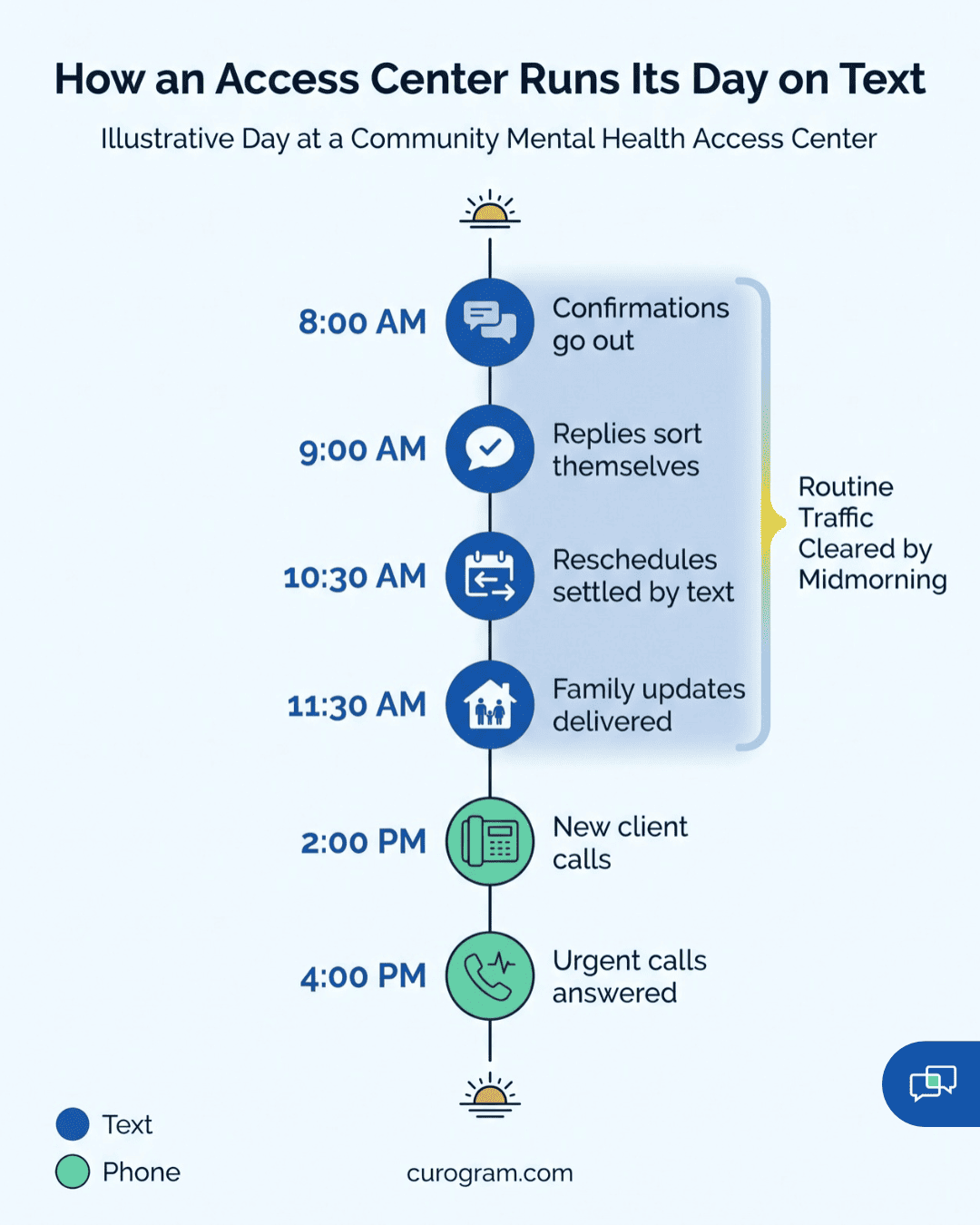
A Day on Text: Step by Step
Take an illustrative agency with one access center and three programs: an SUD IOP group, an I/DD day program, and foster care case management.
Step 1. Send tomorrow’s confirmations in one batch. First thing, the coordinator sends confirmations to all 12 IOP group members and all 18 day program attendees. Two batches, about four minutes total. Both use saved templates, so no program name shows up on anyone’s lock screen.
Step 2. Let replies sort themselves. Most come back as “C” within the hour. The coordinator scans the thread list and marks confirmed visits in Welligent, using the same appointment status field your team already uses for phone confirmations. Nobody had to dial.
Step 3. Work the exceptions. Three clients reply asking to reschedule. One writes, “Can’t make Tuesday, work called me in.” The coordinator answers with two open slots, Wednesday or Thursday at 6 p.m., the client picks one, and the change goes into the Welligent schedule.
Step 4. Push the foster care updates. A court date moved. The case manager texts the foster parent directly, gets a “got it” back, and notes the contact in the case record. No callback, no phone tag, and no second call from a parent who heard the news late.
Step 5. Close the day with follow-ups. Late afternoon, the coordinator checks who never replied. Four day program families get one more text. Two IOP clients get a short personal note from staff they know, which tends to land better than a template.
Step 6. Leave the phone for real calls. Through all of this, the access center phone handled new-client inquiries and anything urgent. Those calls got answered on the first ring.
What Changed on the Floor
|
Task |
Phone-first day |
Text-first day |
|
IOP and day program confirmations |
30 calls, many to voicemail |
2 batches, replies sort in a thread list |
|
Reschedules |
Callback, phone tag, second callback |
Two slot options in one thread |
|
Foster care updates |
Portal message, then a confused call |
Direct text, confirmed by reply |
|
End-of-day follow-up |
Rolls into tomorrow |
One more text to non-responders |
That shift shows up in call volume too. Based on our internal research, automated texting has cut inbound calls by 24% for our clients, with phone volume dropping by up to 50% in some offices.
For an organization trying to reduce access center call volume without a new hire, that’s capacity you didn’t have last month.
Coordinators put the recovered hours into intake completion and clinical coordination.
Curogram Highlight: 2-Way HIPAA-Compliant Texting
2-Way HIPAA-Compliant Texting is the feature behind every step above. It gives your access center and program teams a shared inbox where clients text back and forth with your organization from the number they already have. There’s no app for clients to download and no portal login to forget.
Your staff get saved replies for group changes, rides, forms, and intake steps. Threads can be split by program, so the IOP team, the day program, and foster care each work their own lane while managers see the whole board.
Every message is logged. Curogram is HIPAA-compliant and SOC 2 Type II certified, with role-based access that controls who sees which threads. Texts carry a full audit trail, which a phone call never leaves behind.
It runs alongside Welligent. Your team texts from Curogram, and Welligent stays the system of record for notes, scheduling, and billing. Pair it with automated SMS reminders and the routine confirmation calls go away almost entirely.
Conclusion: Liberate Your Access Center
Your access center is carrying a communication load the portal was meant to share. For many of your clients, that portal was never set up, so the load lands on the phone.
Welligent is built for your schedule, your documentation, and your billing. Curogram is built for your clients’ thirty-second questions, and for the staff hours across programs and sites those questions take up right now. Splitting the work that way is the quickest operational gain a Welligent organization can make this year.
The test is easy to run. Count tomorrow morning’s voicemails across your access center. Then count how many could have been answered by a two-line text.
That number is your starting point. Book a demo with our team, bring your daily call counts and program mix, and we’ll map the workflow live against your actual caseloads.