
 Mira Gwehn Revilla

- Clients don’t need a Welligent Connect account, a password, an email address, or an app store visit.
- Any phone that gets texts works, including a basic flip phone with no data plan.
- Foster youth, I/DD clients and their caregivers, and people in SUD recovery can reply “YES” or ask a question, and a staff member answers.
- Curogram is HIPAA-compliant and SOC 2 Type II certified, and it signs a Business Associate Agreement.
- Based on our internal data, psychiatry practices on Curogram average an 11.03% no-show rate, against a 23.00% industry average.
Ask a Welligent agency what share of its active caseload has turned on Welligent Connect, and you’ll often get a guess. That number decides who hears from you. The portal reaches a client only after three things line up: an email address, a password they can recall, and steady internet.
Many of the people that community mental health centers, foster care agencies, and I/DD providers serve are missing at least one. A 16-year-old in placement may carry a phone but have never opened an inbox.
A man three weeks into recovery may be on his second number this year. An adult with an intellectual disability may depend on a caregiver who already juggles five logins for other services.
We think every client with a phone should be one text away from your front desk, with nothing to set up first. That’s the case for texting Welligent clients without portal login or app downloads. It’s also the most practical form of behavioral health client communication equity we know.
Attendance shows the gap. Based on our internal data, psychiatry practices using Curogram average an 11.03% no-show rate. On that same chart, the industry average is 23.00%. In plain terms, that’s about one missed visit in nine instead of nearly one in four.
For an executive director or clinical director, the question is whether the clients your mission names get your reminders at all. Welligent still does the heavy lifting for charting and multi-program billing. What it can’t do on its own is reach a client who never made it past the login screen.
The Portal Wall: What Welligent Connect Gets Right
Welligent Connect does its job. Clients who activate it can book visits, send secure messages, fill out forms, and pay balances. For a stable adult outpatient with a work email and home Wi-Fi, it’s a fine way to stay in touch with your agency.
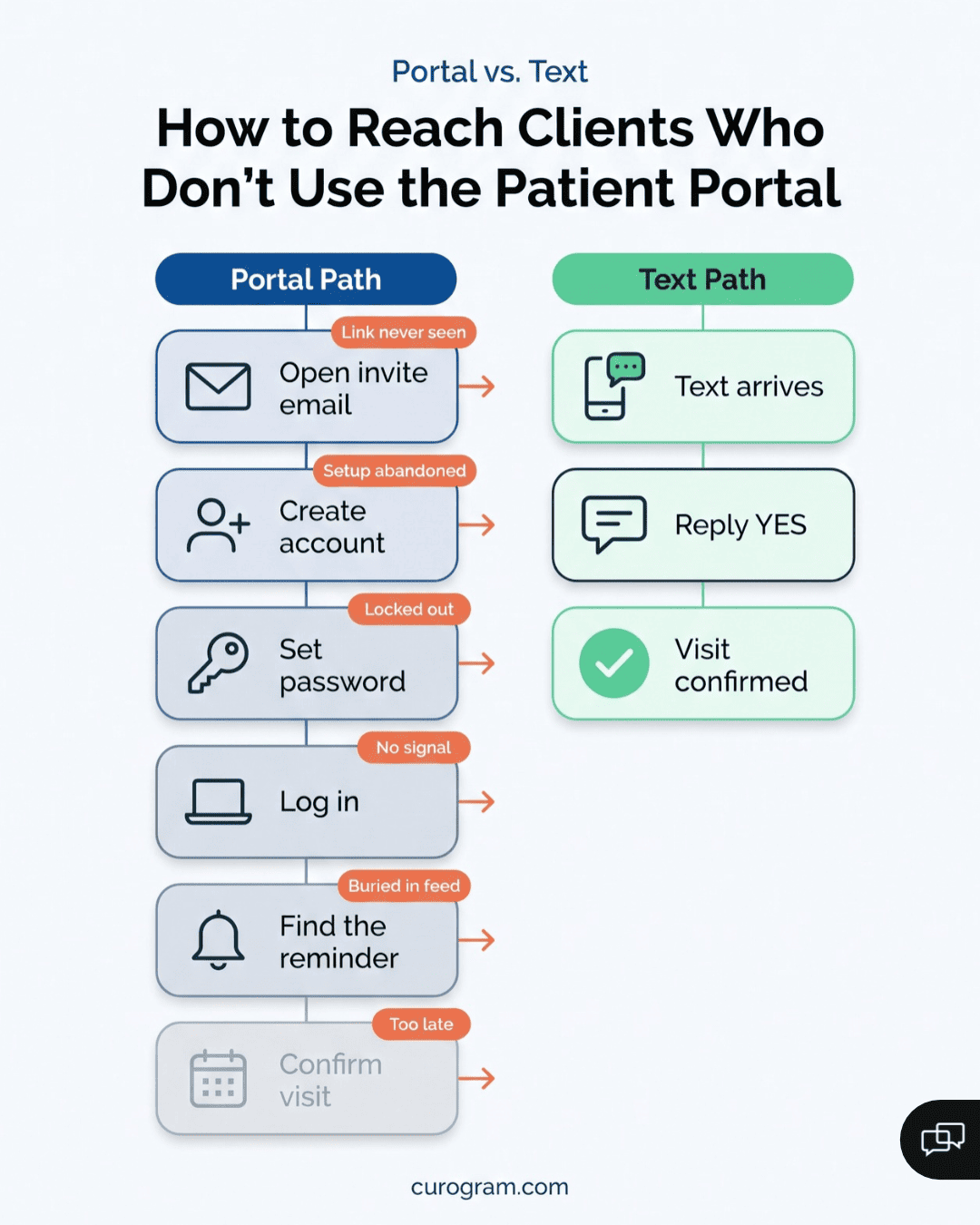
Trouble starts before any of that. Activation is a gate, and every reminder, form, and message sits behind it. If a client never gets through, the portal has nothing to offer them, and your staff often can’t tell who’s stuck on the other side.
That’s the Portal Wall: the account setup, password resets, email checks, and app downloads that stand between your agency and the client. Every portal has some version of it, and it lands hardest on the groups Welligent was built to serve.
4 Things Every Login Assumes
Each step of portal setup assumes something about the client’s life. When that assumption fails, the step fails with it.
|
Portal step |
What it assumes |
Who it tends to miss |
|
Create an account |
The client has a working email |
Foster youth, many seniors |
|
Set a password |
They’ll recall it weeks later |
Clients in crisis or early recovery |
|
Log in to read messages |
They have steady internet |
Clients with no home broadband |
|
Use the web screens alone |
They can read and click through menus |
Many I/DD clients |
Pew Research Center’s 2026 survey found that 16% of U.S. adults are smartphone-only internet users, with no home broadband. Pew also found this reliance on phones is most common in lower-income homes. Those are the homes many Welligent agencies serve.
The Clients Behind the Activation Gap
Call it the Activation Gap: the share of your caseload that never gets past the wall. It has faces.
A 17-year-old in foster care requests a password reset. The reset link goes to a Gmail account a former caseworker set up two placements ago. Nobody has opened it since.
An adult with Down syndrome lives with his sister, who is also his support person. She already manages his Medicaid portal, his pharmacy app, and his day program’s sign-in sheet. One more login isn’t happening.
A woman three weeks into recovery switched carriers after her old phone was lost. Her new number never made it into her portal profile. So the reminder for her third IOP group of the week sits in a feed she can’t see. She misses that group too.
A 74-year-old client in a senior outpatient program has a phone his grandson set up. He uses it to call and text. He will not download another app, and no one at your agency can make him.
All four wanted care. The reminder never reached them.
What a Missed Message Costs
Every unreachable client is a treatment episode at risk of ending without anyone deciding it should, often because of one missed text-sized message.
Your staff feel it first. When the portal fails, the fallback is the phone. A front desk worker dials the number from the intake form, hears that it’s no longer in service, and moves to the next name on a list of 40.
Our internal chart puts the industry benchmark for psychiatry no-shows at 23.00%. At that rate, nearly one in four booked visits goes empty.
For a CMHC billing Medicaid by the visit, each empty slot is lost revenue. It’s also a clinician hour that can’t be refilled on short notice. Group programs take a second hit, since a half-empty IOP room changes the session for everyone who did show up.
The harm runs deeper in SUD and IOP programs. Missing two or three groups in a row is often the first visible step toward dropping out. By the time staff notice, the client’s number may have changed again.
The Question Leaders Keep Asking
Directors who run these programs tend to land on the same question sooner or later: we serve the most vulnerable people in healthcare, so why does our outreach depend on email, stable internet, and remembered passwords?
It’s a fair question. In most agencies, the clients who need the most contact are the ones the portal reaches least. A foster youth with three placements in a year needs more reminders than a stable adult outpatient, and right now gets fewer.
The Direct Text Line: Why Text Survives the Digital Divide
Pew Research Center puts cellphone ownership at 98% of U.S. adults in 2026. Not every one of those phones is a smartphone, and not every one has a data plan. Every one of them can receive a text.
That’s the core of the Direct Text Line. SMS needs no account, no app, no inbox, and no Wi-Fi. A text reaches a prepaid flip phone, a cracked hand-me-down, or a caregiver’s phone in the same way. Any fix for the digital divide behavioral health communication keeps running into should start with this channel.
For a director, this changes what “reachable” means. With texting, a client is reachable if you have a phone number on file, which in most caseloads is nearly everyone.
What the Client Sees on Their Screen
From the client’s side, there’s nothing to learn. A message shows up like any text from a friend:
Hi Jordan, this is Eastside Family Services. You have a visit Thu at 3:30 PM. Reply YES to confirm or text us if you need to change it.
(Names and wording are an example, not a real client.)
Jordan replies “YES,” and the visit is confirmed. Or Jordan writes, “can i come at 4 my bus is late,” and a staff member answers in the same thread.
Compare that with “download our app and create an account.” One request takes a few seconds and a thumb. The other takes an email address, a password, a store download, and a login screen. For many of your clients, that gap decides whether they show up or drop off.
How Curogram Works Alongside Welligent
Welligent doesn’t offer a public API, so we won’t pretend there’s a deep plug-in sync. Curogram works next to Welligent through practical workflow integration. Your staff keep Welligent as the system of record for clinical notes, treatment plans, and multi-program billing, and they use Curogram for client texting.
Nothing about your Welligent setup changes. You keep the EHR you paid for and trained everyone on. Curogram has already published guides on Welligent mass messaging and Welligent automated reminders, and those workflows are in use today.
Where CaredFor Fits
If your agency runs ContinuumCloud’s wider stack, you may already use CaredFor. It’s a solid alumni and peer-support app, and community matters in recovery. Clients who join it get group check-ins and a place to stay connected after discharge.
CaredFor still needs a download, though. That puts it behind the same wall for day-to-day outreach. CaredFor builds community for clients who opt in. Curogram reaches everyone with a phone, including the clients who would never install another app.
Program by Program
Each program type sets up texting a little differently. The main choices are who gets the message, how far ahead it goes out, and how much detail the wording can safely carry. Settle those for each program before the first reminder. Keep each program’s templates separate so staff can’t send the wrong version.
Foster Care
SMS outreach for foster youth programs fits how teens already talk. Coordinators can text a youth about a court date, and text the foster parent about the same visit in a separate thread. No one needs a shared login.
Placement changes are where this pays off. When a youth moves homes, the coordinator swaps the caregiver contact in Curogram that afternoon. The youth’s own number stays the same, so the thread with your agency doesn’t break.
I/DD Day Programs
Texting I/DD clients and caregivers works well for attendance. A day program can send a short text the evening before. A caregiver replies “YES” or “out sick,” and staff adjust transport and staffing before the van leaves. For clients in group homes, the text can go to the house phone or the shift lead’s line, whoever handles mornings.
SUD and IOP Programs
Reaching SUD clients by text calls for care in the wording. Messages should name the visit and time but never the program type, diagnosis, or treatment. Under 42 CFR Part 2, with its compliance date of February 16, 2026, keeping those details off a lock screen is plain good sense.
A reminder like “You have a visit Tue at 10 AM. Reply YES to confirm” tells a roommate nothing.
This is no-portal client engagement built around the phone each client already carries.

The Reachable Caseload: What the Numbers Show
Based on our internal data, practices on Curogram run no-show rates 53% below industry average. The specialty split matters most here. In psychiatry, Curogram practices average 11.03% against an industry average of 23.00%.
One clinic shows how fast this can move. Atlas Medical Center cut its no-show rate from 14.20% to 4.91% in three months using automated reminders and two-way texting.
Atlas is a medical practice, so treat its result as a signal. For behavioral health, the psychiatry figure above is the closer match.
A Worked Example: One IOP Program
Take an illustrative IOP program with 30 active clients. Each attends three groups a week, so the program books 90 group seats weekly. Now apply the two psychiatry rates from our internal chart.
|
Industry rate (23.00%) |
Curogram rate (11.03%) |
|
|
Group seats booked per week |
90 |
90 |
|
Seats missed per week |
20.7 |
9.9 |
|
Seats filled per week |
69.3 |
80.1 |
|
Extra seats filled per year |
about 560 |
These figures are illustrative math, not a client result. Still, the gap is about 11 more filled seats every week. Over a year, that’s roughly 560 group sessions your clinicians already staffed and your clients actually attended.
Group care makes the gain bigger than the count suggests. A group of eight that drops to five feels thin, and clients notice. Fuller rooms give peers more to work with, which helps the next week’s attendance too.
In that program, the text flow runs like this:
- Two days before each group, Curogram sends an automatic reminder with the day and time only.
- Clients reply YES, or text a question like “is group still at 6.”
- Staff see unanswered reminders and call those few clients the day before.
- If a client texts that they can’t come, staff log it in Welligent and offer the next open slot.
- After a missed group, staff send a short check-in text the same afternoon, while there’s still time to re-engage.
Curogram Highlight: 2-Way HIPAA-Compliant Texting
2-Way HIPAA-Compliant Texting gives your Welligent agency a direct line to every client with a phone. Clients don’t create an account or download anything. They get a normal text and reply in their own words.
On your side, staff send and answer messages from Curogram while Welligent stays your system of record. Automated reminders go out on the schedule you set. Client replies come back into the same thread. Your team can see who confirmed, who asked a question, and who hasn’t answered yet.
Compliance is handled up front:
- Curogram is HIPAA-compliant and SOC 2 Type II certified.
- We sign a Business Associate Agreement with your agency.
- When a client texts STOP, the opt-out is applied automatically, which supports your TCPA compliance.
- Templates can be written to leave out program names and treatment details, which suits SUD programs working under 42 CFR Part 2.
The same no-portal idea carries into other Curogram tools. Easy Telemedicine sends a link the client taps to join a video session. Text-to-Pay sends a payment link that works for clients without a stable mailing address.
Based on our internal data, practices using Curogram’s automated reminders hold an average confirmation rate above 75%.
Conclusion: Communication Equity is a Text Message
Every client with a phone can be one text away from your agency. The portal stays in place for clients who want records access and self-scheduling. No one gets left out for lacking an email address, a password, or an app.
Think of the two tools as covering different clients. Welligent Connect serves your records and the clients who opt into it. Curogram fits the rest of their lives: shelter stays, borrowed phones, no inbox, and no patience for one more password.
We’d push one question onto the agenda of your next leadership meeting. What share of our active caseload has actually activated a portal account, and how do we reach everyone else? If no one can pull that figure from a report, it’s the first number to get.
Schedule a demo to see how Curogram reaches the clients your portal can’t. There’s no client-side setup and nothing for anyone to download.