

8 min read

High-Deductible Imaging Payments: Same-Day Collection for StreamlineMD

High-Deductible Imaging Payments: Same-Day Collection for StreamlineMD
💡 Setting up SMS payment links in StreamlineMD takes four steps. Connect your Curogram account through FHIR or HL-7. Set your payment link triggers in the dashboard. Customize the SMS message your patients receive. Then run a test before you go live.

Most billing managers finish the full setup in under 30 minutes. This guide walks billing staff and practice managers through each step. It includes screenshots, quick compliance checks, and easy troubleshooting tips.

By the end, you will know how to launch text-to-pay staff operations at imaging center sites without slowing down clinical work. The result is faster payments, fewer paper statements, and a lighter billing queue. Your team gets back hours each week.

A patient walks out of your imaging center after a CT scan. The next day, they are back at work.

Two weeks later, a paper bill shows up in their mailbox. By then, they barely remember the visit, and the statement collects dust.

This is the gap that drains cash flow. Paper statements collect at around 20% on average. SMS payment links collect at 40 to 50%. That gap shows up in your AR aging report each month.

But many billing teams hesitate to switch tools. They worry about HIPAA risk. They worry that staff training will eat up weeks. Both fears are fair, but both are easy to fix.

This guide is for billing managers, revenue cycle leads, and practice managers who run StreamlineMD every day.

It walks you through SMS payment setup with Curogram, step by step. No jargon, no fluff, just steps you can run today.

You will see how to plug Curogram into StreamlineMD, set up triggers, build a clean SMS template, and stay compliant.

You will also learn how to spot common setup mistakes early. Most teams finish full setup in under 30 minutes. We will also flag the small choices that quietly slow teams down.

The goal is simple. Get patient balances paid faster. Cut down on long phone calls and follow-ups. Free your billing staff to work on claims and denials, not past-due notices.

By the end, you will have a clear text-to-pay staff implementation guide for your team. Each section maps to a real step in your dashboard. You can follow along while logged in, or save the guide for your IT lead.

Let us start with where most cash flow problems begin. That is the workflow burden paper-based billing creates inside your imaging center. Knowing the villain is the first step to beating it.  

The Villain: The Collections Workflow Burden

Most billing teams in radiology and imaging know this pain well. Paper statements take days to print and weeks to land.

By then, patients forget the visit, and your team chases payments by phone. The friction adds up across every shift, every week, every month.

The Hidden Cost of Manual Billing

Most imaging centers measure billing costs in obvious places. They count printer paper, postage, and call center salaries.

Those are real numbers, but they miss the bigger picture. The hidden cost lives in time, attention, and slow cash flow.

A typical imaging center spends $800 to $1,000 each month per location on statements alone. That covers paper, ink, postage, and labor for stuffing envelopes.

Multiply that across multiple sites, and the figure climbs fast. Add the hours your team spends on past-due phone calls.

Each call eats up minutes that could go to claim work.

Internal Curogram research shows that automated SMS replaces nearly all of this manual work. The dollar savings show up first.

But the bigger win is staff focus. Billing teams stop chasing patients and start working on denials and appeals.

Why Paper Statements Lose the Race

Patient memory of a visit fades fast. Recall of a clinical event drops sharply within two weeks. Paper statements often arrive 10 to 14 days after the study. By then, the patient barely connects the bill to the visit.

This is why paper collection rates plateau near 20%. They are not bad statements. They simply arrive too late to be top of mind.

SMS sent within hours of the study lands while the visit is fresh. Patients open the text, tap the link, and pay in under a minute.

Collection rates land at 40 to 50%, based on Curogram client data from clinical settings. The math is simple: speed of contact drives speed of payment.

Every day a balance ages out, your odds of getting paid drop.

The Strain on Your Billing Staff

Manual billing puts steady pressure on your team. Front-desk and billing staff field constant balance questions.

They re-print lost statements, mail second notices, and field angry calls. None of this work moves AR forward fast.

Practice managers feel the strain in turnover and morale. Billing staff are skilled in coding, claims, and denial work.

When they spend hours each day on collections calls, that skill goes unused. The role they signed up for fades into a queue of follow-ups.

That hurts retention. Mistakes creep in when smart people do repetitive low-value work.

The fix is not more headcount. The fix is to reduce manual workload text-to-pay tools can absorb in seconds.

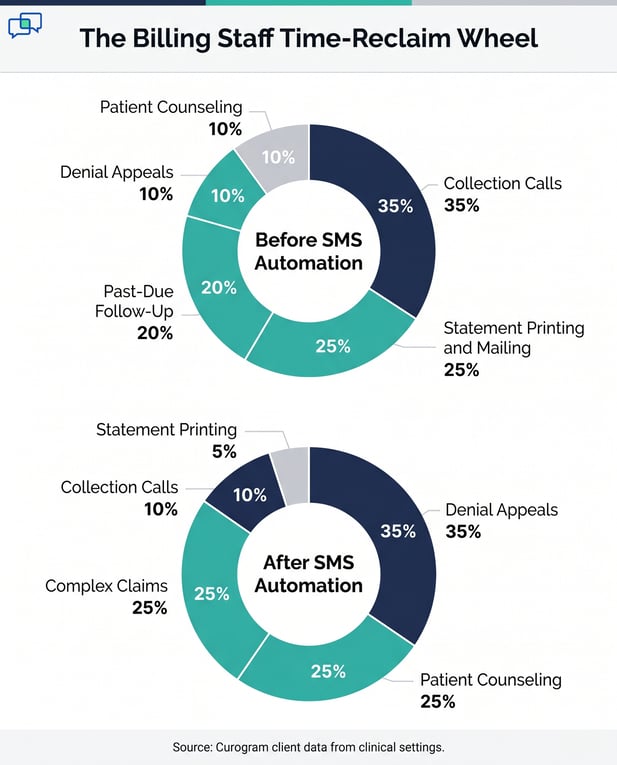
When automation handles the routine, your team can spend more time on the work only humans can do. That includes denial appeals, complex claims, and patient-financial counseling.

Infographic showing billing staff time allocation before and after SMS automation

The Guide: The SMS Collections Platform

Curogram closes the gap between StreamlineMD's billing engine and your patient's phone. The setup is short. Most teams go live in under 30 minutes. Here is how the four-step flow works in practice.

Step 1: Connect Curogram to StreamlineMD

Log into StreamlineMD as an admin. Open the Integrations tab and enable FHIR R4 or HL-7 v2.5. Curogram supports both standards, so pick what your IT team prefers. Generate an API token or key for Curogram to use.

Copy that token into your Curogram dashboard. Store the original safely in your password manager. Never paste API keys into email or shared docs.

Send a test message from StreamlineMD to Curogram to confirm the connection works both ways. If the test fails, check token formatting and firewall rules. Once the test passes, move on to step two.

Step 2: Build the Payment Workflow

In your Curogram dashboard, go to Automation, then Payment Workflow. This screen is the heart of text-to-pay dashboard management for billing teams.

Define your trigger as: when a patient balance is recorded in StreamlineMD, send a payment link. From here, you set the rules that fit your practice.

Set Triggers and Send Delays

Choose when SMS payment links go out. The most common options are immediate, 4 hours after the study, or the next business day.

Most imaging centers pick the 4-hour delay. That gives front-desk staff time to confirm the balance is correct before patients see it.

Define Balance Thresholds and Retry Rules

Set a minimum balance for SMS payment links. Many practices start at $50 or higher to avoid sending links for small co-pays.

Add retry logic: if a patient does not respond within 3 days, send a friendly reminder. Set a frequency cap so the same patient never gets more than one link per balance per month.

Step 3: Craft the SMS Template

Your message template should be short, clear, and HIPAA-safe. Stay under 160 characters when possible.

Example: "Hi [Patient Name], your [Imaging Center] balance is $[Amount]. Pay here: [Link]. Questions? Call [Phone]."

Avoid any clinical detail. No diagnoses, no procedure names, no medical record numbers. Curogram's payment landing page can carry your logo, brand colors, and practice details. That keeps the patient experience consistent without putting PHI in the SMS body.

Step 4: Verify Compliance Before Going Live

Before your first live send, run a quick compliance check. Confirm all patient phone numbers in StreamlineMD are accurate.

Confirm SMS opt-in consent is on file (Curogram keeps the audit trail). Review your message template one more time for HIPAA safety.

PCI compliance is built in. Curogram's payment links use PCI DSS Level 1 infrastructure. No payment card data ever touches your servers or your StreamlineMD instance.

After your test send works, flip the switch and go live with practice manager text-to-pay automation in place. 


The Success: Text-to-Pay Transformation

The wins show up fast. Within the first 30 days of going live, most imaging centers see clear gains in three areas: collections, staff time, and patient feedback. Here is what the numbers look like in real practice.

The Metrics That Move

The biggest shift is in the collection rate. Paper statements collect at around 20% on average.

Curogram client data from clinical settings shows SMS payment links collect at 40 to 50%. That is more than double the recovery rate.

Days-to-payment also drops sharply. Paper statements take 30 to 60 days to clear for most balances.

SMS payment links bring that to 1 to 2 days for the patients who pay. For a center with $500K in monthly AR, that is a major working capital boost.

Statement costs go to nearly zero. Practices report savings of $800 to $1,000 per location per month on paper, postage, and follow-up labor. Across a multi-location group, that adds up to $9,600 to $12,000 in pure cost savings each year per site.

Metric

Paper Statement

SMS Payment Link

Collection rate

Around 20%

40 to 50%

Days to payment

30 to 60 days

1 to 2 days

Monthly cost per location

$800 to $1,000

Near zero

Manual staff hours

High

Minimal

Source: Curogram client data from clinical settings.

The Shift in Staff Time

Staff time is the second big win. Billing teams report that SMS automation removes most routine collection calls.

Reps go from chasing past-due balances to working on denials, appeals, and complex claims. That work brings in higher dollars per hour spent.

Curogram client data also shows up to a 30% lift in front-desk and billing staff productivity. Less time stuffing envelopes. Less time on hold with patients. More time on the work that needs human judgment.

The Combined Outcome

When you pair StreamlineMD's billing strength with Curogram's patient engagement layer, you get a complete loop.

Studies and procedures flow into StreamlineMD. Balances flow out as SMS payment links. Payments flow back to StreamlineMD as confirmed, posted entries.

This is the structure imaging centers need to build strong text-to-pay staff operations at scale.

River Valley FQHC and Kern Gastro have used SMS-based collection workflows to take pressure off billing teams while improving patient pay rates. Their results show the model works across very different practice sizes.

The combined outcome is faster cash, lighter staff workload, and a billing process that patients actually use. None of that requires more headcount. It just requires the right tools sitting alongside the right EMR. 

Medical staff working at her desk looking at her laptop

ConclusionTransform Your Text-to-Pay Workflow

The Collections Workflow Burden is a solvable problem. The friction between StreamlineMD's clean billing engine and your patients' phones has been the missing piece for too long. SMS payment links close that gap.

When you connect Curogram to StreamlineMD, three things change at once. First, your collection rate roughly doubles. Second, your statement costs drop close to zero. Third, your billing team gets back hours each week that used to go to follow-up calls.

The setup itself is short. Connect the integration, build the workflow, write the template, and verify compliance. Most teams complete the full process in under 30 minutes. After that, the system runs in the background.

You do not need new staff or major IT spend. You just need a tool that fits alongside StreamlineMD and respects HIPAA. That is exactly what Curogram is built to do.

Operations teams in imaging centers do not need more people. They need smarter workflows. Every hour your team spends on tasks that a system can handle is an hour pulled away from real billing work.

Text-to-pay automation turns repetitive manual steps into a clean background process. Practice manager text-to-pay automation choices, like trigger timing and balance thresholds, give you full control without daily babysitting. Once it is set, it scales with your patient volume.

This is how high-performing imaging centers grow without growing headcount.

If you are ready to see how this looks in your StreamlineMD instance, schedule a demo.


Frequently Asked Questions

How can we review patient balances before SMS payment links get sent out?

You can set a 24-hour review window in your Curogram dashboard before any SMS goes out. During that window, billing staff can flag balances for manual review or hold them. Most imaging centers auto-send to keep workflow tight, but you keep full control. The approval workflow can be tuned for your practice's risk comfort.

How does Curogram update StreamlineMD after a patient pays?

Curogram sends payment confirmation back to StreamlineMD's billing system in real time. The patient balance flips to "paid" within 1 to 2 minutes. AR aging recalculates on its own. Your billing staff see the update without lifting a finger.

How can we segment payment links based on insurance or payment status?

You can build separate workflows for different balance types in your Curogram dashboard. Common splits include patient copay vs. insurance deductible balances, new vs. returning patients, and insurance-pending vs. final bills. Each segment can have its own message tone, timing, and frequency cap. This lets you tailor the patient feel to the situation without manual sorting.

Why do SMS payment links collect more than paper statements?

Speed and ease drive the gap. SMS arrives within hours of the visit, while patient memory is still fresh. Paying takes one tap on a phone, not a check, stamp, or trip to the bank. That mix of timing and ease is why collection rates jump to 40 to 50%, based on Curogram client data from clinical settings.

How long does it take to train billing staff on the text-to-pay dashboard?

Most billing teams pick up the dashboard in under 30 minutes. The Curogram interface is built for non-technical staff, so the learning curve is short. Training covers payment triggers, template edits, and how to read the daily reports. Many practices finish staff onboarding in one quick team meeting.