

11 min read
Reclaiming Clinical Time: Efficiency with Osmind Secure Texting
Jo Galvez
:
January 31, 2026
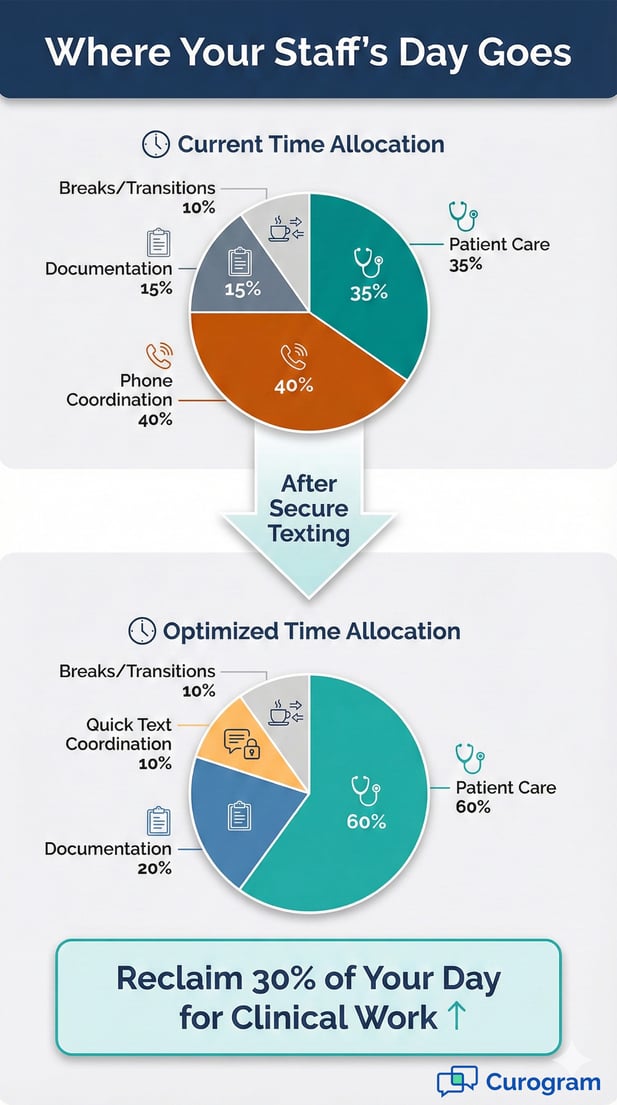
Staff often spend up to 40% of their day on admin work like confirming rides, checking fasting rules, and tracking insurance approvals. Using Curogram for these tasks cuts phone tag by 90%.
This lets nurses and staff focus on patient care instead of phone calls. The streamlined approach helps new patients start treatment faster. It also makes sure sessions begin on time, every time.
Running a ketamine clinic or Spravato treatment center means dealing with unique admin tasks. Every patient needs ride confirmations, fasting checks, and insurance verifications before each session. When your team spends hours on the phone each day, clinical care suffers.
Most interventional psychiatry practices face this same problem. The high-touch nature of these treatments creates a constant stream of logistics work.
Your front desk staff juggles 20 or more calls per day just to confirm basic details. Your nurses split their time between patient monitoring and phone management.
This admin burden slows everything down. New patients wait longer to start treatment. Same-day cancellations disrupt your schedule when you can't reach someone in time. Staff burnout increases as clinical professionals spend less time doing what they trained for.
The good news? Improving Osmind clinical workflow efficiency doesn't require adding more staff. The solution lies in how you communicate. Secure texting transforms your clinic operations by handling routine tasks through quick, two-way messages instead of lengthy phone calls.
When you reduce mental health admin work through smart automation, your team reclaims valuable time. Your psychiatry practice automation tools should work with your existing systems.
They should make life easier, not more complicated. Ketamine clinic staff productivity improves when technology handles the repetitive work.
This guide shows how secure texting specifically helps with interventional psychiatry care coordination. You'll learn how to streamline Spravato onboarding and manage other treatment logistics.
Most importantly, you'll see how these changes let your clinical team focus on what matters most—providing exceptional patient care.
The Admin Bottleneck: Why Phone-Based Coordination Stalls Growth
Phone calls create major slowdowns in busy psychiatry clinics. Each call takes several minutes, often requires multiple attempts, and pulls staff away from other tasks.
When you multiply this across dozens of daily interactions, the time cost becomes massive. This admin burden directly limits how many patients you can serve.
The High-Touch Burden
Interventional treatments demand more prep work than standard appointments. Each Ketamine or Spravato session requires several safety confirmations. Your staff must verify transportation arrangements before every visit. They need to confirm that patients followed fasting protocols correctly.
Making these checks by phone creates a permanent backlog. Front-desk staff play phone tag for hours each day. They leave voicemails that patients don't check. They wait on hold when calling patients back. For clinics treating 20 or more patients daily, this becomes unsustainable.
The Real Cost of Phone Tag
Consider what happens when you can't reach a patient. Staff members make multiple call attempts throughout the day. Each attempt interrupts other work and breaks concentration. Meanwhile, appointment slots sit in limbo because you need confirmations before scheduling the next patient.
This inefficiency compounds during busy periods. Your clinic might handle 15 scheduled sessions plus several intake calls for new patients. Each one needs follow-up coordination. The phone becomes a bottleneck that limits your daily capacity.
How Admin Work Reduces Available Treatment Slots
Every minute spent on the phone is time not spent on patient care. When your team dedicates 40% of their day to coordination calls, that's 40% less capacity for treatments. You can't increase patient volume without first solving the communication bottleneck.
The impact extends beyond just time. Staff exhaustion from constant phone work leads to errors. Missed messages result in last-minute schedule changes. These problems cascade, creating more work for everyone.
The Onboarding Delay
New patients face the longest wait times because onboarding requires the most coordination. You need insurance cards, medical history forms, and consent documents before the first session. Collecting these items through traditional methods takes weeks instead of days.
Phone calls don't work well for document collection. You can't send forms over the phone. Mailing paperwork adds days to the process. Patient portals sound good in theory, but suffer from low adoption rates.
Why Time-to-Treatment Matters
Patients seeking ketamine or Spravato treatments often need help quickly. Depression and treatment-resistant conditions create urgent situations. Every day of delay matters to someone in crisis. Slow onboarding means patients wait longer for relief.
The delay also affects your clinic operations. Incomplete paperwork causes appointment rescheduling. This creates gaps in your schedule and reduces revenue. When you streamline the onboarding process, everyone benefits.
Insurance Verification Slowdowns
Insurance companies require specific documentation for interventional treatments. Getting this information through phone calls and faxes takes forever. Patients forget to send the required documents. Staff spend hours chasing down missing paperwork.
These delays prevent you from confirming coverage quickly. You can't schedule first appointments until insurance is verified. The entire process grinds to a halt over simple document transfers that should take minutes.
The Provider Burnout Factor
Clinical staff didn't train to spend their days on the phone. Nurses and medical assistants want to focus on patient care, not logistics coordination. When admin tasks consume their time, job satisfaction drops. This leads to stress, exhaustion, and eventually turnover.
The burnout problem hits interventional psychiatry especially hard. These treatments require clinical vigilance and emotional presence. Your staff can't provide quality care while distracted by ringing phones and pending callbacks.
The Cost of Staff Turnover
Replacing burned-out staff costs thousands of dollars per position. You lose institutional knowledge when experienced team members leave. New hires need training time before reaching full productivity. Meanwhile, the remaining staff carry an extra workload during transitions.
High turnover also affects patient care quality. Patients build relationships with specific staff members. Frequent changes disrupt continuity of care. This matters especially in mental health treatment, where trust plays a crucial role.
When Clinical Work Gets Compromised
Phone interruptions prevent nurses from focusing on patient monitoring. They miss subtle signs that require immediate attention. Safety checks get rushed when staff feel pressured to answer ringing phones. This creates risks that no clinic should accept.
Quality interventional psychiatry care coordination requires presence and attention. Your team needs time for integration support after Ketamine sessions.
They need bandwidth for patient education about Spravato side effects. Administrative overload makes this level of care impossible to maintain consistently.
Streamlining the Osmind Journey with Curogram
Secure texting transforms how clinics handle routine coordination tasks. Instead of phone calls taking 5-10 minutes each, text messages resolve issues in under a minute. This shift dramatically improves Osmind clinical workflow efficiency. Your team handles more patients without adding staff hours.
Rapid Document Capture
Getting documents from patients becomes simple with text messaging. Need an insurance card photo? Send a quick text request. The patient snaps a picture and sends it back within minutes. This replaces days of waiting for mailed documents or portal uploads.
Prior authorization forms work the same way. Patients receive a text asking for the document. They photograph it with their phone and reply. Your staff gets the image instantly, ready to upload into the patient's Osmind profile.
Why Photo Messaging Works Better
Traditional document collection creates friction at every step. Patients must find scanners or make office visits. They struggle with portal logins and file uploads. Many give up halfway through, causing delays.
Texting removes all these barriers. Everyone knows how to send a photo via text. It takes seconds and requires no technical knowledge. This simplicity dramatically increases completion rates for document requests.
Faster Insurance Verification
Insurance verification speeds up when you get information quickly. Text a patient in the morning requesting their card. Receive the photo by afternoon. Start the verification process the same day instead of waiting a week.
This acceleration directly impacts your schedule. You can confirm coverage and book first appointments faster. Patients start treatment sooner. Your clinic fills appointment slots more efficiently.
Automated Logistics Confirmation
Confirming ride arrangements for tomorrow's Ketamine sessions used to mean 15 separate phone calls. Now you send one message to all scheduled patients. They reply YES or NO. Your entire confirmation process completes in minutes instead of hours.
This approach works for any recurring confirmation need. Fasting reminders go out the night before sessions. Medication hold instructions reach patients at the right time. Each message includes clear yes/no response options.
Bulk Messaging With Personal Touch
The system sends messages to multiple patients simultaneously. But each patient sees only their own conversation. Messages include their name and appointment details. This maintains the personal connection while saving massive amounts of time.
Staff can also handle individual questions through the same interface. If a patient has concerns about fasting instructions, they text back. Your team responds directly within the conversation thread. This flexibility combines efficiency with personalized care.
Real-Time Schedule Updates
When confirmation responses come back, you know your schedule status immediately. Patients who can't make tomorrow's appointment should text back right away. This gives you time to fill the slot with someone from your waitlist.
Compare this to phone confirmation attempts. You leave voicemails and wait for callbacks. Sometimes you don't know about cancellations until the morning of the appointment. Texting eliminates this uncertainty.
The Shared Inbox Advantage
Team communication becomes seamless when everyone accesses the same message history. No more wondering "Who talked to this patient?" or "What did we tell them yesterday?" The shared inbox shows all interactions in one place.
This visibility proves especially valuable during shift changes. The evening nurse sees what the morning nurse discussed. Questions get answered consistently. Patients don't repeat information multiple times.
Better Care Coordination Between Shifts
Clinics operating extended hours need smooth handoffs between teams. With phone-based systems, critical information gets lost in verbal handoffs. Important details slip through the cracks.
The shared text inbox creates a written record. Staff members quickly scan recent conversations to understand each patient's situation. They see pending issues that need follow-up. This continuity improves both efficiency and safety.
Accountability and Quality Control
Message history provides documentation of all patient interactions. Supervisors can review communication quality. They can identify training opportunities when staff members struggle with certain situations.
This record also protects your practice. If questions arise about instructions given to patients, you have clear documentation. The timestamp and message content show exactly what was communicated and when.

Maximizing Patient Throughput Without Compromising Care
Improving operational efficiency shouldn't mean rushing patients or cutting corners on safety. The goal is to eliminate wasted time on admin tasks, so your team can focus more on clinical care. Smart automation helps you treat more patients while maintaining or even improving care quality.
Reducing Same-Day Cancellations
Last-minute cancellations cost your clinic revenue and waste appointment slots. Often, these happen because patients discover logistical problems too late. They can't find a ride. They forgot about the fasting requirement. These issues could have been resolved with earlier communication.
Text messaging catches these problems 24 hours in advance. Your system sends pre-appointment reminders with specific requirements. Patients who spot issues have time to address them. Those who truly can't make it can cancel early enough for you to rebook the slot.
Proactive Problem Solving
When patients text back with concerns, staff can troubleshoot immediately. Someone worried about transportation? Provide ride service information right away. Confused about medication holds? Send clear instructions via text.
This proactive approach prevents no-shows. Patients feel supported rather than stressed. They know they can reach out with questions. This confidence reduces anxiety and improves treatment compliance.
Filling Empty Slots Quickly
Even with perfect coordination, some cancellations happen. Medical emergencies or family crises arise. What matters is how quickly you fill the empty slot.
Text your waitlist patients instantly when a spot opens. The first person to confirm gets the appointment. This speed maximizes schedule utilization and keeps revenue steady.
Scaling Onboarding
New patient intake determines how fast your practice can grow. Slow onboarding limits your capacity regardless of demand. Secure texting accelerates every step from initial inquiry to first treatment.
Walk patients through the process via text messages. Send the intake packet. Request insurance information. Provide consent forms. Each step happens quickly because patients can respond on their schedule.
Moving From Inquiry to Treatment Faster
Traditional onboarding takes two to three weeks. You mail forms, wait for returns, and make follow-up calls. Text-based onboarding completes in days. Patients move from inquiry to first treatment 30% faster.
This speed serves patients better. It also increases your monthly new patient volume. You can accommodate more people without changing your clinical capacity.
Keeping Momentum During Intake
Long onboarding processes lose patients. Some find other providers. Others lose motivation as weeks pass. Fast communication maintains engagement.
Each completed step via text creates momentum. Patients feel progress toward treatment. This psychological factor matters tremendously in mental health care, where hope and motivation are crucial.
Focusing on the Therapeutic Window
Interventional psychiatry demands your full attention during treatment sessions. Ketamine and Spravato administrations require careful monitoring. Patients need emotional support during and after these powerful experiences.
When administrative tasks are handled efficiently outside treatment times, your clinical staff can be fully present during sessions. They're not distracted by ringing phones. They don't rush through integration conversations to return calls.
Quality Matters More Than Quantity
Yes, operational efficiency helps you treat more patients. But the deeper benefit is improving care quality for everyone. Your team has mental bandwidth for therapeutic presence.
Patients notice this difference. They feel heard and supported. This improves outcomes and builds your reputation. Word spreads about clinics that combine cutting-edge treatments with exceptional care.
Staff Satisfaction Improves Treatment Quality
Happy, unstressed staff provide better care. When your team spends time on meaningful clinical work instead of phone tag, job satisfaction increases. This translates directly into patient experience.
Nurses who feel fulfilled stay longer. Experienced staff develop deeper expertise in interventional treatments. Your clinic benefits from stability and growing competence.
Frequently Asked Questions About Workflow Automation
Clinics considering secure texting systems often have similar questions about integration, training, and daily operations.
Understanding how these tools work with existing software helps practices make informed decisions. Here are answers to the most common questions about implementing workflow automation.
Does this integrate with the Osmind calendar?
Yes, Curogram connects directly with your Osmind calendar system. This integration enables automated communication based on appointment schedules. The system knows when patients have upcoming sessions and triggers relevant messages at the right times.
Pre-treatment preparation messages are sent automatically before scheduled appointments. Post-treatment follow-ups occur on the correct timeline. Your team doesn't need to manually track when to send each message.
How Calendar Integration Saves Time
Without integration, staff must check the schedule and manually send messages. They might miss appointments or send reminders at the wrong times. Calendar integration eliminates these errors.
The system sees your Ketamine session at 2 PM tomorrow. It sends a fasting reminder tonight. It triggered a ride confirmation this morning. All of this happens automatically based on your appointment schedule.
Customizing Message Timing
Your practice sets the rules for when messages are sent. Want fasting reminders 12 hours before appointments? Configure that timing once. Need ride confirmations 24 hours in advance? Set that rule too.
These settings apply automatically to all future appointments. Your team doesn't repeat the same work for every patient. The system handles routine communication while staff focus on exceptions and special cases.
Can we manage multiple locations from one dashboard?
Absolutely. Growing interventional psychiatry groups need tools that scale across locations. Curogram provides filters that let you view and manage messages by specific sites or providers.
Your main office sees all communication across the practice. Individual location managers can filter to see only their patients. Providers access messages related to their own caseload. This flexibility supports different management structures.
Standardizing Across Multiple Sites
Multi-location practices benefit from consistent communication. Create message templates once and share them across all sites. This ensures patients receive the same quality experience regardless of which location they visit.
Standardization also simplifies training. Staff who transfer between locations already know the communication system. They don't need to learn different processes at each site.
Location-Specific Customization
While maintaining consistency, you can still customize for local needs. One location might need Spanish-language messages. Another might have different transportation resources to share with patients.
The system allows both standardization and customization. Set practice-wide defaults while permitting location-specific adjustments. This balance serves diverse patient populations well.
How long does it take to train staff?
Most teams reach full proficiency in less than 30 minutes. The interface looks and works like the texting apps everyone already uses. This familiarity dramatically reduces training time.
Staff don't need technical expertise or special computer skills. If they can text on their personal phone, they can use Curogram. This simplicity matters when hiring and onboarding new team members.
Training That Fits Your Schedule
You don't need to dedicate entire days to training sessions. Staff can learn during regular work hours. They practice by handling actual patient communication with supervisor support.
This hands-on approach builds confidence quickly. Within a few hours, new users handle most situations independently. Complex scenarios get easier with practice over the first week.
Ongoing Support and Resources
Questions that arise after initial training get answered quickly. Support resources include help documentation, video tutorials, and direct access to customer service. Your team never feels stuck or unsupported.
Regular updates add features without requiring retraining. The system evolves to meet practice needs while maintaining its simple, familiar interface. This means your investment in training remains valuable long-term.
Reclaim Your Day for Better Patient Care
Your clinic exists to help patients recover from treatment-resistant depression and other serious conditions. Every hour spent on phone tag is an hour taken away from that mission. Secure messaging returns time to where it belongs—direct patient care.
The transformation happens quickly once you implement these tools. Staff who spent mornings making confirmation calls now prepare treatment rooms and review patient charts.
Nurses freed from phone interruptions provide more attentive session monitoring. Administrative efficiency directly enables better clinical care.
This shift improves everyone's experience. Patients get faster responses to questions and feel more connected to your team. They complete onboarding quicker and start treatment sooner.
Staff members feel less stressed and more fulfilled by their work. Your practice grows sustainably without burning out your team.
Osmind clinical workflow efficiency improvements ripple through your entire operation. You fill appointment slots more reliably. Revenue increases as no-show rates drop.
Your reputation grows as patients share positive experiences. Clinical outcomes improve when your team can focus on therapeutic relationships.
The question isn't whether to modernize your communication systems. It's how quickly you can make the change. Every day without these tools means more wasted hours, more staff frustration, and fewer patients receiving timely care.
Learn specifically how it will work with your Osmind setup. Discover which administrative bottlenecks you can eliminate first. Most importantly, take the first step toward reclaiming your day for what matters most—exceptional patient care. How?
Schedule a Quick Demo today to see how Curogram’s secure messaging can optimize your Osmind clinical workflow efficiency and eliminate your administrative bottlenecks.