The ROI of Automated Appointment Reminders for GE Centricity Clinics
💡 Empty appointment slots are expensive mistakes that most clinics can avoid. Every time a patient forgets their appointment, you lose money that...
16 min read
Mira Gwehn Revilla
:
January 12, 2026
Table of Contents
Enterprise patient-texting workflows for Oracle Health teams can fix a problem you feel each morning. The phones light up, the queue grows, and staff start to triage by stress.
Most calls are not rare or hard. They are simple asks about visit time, site, or a new slot. Each call still pulls one staff member off other work. Run the math on a busy day. If one call takes 4 min, then 300 calls take 1,200 min. That is 20 staff hours in one day. Now add call backs, wrong numbers, and missed notes.
In a large Oracle Health org, that drag spreads fast. One site fixes it one way, another site does the opposite. Soon, no one trusts the process. Patients call twice because they got no clear reply.
Texting can help, but only if it is run like a system. Random one-off texts just move the mess to a new place. A real workflow has steps, owners, and a record.
This post breaks down how to build that structure. You will see how shared queues, smart routing, and set replies cut call load. You will also see how teams set clear response goals without adding staff.
If your healthcare communication workflows feel loud and hard to scale, you are not alone. The fix is not “try harder.” It is to make patient texting repeatable, trackable, and safe.
Enterprise patient-texting workflows for Oracle Health teams matter because volume is not extra. In large orgs, patient access is a nonstop daily stream of asks, updates, and changes. If your only tool is the phone, the work will always outgrow the team.
Oracle Health sites often serve many clinics, labs, and sites in one network. That means one change can touch hundreds of visits. A storm can close a site.
A provider can run late. A ref order can need a quick add-on visit. Each event creates a burst of patient calls. Phone-first work does not scale with that demand. Calls are one-to-one and time locked. If the patient misses the call, you start again.
If the staff member steps away, the work pauses. That is why call queues spike, even when staff are skilled. Texting helps, but the real win is the workflow around it. A workflow turns each text into a clear path. It sets what to say, who replies, and what happens next. It also creates a log, so teams can see what was done.
Think of a simple change notice. With a workflow, the message is sent once, with a set reply path. Patients can confirm, ask a follow-up, or pick a new slot. Your team can close the loop in minutes, not hours.
The result is more than speed. Texting workflows add structure, routing, and ownership. Leads can see load by team, site, and time of day. Operations can spot patterns and fix root causes. That is how texting becomes core ops work, not a side task.
Here is a fast way to see the gap:
Assume an access team gets 1,000 patient asks a day. If half are routine, that is 500 calls you can shift to text. If each call takes 4 min, that is 2,000 min, or 33 staff hours.
With text, one agent can work many threads in one queue. The team still calls when a case is complex or urgent. But routine asks stop blocking the line for patients who need live help.
It also improves cross-team visibility. A patient may text about a ref, then ask schedule for a new date. With a shared thread, both teams see the same history. That cuts repeat work and keeps replies consistent. Leads can coach with facts, not gut feel alone.
Calls and voicemails are hard to track at scale. You can count calls, but you cannot see what each patient needs. You also cannot see which calls still need a next step.
Shift change makes it worse. One agent ends a day with 18 open calls. Another agent starts with no clear view of what was promised. Patients call again, then again, and the trust drops.
Next, follow-up work often has no clear owner. A lab team may think schedule will call. Schedulers may think the clinic will call. No one is wrong, yet the patient still waits.
This adds a real cost. A late reply can mean a missed visit or a ref that goes cold. It can also mean more calls, since patients chase the same answer.
A shared texting workflow cuts that drift. The message stays in one place. The thread shows who touched it, and what was sent. That makes handoffs safe, even across teams and shifts.
In short, enterprise work needs a shared system. When Oracle Health teams treat texting as ops infra, access feels calm. Patients get one clear path to help, and staff stop living in the phone.
Designing structured patient-texting workflows starts with one goal: predict the next step. In an enterprise setting, “good intent” is not enough. If each person writes messages their own way, the process will drift.
A strong workflow makes the same task look the same each time. It tells staff when to send a text, what to include, and how to close it. It also tells leaders how to measure it. That is how healthcare communication workflows become stable, not personal.
Start by mapping your top message types. Most Oracle Health teams see the same patterns each day. Confirm and resched. Prep and forms. Ref status and simple billing asks. Each type can become a repeatable flow.
Next, write the steps in plain terms. For each step, note the trigger, the owner, and the best reply. Then build a short set of templates. Templates cut time and reduce risk, since staff do not need to improvise.
Pilot in one site for two week: Log each edge case. Update templates. Then, roll to the next site with the same playbook fast. Share the new steps in a one-page note.
Lastly, treat every message as part of the record. Enterprise workflows work best in shared, auditable systems. That means one place to view the thread, the time, and the owner. It also means less guesswork during audits.
A centralized queue is the backbone of scale. Instead of texts living on one phone, messages land in a shared inbox. Any trained agent can pick up the next thread.
This is key for patient access teams. Patients do not care who replies.
They care that someone replies with the right info. A shared queue keeps service steady, even when staff are out. It also changes how teams work. Agents can tag a peer, add a note, or hand off to a new queue. No one has to start over. The full thread stays visible to the next person.
Managers also gain real oversight. They can see total volume, reply time, and open threads by team. They can also spot peak hours and shift load. This makes staffing a data task, not a guess.
Here is a simple example:
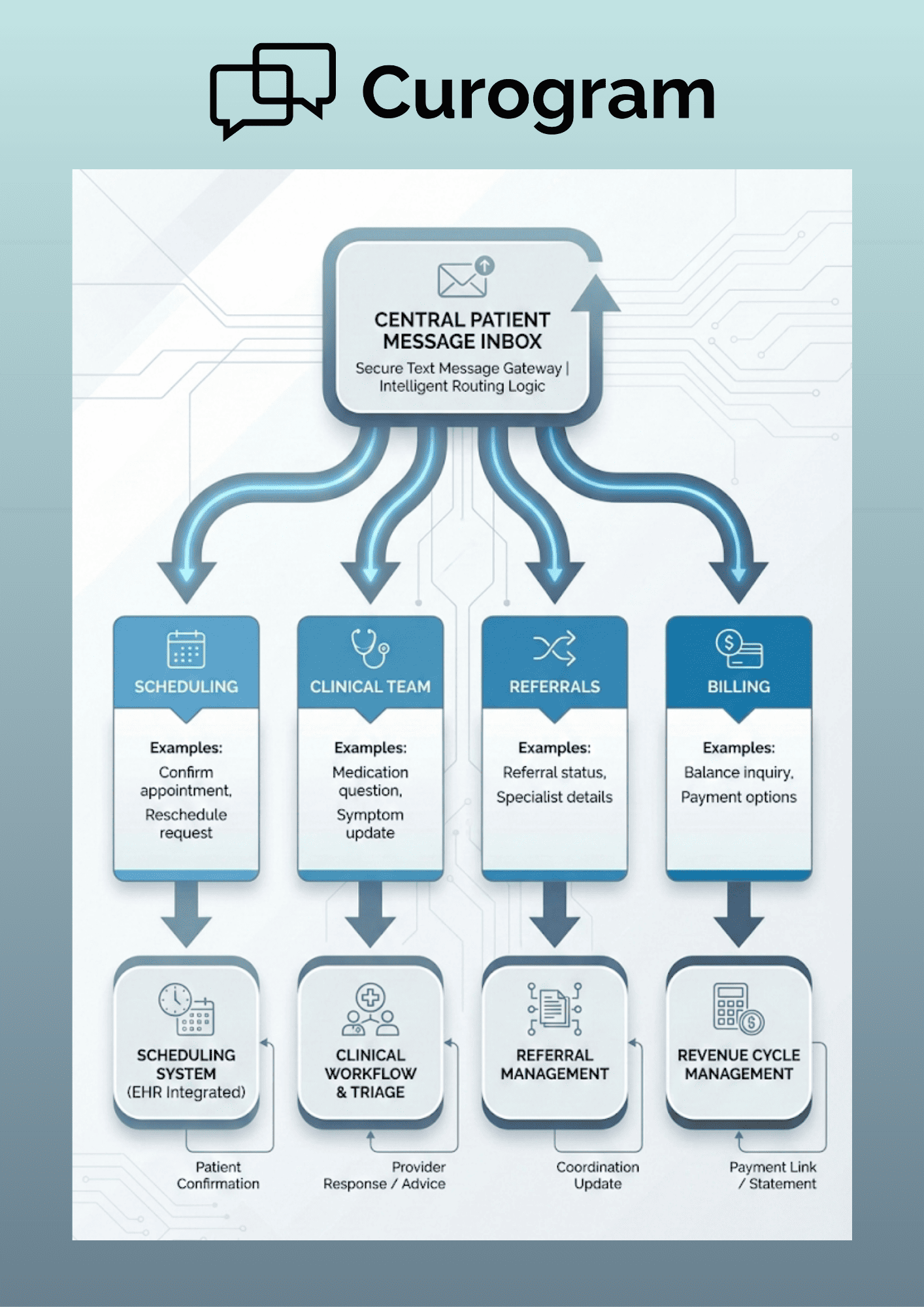
Routing rules keep speed without chaos. In an Oracle Health org, one inbox is rarely enough. You need a clear path by dept, site, and service line. Role-based access makes that safe. A scheduling agent should not see a nurse-only queue. A reference team should not see payment data if they do not need it.
Access should match the job, not the person’s device. Good routing also reduces internal handoffs. When a message lands in the right queue first, work moves fast. When it lands in the wrong place, time is lost in transfers.
Patients feel that delay right away. Build routing rules around real work. Use visit type, site, and key words as cues. Add a “triage” queue for odd cases. Then, push the thread to the right owner with one click.
Keep the rules simple at first. If you start with 20 routes, teams will ignore them. Start with 5 routes that cover most volume. Review misses each week, then refine.
When workflow, queues, and roles align, texting becomes a real channel. Teams reply faster, leaders see more, and patients stop calling back.

Reducing inbound call volume starts with a truth most leaders already know. Many patient calls are routine and repeat the same set of needs. If you answer every routine ask by phone, you lock staff into busy work.
Texting workflows shift those routine asks to a faster lane. Patients get a quick reply without hold time. Teams can handle more threads with the same headcount. Call center staff can then focus on cases that need a live voice.
This reduces stress fast. This is not about “doing less” for patients. It is about matching the channel to the task. A quick yes/no, a link, or a short note is often enough. Save calls for fear, pain, or high-risk care.
To build the right plan, start with your call log. List the top 10 call reasons for the last 30 days. Then, group them into three bins: simple, mixed, and complex. Texting should take most of the simple bin, plus parts of the mixed bin.
Here is a simple way to size the win:
Even if only half of those calls move to text, you still save time. You also reduce peaks. Phone volume peaks create long holds, which create more hang-ups.
The first step is to automate the messages that should never be ad hoc. These are tasks where the right reply is known in advance. You can build them once, then run them every day.
Appointment confirmations and reminders are the best place to start. A workflow sends a text at set times before the visit. It asks the patient to confirm or resched. When the patient replies, the status updates in the queue. If the patient needs help, the thread moves to an agent.
Directions and pre-visit instructions are next. Patients call when they are not sure where to go or what to do. A texting workflow can send the right site info and parking tips. It can also send prep notes based on visit type.
For telehealth, it can send the link and a short test-your-device tip. Scheduling questions and resched requests also fit well. Most resched calls start with the same ask about open times.
A workflow can offer two to three slots by text. It can also send a link to pick a time, if you allow self-book:
Add one more feature that many teams forget: after-hours rules. A good workflow sets an auto reply after close. It tells the patient when staff will reply. It also gives a safe path for urgent needs, like 911 or a nurse line.
Call deflect only works if service stays strong. This means texts must be fast, clear, and complete. It also means patients must feel heard.
Start with speed. A phone line has one pace: real time. A text queue can still be slow if no one owns it. Set a clear reply goal for each queue, like 15 min in work hours. Then, track it and coach to it.
Next, write messages like a human. Use short lines. Ask one thing at a time. Offer a clear next step, like Reply 1 to confirm. Patients should not need to guess what to do. Use a simple scorecard for each queue.
Track average reply time, open backlog, and the share of threads that end in a call. Also track repeat texts from the same patient in 24 hours. If repeats increase, your first reply is not clear.
Run a weekly message huddle. Pick 20 threads and review them as a team. Look for slow handoffs, weak templates, and tone issues. Update your templates the same day. Train new staff on text skills, not just phone skills. Teach when to use a template and when to write free text, as well as when to escalate to a nurse or a supervisor. This keeps service high as volume grows.
Ask patients one quick question after key threads: Did this help? Use the answers to refine weekly. Also plan for the edge cases. Some patients will not text. Some will have vision or language needs. Others will insist on a call. Your workflow should allow an easy switch to voice.
Here is an example from an imaging site:
Another example is a provider delay:
Quality also depends on tone. A text should not feel like a bot wall. Use names when you can, and use plain words. Keep the thread open for quick follow-ups. Finally, keep a phone safety net for high-risk care. If a patient shares red flag signs, route to a nurse queue. If the patient is upset, offer a call.
Texting workflows should reduce calls, not block care. When you do this well, the phone load drops in a safe way. Enterprise patient-texting workflows for Oracle Health teams help staff spend time where it matters. Patients get faster answers, and call centers stop drowning.
Supporting cross-department work is where texting workflows pay off most. Enterprise systems depend on many teams moving in sync. If each team works in its own inbox, the patient gets mixed signals.
Texting workflows keep the patient thread intact across the journey. The same message can start in access, move to sched, then move to clinic. The full history stays in view, so no one repeats the same questions. This prevents duplicate outreach and cuts back-and-forth calls.
Coordination breaks when messages do not follow the patient. A patient may ask about a ref, a prep rule, and a new date in one day. If those asks land in three tools, each team starts from zero.
With a shared workflow, teams see the same thread. Schedulers can see what clinic sent. Clinic can see what reference said. This makes replies match and keeps the plan clear.
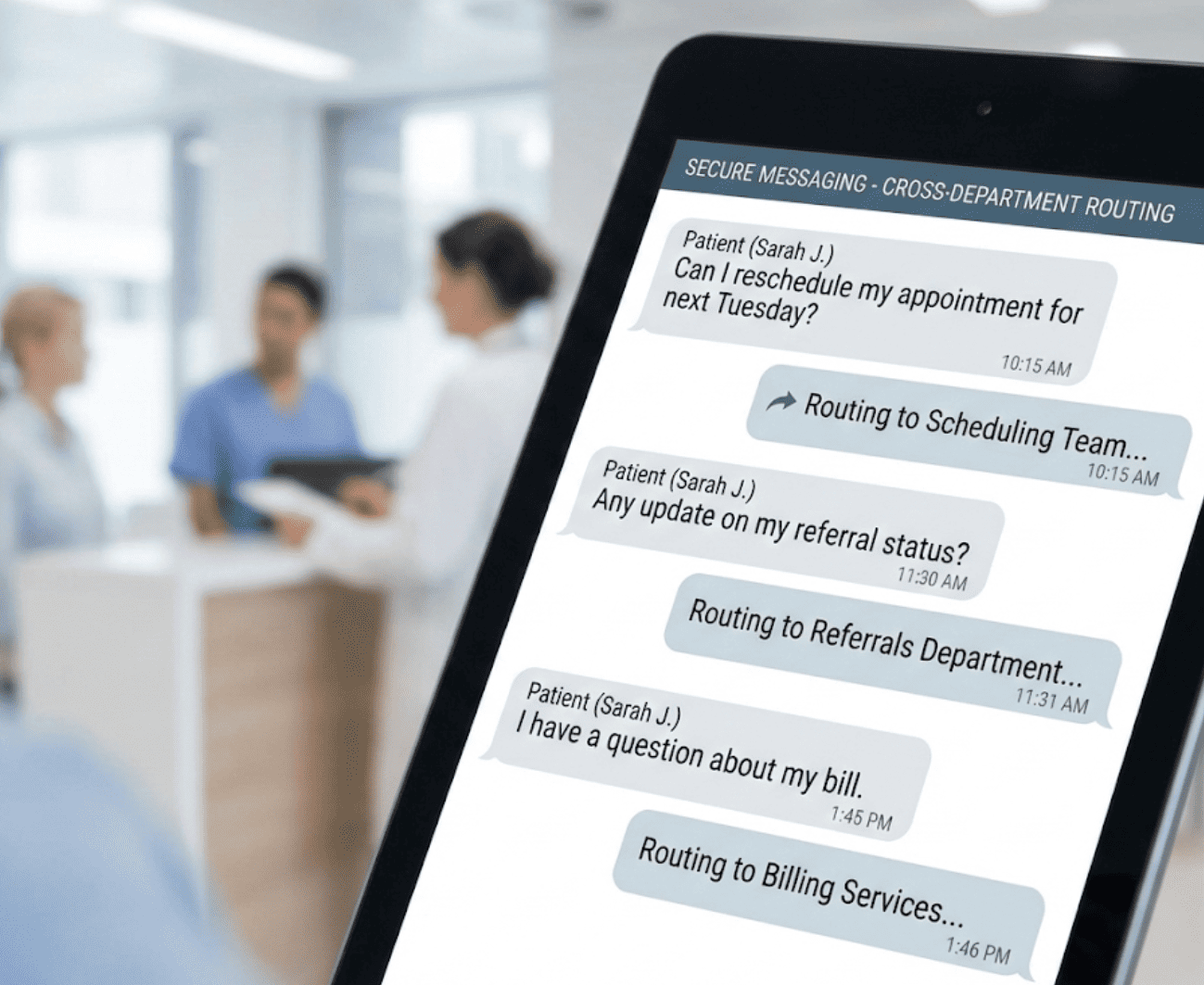
Here is an example scenario:
Shift work can break continuity fast. One person steps out, and the patient thread stalls. Patients then call, because they fear they were missed. A shared queue fixes this. Messages stay in the same place across shifts. The next agent can read the last reply and act.
Follow-ups stay clear, even when staff change. A simple rule helps: never leave a thread “open” with no owner. Use status tags like New, In Work, Waiting, and Done. At shift end, move all open threads to a handoff queue. This makes the start of shift smooth and calm.

Improving response time means setting a clear pace for patient texts. It also means making ownership visible, not implied. When the rules are clear, teams can hit them. Texting workflows create measurable standards. Leads can see reply time by queue and by hour.
They can also see where patients wait too long. That is the data you need for better ops. Use a simple weekly report. Track how many threads hit the SLA and how many miss.
If 200 of 1,000 threads miss, that is a 20% gap. Fix the top cause, then recheck next week with care.
Start by defining what “fast enough” means for each message type. A simple sched ask may need a reply in 15 min. A ref update may fit in 60 min. Meanwhile, a clinical triage ask may need a call right away.
Write those goals as simple SLAs. Post them in the team playbook. Then, set alerts for threads that pass the limit.
Once you can see the queue, you can fix the work. If one site has a daily backlog, you can shift staff for peak hours. If one message type takes too long, you can update the template. If one team needs help, you can coach with real threads.
You can also use visibility for training. New staff can shadow the best threads. Leads can show what “good” looks like in a short review. Over time, the team replies with less stress and more trust.
Enterprise texting workflows must protect PHI by design, not as an afterthought. Patient communication happens continuously, which means compliance must be built into every message.
Consumer texting tools are not designed for healthcare use. They lack the controls needed to manage sensitive data across teams, locations, and shifts.
A compliant messaging workflow limits what information is sent, who can access it, and where it is stored. It also creates a reliable record of each exchange, which is critical when questions arise about what instructions were given and when.
A compliant texting workflow uses secure message delivery to protect patient data at all times. In many cases, the safest approach is to send a secure link instead of placing PHI in plain SMS. All messages should be stored in a centralized system, rather than scattered across devices or inboxes.
Audit-ready message logs are essential at enterprise scale. These logs must include timestamps, user names, and complete conversation history. Fast search access is also important when compliance, legal, or risk teams need records. With proper logging in place, audits become a structured process instead of a last-minute scramble.
Effective control begins with role-based permissions. A scheduling agent should not have access to clinical notes, and clinical staff should not view billing conversations unless required.
Limiting access by role reduces unnecessary exposure to PHI and lowers the risk of unauthorized disclosures. Controlled access also helps eliminate informal or “shadow” texting outside approved systems.
When staff are given a secure tool that fits their daily workflow, they are less likely to rely on personal devices or consumer apps. For Oracle Health teams, this approach supports safe, scalable communication without slowing operations.
Oracle Health teams require more than basic texting functionality. Enterprise environments demand systems that support high message volume, complex workflows, and strict compliance requirements.
Curogram is designed to meet these needs by supporting enterprise healthcare operations at scale. Patient access teams can rely on shared queues, standardized templates, and clear handoffs to manage communication consistently, even during peak hours.
Curogram is also built to handle high-volume messaging without losing context. Teams can manage multiple patient conversations at once while maintaining full message history and ownership.
Leaders gain visibility into queue volume and response times across locations, which supports staffing decisions and operational oversight. This level of insight is essential for large Oracle Health organizations managing thousands of patient interactions each day.
Equally important, Curogram aligns with Oracle Health environments rather than attempting to replace the EHR. The platform adds a dedicated messaging layer that integrates into existing workflows, allowing teams to communicate with patients without disrupting established processes.
Curogram is built around workflow, not isolated conversations. Centralized teams work from a single system instead of juggling phones, email, and informal notes. When a message is reassigned, the full conversation history follows, allowing the next team member to respond without delay or rework.
The platform scales across multiple locations while maintaining consistent standards and compliance controls. By embedding secure messaging into daily operations, Oracle Health teams can move faster without compromising oversight, accuracy, or patient trust.
Enterprise patient texting is most effective when it is managed as an operational system rather than an informal communication channel.
When Oracle Health teams use shared queues, clear routing rules, and standardized templates, patient communication becomes more predictable and easier to manage.
Duplicate calls decrease because routine questions are resolved through text. Ownership is clear, handoffs are smoother, and staff no longer need to guess who is responsible for follow-up.
Texting workflows should be positioned as part of core operational infrastructure. Routine requests move to text, allowing phone lines to focus on complex or urgent needs.
Teams gain visibility into message backlogs and can act before delays build. Risk is also reduced because messages are logged, access is controlled, and communication remains auditable.
Organizations that start with a small set of high-volume workflows, such as appointment confirmations, reschedules, and preparation instructions, often see measurable impact within weeks.
Successful rollout requires clear standards. Teams should agree on which topics are appropriate for text and which require a call. Message tags and queue ownership rules help staff prioritize work quickly and maintain continuity during shift changes.
Progress can be measured using simple indicators, such as daily call volume, closed text conversations, and the percentage of text interactions that still require a phone call. As workflows improve, reliance on calls continues to decline.
Why Curogram is an Essential for Oracle Health Teams
Curogram is designed to treat patient messaging as an operational workflow, not a series of isolated conversations. For Oracle Health teams managing high patient volume across multiple sites, this distinction is critical.
Each patient message becomes a structured task that can be routed, tracked, reassigned, and resolved within a shared system. This approach allows teams to manage communication with the same discipline applied to scheduling, referrals, and billing workflows.
Patient access teams work from centralized message queues rather than individual devices. Messages are routed by department, location, or service type, ensuring the right team receives each request without manual forwarding.
Standardized templates help staff respond quickly and consistently, reducing response time while maintaining clear, professional communication. When volume spikes, multiple staff members can work the same queue without duplicating effort or losing context.
Curogram also provides the visibility enterprise leaders need. Supervisors can monitor queue volume, response times, and message backlogs across sites in real time.
This insight supports better staffing decisions, workload balancing, and performance improvement. Trends in patient inquiries can be identified and addressed through updated workflows or templates, rather than adding staff to manage preventable work.
Compliance is built into the workflow. Messages are securely delivered, logged, and stored with complete timestamps and user attribution. Role-based access ensures staff only see the information required for their responsibilities, reducing unnecessary exposure to PHI. Secure links can be used when sensitive information is needed, keeping plain SMS content minimal.
Most importantly, Curogram integrates smoothly into Oracle Health environments. It adds a communication layer that complements existing systems instead of disrupting them. Teams continue working within familiar processes while gaining a reliable, scalable way to manage patient communication.
Enterprise patient-texting workflows for Oracle Health teams succeed when communication is treated as operational infrastructure. When messaging is structured, routed, and measured, it stops being a source of noise and becomes a reliable system.
Shared queues, defined workflows, and standardized templates reduce confusion for staff and repeated outreach from patients. Instead of reacting to interruptions, teams manage patient communication with the same discipline applied to scheduling, referrals, and billing.
The operational benefits are visible and measurable. Inbound call volume declines as routine requests move to text. Response times improve because teams can see backlog and ownership in real time.
Shift handoffs become smoother because full message history stays intact. Risk exposure also decreases, since messages are logged, access is controlled, and communication remains auditable across departments and locations.
For organizations beginning this transition, progress does not require a full overhaul. Most Oracle Health teams start by identifying the three most common call reasons and building workflows for confirmations, reschedules, and preparation instructions.
Clear response expectations are set for each queue, and performance is reviewed weekly. As teams gain confidence, workflows expand to referrals, cross-site coordination, and other shared services without adding staff.
Successful adoption depends on clear standards. Teams must agree on which topics are appropriate for text and which require escalation to a call.
Message tagging and backup ownership ensure continuity during peak periods and shift changes. Leaders should track a small set of indicators, including daily call volume, closed text conversations, and the percentage of text interactions that still convert to phone calls.
Patient texting is no longer an add-on but an essential. Book your demo today and see how messaging workflows become clearer and more effective with Curogram.
A shared queue keeps the full thread in one place, not on one phone. The next agent can see what was promised and what is pending. Use status tags and a handoff queue so nothing sits unowned.
Set different goals by message type, not one rule for all. Match staffing to peak hours, then use alerts for late threads. Track SLA hits each week. If misses stay high, simplify templates and routing.
Use secure messaging that logs every thread and limits access by role. Keep PHI out of plain SMS when possible by using secure links. Train staff to move red-flag topics to a call and document actions.
💡 Empty appointment slots are expensive mistakes that most clinics can avoid. Every time a patient forgets their appointment, you lose money that...
💡 Mass texting in InSync EMR helps behavioral health organizations reach many patients fast. Being secure, compliant, and simple, it improves...
💡 Secure patient communication in Allscripts cuts phone chaos while keeping patients valued. By using HIPAA-compliant texting, you can: Shift...