9 min read

HIPAA Texting for Notenetic Practices | Reach Clients by Text

HIPAA Texting for Notenetic Practices | Reach Clients by Text
💡 HIPAA compliant texting for Notenetic behavioral health practices means real SMS on a secured platform that sits beside Notenetic, not inside it. Curogram adds that layer. Clients reply from their own text app. There's no portal login and no download, and notes and billing stay in Notenetic.
  • Clients text your practice number and reply in seconds, the same way they text anyone.
  • Staff work one shared inbox with saved quick replies instead of a voicemail queue.
  • Threads are stored and can be audited later. Nothing lands on a clinician's personal phone.
  • For substance use treatment, texts carry logistics and secure links only, never diagnosis or treatment detail.
  • Curogram clients average a confirmation rate above 75%, based on our internal data.
Notenetic keeps the clinical record. Curogram opens the channel clients answer.

Mental health clinics inside one VA medical center missed between 18.0% and 21.9% of scheduled appointments over a full year. Primary care clinics in the same system missed 10.5% to 12.1%.

Those figures come from a 2023 cluster randomized trial published in the Journal of General Internal Medicine, covering 38,945 mental health appointments. Nearly double the miss rate, same buildings, same schedulers.

Part of that gap is clinical. Depression drains follow-through. Anxiety makes a phone call feel expensive. Part of it is plumbing, though, and plumbing can be fixed this quarter.

Notenetic gives behavioral health practices a strong clinical spine. Progress notes, assessments, treatment plans, electronic claims, and HIPAA-compliant video sessions all live in one subscription.

Its Client Portal lets clients sign documents, see upcoming appointments, and message their clinician. All of that sits behind a login.

A login is a small ask before a scheduled telehealth session. It's a large ask for a nine-word sentence like "can we move Thursday to Friday." Clients who want to keep the appointment still lose it at that screen. Then the practice reads the silence as disengagement.

We work with behavioral health teams every day, and the pattern is consistent enough to name. Practices lose clients at the login screen because the channel asks for effort at the exact moment a client has the least to spare.

This article makes one argument. Adding secure SMS beside Notenetic recovers appointments that portal messaging never had a real shot at.

The Login Wall

Credit where it belongs. Notenetic was built for behavioral health, not adapted from a primary care chart. Intake documents, progress notes, and assessments live in templates you can shape. A group running IOP notes and a solo therapist running weekly sessions can both work in it without a fight.

Billing is genuinely strong. Claims go out to thousands of payers in as few as two clicks, which matters when you bill Medicaid alongside three private plans.

HIPAA-compliant video comes included rather than bolted on. There's no long-term contract, and two hours of live virtual training come with the subscription.

None of that is the problem. One specific door is.

Portal Messaging Asks for a Password

Secure messaging in Notenetic runs through the Client Portal. Clients can view and sign documents, check upcoming appointments, and message their clinician there. Every one of those actions starts with a login.

Think about who your clients are. A 24-year-old in his fourth week of outpatient treatment. Or a single mother moving a session around a shift change. A client with PTSD whose executive function is the exact thing therapy is working on.

Asking any of them to recall a password they set once at intake, six weeks ago, is asking for something a full caseload will not reliably produce.

Portals carry a second cost that nobody logs. Opening one in a break room or on a bus puts a mental health provider's name on a screen in public view. Some clients simply won't.

The Reschedule That Never Happens

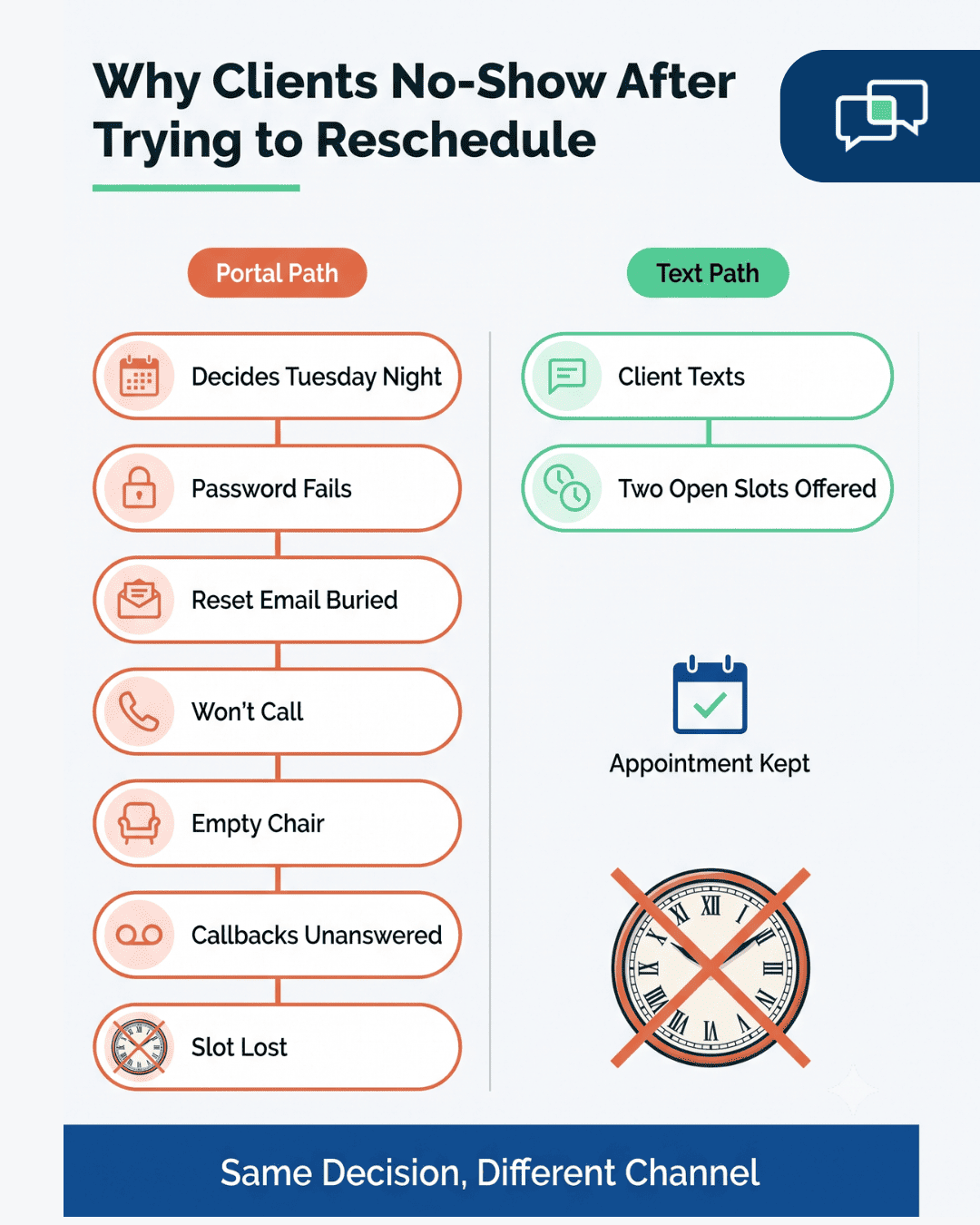
Staff describe the loop to us the same way, step by step:

  1. Client needs to move Thursday to Friday. Decides Tuesday night.
  2. Opens the portal. Password doesn't work.
  3. Requests a reset. The email lands in promotions. Client puts the phone down.
  4. Doesn't call. Calling means talking, and talking is part of what they're in treatment to make easier.
  5. Thursday arrives. Client doesn't.
  6. Front desk calls at 3:10. Voicemail. Calls again Friday. Voicemail.
  7. Slot gone, clinician has a hole in the day, and the client now feels bad enough about ghosting that coming back got harder.

Seven steps, and only one of them needed to happen. Your client made the decision on Tuesday. The system had nowhere to put it.

What the Gap Costs

Front desks at small behavioral health practices field 40 to 80 calls on an ordinary day, most of them logistics: reminder calls, reschedules, voicemails returned. Each one is a task a two-word text reply could have closed.

Revenue is easier to size. Community mental health programs see 25% to 40% of clients miss a first appointment, according to research published in The American Journal of Managed Care. Ongoing outpatient rates run lower but still sit well above general medicine.

The dollar view for a small practice looks like this. These figures are illustrative. We built them from published no-show ranges and a $150 session rate, not from a specific client:


Silence Reads as Disengagement

Clinicians feel this before the finance report does. A client stops showing, and the working assumption is that treatment stalled, rapport broke, or the client relapsed. Sometimes that's true. Often the client tried to reach you on a Tuesday and hit a password field.

Substance use treatment programs carry higher stakes still. 42 CFR Part 2 governs confidentiality of SUD patient records, and enforcement of the updated 2024 rule began February 16, 2026 under the HHS Office for Civil Rights.

Any messaging channel a Part 2 program uses has to keep diagnosis and treatment detail out of the message body. That constraint shapes how texting gets set up, and we walk through the specifics below.

The Direct Line

Curogram doesn't touch your chart. It runs beside Notenetic as a communication layer, sending SMS from your practice's own number. Clinical documentation, treatment plans, claims, and video sessions stay where they are.

That separation is deliberate, and we'll state the limit plainly instead of burying it. Message threads do not write back into Notenetic notes automatically.

Staff keep documenting clinical content in the chart the way they do today. What moves is where the logistics conversation lives.

For a practice manager, this means nobody migrates anything: no data conversion project, no downtime on billing, no retraining clinicians on documentation.

Curogram works as a Notenetic client portal alternative for one job only, which is reaching clients between sessions. Everything else about your Tuesday stays the same.

What Staff See

One shared inbox. Every conversation from every client, visible to the team members you assign, with threads attached to the client record inside Curogram.

Front desk builds a library of saved replies once and reuses it for months. Six templates cover most of a day:

  • Confirm Thursday
  • Offer two open slots this week
  • Send intake link
  • Send telehealth link
  • Copay balance and payment link
  • Waitlist offer for a same-day opening

Threads stay stored and auditable. A supervisor reviewing a complaint six months later can see exactly what was sent and when. Client messages never route through a clinician's personal cell number. That kills the most common shadow workflow in small practices: the therapist who gives her mobile to two clients and then can't unring it.

What Clients See

A text. That's the whole experience.

Nothing to download, no account, no password. Their phone shows a message from your practice number, they type back, and it lands in your inbox.

Opting out takes one reply. This is the case for no-app client texting in behavioral health, and it's less about convenience than about who gets reached at all.

A real exchange runs about this short:

Riverbend Counseling: Hi Marcus, confirming your appointment Thu 4/9 at 3:00 PM. Reply C to confirm or R to reschedule.
Marcus: R
Riverbend Counseling: No problem. We have Fri 4/10 at 11:00 AM or 2:30 PM. Reply 1 or 2.
Marcus: 2

Side-by-side flow chart showing why therapy clients no-show after a failed portal reschedule attempt

Why the Channel Fits This Population

A text is quiet. Nothing on the lock screen announces a behavioral health provider unless you set it up that way. A glance from a coworker shows a message thread that looks like every other message thread.

Lower friction works as an access feature here. Clients with panic symptoms, social anxiety, or ADHD are the ones a phone-first system filters out hardest. They're also the ones weekly attendance helps most.

Secure texting for Notenetic EHR clients removes the two steps those clients stall on: making a call and recalling a credential.

Automation done this way reads as more personal. A reminder that arrives 48 hours ahead and accepts a one-letter reply is a conversation a client can actually finish.

Configuring for 42 CFR Part 2

Part 2 programs need message bodies that carry logistics and secure links only. Three rules cover it:

  • Keep clinical content out of SMS. No diagnosis. No medication names. No group or level-of-care labels. "Your Suboxone induction appointment" belongs in the chart, not a text.

  • Watch the sender name. If your program's name marks it as SUD treatment, a neutral practice name on outbound messages protects the client on a shared screen.

  • Put detail behind a link. Anything past a time and a confirmation goes into a secure link the client opens, so the SMS body stays clean.

Set up that way, HIPAA texting for a mental health practice handles the whole scheduling conversation without carrying one piece of treatment detail.

The Open Channel: What Changes in Week One

Practices we onboard are live inside five days.

Day

What happens

1

Roster imports. Your number goes live for SMS. Reminders set at 48 and 2 hours. Consent logged at intake, per TCPA.

2

Confirmations land within minutes. Front desk saves six quick replies.

3

A client texts at 7:40 PM: "can't make thursday, anything friday." Staff offer two slots by 8:15. Thursday goes out as a waitlist text and gets taken.

4

The confirmation voicemail queue stops. Ninety minutes of calls become one inbox.

5

Numbers show up.


Confirmation rate moves first. Curogram clients average above 75%, based on our internal data. No-shows move slower but further: Atlas Medical Center fell from 14.20% to 4.91% in three months, per our case studies.

Volume holds under real caseloads. Covina Arthritic Clinic confirms over 1,100 appointments monthly. SMS recall reconverted 35% of overdue patients at one multi-location practice, bringing back 1,240.


Curogram 2-Way Texting for Notenetic Practices

2-Way HIPAA Texting is the feature doing the work in every scenario above. It gives your practice a real SMS line clients answer from their default messaging app. Threads are secured under a signed BAA, stored, and auditable on your side.

Staff run it from one shared inbox. Messages can be assigned, so a billing coordinator handles balance questions while a scheduler handles Friday slots.

Saved quick replies turn the ten most common exchanges into two taps. Group practices route by clinician or keep one queue, based on how the front desk is staffed.

For Notenetic practices, the split is clean. Notenetic 2-way texting for behavioral health practices runs through Curogram. Documentation, assessments, claims, and video sessions stay in Notenetic.

There's no API dependency between them and no automated write-back of threads into the chart, so your documentation workflow doesn't change.

Compliance posture is built for this population. Texts carry scheduling logistics and secure links, which keeps Part 2 programs inside their rules without a separate texting policy. Clients opt out with one reply, and that opt-out is honored automatically.

What it removes is the personal-phone workaround. Clinicians stop handing out mobile numbers to the two clients who need between-session contact most. The practice now has a channel that does the job and leaves a record.

Conclusion: Give Every Client a Direct Line

The portal asks clients to come to you. Text meets them where their attention already sits, which for behavioral health clients decides whether a session gets moved or missed.

Notenetic holds your clinical record, and it does that job well. Curogram covers their side of the relationship: the logistics conversation between sessions that decides whether the next session happens at all. Two systems, one job each.

Judge this on the numbers that touch your schedule. Above 75% confirmation across our client base. A drop from 14.20% to 4.91% no-shows at Atlas Medical Center in three months. More than 1,100 appointments confirmed monthly at Covina Arthritic Clinic.

Every one of those came from a client answering a text they didn't have to log in to send.

If you want to text clients between therapy sessions without adding a system your staff has to learn from scratch, that's a twenty-minute conversation, not a migration project.

Book a demo and we'll start with the client side: what the reminder looks like on a phone, what a reschedule thread looks like in the shared inbox, and how Part 2 setup works for SUD programs.


Frequently Asked Questions

How does texting clients stay HIPAA compliant?

Three things carry it. You need a platform that encrypts and stores messages under a signed BAA, plus documented client consent to receive texts, and message content that fits the channel. Curogram operates under a BAA and keeps threads stored and auditable. For substance use treatment programs, texts hold logistics and secure links only, never diagnosis or treatment detail.

Why does portal messaging fall short of SMS in behavioral health?

A portal wants a login at the moment a client has the least motivation to produce one. Depression, anxiety, and ADHD symptoms are the very things that make password resets and phone calls feel costly. Opening a portal in public also puts a provider name on screen. Texting drops all three barriers.

How do we keep 42 CFR Part 2 rules intact when we text clients?

Set outbound texts to carry appointment times, confirmations, and secure links. Clinical content goes behind the link, never in the SMS body. Use a neutral sender name if your program name marks it as SUD treatment. Enforcement of the updated Part 2 rule began February 16, 2026, so write the choice into your policies.

What happens to Notenetic documentation once Curogram is running?

Nothing changes. Progress notes, assessments, treatment plans, claims, and telehealth sessions stay in Notenetic. Curogram runs as a separate layer, with no API dependency and no automated write-back of threads into the chart. Clinicians document the same way they did the week before, and billing workflows stay untouched.

How long does a front desk take to get comfortable with a second screen?

Most teams we onboard work confidently in the shared inbox inside a week. The learning curve is short because the inbox behaves like messaging apps staff already use. The bigger shift is behavioral. Staff stop working the voicemail queue for confirmations and start triaging one inbox instead.