


7 min read

Automate Google Reviews for Netsmart Practice

Automate Google Reviews for Netsmart Practice

💡 Automated review requests for a Netsmart practice use a platform like Curogram to send a short satisfaction text after each session.                

Happy clients get a direct link to your Google Business Profile, while unhappy ones get flagged for private follow-up. After setup, the whole process runs without staff effort.

This matters in behavioral health, where around 90% of prospective clients check your Google profile before your website. Strong reviews build trust before the first call.


One multi-location practice earned 1,064 new 5-star reviews in just 3 months using this approach. 


A new client is looking for a therapist tonight. They open Google, type in your city, and scan the results. Your practice shows up — right next to a 3.2-star rating and 11 reviews.

They don't call. They scroll to the next name on the list, and they're gone.

Here's the hard part.

Your clinicians may be the best in the region. Your care might change lives every single day. But none of that shows up in a single search result.

In behavioral health, this gap is bigger than most leaders realize. Around 90% of prospective clients see your Google Business Profile before they ever reach your website. That profile is your real front door. If it looks thin or shaky, people assume the care behind it is too.

The frustrating truth?

Most clinics know their reviews don't match their quality. They just don't have a reliable way to fix it. So the gap stays open, month after month.

Asking clients for reviews in person feels awkward, especially in a clinical setting. Email requests and paper cards get ignored. And no one on staff actually owns reputation, so it quietly slips through the cracks.

Meanwhile, competitors with stronger profiles keep winning the clients you never even saw. You never get the chance to compete, because you never show up.

There's a better way, and it doesn't add work to anyone's plate. With the right post-appointment survey automation built for behavioral health, your happiest clients build your reputation for you — while concerns get caught privately before they go public.

This guide walks through how automated review requests work for a Netsmart practice, from setup to results, why manual methods fail, and how one approach turned quiet, satisfied clients into 1,064 new 5-star reviews.

Let's start with the villain behind a weak reputation.

A Reputation That Doesn't Match Your Care

Many behavioral health organizations have fewer than 50 Google reviews. Some sit at ratings like 1.8, 2.5, or 2.9 stars — numbers that don't reflect the care they actually deliver.

Meanwhile, around 90% of prospective clients check that profile before they ever visit your website. The clinical work is excellent. The digital front door says otherwise.

Why It Keeps Happening

There's a reason this gap is so common, and it's not laziness.

The usual ways of gathering reviews quietly break down in a behavioral health setting:

  • Asking in person feels awkward when the relationship is built on trust, not transactions.
  • Manual emails and printed cards tend to land in the single digits for response rates.
  • No one truly owns reputation, so the effort fades fast.

Put together, these add up to silence. The reviews never get asked for, and the profile never grows.

Slow review velocity has a real cost. Google's Local Pack — the map results at the top of a search — rewards practices with steady, recent reviews. Without a consistent flow, your profile stalls. The next clinic on the list wins instead.

For clinical leaders, this is the part that stings. You know the care is strong, but your online presence whispers when it should be shouting. In a field where stigma already makes people hesitate, a weak reputation can be the final nudge that sends someone to a competitor.

How Automated Review Requests Build Your Reputation in the Background

The fix isn't more effort. It's a system that runs on its own. With the right setup, a short, friendly text goes out after each appointment to check in on how the visit went. Happy clients get pointed toward Google, and unhappy ones get routed straight to you.

That is the core of how Curogram works to automate Google reviews for a Netsmart behavioral health practice.

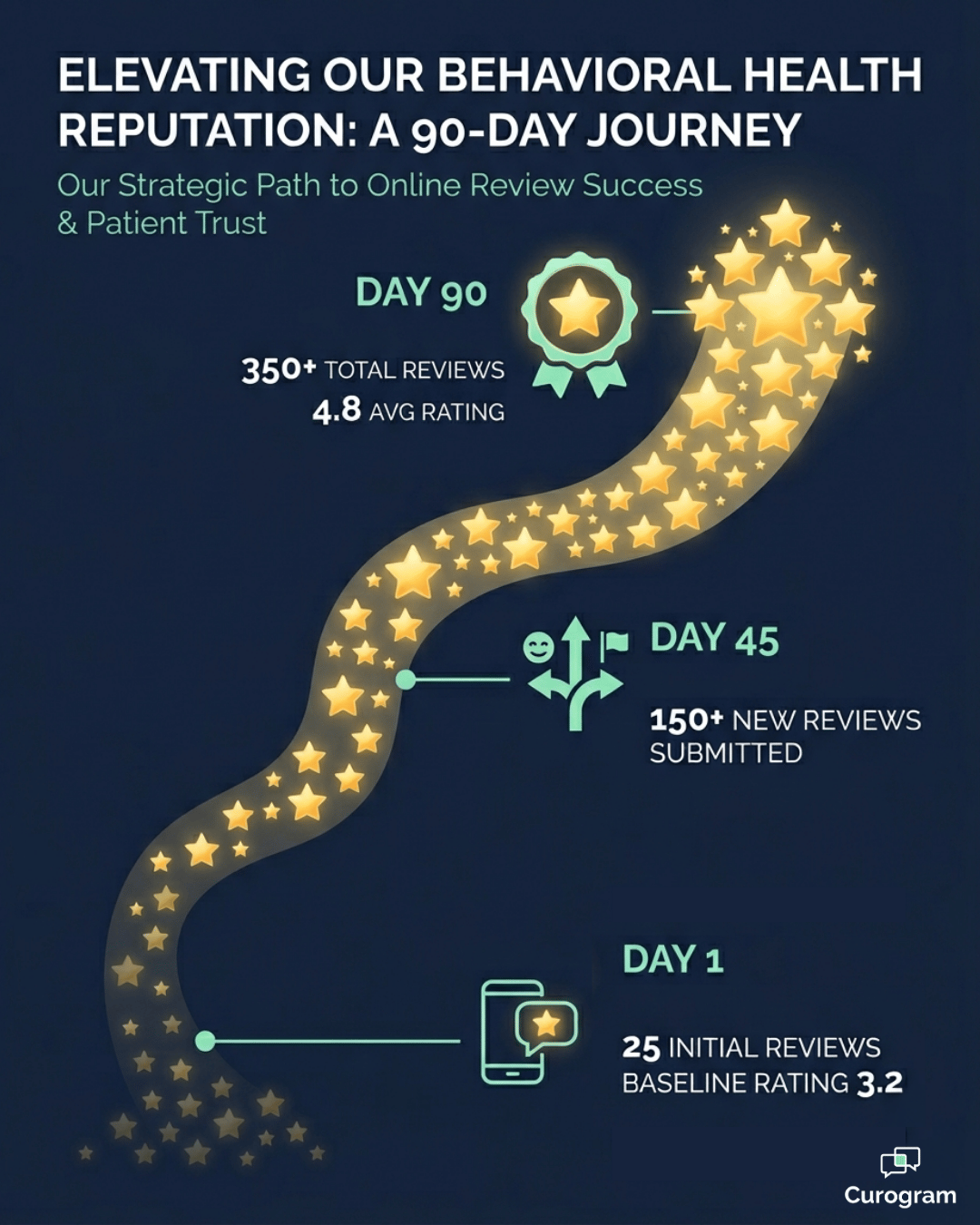
90-day Google review growth path for a behavioral health practice using automation

Smart Routing That Protects Your Reputation

This is where the approach earns its keep.

The post-appointment text asks one simple question about the visit, then splits clients down two paths:

  • Positive responses get a direct link to your behavioral health Google Business Profile, where leaving a review takes seconds.
  • Concerns trigger an internal alert, so your team can follow up privately before anything ever goes public.

In plain terms, your best experiences become public proof, and your tough moments become private fixes. You catch problems early instead of reading about them online.

Setup That Works Alongside Netsmart

You don't have to touch your EHR to make this work. The reputation management setup for a Netsmart practice runs independently, with no API access required. You configure the timing in a separate dashboard, and it handles the rest.

You also control when the message lands — right after the session, at the end of the day, or the next morning. Curogram review requests run alongside Netsmart, so your clinical workflow stays exactly as it is.

The tone matters more here than in almost any other specialty. The survey language is written for behavioral health sensitivity — warm, brief, and never pushy.

It reads like a genuine check-in, not a sales ask. In a relationship built on trust, that small difference is everything.

Behavioral health clinician listening closely to a client during a therapy session

A Front Door That Earns Trust Before the First Call

The results show up faster than most teams expect. One multi-location practice used automated post-visit surveys and generated 1,064 new 5-star reviews in just 3 months.

Around 90% of the clients who responded left a 5-star review. As that volume climbed, the practice's Local Pack ranking improved within weeks.

The Numbers Add Up Fast

Here's what that pace can look like for a single practice.

The table below is an example, not a guarantee, but it shows how fast reviews add up once the system is running.

Monthly client visits Survey response rate New 5-star reviews/month Reviews in 3 months
300 25% ~68 ~200
600 25% ~135 ~405
1,000 25% ~225 ~675

(Assumes about 90% of responders leave a 5-star review.)

In practice, that means a profile with a dozen reviews can turn into hundreds in a single quarter — without adding a single task to your staff's day.

From a Wish to a System

The bigger change is mental. Your practice stops hoping clients leave reviews and starts running a pipeline that fills itself. Reputation becomes a system you can count on, not a wish you repeat at staff meetings.

Appear at the top of Google. Automate 5-star reviews and build a pervasive online reputation today with Curogram.  

And the effect compounds. A prospective client searching for help now sees a profile that matches the care you deliver — dozens or hundreds of honest 5-star reviews that build trust before the first call. More people reach out.

Over time, your reputation turns into a referral engine that keeps working while you sleep.

What the Setup Actually Looks Like

The best part of this approach is how little there is to do. The automated review request setup for a Netsmart practice takes a short call and a few choices, not a long IT project. There's no EHR integration to build and no new habits for your team to learn.

Here's the basic path from sign-up to live:

  1. Connect your Google Business Profile so positive responses link straight to your review page.
  2. Choose your survey timing — right after the session, end of day, or the next morning.
  3. Review the message wording, which is already tuned for behavioral health sensitivity.
  4. Set who gets the internal alert when a client raises a concern.
  5. Turn it on, and let the texts start going out after each appointment.

After that, the system runs on its own. The only ongoing task is following up on flagged concerns, which is something your team would want to do anyway. Everything else — sending, routing, and linking — happens in the background.

One thing worth setting early is your goal. Knowing how many reviews you need to outrank nearby clinics gives the whole effort a clear target.

From there, it's just a matter of letting satisfied clients do what they were always happy to do: say good things about the care they received.

Let Your Best Clients Tell Your Story

Your clinical team already does the hard part. They show up, build trust, and help people through some of the toughest moments of their lives. The problem was never the quality of care. It was that the care stayed invisible online, and the people who needed it most never saw it.

Automated review requests fix that quietly. After a simple reputation management setup alongside Netsmart, your happiest clients steer prospective patients straight to your behavioral health Google Business Profile.

Concerns get caught privately, before they ever go public. No one on your team adds a task to their day.

Think of it as a clear division of labor.

Netsmart runs your clinical operations and keeps your records in order. Curogram makes sure the people searching for help can actually see the excellence happening inside your walls.

Over a few months, that shift adds up. A thin profile with a handful of reviews becomes a steady stream of authentic 5-star feedback. More prospective clients trust you before the first call.

More of them pick up the phone instead of scrolling past.

That's the real return. Not just a higher star rating, but a reputation that works as a referral engine while your staff focuses on care. The reviews keep coming long after setup, with no ongoing effort.

Your care already speaks for itself. The only question is whether the people who need you can hear it where it matters most — on Google. That's where the decision actually gets made.

Schedule a Demo with Curogram and find out exactly how many reviews you need to rank #1 in your area. We'll show you how the setup works, how the routing protects your reputation, and how fast satisfied clients can start doing the talking for you.


Frequently Asked Questions

Is it appropriate to ask behavioral health clients for Google reviews?

Yes, when it's done with care. The message is framed as a satisfaction check-in, not a hard review request. Clients who report a positive experience are gently invited to share it on Google. There's no pressure, and the language stays warm and respectful of the clinical relationship.

What happens when a client reports a negative experience?

Negative responses are routed to a private internal alert instead of Google. This gives your team the chance to address the concern directly, often resolving it before it ever becomes a public review. It works as both a reputation safeguard and a care-quality signal.

Does the review system require Netsmart API access?

No. The reputation tools run independently alongside Netsmart, so no EHR integration is needed. You set the survey timing in a separate dashboard, and the system handles delivery from there. Your clinical workflow stays untouched.

How long does it take to see results?

Faster than most teams expect. Because reviews start flowing after every appointment, momentum builds quickly. Steady review velocity often lifts a practice's Local Pack ranking within weeks, and one multi-location practice reached 1,064 new 5-star reviews in 3 months. The exact pace depends on your visit volume.

How much staff time does this take after setup?

Almost none. The whole point is that it runs in the background. Once the survey timing is configured, the texts send and route on their own, so no one has to chase reviews or remember to ask. The only time your team steps in is to follow up on a flagged concern, which protects your reputation anyway.