
9 min read

Leave a Google Review for Your Modmed Doctor | Quick & Easy

Leave a Google Review for Your Modmed Doctor | Quick & Easy
💡 Modmed patients can leave a Google review in about 30 seconds through a text message sent shortly after their appointment. Curogram delivers a one-tap link straight to the practice's Google Business Profile. There's no app to install and no portal login required.      
Patients tap the link, choose a star rating, type a short note if they want, and submit. The whole process turns a positive specialty visit into visible social proof.

For dermatology, orthopedics, ophthalmology, and other Modmed-powered practices, this is the bridge between satisfied patients and a stronger online reputation.


Most patients who love their specialist never say so publicly.

They walk out of the office feeling grateful, maybe even relieved. They mean to leave a review. Then life takes over.

A great visit becomes a private memory instead of a public recommendation. That gap is quiet, but it's expensive. Every unwritten review is one less reason a future patient picks up the phone to book with your practice.

Now think about a single week at a busy Modmed specialty clinic.

Say your providers see 200 patients. Most leave happy. A handful are deeply moved by the care they got. How many of those experiences end up on Google? In most practices, it's a small fraction.

This isn't a patient problem. It's a friction problem. Asking someone to open Google, search for your business, scroll, sign in, and write a review takes 8 to 10 steps. Even motivated patients drop off somewhere in the middle.

The patient Google review experience for Modmed specialty practice teams should be simpler than that. Much simpler. Curogram closes the loop with a single text message that gets to the review form in two taps, sent at the exact moment a patient is most likely to act.

This article walks through how that 30-second flow works. You'll see why timing matters, how the easy Google review process for dermatology, orthopedics, ophthalmology and other specialties drives consistent 3–5% response rates, and what that looks like in real numbers for your practice.

By the end, you'll see exactly how the Modmed patients Google review request experience from appointment to 5-star review — can become one of your most reliable growth channels.

The Quiet Problem Hiding Inside Every Happy Visit

The intention gap nobody talks about

Patient satisfaction at Modmed specialty practices is usually high. Your providers are skilled. Procedures go well. Staff are kind. Patients leave feeling like they got the care they came for.

Many of them think, "I should leave a review for Dr. Smith." And they mean it. The intention is real.

But then they drive home. They pick up the kids. They open work email. By dinner, the thought is fading. By the next morning, it's gone.

This is the intention gap — the space between how patients feel and what they actually do. Most reviews die in this space, never written, never seen by the next patient searching for care.

What a forgotten review really costs

Consider a 45-year-old patient who finishes an orthopedic consultation for a knee replacement. The surgeon was thorough. Every question got an answer. The patient leaves thinking, "That's the best doctor's visit I've ever had."

Then they check their phone. Three missed calls. Twelve new emails. They drive to the pharmacy. They stop for groceries. By the time they sit down at home, the review is forgotten.

Two weeks later, a neighbor asks for an orthopedic surgeon. The patient gives a glowing recommendation in person. But the Google review that could have reached hundreds of strangers searching that same week never existed.

This happens after most positive visits, in most specialty practices, every single day.

The 8-step problem

Here's why even motivated patients give up. Without a direct link, leaving a Google review is a small obstacle course.

Each step looks easy on its own, but stacked together they create enough friction to lose most reviewers.

  • Open Google Maps or Google Search. The patient first has to remember which app to use. Some open Maps, some default to a browser, some try the Google app. The path splits before the review process even starts.
  • Search for the practice by name. Now they have to recall the exact name. Was it "Smith Orthopedic" or "Smith Orthopedics and Sports Medicine"? Typos and vague memory send them to the wrong listing or a competitor with a similar name.
  • Find the correct location. Many specialty practices have more than one office. The patient has to pick the right pin on the map. Choose wrong, and the review lands on the wrong location, helping no one.
  • Scroll to the review section. Google's mobile listing puts photos, hours, phone numbers, directions, and the website above reviews. On a small screen, scrolling past all of that feels longer than it sounds.
  • Tap "Write a review." This is a small button hidden among options like "Suggest an edit" or "Add a photo." Patients who aren't review veterans often hunt for a moment before they find it.
  • Sign in to Google. If the patient isn't already signed in, a login screen appears. Forgotten passwords and multiple accounts cause many patients to abandon the process here.
  • Pick a star rating. This is the only step that feels natural. By now, though, the patient has already spent more time getting to the form than they expected.
  • Type a comment. The blank text box is intimidating. Many patients freeze, unsure what to write, and close the app telling themselves they'll come back later — and never do.
  • Hit submit. Even at the finish line, a slow connection or a misread captcha can stall the review for another minute.

That's 8 to 10 steps. Each one is a chance to give up. A delayed review is almost always a lost review.

Curogram's one-tap Google review text message for Modmed patients shrinks that whole list to two actions: tap the link, leave the review.

Why this matters to the next patient too

Patients searching for a new specialist read reviews before they book. They trust other patients more than they trust credentials, websites, or ads. Peer voices carry more weight than anything your practice says about itself.

Think about what a prospective patient actually does before choosing a specialist:

  • Searches the practice name on Google
  • Skims the star rating in the first few seconds
  • Reads two or three recent reviews to gauge tone and bedside manner
  • Checks whether reviews mention their specific condition or procedure

When a happy patient leaves without leaving a review, they aren't just skipping a favor to you.

They're skipping a favor to the next patient — the one searching at 11 p.m. for a dermatologist who'll listen, or an orthopedic surgeon who'll explain things clearly. Reframed that way, the review isn't a chore. It's a small kindness passed forward.

That kindness only happens if the ask is easy enough to act on in the moment. Which brings us to how the 30-second flow actually works.

How the 30-Second Review Actually Works

A text, a tap, and you're done

Curogram's patient review request after appointment Modmed flow is built around one idea:

Remove every obstacle between the patient's good feeling and the Google review that captures it.

Every step in that 8-to-10-step traditional process gets either eliminated or pre-handled in the background.

It works like this. After the appointment, the patient gets a short text from the practice's regular phone number — the same number they already use for appointment reminders. The message thanks them and includes a link.

Tap the link. Pick the stars. Submit. The review is live before the coffee finishes brewing.

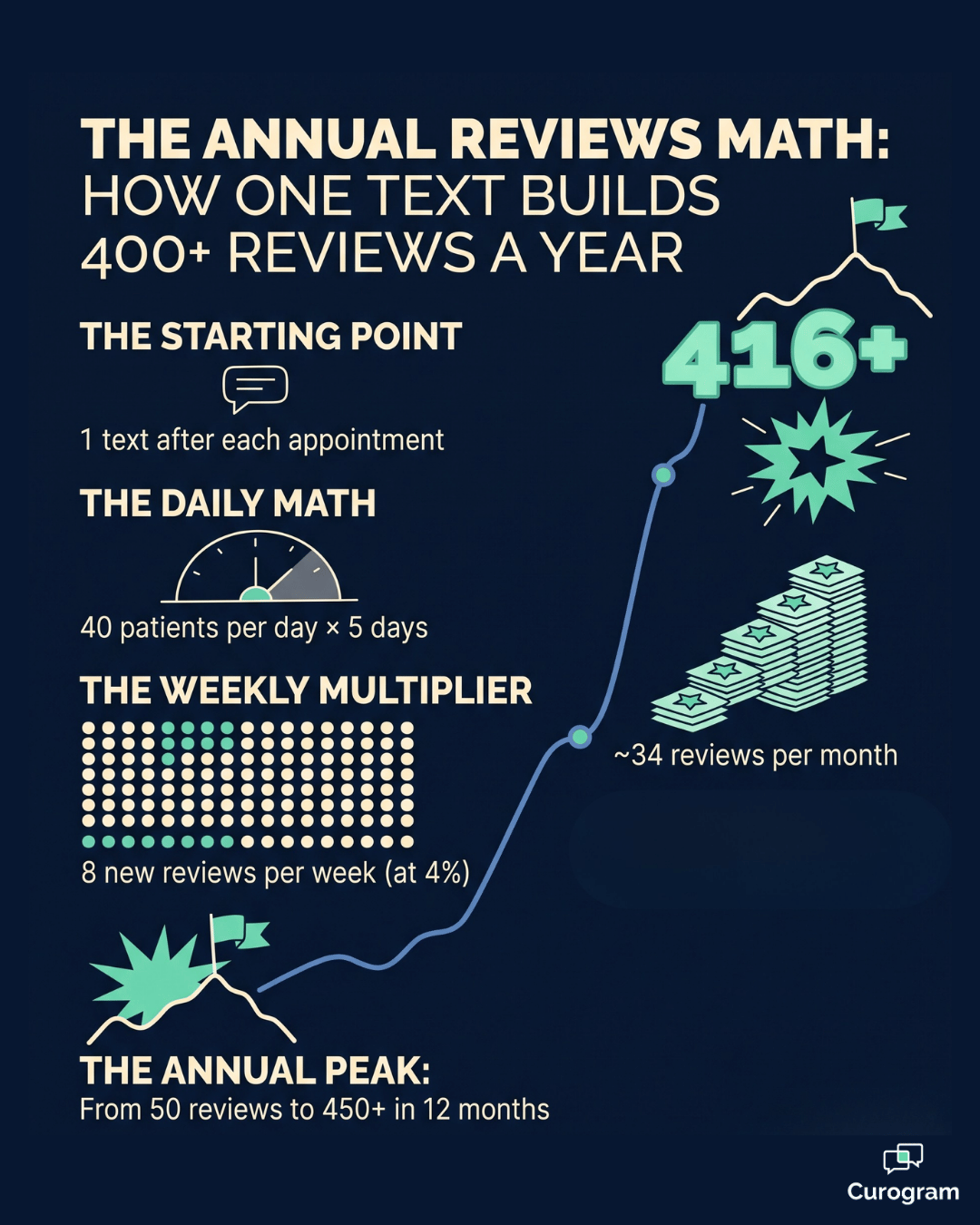
Infographic showing how Modmed practices grow from 1 text per visit to 400+ Google reviews per year.

The one-tap link, step by step

Here's what the Curogram patient review experience Modmed practices deliver looks like from the patient's side. The text from the practice number arrives, and a quick tap on the link opens the Google review form directly — no searching, no scrolling.

From there, the patient picks a star rating in about 5 seconds, types a short comment in another 15 to 20 seconds if they feel like it, and taps submit. The comment step is optional, so patients who just want to leave stars can finish even faster.

Total time:

Around 30 seconds. No app to install. No portal to log into. No survey to complete.

This is the easy Google review process for dermatology, orthopedics, ophthalmology, and any other Modmed specialty.

Why the timing changes everything

A review request sent right after the visit catches the patient at peak willingness. The visit is fresh. Satisfaction is high. The phone is already in their hand.

A request sent a week later catches almost nothing. The feeling has faded. Other priorities have moved in. The moment is gone.

Industry data and Curogram client patterns show same-day requests pull in roughly 3 to 5 times more reviews than delayed ones. That's a huge swing — and it's entirely about catching the right window.

For your team, that means timing isn't a small detail. It's most of the strategy.

How it fits each specialty

Different specialties have different emotional peaks. Curogram's review request flow lands in the right pocket for each one, because the patient receives the text while the feeling is still active rather than days later when it has faded.

A few examples of how that plays out across Modmed-powered specialties:

  • Ophthalmology (post-cataract): patients are emotional about restored vision — gratitude is at its highest in the first 24 hours.
  • Dermatology (cosmetic): patients are still admiring their results in the mirror when the text lands.
  • Orthopedics (consultation): patients feel reassured by a clear surgical plan, before pre-surgery anxiety sets in.
  • Pain management: patients finally feeling relief leave some of the most heartfelt reviews — but only if asked while the feeling is fresh.

This is how patients leave Google reviews Modmed specialty clinic teams want: authentic, detailed, and tied to specific moments of care.

The next question most practice managers ask is what this actually looks like as numbers on a calendar.

Front-desk view of a Modmed specialty practice managing patient review requests on a clean monitor.

What the Numbers Look Like When This Runs Every Day

A simple math example

Across Curogram clients, roughly 3–5% of patients who receive a text-based review request leave one. That sounds modest. It isn't.

Let's run the numbers for a single-provider Modmed specialty practice seeing 40 patients per day, five days a week.

Time Frame Patients Texted New Reviews (at 4%)
Per week 200 8
Per month ~860 ~34
Per quarter ~2,600 ~104
Per year ~10,400 ~416

This means a practice that's currently sitting on 50 Google reviews could realistically pass 450 in twelve months.

For your team, that turns a static page into a steadily growing asset — without adding a single task to the front desk.

From invisible satisfaction to visible proof

Without a system like this, patient satisfaction lives in private memory. A patient tells one friend. Maybe two. The rest of the world never knows.

With Curogram, every good visit has a chance to become a public recommendation.

Appear at the top of Google. Automate 5-star reviews and build a pervasive online reputation today with Curogram.  

That changes what prospective patients actually see when they Google your name:

  • A higher overall star rating, refreshed by recent reviews
  • A steady stream of new dates, signaling an active, current practice
  • Specific patient stories that match what searchers are looking for

That shift matters more than any single review. The Google profile stops being a stale page with a handful of outdated reviews and starts to read like a living record of how your practice actually treats people

A Real-World Outcome

An ophthalmology group used Curogram review requests with every post-cataract patient. Within 6 months, their Google reviews more than doubled — from around 200 to over 400.

The reviews didn't just go up in count. They got better in content. Patients consistently wrote things like "life-changing cataract surgery," "Dr. Lee explained everything," and "the staff were warm and professional."

Prospective patients reading those reviews see exactly the reassurance they're looking for. New consults went up because the Google profile finally told the story of clinical excellence — in the patients' own words, not the practice's.

In practice, this is what reputation growth looks like: less marketing copy, more patient voices. And for most Modmed specialty practices, the path to that growth starts with a single decision — making the ask easier.

Your 30 Seconds Builds the Next Patient's Confidence 

Patient satisfaction is already happening inside your practice every day. The question isn't whether your team is doing good work. It's whether anyone outside your waiting room can see it.

Most of what makes a Modmed specialty practice great is invisible online. A clear pre-op explanation. A kind nurse. A surgeon who took an extra ten minutes. None of it shows up on Google unless someone tells the story.

Curogram exists to make telling that story almost effortless. One text. One tap. About 30 seconds. The patient's experience becomes a public record that helps the next person searching for that same specialty.

For your team, the math is hard to ignore. A 3–5% response rate on consistent volume can compound into hundreds of new reviews per year. That's stronger local search visibility, more confidence from prospective patients, and a higher likelihood that searchers click "Call" instead of scrolling to a competitor.

There's no app for patients to download. No login. No new workflow for your front desk to memorize. The texts go out automatically through the same Modmed-integrated channel your team already uses for appointment reminders and two-way messaging.

If you'd like to see the patient-side experience in action — the exact text, the link behavior, the form that opens — the easiest next step is a short demo.

Schedule a Demo today. In 15 minutes, you'll see why 3–5% of patients consistently leave reviews when the process is this simple, and how quickly your Modmed specialty practice can turn quiet satisfaction into visible proof.


Frequently Asked Questions

Is the review request text intrusive or annoying to patients?

No. It's a single, brief text sent from your practice's regular phone number — the same line patients already use for appointment reminders and two-way messaging. The tone is personal, not promotional. Patients who don't want to leave a review simply ignore the text. There's no follow-up nagging and no repeated requests. Many practices report that patients actually thank them for making it easy.

Do patients need a Google account to leave a review?

Yes, Google requires an account to submit a review. The good news is that most smartphone users already have one. It's required on Android and widely used on iPhones for Gmail, YouTube, Maps, and other Google services. When patients tap the Curogram link, they're usually already signed in, so the review form opens immediately. For the small group without an account, signup takes only a few minutes.

Can the practice see which patients left specific reviews?

Google reviews are public and display the reviewer's Google account name, which may or may not match the patient's chart. Curogram can show you which patients received review requests and your overall response rate, but it doesn't link specific patients to specific reviews. This protects patient privacy and keeps the process voluntary and authentic — which is also what keeps the reviews trustworthy to future patients reading them.

How soon after the appointment is the text sent?

Curogram sends the request within hours of the visit, while the experience is still fresh. This timing window is what drives the 3–5% response rate. Same-day requests typically pull in 3 to 5 times more reviews than requests sent days later, when the moment has passed.

Does this work for all Modmed specialty practices?

Yes. The flow is specialty-neutral and works equally well for dermatology, orthopedics, ophthalmology, pain management, gastroenterology, and others. Curogram integrates with Modmed so the trigger fires automatically after a completed appointment — no manual tagging or front-desk intervention needed.


Cloud 9 Ortho Reviews | Turn Every Appointment into a 5-Star Review

Cloud 9 Ortho Reviews | Turn Every Appointment into a 5-Star Review

💡 Cloud 9 orthodontic Google reviews generated through automated post-visit text requests let your practice build a five-star reputation at scale —...

Read More
Rural Patients Leave Reviews by Text | Azalea Health + Curogram

Rural Patients Leave Reviews by Text | Azalea Health + Curogram

💡 Rural patients leave reviews when asked by text message after Azalea Health visits because SMS is the one channel that fits how they already...

Read More
AdvancedMD Google Reviews | From Survey Scores to Search Visibility

AdvancedMD Google Reviews | From Survey Scores to Search Visibility

💡 AdvancedMD includes a built-in reputation module that automates post-visit surveys. But patient feedback collected this way stays inside the...

Read More