10 min read

Skip the Portal: Vascular Patient Payment via Mobile Text Link

Skip the Portal: Vascular Patient Payment via Mobile Text Link
💡 After a cardiac or vascular procedure, most patients want to pay their bill fast and move on. A text payment link makes that possible in under one minute.
  • A secure SMS arrives within hours of discharge
  • One tap opens a payment page; no app, no login
  • Works on any mobile phone, even flip phones
  • Card data is encrypted; nothing is stored
  • You stay in control of when and how much to pay
Patients aged 65 and up often skip patient portals because of login hurdles. Text payment removes those steps entirely.

You walk out of an outpatient lab after a vascular study, still groggy from the sedative. The nurse hands you a folder thick with discharge papers. A bill notice sits somewhere inside, but you can barely focus on it. Your only thought is getting home.

Two days later, your phone buzzes. The text shows your balance and a payment link from the facility, with the office's full name at the top. You tap, enter your card, and the bill is done in 45 seconds. No envelope, no portal login, no follow-up calls from a collections agent.

This is the new normal for patients on high-deductible health plans today. After a cardiac or vascular procedure, most people owe somewhere between $500 and $2,000 out of pocket. The faster they pay that balance, the less stress the bill causes. The slower they pay, the more likely it ends up in collections.

For older patients, this matters even more. A vascular patient payment text link arrives on mobile after a procedure—no portal, no login, no waiting. There's no username to recall, no password to reset. No mailbox to watch for two weeks straight.

This guide explains why so many patients now prefer text payment over paper statements. We'll cover what your patient responsibility actually means and why mailed bills cause so much friction. We'll show how text-based payment works step by step. We'll also explain why SMS payment is safer than most people assume.

By the end, you'll know what to ask your facility about. You'll also feel confident that text payment is easier and more secure than mailing a check. The shift away from paper is already happening—you might as well benefit from it.

Understanding Your Patient Responsibility

Before we explore how text payment works, it helps to understand what you actually owe. Health insurance does not pay for everything. Your share of the cost has a name—and it almost always shows up after a procedure.

Most cardiac and vascular procedures generate a bill for the patient. That bill is your responsibility, not your insurer's. Knowing how the math works makes the bill feel less confusing when it shows up at your door.

What Counts as Your Patient Responsibility?

Your insurance plan has a deductible. This is the amount you must pay out of pocket before insurance starts covering medical care. For most working-age adults, yearly deductibles fall between $1,500 and $5,000. Some high-deductible plans push that number even higher.

Here's how it works in real life:

Say, you have bypass surgery that costs $6,000 total. Your deductible is $2,000, so you pay that amount first. Your insurance then covers $3,000 of the remaining cost, and you owe the final $1,000.


Vascular and OBL procedures follow the same pattern. A diagnostic angiogram at an office-based lab might cost $4,500. After your insurance pays its share, your balance could land at around $850. The facility then bills you for the rest, just like any business that collects for a service rendered.

Here's a quick snapshot of typical costs you might see in vascular or cardiac care:

Procedure

Total Cost

Insurance Pays

You Owe

Carotid duplex scan

$1,200

$850

$350

Peripheral angiogram

$4,500

$3,650

$850

Bypass surgery

$6,000

$4,000

$1,000

Stent placement

$8,500

$6,800

$1,700


These are example figures only. Your actual costs depend on your plan, your location, and your provider. Always check your Explanation of Benefits (EOB) statement from your insurer to see what you owe before paying.

Why Paying Your Balance Quickly Matters

Paying your balance quickly protects you in three concrete ways:

  • Unpaid medical bills can hurt your credit score if they end up in collections. Most facilities wait 90 to 120 days before reporting an unpaid bill. That window closes faster than you might think, especially if a paper statement gets lost in the mail.

  • Many facilities offer a discount for early payment. A 5% to 10% discount on a $1,000 balance saves you $50 to $100—real money for any household. Some offices include the discount terms right in the cardiac patient billing text they send within hours of discharge.

  • Paying early gives you peace of mind. No follow-up calls during dinner. No certified letters with collection threats. No surprise hit on a credit check when you apply for a car loan or mortgage.

There's also a less obvious benefit—you stay in control of when and how you pay. Once a bill is current, you can move on with your week. You don't have a vague obligation hanging over your head for weeks while you wait for more paperwork.

Knowing what you owe is the first step. The second step is choosing how to pay—and that's where the old paper system has been failing patients for years.

Older couple at kitchen table frustrated by stack of unopened paper medical bills

The Paper Statement Problem

For decades, paying a medical bill meant waiting for an envelope. The system worked for younger generations and steady mail carriers. But it has aged badly. Today, paper bills create more friction than they solve.

Why Paper Bills Slow Everything Down

The biggest issue is timing. A paper statement usually arrives 2 to 4 weeks after your procedure. By then, you've forgotten the details of your visit. Other bills have piled up, and your discharge instructions are in a drawer somewhere.

Paper statements also get lost. Mail gets buried under junk flyers. Some go to old addresses if you moved recently. Postal delays can add another week to the process. Many patients tell us they never received the first statement—only the second or third reminder.

The charges themselves can confuse patients. After a single procedure, you might get three separate bills. One comes from the hospital, one from the anesthesia group, one from the imaging facility. Without context, it's hard to know which bill belongs to which visit.

Paying by mail adds another layer of friction. You need a check, a stamp, and a return envelope. You might need to call the facility just to confirm the right payment address. For most people, that's enough friction to put the bill aside for "later"—which often turns into never.

Here's what the typical paper-bill timeline looks like:

Day

Event

0

Procedure complete; you go home

14–28

Paper statement arrives in mail

30

You set the bill aside; other bills pile up

45

You forget about it

60

Second statement arrives

90+

Collections process begins


Why Patient Portals Aren't Always the Answer

Many facilities have tried to fix the paper problem by pushing patients toward online portals. In theory, this is a good solution. In practice, portals work poorly for older patients.

Portals require a login. You need a username and password, both of which patients often forget or never received in the first place. Password resets require email access. They also require answering security questions that may have been set up months earlier.

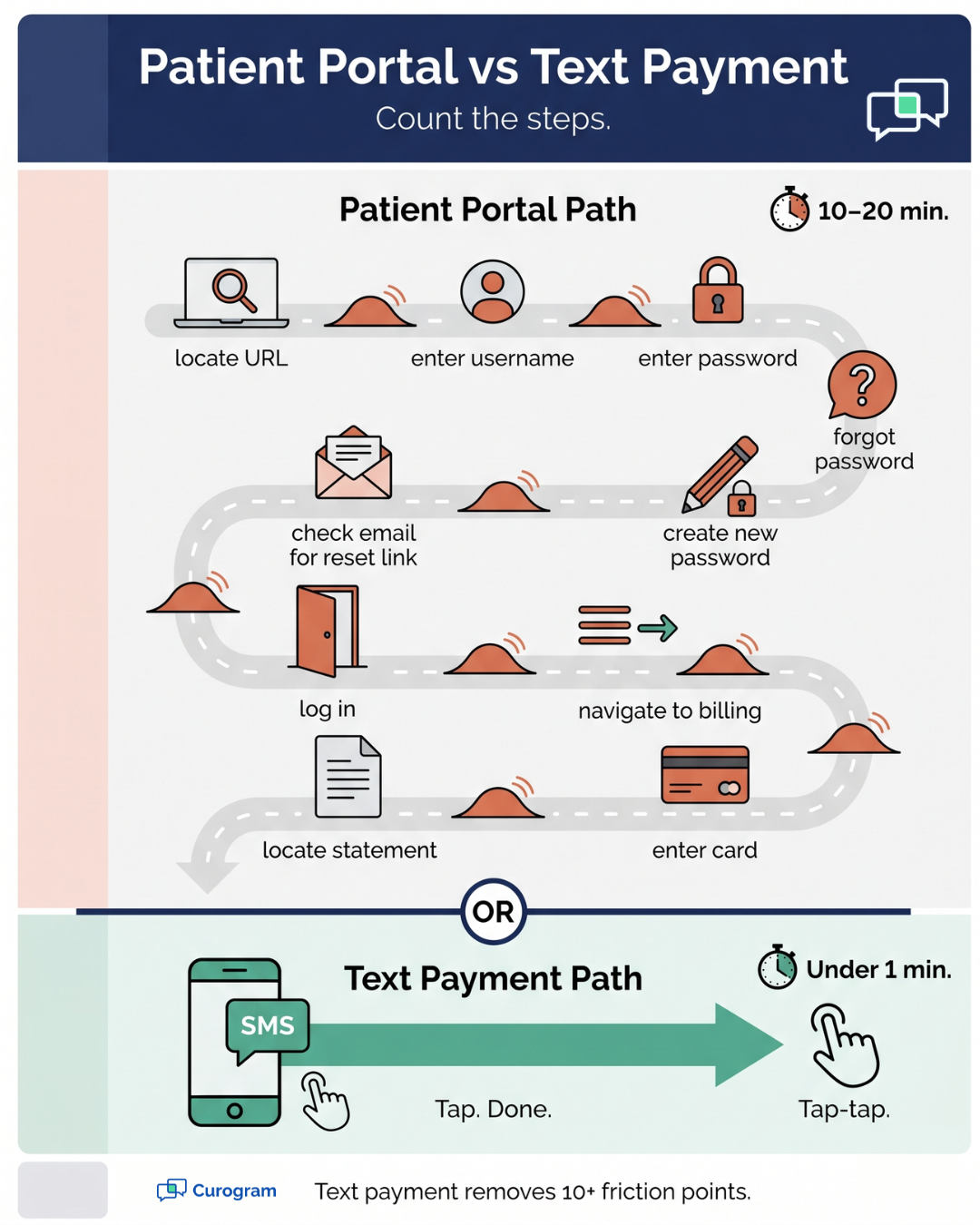
Once logged in, the process is rarely simple. You click through menus and find the billing section. You locate your statement. Then you click another link to actually pay. For a 70-year-old with mild cataracts and limited tech experience, this can take 15 minutes or more.

In practical experience, most patients aged 65 and over rarely use their patient portals at all. They might log in once during signup and never return. Some never finish setup in the first place.

Compare this to SMS. An elderly patient payment SMS works on any phone—including basic flip phones. There's no login. There's no app to install. The link opens directly in the phone's browser. One tap shows the balance; another tap completes payment.

Vertical infographic showing friction speed bumps on patient portal payment versus one-tap text payment

The Real Cost of Friction

Friction in billing has a real price. Patients who don't pay quickly often don't pay at all. Facilities lose revenue. Patients lose credit standing. Nobody benefits from the delay—it's just an old system that nobody got around to fixing until SMS came along.

The good news is that the alternative already exists, and it works on the device you already use every day. The next section walks through exactly how text-based payment works from start to finish.

How Text-Based Payment Works

Text payment is simple by design. The whole process strips away anything that creates delay or confusion. Here's what actually happens behind the scenes—and why it works so well for vascular and cardiac patients:

The 4 Steps of Text Payment, from Discharge to Confirmation

Most text payment systems follow the same basic flow. The steps are short, sequential, and don't require anything you don't already have on your phone.

Step 1: Discharge and bill finalization

After your procedure, the facility's billing team finalizes your balance. They calculate what your insurance covered, what your deductible took, and what you owe out of pocket.

This usually happens within a few hours of you leaving the clinic. Modern systems pull this data straight from the EMR, which speeds things up.

Step 2: SMS arrival

Within 2 to 4 hours of discharge, you receive a text from the facility. The message includes the facility's full name (for example, "Atlas Vascular Center"), your balance amount, and a secure payment link.

Some facilities also include the procedure date so you can match the bill to your visit. The link is unique to your account—nobody else can use it to pay.

Step 3: One-tap payment

You tap the link, which opens a payment page right in your phone's browser. You enter your credit or debit card details on a secure form.

The whole process takes under one minute for most patients—even those who aren't comfortable with technology. The form is large, simple, and works the same way as any online shopping checkout.

Step 4: Confirmation

After payment, you get a second text confirming the transaction. The message includes the amount paid, the date, and often a confirmation number for your records. Some systems also email you a receipt for tax or HSA documentation. The receipt is saved on the facility's side too, so you don't have to keep a copy.

Here's how text payment compares to other common methods:

Method

Time to Pay

Friction Level

Common Issues

Paper check

5–10 min

High

Lost mail, wrong address, postal delay

Phone call

8–15 min

High

Hold times, errors, read card aloud

Patient portal

10–20 min

Medium

Login issues, password resets

Text payment

Under 1 min

Very low

None for most patients


Why Text Payment Is More Secure Than People Assume

A lot of patients hesitate at first. The idea of paying through a text feels modern, and sometimes "modern" sounds risky. The reality is the opposite—text payment is more secure than most traditional methods. The technology behind it has been refined over the last decade.

End-to-end encryption protects your data. Every text payment system worth using encrypts the connection between your phone and the payment processor. This is the same level of security banks use for online transactions. Your card number travels safely from your screen to the processor without being exposed.

The facility never stores your card information. Modern payment platforms use what's called "tokenization." Instead of saving your real card number, the system creates a unique token that represents the transaction.

The card data itself goes straight to a certified payment network—not to the facility's database. Even if a hacker breached the facility's system, your card data would not be there to steal.

How to Tell a Real Payment Text from a Scam

Scam texts are real, and learning to spot them protects your wallet and your peace of mind. Here are the markers that show a payment text is legitimate:

  • Includes the facility's name - If you had a procedure at "Metro Vascular Center," the text will say "Metro Vascular Center" or a recognizable short version. Scam texts often use vague phrasing like "your provider" or "your account."

  • Never asks for personal information - The facility already has your name, your insurance details, and your contact info. The text should only ask for payment for a bill you know you owe. If a text asks you to "verify your identity," "confirm your SSN," or "update your insurance," it's a scam.

  • Uses a professional payment link - The URL usually contains the facility's domain or a known payment processor. Pressing and holding the link on a phone shows the full address before you tap. If the link looks random or uses a free URL shortener, that's a red flag.

The OBL patient payment experience improves dramatically once patients learn these markers. Most facilities also tell patients at checkout, "You'll get a text from us within a few hours with your balance—it'll come from this name." That heads-up alone prevents most confusion.

When in doubt, call the facility directly using the number on their website. Ask if they sent you a payment text. A 30-second call clears up almost every scam concern.


How Curogram Connects Text Payment to Medstreaming for a Cleaner Patient Experience

Curogram works directly with Medstreaming, the EMR most cardiac and vascular practices already use. The integration means patient balances flow from

Medstreaming into Curogram's text-to-pay system without manual entry. Staff don't double-enter numbers. Patients don't wait days for the bill to be calculated.

When you complete a procedure at a Medstreaming-powered facility, your bill is finalized inside the EMR within hours. Curogram pulls that balance, formats it for SMS, and sends the text to your phone. The whole handoff happens in the background—you only see the final text.

The platform is HIPAA-compliant by design. Curogram's SMS payment links never include protected health information like your specific diagnosis or treatment details. The text only confirms you have a balance and provides a secure link. Your actual medical information stays inside Medstreaming, where it belongs.

Based on our internal data, practices using Curogram see strong operational gains across SMS-driven workflows. One client, Atlas Medical Center, reduced no-show rates from 14.20% to 4.91% within three months after switching to Curogram's reminder system—a result 3x better than the industry average. The same texting infrastructure powers text-to-pay for vascular and cardiac clinics.

For patients, this matters in practical ways. You get your bill quickly, while the procedure is still fresh in your mind. You pay without leaving your couch. You avoid the credit-score risk of forgotten paper statements.

For older patients with limited tech experience, the process feels closer to receiving a text from a friend than navigating a hospital portal.

Conclusion

Paying a medical bill should not be the hardest part of recovery. After a cardiac or vascular procedure, your focus belongs on healing—not on hunting down a paper statement that arrived two weeks late.

Text-based payment fixes the timing problem. The bill arrives within hours of discharge, while the visit is still on your mind. One tap pays it. No envelope to mail. No portal to navigate. No fear of a missed payment hitting your credit score later.

For patients aged 65 and over, the difference is even bigger. Patient portals were never designed for users who struggle with passwords or small screens. Text payment works the way phones have always worked—you receive a message, you tap it, you're done. Even a basic flip phone can handle it.

The security side often surprises patients too. Text payment is more secure than mailing a check or speaking your card number over the phone. Your card data never sits in a facility database. Encryption protects every step of the process.

If you've had a procedure and your facility doesn't yet offer text payment, ask about it at your next visit. More vascular, cardiac, and OBL practices are adopting SMS billing every quarter. Your request can help speed up that change at your specific clinic.

If you're a clinic admin reading this, the path forward is clear. Patients prefer text. Staff save time. Collection rates improve. The integration with EMRs like Medstreaming means you don't have to overhaul your existing workflow to make the change.

Give your vascular and cardiac patients the payment experience they actually want. Book a demo today and watch a real text-to-pay flow from your patient's point of view.


Frequently Asked Questions

How does text payment work if I have a flip phone?

Most text payment links open in a basic mobile browser, which flip phones include. You'll see a simple payment page where you can enter your card details. No app is needed at any point.

Why is text payment safer than mailing a check?

Text payment uses bank-level encryption and never stores your card data. Mailing a check exposes your bank account number, routing number, and signature to anyone who handles the envelope along the way.

How can I tell if a payment text is from my facility?

A real text shows the facility's full name, references a balance you know you owe, and never asks for your SSN or password. If unsure, call the facility directly to confirm before tapping.

How long do I have to pay through the text link?

Most facilities give you 30 to 60 days before any consequence. Tap the link any time within that window. You may receive optional reminder texts, but you can opt out anytime.

Why do facilities send text payment links so quickly after discharge?

Speed helps both sides. You see the bill while the visit is fresh and easy to remember. The facility avoids weeks of mail delays and lowers the chance the bill heads to collections.