Skip Paper: Lytec Digital Intake Forms With Structured Write-Back
💡 Lytec has no native digital intake. Curogram texts patients a form that writes their answers straight back into Lytec fields. Patients fill out...
11 min read
Mira Gwehn Revilla
:
June 24, 2026
Count the paper packets stacked on your front desk right now. Each one holds a patient's history, insurance, and consent forms. And each one waits for a person to type it into Lytec, field by field.
That daily task has a name in busy practices. Staff call it the Re-Typing Hour. It is the slow grind of turning clipboards into clean Lytec records by hand.
The work drags on, and it is easy to get wrong. A 7 becomes a 1. A phone number drops a digit. An insurance ID gets skipped. Small slips like these come back later as billing denials.
Lytec is a strong tool for storing patient data. The trouble is the gap before the data arrives. Paper and PDF forms do not flow into Lytec on their own. Someone has to key every field by hand.
This is where Lytec patient intake without manual data entry changes the day. Curogram texts patients a form before the visit. Patients fill it out on their phones. Their answers write back into Lytec as structured data, not a flat scan.
Your team stops acting as a data-entry crew. They check the form for accuracy and move on. A packet that once cost 10–15 minutes now takes a quick glance. That time figure is an illustrative estimate, not a measured benchmark.
The payoff reaches past the front desk. Cleaner intake means fewer denials at billing. Faster check-in means shorter waits in your lobby.
Staff get their focus back for the patients standing right in front of them. The whole front of the house simply runs calmer.
This guide shows how the shift works. We will name the villain, meet the fix, and map out the wins. By the end, you will see how to hand your desk back its hour.
Lytec is built to store patient data, and it does that job well. The catch sits one step earlier. Getting paper or PDF intake into Lytec is a fully manual job. The system cannot read a clipboard. A person has to type every answer in.
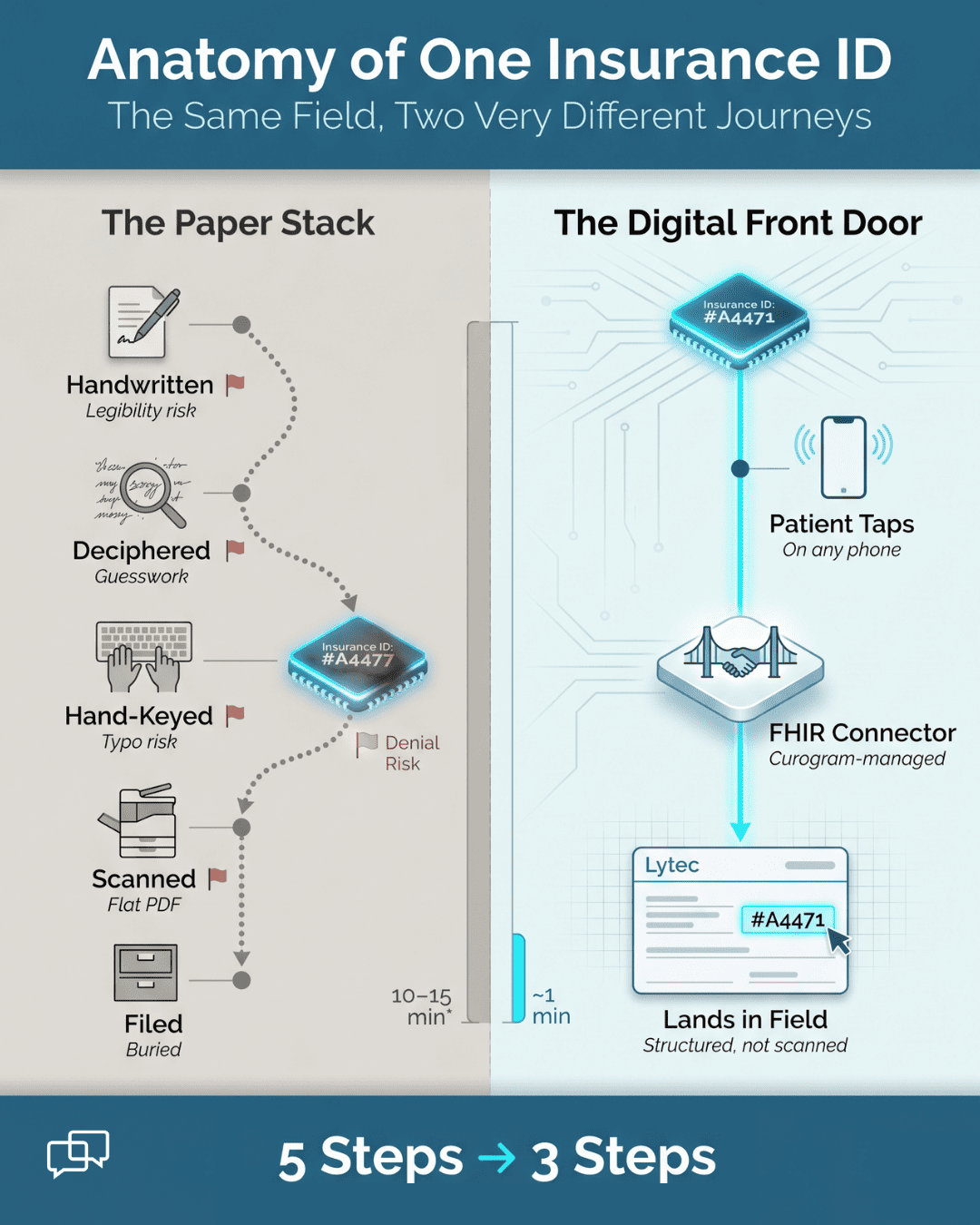
Walk through a single packet to see the load. First, the desk collects the clipboard at check-in. Next, someone reads the handwriting, which is not always clear. Then they type all 19 pages into Lytec, line by line.
The work does not end there. Blanks show up, so staff chase the patient for missing answers. After that, the paper gets scanned and filed away. One patient can eat a real slice of the morning.
How long does that take? A common estimate is 10–15 minutes of pure re-entry per patient. Treat that as an illustrative range, not a hard benchmark. Now multiply it across a full schedule. Twenty patients could mean three to five hours of typing alone.
A digit flips in a phone number. A birth date lands in the wrong format. An insurance ID gets one wrong character. These small errors are easy to make and hard to spot.
The cost of those errors shows up later, not now. A wrong ID can trigger a claim denial. A missing field can stall a charge. So the desk pays twice: once to type, and again to fix. The goal of any fix should be to reduce intake errors in Lytec at the source.
There is a human cost too. The desk stays buried in paperwork all day. Patients stand at the counter waiting for a hello. Staff feel like data-entry clerks, not the face of the practice. Morale dips when the to-do pile never shrinks.
This is the villain in plain sight. Not Lytec itself, but the manual bridge into it. Every paper packet is another round of hand-keying. The more your practice grows, the heavier that stack gets.
Imagine two clinics with the same patient count. One keys every form by hand. The other lets the answers arrive already typed. By noon, those two front desks live in different worlds. The first is swamped. The second is calm and current.
The promise here is simple. You can stop re-typing paper forms into Lytec for good. The next section shows the door that makes it possible.
Let us put rough numbers to the daily drain. Say your desk sees 20 patients a day. Use the low end of 10 minutes per packet. That is 200 minutes, or more than three hours, spent typing. Over a five-day week, that climbs past 16 hours.
These figures are example math, not a measured study. Still, they show the shape of the problem. That is most of a full work shift each week. Imagine handing one staff member back two full days a month. That is the size of the prize hiding in your paper stack.
Reworking a single denied claim takes staff time and delays cash. A few bad keystrokes can ripple into weeks of back-and-forth. Clean data at intake quietly prevents that whole chain.
There is also the patient's view of all this. They filled out the form once, by hand, in the lobby. To them, the job is done. They do not see the second pass your team makes later. A long check-in line just reads as a slow, dated office.
So the paper stack is not only a staff problem. It shapes how patients judge your front door. A clipboard handoff feels like a chore from another era. The fix is to move that work off paper entirely.
The fix is a digital front door that opens before the visit. Instead of paper at check-in, intake comes in early and complete. Patients answer on their own phones, at their own pace. Their replies arrive as clean data your staff can review.
Curogram texts a secure form link before the appointment. The patient taps it open. There is no app to download and no portal password to recall. They fill it out from the couch, not the waiting room.
The form is smarter than a paper sheet. Required fields block a patient from skipping key answers. Built-in logic hides questions that do not apply. So a new patient and a returning one see different paths. The result is a form that comes back full and tidy.
Now for the part your billing team will love. The answers do not land as a flat PDF or a scan. They write back into Lytec as structured data. Each reply drops into its matching field on its own. This is how Lytec forms write back to fields without a human in the middle.
Because the data is structured, your staff stop hand-keying. They open the record and review what is there. They confirm, fix a typo if needed, and move on. That single shift is what powers true Lytec front desk intake automation.
Cleaner inputs also reduce intake errors in Lytec from the start. There is no second transcription step to introduce mistakes. The patient typed it; the system placed it. Fewer wrong digits means fewer denials waiting at billing.

Curogram manages the FHIR connector that joins the two. Your team does not build it or maintain it. That heavy lifting sits on Curogram's side, not yours.
Field scope is set clearly, not left vague. During a short demo, the team shows which Lytec fields sync. You see your own forms map to your own fields. Nothing is a mystery, and nothing is a surprise on day one.
The training cost is just as light. Most front desk staff pick up the new flow in under 10 minutes. They already know Lytec, so little changes for them. Check-in simply turns from typing into a quick review.
Think about what this door really removes. It takes away the clipboard, the scanner, and the re-key step. It also helps eliminate double entry from Lytec intake for good. One clean pass replaces two messy ones.
|
Here is a quick before-and-after to make it concrete: Before, a patient hands over paper and staff type it later. After, the patient types it once and the field fills itself. The work moves from your desk to a few taps on a phone. |
That is the digital front door in action. It is not a new system to learn. It is a smoother way into the system you already trust. The next section shows what changes once that door is open.
Walk through one real-world example to see the flow. A new patient, Maria, books a visit for Thursday. On Tuesday, she gets a text with her intake link. She fills it out that night while watching TV.
Her phone number, insurance ID, and history all go in once. Required fields stop her from leaving the allergy box blank. By the time she arrives, her record is ready. The desk greets her instead of handing her a clipboard.
Compare that to the old way for the same visit. Maria writes 19 pages in the lobby on Thursday. Staff then spend 10 minutes keying it after she leaves. Two people do the same job, hours apart, with room for error.
The digital door collapses those two steps into one. Maria's typing is the only typing that happens. That is the quiet power of moving intake before the visit.
Look at the front desk once the digital door is open. The clipboard is gone. The scanner sits idle. The morning typing pile never forms in the first place. This is the clipboard-free check-in, and it changes the whole rhythm of the day.
Start with the metric that staff feel first. The 10–15 minutes of manual entry per patient drops away.
That window was tied to those heavy 19-page packets. With the data pre-filled, the desk reviews in a minute or two. Again, treat that time range as an illustrative estimate, not a measured figure.
Cleaner data carries a second, slower payoff. Fewer typos at intake means fewer denials later. A correct insurance ID sails through. A complete history avoids a stalled charge. The savings show up in your billing report weeks down the line.
Here is a simple before-and-after view of one check-in.
|
Step |
Paper stack (before) |
Clipboard-free (after) |
|
Form filled |
In the lobby, by hand |
At home, on the patient's phone |
|
Data entry |
Staff type 19 pages into Lytec |
Answers write back to fields on their own |
|
Blanks |
Chased after the visit |
Blocked by required fields up front |
|
Errors |
Added during re-typing |
Fewer, since there is no second pass |
|
Filing |
Scan and store the paper |
No scanning patient forms into Lytec |
|
Desk time |
10–15 minutes per patient |
A quick one-minute review |
The table points to the real shift in the work. The Re-Typing Hour simply disappears. Intake stops being transcription. It becomes a fast review instead. Your team checks the record rather than rebuilding it.
Think of the time math from earlier in plain terms. A desk that saved three hours a day gains back serious room. They could see more walk-ins. They could answer the phone on the first ring. They could fix a billing snag before it grows.
Let us put a rough number on that recovered time. Say each saved packet returns 10 minutes to the desk. Across 20 patients, that is more than three hours back. This is example math, not a benchmark. Still, it shows how much capacity hides in the stack.
The outcome lands in four clear wins. Check-in gets faster, so lobbies move quicker. Errors drop, so records stay clean. Denials fall, so cash flows smoother. And capacity grows at the same headcount.
You do not add staff to handle more patients. You free the staff you already have. The hour once lost to typing turns into service time. That is how a lean team scales without growing.
Consider a small specialty clinic as an example. It runs with two front desk staff and no room to hire. Volume keeps climbing, and the typing keeps piling up.
After moving intake to the digital door, the typing load fades. The same two people now handle the higher volume calmly.
There is a patient-facing win worth naming too. A fast, clean check-in feels modern and respectful. Patients skip the lobby clipboard entirely. They walk in, get greeted, and get seen. That first impression shapes reviews and return visits.
Think about the staff experience as well. Nobody spends the day decoding handwriting. Nobody re-types the same form a patient already filled. The work that remains needs judgment, not just typing speed. That is more rewarding work to do all day.
It all traces back to one core change. The data arrives structured, so the desk reviews instead of re-types. Every other win flows from that single move. Faster check-in, fewer errors, fewer denials, and more room to grow.
The clipboard-free check-in is not a far-off dream. It is what happens the day the forms write themselves in. Your desk stops being a typing pool. It becomes the welcoming front of your practice again.

How Curogram Turns Intake into a Quick Review, Not a Re-Type
Curogram closes the gap that sits between a patient's phone and your Lytec record. The feature that does the heavy lifting is Electronic Patient Forms. Think of it as your digital front door, open before the visit even starts.
Here is how it works in plain terms. You text the patient a form link before their appointment. They tap it open on any phone, no app and no portal login. They type their history, insurance, and consent answers right there.
The form is built to catch problems early. Required fields will not let a patient skip a key answer. Smart logic shows only the questions that apply to them. So the form that reaches your desk is already complete and clean.
Then comes the part that saves your team the hour. Those answers write back into Lytec as structured data. Each reply lands in its matching field, not as a flat PDF or a scan. Your staff review the form for accuracy instead of typing it from scratch.
Curogram also manages the FHIR connector that links the two systems. You do not build or maintain it. During a quick demo, the team confirms exactly which Lytec fields sync, so there are no surprises later.
The training load stays light on purpose. Most front desk staff learn the new check-in flow in well under 10 minutes flat. Check-in shifts from data entry to a fast review and a friendly hello.
One more practical win is worth naming. Curogram folds paper, scanning, and a separate forms tool into one platform and one bill.
Many practices retire the extra tools they once paid for. That means less software to juggle and one less vendor to chase. It also clears a smoother path from the patient's form straight to the Lytec field.
The Re-Typing Hour is not a fixed cost of running a practice. It is a habit your tools can break. When intake arrives as structured data, the desk stops keying and starts reviewing.
Here is the simple idea at the center of it all. Lytec holds the record. Curogram fills the record before the patient walks in. The two work side by side, each doing what it does best.
That small change moves a lot of weight. Your front desk reclaims the time once lost to re-typing paper forms into Lytec. Required fields trim the blanks that used to slow check-in. Cleaner data means fewer denials waiting at billing.
None of this asks your team to learn a heavy new system. Training runs under 10 minutes. Staff keep using Lytec the way they always have. The forms simply show up complete.
Think about what your desk could do with that hour back. They could greet patients warmly. They could answer the phone faster. They could fix one billing issue before it grows. The work that needs a human gets a human again.
You do not have to take this on faith. The fastest way to judge it is to watch it happen. See a form write back to your own Lytec fields in real time. Most demos make the point in about 15 minutes.
Hand your desk back its hour and your billing team cleaner datak. Schedule your Curogram demo and turn intake into a quick review.
Curogram texts a secure form link before the visit, with no app or portal login. The patient fills it out on any phone. Their answers flow straight into your Lytec fields as clean, structured data.
Manual re-typing is slow and breeds typos in IDs, dates, and phone numbers. Those small slips trigger denials later. Pre-filled, structured intake removes the second pass, so the data stays clean from the start.
Required fields stop patients from skipping key answers, and built-in logic hides questions that do not apply. So forms come back complete. That cuts the blanks your desk used to chase down after each visit.
Curogram is HIPAA compliant and SOC 2 Type II certified, and it signs a BAA with your practice. Intake data stays protected from the patient's phone all the way into your Lytec record.
Curogram folds paper, scanning, and any standalone forms tool into one platform and one bill. Most practices retire the extras. Field scope and sync details get confirmed during a short, hands-on demo.
💡 Lytec has no native digital intake. Curogram texts patients a form that writes their answers straight back into Lytec fields. Patients fill out...
💡 SmartCare EHR practices can digitize patient intake by adding a HIPAA-compliant forms platform. Curogram texts secure form links straight to each...
💡 Athenahealth secure online forms powered by Curogram replace paper intake with a text-based digital form that writes data straight into Athena's...