
 Jo Galvez

Every patient gets the same text, so your listing reflects all your patients. It holds no health details. Any patient can reply to reach the office.
Staff do nothing at checkout, and no one picks who gets asked. One multi-location practice earned 1,064 new 5-star reviews in three months, based on Curogram client data from clinical settings.
A small practice with 14 Google reviews and a 2.6 rating is usually being rated by patients who left upset. Patients who left happy went home, made dinner, and never thought about Google again.
Lytec runs the schedule and billing for that practice well. But nothing in Lytec, and usually nothing in the add-ons sold around it, asks those happy patients for a review. So a checkout script gets written, staff skips it on busy days, and the rating stays right where it was.
That cycle is common at small offices, and it has a plain cause. The person asked to read the script is also answering the phone, scanning an insurance card, and booking a follow-up visit for the patient.
Our view: the ask should be automatic. Every patient, after every visit, gets the same short text with a link to Google, and nobody at the desk decides who gets asked.
That approach does two jobs at once. It builds volume, which is what moves a thin listing. And it keeps the practice inside Google's rules, which bar asking only the patients you expect to be pleased.
Below, we cover why Lytec practices end up with thin listings and how automated requests connect to the Lytec schedule. We also lay out what Google and the FTC allow, and what a week of requests looks like at a small office.
The goal is a listing that matches the care your patients already get, built without adding a single task at checkout.
Why Lytec Practices Get Stuck With a Two-Star Listing
Lytec handles the business side of a small practice: schedule, charges, patient ledger. Reputation sits outside all of it.
Where Reviews Fall Through the Add-On Stack
Many Lytec offices buy add-ons through their reseller to cover reminders, messaging, and patient statements. Ask which one handles Google reviews and the answer is usually none of them. Each tool does its own job, and review requests were never part of the bundle.
That gap is where the CGM Lytec reputation management add-on question comes up. Most practices fill it with good intentions and a sign by the door.
The Manual Ask, Step by Step
- One evening, the owner checks the listing and finds 2.3 stars.
- Next, the office manager writes a checkout line: "Would you mind leaving us a review?"
- Staff use it for a week, then drop it whenever the phone rings.
- A "Review us on Google" sign goes up by the door.
- Three months later, the only new reviews come from patients who were upset.
Why a Few Bad Reviews Weigh So Much
Readers notice the share of reviews that are negative. A 2024 study in the Journal of Medical Internet Research showed people a doctor's profile with different shares of bad reviews. When 30% were negative, intent to choose that doctor averaged 3.8 out of 7. At 10%, it rose to 5.1.
Volume changes that share. Four complaints among 12 reviews is a third of the listing. The same four among 300 reviews barely register. That math is why Google reviews for small medical practices come down to volume.
The Owner's Side of It
Think of a physician-owner with 20 years of steady practice who searches the practice name one night. Its top review is a 2019 billing dispute.
Next comes a complaint about parking, and neither one mentions the care. That's the Lytec practice Google Business Profile every new patient in town sees first.
How Automated Google Review Requests Work With Lytec
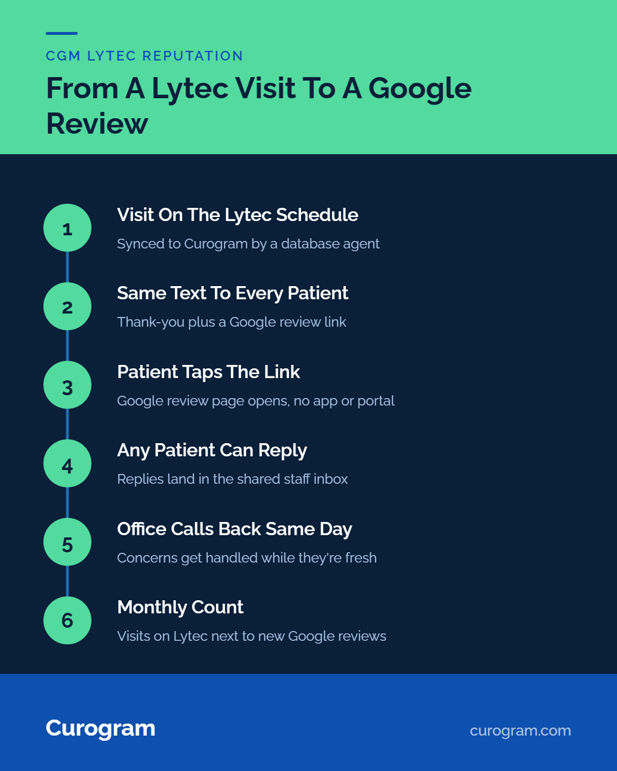
Curogram turns visits on the Lytec schedule into review requests, with no one at the desk choosing who gets one. Its Lytec integration supplies the schedule data.
From Lytec Visit to Review Request
- Curogram syncs patients and appointments from your Lytec database through an agent your practice approves.
- After a visit, the patient gets a short text from the practice's number.
- Each text says thank you and links to the practice's Google review page.
- Anyone who wants to tell the office something can reply, and the reply lands in the shared staff inbox.
Setup for the Lytec connection usually takes 2 to 5 days, and Lytec adds no integration fee. Nobody has to remember anything at checkout.
What Google and the FTC Allow
Google's contribution policy bars businesses from discouraging negative reviews or selectively soliciting positive ones. It also bans incentives for any review. The FTC's 2024 rule on fake reviews prohibits rewards tied to reviews that express a set sentiment.
Automated patient review requests in healthcare fit both rules when every patient gets the same message, with no gift and no screening. That's the design we'd insist on from any vendor: one request, sent to everyone.
Keeping the Text Free of Health Details
HIPAA compliant review request texts carry no health information. Each message names the practice, thanks the patient, and links to Google. It says nothing about the visit reason or any condition. Curogram is HIPAA compliant and SOC 2 Type II certified.
A typical one reads: "Thanks for visiting Oak Street Family Medicine today. If you have a minute, we'd value a Google review: [link]. Reply here if anything needs our attention."
Curogram Highlight: Automated Google Review RequestsAutomated Google Review Requests text every patient a review link after their visit, using the schedule Curogram already syncs from Lytec. Patients tap the link and land on your Google review page, with no app and no practice portal. Replies come back to the same shared inbox your staff use for patient texts. The channel that runs 2-way HIPAA-compliant texting and appointment reminders carries the review request too. |

What Changes When Every Patient Gets Asked
To see the change, follow one office through one quarter. This example is illustrative: a three-provider family medicine practice on Lytec seeing about 60 patients a day.
A Quarter of Requests, Worked Through
|
Step |
Illustrative office |
|---|---|
|
Visits per week |
300 |
|
Review requests sent |
300 (every patient) |
|
Share who post a review (assumed for this example) |
1 in 20 |
|
New reviews per week |
15 |
|
New reviews per quarter (13 weeks) |
195 |
Swap in your own weekly visit count. Even at a lower posting rate, a quarter of requests to every patient outpaces a checkout script that gets used one week in four.
Why the Request Goes Out the Same Day
A request sent within hours of the visit catches the patient while the details are fresh. She still remembers the nurse who knew her name and the wait that ran short. A week later, the visit has blurred into everything else in her week.
What the Numbers Say
One multi-location practice using Curogram's post-visit requests earned 1,064 new 5-star reviews in three months, based on Curogram client data from clinical settings. At that pace, a handful of old complaints becomes a small slice of a long, recent list.
Steady volume is the most reliable way we know to improve a medical practice's Google rating. Responses matter too: in the same JMIR study, a physician's reply to negative reviews raised intent to choose that doctor from 4.1 to 4.8.
What the Front Desk Stops Doing
Out goes the checkout script. So does the sign by the door, and the owner's monthly question about how reviews are coming. When a patient replies with a concern, the office manager sees it in the inbox and can call that day.
For the staff routine, see our Lytec review request workflow. For the patient's view of the text, see easy Google reviews by text.
Conclusion: Turn Every Great Visit Into a Review
Lytec runs your schedule and billing. Curogram turns the visits already on that schedule into a steady flow of review requests, sent to every patient by text.
Your patients have already formed an opinion of your care. Many would share it if someone asked at the right moment, in a channel they already use, with nothing in the way.
Before you talk to anyone, pull two numbers: last quarter's visit count and last quarter's new Google reviews. Put them side by side. If the second is a small fraction of the first, the gap is patients nobody asked.
We'll walk through how one practice earned 1,064 new 5-star reviews in three months. See how it works with your Lytec system in 15 minutes when you book a demo.
Frequently Asked Questions