

7 min read

The Patient Reminder Workflow for Exa Imaging Centers

The Patient Reminder Workflow for Exa Imaging Centers
💡Exa PACS patient reminders in an imaging center workflow work best when the message schedule follows prep requirements instead of a single 24-hour text. Curogram runs a three-touch sequence alongside Exa PACS/RIS: prep instructions 72 hours out, a two-way confirmation 24 hours out, and arrival logistics 2 hours out.

Replies land in a staffed inbox, so a patient who cannot find the MRI screening form gets an answer while the slot can still be saved or refilled. Exa keeps resource-based scheduling, worklists, and billing.

Curogram carries the patient-facing messages and the replies that come back. Imaging centers running sequenced confirmations see confirmation rates above 75%, based on our internal data.


A patient can show up on time, park, sign in, and still cost you the scanner hour. She ate breakfast at 7 AM. Her CT was ordered with IV contrast and a four-hour fast. Now the tech is on the phone with the radiologist, and the 9:30 slot is gone either way.

Most imaging reminder setups leave that gap open. A confirmation text sent the day before asks one question: are you coming? It never asks the one that protects the hour: do you know what to do before you get here?

We think imaging centers on Exa need reminders sequenced to prep requirements, with a real reply path, because the failure mode in imaging is a prepped-wrong patient more often than an empty chair.

Exa RIS already handles the hard scheduling work. Resource-based booking by modality, physician, and procedure. A color-coded scheduler that flags insurance verification timing. A single database shared with PACS and Billing.

The problem sits in the days between the order and the appointment. A patient referred by a physician she trusts waits at a center she has never visited, holding prep instructions she may never have received.

Three touches close those days, timed to what the modality requires. Centers already running two-way texting for Konica Minolta Exa know the inbox works. This is what to send through it, and when.

The Villain: The Burned Modality Hour

The Modality Hour Nobody Can Refill

A primary care practice that loses a 2 PM slot can often fill it. Someone in the waiting room needs a med check, and the schedule absorbs it. An MRI hour absorbs nothing.

The study was authorized for a specific procedure, the tech was assigned to that modality, and no walk-in population exists for a contrast-enhanced abdominal MRI. When that hour empties at 9:40 AM,

it stays empty until 10:30. Across three modalities running six days a week, a few weekly prep failures per scanner remove real capacity from a schedule that referring physicians are already waiting on.

Prep Is Where Imaging Appointments Break

Each modality gates on something different, and each one fails differently.

  • MRI: safety screening for implants, pacemakers, and metal fragments. The ACR Manual on MR Safety treats screening as a gate, not paperwork.
  • CT with IV contrast: fasting windows and, for many patients, recent renal function labs. Coffee with cream at 6 AM can end the appointment.
  • Mammography: no deodorant or powder on exam day. Artifact sends the patient back for a repeat.
  • Abdominal ultrasound: fasting, often with a full bladder on a timed schedule she has to run at home.

A voicemail carries none of that reliably. Neither does a text reading “Reply Y to confirm.”

Phone Confirmation Drops the Instructions

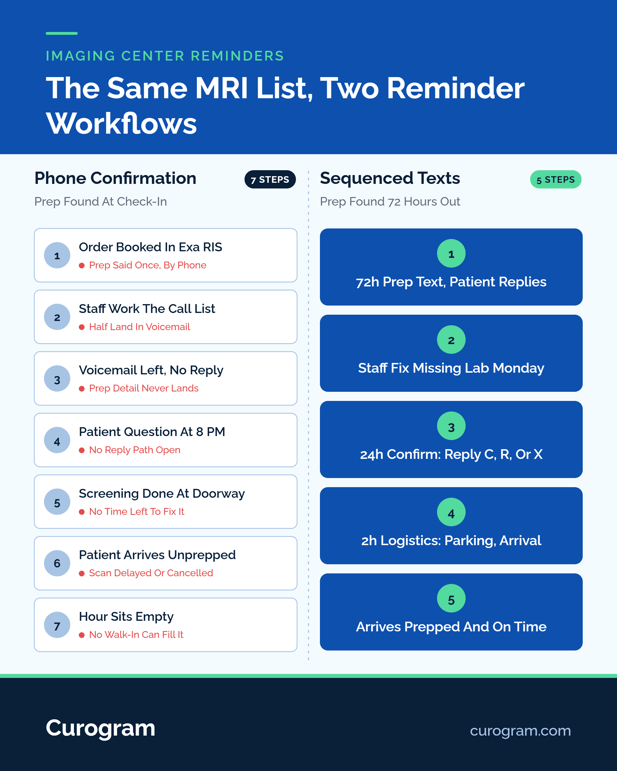
Call-based confirmation was built to answer attendance. Staff work a list, reach maybe half the patients live, leave voicemails for the rest, and mark the RIS. Prep detail travels only on the calls that connect.

The reverse direction fails too. A patient who remembers her pacemaker card at 8 PM has nowhere to put the question. She shows up, tells the tech, and screening happens in the doorway instead of three days out.

Most imaging volume arrives by referral. She chose her orthopedist, not your center, and has never met your staff. No relationship holds the appointment together, which is why the first three messages she receives from you do more for attendance than any generic cadence.

Infographic comparing how patients get reminders for prep before a radiology procedure

The Guide: The Prep-Sequenced Reminder Workflow: 72 Hours, 24 Hours, 2 Hours

Three touches, each with a different job. The sequence is front-loaded, because prep problems need days to solve and attendance problems need hours.

Timing

What the message carries

What a reply does

72 hours out

Modality-specific prep: fasting window, screening questions, what to bring

Patient flags an implant or a missing lab. Staff resolve it with three days of runway

24 hours out

Confirmation: reply C to confirm, R to reschedule, X to cancel

C marks the slot solid. R opens a conversation. X frees the hour early enough to offer it

2 hours out

Logistics: suite, parking, arrival time, what happens on arrival

Patient reports traffic, and the tech adjusts instead of guessing


72 Hours: The Message That Saves the Hour

This is the touch most reminder tools skip, and it does the heaviest work.

A contrast CT patient gets her fasting window as an actual clock time, not “fast prior to your exam.” A mammography patient gets the deodorant instruction.

An MRI patient gets three screening questions she can answer by text. Answers come back to a staffed inbox, so a spinal stimulator surfaces Wednesday morning rather than Saturday at the scanner.

24 Hours: Confirm, Reschedule, Cancel

Single-key replies keep response rates high because they take four seconds. C, R, and X cover the decision the patient is actually making.

An R reply is worth as much as a C, since it converts a future empty hour into a rebooking conversation while the slot can still be sold. Filling that hour runs on the same broadcast engine behind mass text notifications for Exa imaging centers.

2 Hours: The Arrival Details

Short and practical. Suite number, parking structure, which entrance is unlocked before 8 AM. First-time patients get lost in medical office parks constantly, and a late arrival on a 30-minute MRI slot is a partial burn even when the study runs.

Where This Sits Next to Exa

Curogram complements Exa PACS/RIS. It does not replace scheduling, worklists, or billing. Exa stays the source of truth for the appointment, and Curogram runs as a communication layer alongside it, sending the sequence and holding replies in a threaded inbox your front desk already watches.

Konica Minolta has been open about this model. The next-generation Exa Platform ships with an open API, and the April 2025 openDoctor agreement covers self-scheduling and patient engagement on that basis.

Confirm your own data flow with both vendors before assuming any specific write-back behavior. What we will state plainly: messages, replies, and the audit trail live on the Curogram side, under SOC 2 Type II certification and HIPAA compliance.


The Success: Walking One Contrast CT From Order to Scan

Referring physician orders a CT abdomen and pelvis with IV contrast for a 54-year-old woman, first visit to your center, scheduled Thursday at 9:30 AM.

Monday: The Order Lands and the Appointment Is Booked

Your scheduler books Thursday in Exa RIS, checks eligibility, and confirms the procedure code. Prep attaches to that code: four-hour fast, current creatinine. The patient hears all of it once, verbally, on a call she takes in a parking lot.

Monday Afternoon: The 72-Hour Message

She gets a text naming your center, her modality, and her Thursday time. Three items: stop eating after 5:30 AM, bring insurance card and ID, reply if you take metformin or have reacted to contrast dye.

She replies that her labs were drawn six weeks ago elsewhere. Front desk sees it at 4 PM and requests the results, with three days to land them. On a call-list workflow, nobody learns this until she is in the chair.

Wednesday: The 24-Hour Confirmation

She replies C. Two other patients reply R, and staff rebook them into next week while opening those Thursday hours to the waitlist.

Thursday 7:30 AM: The Logistics Text

Suite 210, rear parking structure, doors at 7:45, arrive by 9:15. She arrives at 9:14, fasted, labs in the chart. The scan runs on time.

What This Does Across a Full Schedule

Sequenced two-way reminders produce confirmation rates above 75% in our client base, and no-show rates roughly 53% below industry average, based on our internal data.

One Curogram client tracked no-shows from 14.20% to 4.91% within three months of switching to automated two-way reminders. That figure comes from a clinical practice rather than an imaging center, so treat it as directional for a modality schedule.

Measure

Before sequenced reminders

After

Confirmation rate

Whatever the call list reached

Above 75%

No-show rate (one client, three months)

14.20%

4.91%

Prep questions surfaced

At check-in

72 hours out

Cancellations received

Day of, or never

Early enough to refill


Prep questions that used to surface at the check-in window now surface Monday afternoon, when staff can still act on them. That is what protected scanner hours means in practice.

Woman checking health insurance details on her phone at home

Conclusion: Getting Patients Prepped, Not Just Booked

Exa runs the imaging side of your operation well. Scheduling by modality and resource, a shared database across PACS, RIS, and Billing, worklists your radiologists trust. What it was never built to do is hold a three-day conversation with a woman who cannot remember whether her stent is MRI-safe.

That conversation decides whether imaging appointments hold, and it runs on its own schedule: prep at 72 hours, confirmation at 24, logistics at 2. Every touch has a reply path, and every reply lands somewhere a person is watching.

We would rather your staff spend Monday afternoon chasing one missing creatinine result than spend Thursday morning explaining to a fasted patient why she has to come back. The first costs ten minutes. The second costs an hour of scanner time, a repeat authorization, and a referring physician who notices.

Curogram works alongside Exa PACS/RIS under SOC 2 Type II certification and HIPAA compliance. Nothing about your imaging workflow changes. What changes is what happens in the days before the patient arrives.

Book a demo, and we will walk through your actual modality mix, prep by prep, and show you the three messages a CT patient would receive between order and scan.


Frequently Asked Questions

How does HIPAA apply to sending prep instructions by text?

Prep texts are patient communications covered by HIPAA, which requires a BAA, access controls, and audit logging from your vendor. Curogram operates under HIPAA compliance and SOC 2 Type II certification, with message-level audit trails.

How should reminder content differ between MRI, CT, and mammography?

Each modality gates on something different: MRI on safety screening for implants and metal, contrast CT on fasting and renal labs, mammography on skipping deodorant and powder. Messages should carry the specific gate, not generic prep language.

What happens operationally when a patient replies to cancel?

The X reply threads into your staffed inbox with the patient and appointment identified. Front desk cancels in Exa RIS and works the waitlist for that modality, which is why a 24-hour cancellation still recovers part of the hour.

Why does a 72-hour touch matter more than a day-before reminder?

Prep problems need lead time to fix. A missing lab, a pacemaker card, or a work conflict all take days to resolve. Surfacing them Monday keeps Thursday's slot intact instead of documenting why it burned.

How do sequenced reminders work alongside Exa without replacing anything?

Exa stays the scheduling and imaging system of record. Curogram runs as a communication layer next to it, sending the sequence and holding replies. Confirm your specific data flow with both Konica Minolta and Curogram before configuration.