
1 min read
Collecting Copays and Balances Faster w/ Text-to-Pay in Allscripts PM
💡 When you collect copays in Allscripts PM, you make payments simpler for your patients. Patients receive simple, secure links they can use on...
8 min read

Send payment requests automatically through secure text.
Offer pay from phone options for faster processing.
Reduce delays caused by forgotten wallets or unclear charges.
Give staff more time to focus on patient conversations.
Help patients understand costs in clear, simple messages.
Curogram helps improve your billing workflow by integrating text-to-pay with ease.
Collecting payments in a radiology center often feels more emotional than you expect. Patients arrive focused on their exam and sometimes feel anxious about the results. When they learn about their copay or balance at check in, they may not be ready to handle it.
Some patients do not carry physical cards. Others want to pay later but forget once they leave. You and your staff try to guide them through the moment, yet the workflow still feels fragile. When you rely only on in person payments, you carry extra pressure on already busy days. Staff must explain charges, track down missing payments, and document each attempt.
Exa text to pay workflows for radiology give you another way to support patients. They let you send secure payment links before or after the appointment. Patients can pay from their phone at a calm moment. Staff do not have to ask repeatedly or chase down missing balances.
In this blog, we explore the challenges of traditional payment collection. Let's learn how connected text to pay tools help and see the benefits for everyone involved.
When your radiology center relies only on in person payments, you may notice how often the workflow breaks down. In our detailed guide, we covered the value of text-to-pay for Exa users.
Patients do not always arrive prepared to pay their copay. They may not understand why the amount is different from past visits. Some feel embarrassed if they forget their wallet or if the cost is higher than expected. These moments create tension right at the start of the visit and can shape the emotional tone for the rest of the day.
Staff carry a lot of responsibility in these interactions. They must explain charges clearly, stay calm when patients feel upset, and document every step. If several patients arrive at once, the front desk becomes crowded. Staff try to move quickly, but payment conversations slow everything down. These delays affect the imaging schedule and create longer wait times. Even when your team works hard, the process feels unstable because so many things depend on the patient’s readiness.
You may also struggle with unpaid balances that appear after the visit. Some patients say they will pay online later, but they forget once they return to their routines. Others wait for statements that arrive weeks after the appointment, which can cause confusion about what they owe. Staff must follow up with calls, statements, or emails. This work adds up and drains time that could be spent helping patients with questions or supporting technologists.
Another challenge is the emotional weight of these conversations. Talking about money can make people feel vulnerable. Patients may apologize, feel guilty, or react defensively. Staff often absorb this emotion, even when they know the patient is doing their best. Over time, these interactions contribute to burnout because the workflow puts people in stressful situations again and again.
Traditional copay collection also increases the risk of errors. When payments are processed manually while the waiting room is busy, staff may rush. They might write a note incorrectly or forget to update a balance. These small mistakes become larger issues later in billing. The workflow ends up depending too much on memory and perfect timing during the busiest parts of the day. These challenges show why relying only on in person payments can make your imaging center feel less stable than it should.
Curogram helps you create a more stable process by connecting digital payment tools to your existing imaging workflow. Instead of asking every patient to pay at the front desk, you can send a secure payment link directly to their phone. This link allows them to pay before they arrive or shortly after their appointment. The process feels simple and respectful. It gives patients more control over when they complete the payment.
Exa text to pay workflows for radiology let you automate part of this process. When an appointment is scheduled, you can send a reminder with the estimated copay. Patients see the information early, which helps them prepare. If they forget, you can send a follow-up message after the visit. This removes pressure from staff and gives patients clear options for completing their balance.
The payment page is easy to use. Patients do not need to create an account or remember a password. They click the link, review the amount, and pay with their card. This simplicity matters because it lowers the emotional stress that often appears during in person conversations. When people pay from home or another quiet place, they can focus without feeling rushed by a busy waiting room.
Integration with Exa also helps your staff stay organized. Payments link to the patient record so staff can see which balances are complete and which are pending. This reduces guesswork and prevents duplicate conversations. Staff can approach patients calmly because they already know whether payment has been made. The workflow becomes smoother and more predictable.
Curogram also supports post visit payment messaging. If a balance remains after insurance processes the claim, you can send a secure text with the updated amount. Patients appreciate this clarity because it prevents confusion about mailed statements. It also helps them stay on track with their financial responsibilities. Over time, these small improvements add up to a more stable system for both staff and patients.
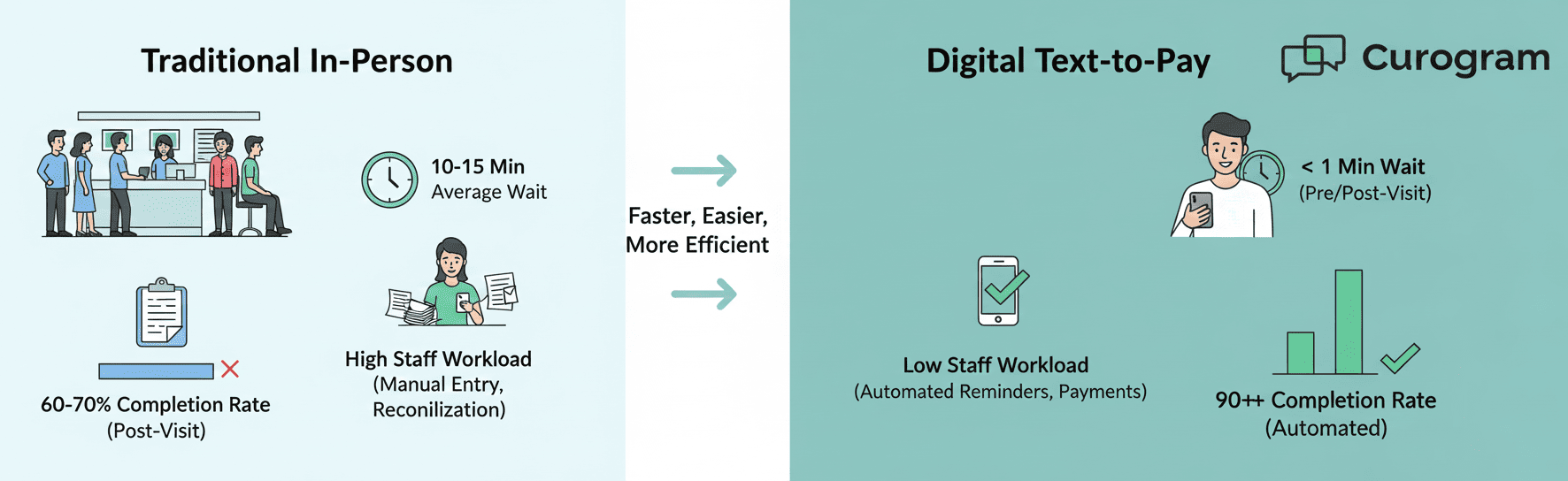
When you use digital payment tools, patients no longer need to handle copay conversations at the front desk. They can complete payments before they arrive, which shortens check in time. This helps the waiting room stay calm and organized. Patients feel less rushed and more prepared for their exam.
Payment discussions can be stressful for both patients and staff. When payments are completed through a phone link, the emotional weight decreases. Patients can take their time to review the charge without feeling watched. Staff avoid difficult conversations that drain energy during busy hours.
People respond well to simple reminders sent at the right moment. When you send payment links automatically, more patients follow through. They can pay in one step instead of remembering to call later. This leads to fewer unpaid balances and less follow-up work for your team.
Manual payment entry can cause mistakes, especially during rush periods. Digital tools capture payment details clearly and securely. Staff no longer need to type long card numbers or interpret handwritten notes. This increases accuracy and reduces billing issues.
Payment links allow you to share amounts in writing. Patients can read the details and double check their understanding. This is especially helpful for people who feel overwhelmed during medical visits. Written clarity reduces misunderstandings and frustration.
Some patients cannot stay after their exam to sort out payments. They may need to return to work quickly or attend to family responsibilities. Text to pay gives them a way to complete the payment later in the day. This helps them stay on track without holding up your workflow.
Talking about money at the front desk can make people uncomfortable. Digital payments allow patients to complete the process privately. They do not have to speak loudly or share sensitive information in a public space. This improves their overall experience.
Front desk teams handle many responsibilities at once. Removing in person payment tasks reduces their workload. They can focus on welcoming patients and supporting technologists. This leads to a calmer and more predictable workday.
Digital systems record payments automatically. This reduces the chance of lost receipts or incomplete entries. Staff can review payment history quickly when patients have questions. This supports smoother communication and fewer disputes.
If you manage several locations, digital payments create consistency across your network. Each site follows the same process. Patients receive the same style of messaging. Staff benefit from a shared workflow that feels familiar and reliable.
Sometimes insurance changes the patient’s portion after the visit. Digital tools allow you to send updated payment links with the correct balance. Patients can pay quickly without waiting for a mailed statement. This prevents delays and helps you maintain steady cash flow.
Paper statements cost time and money to create. Phone calls often go unanswered. Digital payment reminders reduce the need for these extra steps. This allows staff to focus on patient care instead of collections.
Patients appreciate when processes feel simple. Paying from a phone is familiar and convenient. It requires less effort than logging into a portal or calling the office. This positive experience can shape how patients feel about your imaging center.
Caregivers often help patients manage medical expenses. Digital payment links are easy to forward or show to another person. This helps caregivers stay informed and assist when needed. It also increases the chance that payments are completed on time.
Digital tools prepare your imaging center for future improvements. Once patients are comfortable paying through secure links, you can expand to prepayment for certain exams or automated balance reminders. These steps reduce workload and strengthen communication. Over time, your payment workflows become more stable and efficient.
A radiology practice noticed that many patients left without paying their copays. Staff tried calling after appointments, but the response rate was low. Patients often said they forgot or were too overwhelmed during check in. The practice knew this pattern created extra work and left staff tired by the end of the day.
They introduced text to pay options linked to Exa. Patients received a secure link with the estimate before the visit and a follow-up link after the exam. Many paid within minutes. Staff saw fewer unpaid balances and fewer stressful conversations at the desk.
After three months, the center reviewed its data. Copay completion improved. Staff reported less emotional strain because they were not chasing payments. Patients said the process felt faster and easier. The practice expanded digital payments to all locations and continued to refine timing and messaging based on patient feedback.
Start by examining your current process. Look at how often patients forget wallets or feel surprised by costs. Ask staff which parts of the workflow feel most stressful or time consuming.
Next, choose one department or exam type to pilot text to pay tools. Start small so you can gather feedback and adjust your process. Experiment with the timing of reminders and the clarity of your messages.
When the pilot feels stable, expand to more visit types or locations. Keep listening to staff and patients. Their experiences will help you build a workflow that feels both practical and supportive.
Curogram supports radiology teams by connecting digital payment tools to their daily workflows. When you use text to pay inside Exa, you help patients complete payments without adding pressure. They receive clear messages and secure links they can open from any device. This reduces confusion and helps them stay on track with their financial responsibilities.
Staff also benefit from a predictable and organized system. They can see payment status in real time and do not need to chase unpaid balances. This frees time for patient support and reduces emotional strain during busy hours. The workflow becomes more stable, and the check in experience feels calmer for everyone involved.
Most of all, Curogram helps you create a balance between technology and human care. Digital payments handle routine tasks so your team can focus on meaningful conversations. This combination helps your imaging center offer a smoother, more supportive experience from check in to follow up.
Digital payment tools connected to Exa offer a calmer path in billing your patients. They can pay before or after the visit through secure text links. They have time to review the amount and complete the process when they feel ready. Staff gain more time for patient conversations instead of chasing balances. The workflow becomes more predictable and respectful.
If you want to collect copays Exa radiology workflows in a smoother way, text to pay tools can help you get there. They do not replace human care. They support it by giving patients simpler options. Over time, these small improvements help your imaging center feel more organized.
Want to see how easy it is to collect co-pays with Curogram? Book a quick demo today.

1 min read
💡 When you collect copays in Allscripts PM, you make payments simpler for your patients. Patients receive simple, secure links they can use on...

1 min read
💡 Text-to-pay in DrChrono makes it simple for clinics to collect balances securely. With secure text payment workflow, you can: Send HIPAA +...

1 min read
💡 Adding secure text-to-pay on top of InSync workflows can improve your billing process. You can reach patients on the device they check all day....