
Behavioral health and therapy practices on InSync field 80+ calls a day: confirmations, intake questions, reschedules, copay questions. Portal messaging is pull-based, so only 15–20% of clients log in and staff cannot see who read what.
Curogram sends every conversation to the right queue — intake, billing, clinical, or therapy scheduling. Any authorized staff member can answer, hand off, or close a thread in seconds, at a 98% SMS open rate.
InSync stays your system of record throughout. Charting, scheduling, and claims do not change.
Most InSync front offices read their call volume as a staffing problem. Add a person, work the queue down, repeat next quarter. We think that diagnosis is wrong, and the better fix costs less than the hire.
Your phones ring because your other channel does not deliver. Portal messaging in InSync is pull-based. The client has to recall a URL, recall a password, and open a browser to find what you sent. Nothing pushes to a lock screen, and nothing tells your staff whether the message landed.
So every message becomes a message plus a call. That is the Unopened Inbox, which is the Portal Paradox as your front desk lives it, hour by hour.
The math is not subtle. Portal engagement in behavioral health runs 15–20%. SMS open rates run about 98%.
When your first attempt reaches 98% of a caseload, the second attempt mostly stops being needed. Second attempts are what your day is made of.
This playbook walks the real workflow, from morning triage through end-of-day follow-up, for a routed text inbox running beside InSync. We wrote it for office managers, intake coordinators, and schedulers, so it deals in queues, handoffs, and saved replies.
Curogram supplies the text layer. Qualifacts InSync keeps charts, notes, scheduling, and billing exactly where they are.
Why Your Team Works Every Message Twice
What InSync Centralizes, and What It Leaves on Your Desk
InSync earns its reputation on the clinical side. About 90% of users cite easy templates, and scheduling and billing share one platform. Front desks like the lookup story.
Patient communication is the gap. Portal messaging carries no SMS push and no read receipts, so your staff is messaging into the dark.
They cannot tell a client who ignored a message from a client who never got one. Both look identical in the queue.
One Morning, Traced
An intake coordinator sends portal messages to five new behavioral health referrals at 8:15. By 9:30, she has zero replies, so she starts dialing. One client in early recovery never saw the message. Nothing hit his lock screen, and his login stopped working when he changed phones.
Meanwhile, the phones stack up. InSync slows at peak hours, which stretches every chart lookup by a few seconds. At 80 calls, that adds real minutes. Nobody has offered her a behavioral health phone tag solution yet.
What the Bottleneck Costs
Unconfirmed appointments feed no-show rates of 23–50% in behavioral health, worth $15,000–$25,000+ a month across 10–15 providers.
One general inbox makes it worse. A copay question, a crisis-adjacent clinical message, and an intake packet chase pile into the same list, sorted by arrival time rather than urgency.
Therapy front desks run the same leak at higher volume. Coordinating 2–3 visits a week per patient across 6–12 week plans means constant quick reschedules. At $150 a visit, 5–8 daily no-shows drain $15,000–$24,000 a month.
The 4 PM Hour
An office manager ends her shift with a voicemail backlog and no way to know which portal messages landed. Down the hall, a therapy scheduler spends the whole 4 PM hour calling tomorrow's caseload. A portal cannot confirm anyone, so she dials one number at a time.

One Routed Inbox: Department Text Routing for Clinics
Why Routing Is the Staff-Side Feature That Matters
A shared team texting inbox for therapy practices works only if threads sort themselves. Department text routing for clinics does that.
Intake, billing, clinical, and therapy scheduling each hold a queue, and every reply lands where somebody can resolve it. Your team skips the 8 a.m. sorting exercise, because arrival already assigns the work.
|
Queue |
What lands there |
Who owns it |
|---|---|---|
|
Intake |
New referrals, packet status, insurance questions |
Intake coordinator |
|
Therapy scheduling |
Reschedules, recurring-visit changes, waitlist offers |
Scheduler |
|
Billing |
Copays, balances, payment plan questions |
Billing specialist |
|
Clinical |
Between-session check-ins, Part 2-sensitive threads |
Clinician or care team |
Curogram Highlight: 2-Way HIPAA-Compliant Texting
2-Way HIPAA-Compliant Texting puts a shared team inbox behind those queues. Templates and saved replies cover what your team answers all day: appointment confirmations, packet status, authorization updates, parking and directions, copay amounts. Every thread shows who answered, when, and what is still open. Read status is included.
Curogram is HIPAA-compliant and SOC 2 Type II certified, runs under a Business Associate Agreement, and applies role-based access to each queue. For SUD programs, Part 2-ready messaging keeps sensitive threads inside the clinical queue.
What Setup Actually Involves
InSync publishes a well-documented FHIR R4 API, which makes this easier than most behavioral health EHR projects. Curogram handles the rest of the Qualifacts InSync staff communication workflow setup: BAAs with Qualifacts and your practice, sandbox registration, API-coordinator sign-off.
Days, not months, and no IT department. InSync remains the system of record. Qualifacts iQ can keep drafting clinical notes. The patient conversation is the part of the stack it does not cover.
Discretion Built Into the Routing
For behavioral health and SUD teams, keeping Part 2-sensitive threads inside a controlled clinical queue is discretion by design. Plenty of clients will answer a text and never a call.
For therapy front desks, the scheduling queue absorbs recurring-visit churn. A patient moves Thursday's PT session in three texts while your staff stays at the check-in line.
The Front Desk That Sees Every Reply: A Day, Step by Step
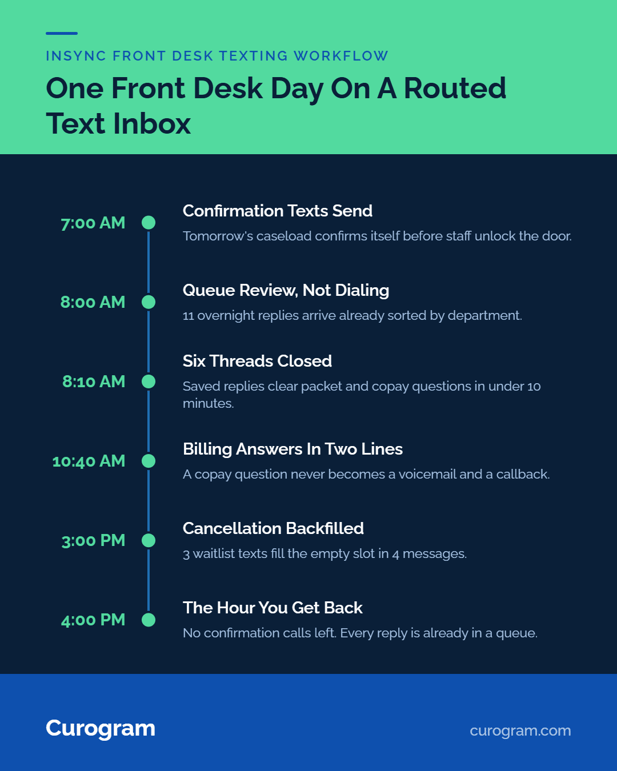
8:00 to 9:00 — Triage Instead of Dialing
Morning starts as a queue review. Overnight replies are already sorted by department. The intake coordinator opens 11 threads, sees which packets came back, and answers six with saved replies in under ten minutes.
Anything needing a clinician gets assigned, not forwarded. Confirmation texts went out at 7 a.m. and are already answered.
10:00 to 2:00 — Resolution Without a Handset
A copay question at 10:40 goes to billing and gets answered in two lines. A post-op knee patient asks to swap Thursday for Friday.
The scheduler offers two slots, the patient taps one, and InSync gets updated. Staff handles about ten text threads in the time one phone call used to take, based on what we see across client front desks.
3:00 — The Cancellation Backfill
A 3 PM cancellation used to mean a dead slot. Now the scheduler texts three waitlisted patients at once and fills it in four messages. Nobody leaves the desk.
End of Day — What the Numbers Show
|
Task |
Portal-and-phone loop |
Routed text inbox |
|---|---|---|
|
Confirming tomorrow's caseload |
The full 4 PM hour, one call at a time |
Automated, replies reviewed in minutes |
|
Knowing a message arrived |
No read receipt |
Read status on every thread |
|
Answering a copay question |
Voicemail, then callback |
Two lines, one queue |
Across Curogram practices, confirmation rates average above 75%. No-show rates run 53% below the industry average, and psychiatry clients average 11.03% against a 23.00% benchmark.
Those figures come from our internal client data. They follow directly from a 98% open rate replacing 15–20% portal engagement.
Liberate Your Front Desk From the Portal Loop
The fastest InSync EHR front office efficiency gain available to you costs no headcount. Move routine patient messages out of the portal-and-phone loop and into a routed, HIPAA-compliant text inbox.
InSync holds your schedule, your notes, and your claims. Curogram handles your patients' 30-second questions, and the staff hours those questions consume twice over: once as a message, once as a call.
Count this morning's voicemails. Count the portal messages nobody answered. That is the queue a routed text inbox absorbs.
Schedule a Consultation. Bring your daily call count and your portal adoption rate, and we will map your department routing live.
Frequently Asked Questions
Role-based access controls determine which queue each person sees, and Curogram runs under a Business Associate Agreement with SOC 2 Type II certification. Every message is logged and auditable, which phone calls never were.
Most teams handle live threads on day one. If your staff can text, they can work a queue, and there is no patient-side setup to troubleshoot. That is where portal support hours usually go.
The portal still serves the 15–20% who use it for records, forms, and payments. Texting absorbs the high-volume routine traffic that was defaulting to your phone line. Most practices run both, with text as the front door.
Sort by who resolves it, not by topic. Anything a scheduler can close goes to scheduling. Anything needing clinical judgment or Part 2 protection goes to the clinical queue. We map this with you during setup.
Reminders end your outbound confirmation calls. Routing reaches the inbound side too, because a patient who can text a question never dials to ask it, and the answer arrives without a callback.