
Examples of HIPAA-Compliant Texting Workflows in Practice Fusion
See examples of HIPAA-compliant texting workflows in Practice Fusion. Learn how reminders, follow-ups, and reviews improve efficiency and engagement.
7 min read

To text patients from a Practice Fusion practice and stay HIPAA-compliant, you need a texting platform that encrypts messages, logs every thread, and signs a BAA. It should also connect to your Practice Fusion schedule so staff don’t retype replies. Most small practices on Practice Fusion don’t have that yet.
Instead, the front desk runs on phone calls, voicemail, and clipboards. A patient calls at 8:05 a.m. to cancel, the line is busy, and the slot sits empty by 10. To save time, staff text from a personal cell, and now there’s PHI on a phone nobody audits.
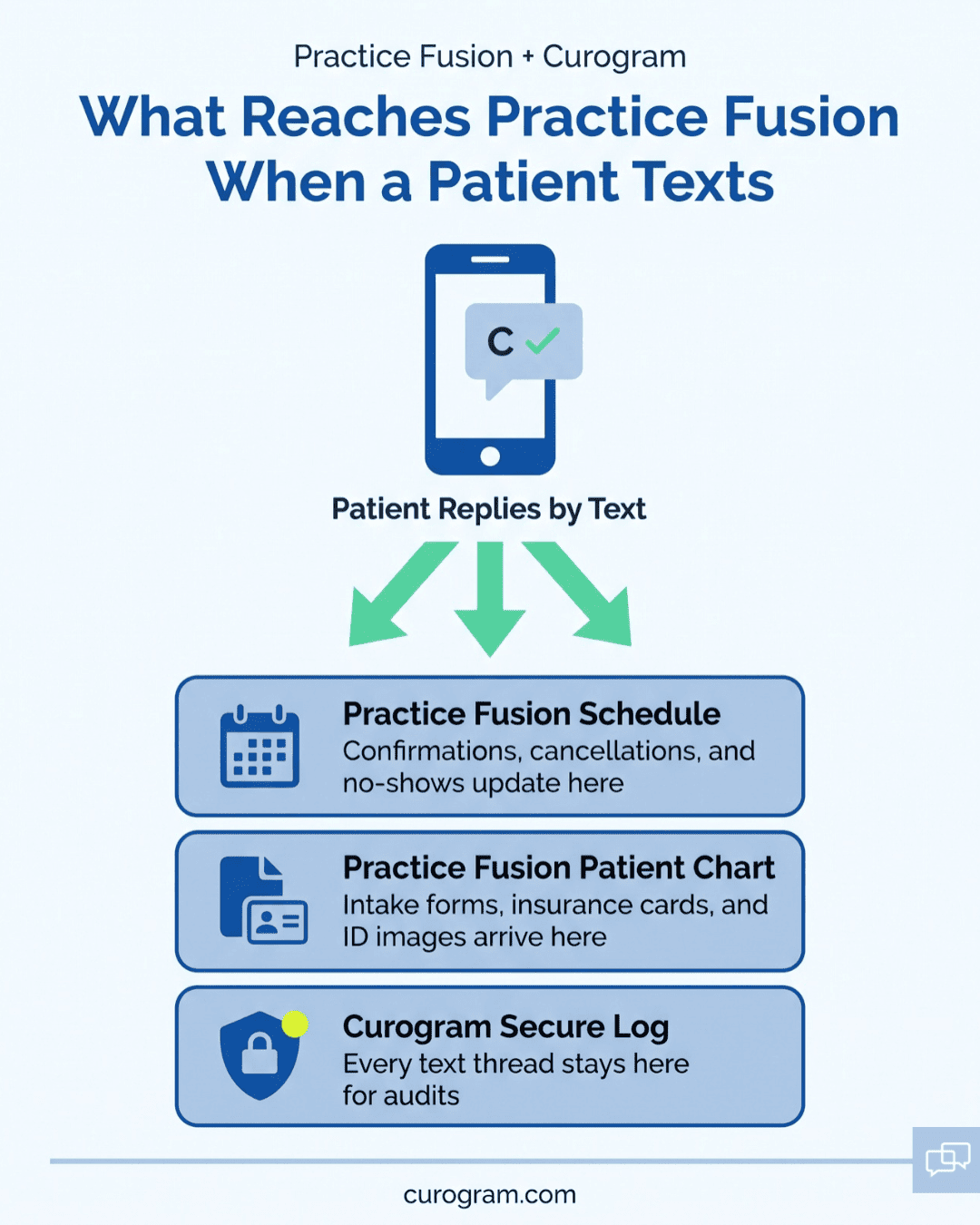
HIPAA-compliant texting for Practice Fusion moves that work to text. Patients get reminders they can answer with one reply. Confirmations and cancellations update the Practice Fusion schedule, completed intake forms reach Practice Fusion, and every message is logged in Curogram. Fewer calls come in, and open slots show up early enough to refill.
This blog explores how Curogram’s HIPAA-compliant platform connects with Practice Fusion. We’ll cover the following topics:
This guide applies to one-provider clinics and to groups with several locations.
HIPAA-compliant texting is secure, two-way electronic messaging that transmits, receives, and stores protected health information (PHI) under appropriate administrative, physical, and technical safeguards.
In practice, that means encryption in transit and at rest, role-based access, identity and access management, message retention, and a complete audit trail for every conversation.
These safeguards align to the core expectation that clinics protect confidentiality, integrity, and availability of electronic PHI through reasonable, documented controls.
Consumer texting apps lack the controls required to protect PHI. Messages aren’t consistently encrypted end-to-end, there’s no standardized way to restrict who can access the conversation, and nothing ensures messages are logged for auditing.
Even when staff avoid explicit PHI, context can still reveal sensitive information. This is why using personal phones or unlogged channels creates avoidable compliance risk—no access controls, no centralized logging, and gaps in documentation.
A healthcare-grade, HIPAA-aligned messaging platform closes those gaps. Core capabilities include:
When a secure platform is connected to your EHR, Practice Fusion patient communication becomes faster and safer: staff text from a shared, HIPAA-logged inbox; patients reply on any device; and appointment updates and completed forms reach Practice Fusion without manual entry. The result is simpler compliance and better experience for patients and staff alike.

Front desks spend hours on status updates, reschedules, and FAQs. Without secure texting, routine calls queue up, staff are interrupted, and documentation suffers.
Clinics that move common workflows to HIPAA-logged messaging take routine calls off the phone and free hours each week for higher-value tasks.
Patients want confirmations, prep notes, and directions by text, without logging into a portal or downloading an app. We explain how that works in How Patients Text Their Doctor’s Office Without an App or a Portal.
Secure texting gives patients that ease while keeping the safeguards consumer SMS lacks.. It raises responsiveness and satisfaction while keeping communications centralized and retrievable.
When conversations happen on personal phones or unlogged channels, your audit trail breaks—and so does trust. The biggest compliance risks in disconnected systems include unsecured communications, missing documentation, and EHR silos.
A HIPAA-compliant messaging solution centralizes conversations, automates logging, and sends completed forms to the EHR, reducing exposure and audit prep time.
Bottom line: for secure texting Practice Fusion workflows, a HIPAA-grade platform is the pragmatic path to faster responses, fewer calls, lower no-shows, and defensible compliance.
Generic robocalls don’t move behavior; EMR-aware reminders do. When reminders read live schedule data (provider, location, visit type) and include simple reply options (confirm, cancel, or ask to reschedule), patients respond faster and show up prepared.
Clinics that align reminder cadence to appointment type—e.g., 3 days, 24 hours, 2 hours—consistently recover at-risk slots and reduce missed visits. Two-way confirmations let staff backfill openings quickly, and every reply is captured in a HIPAA-logged thread in Curogram.
Missteps before the visit cause day-of cancellations: fasting missed, forms incomplete, insurance cards forgotten. Secure texts with tailored prep (“fast 8 hours,” “arrive 15 minutes early,” “complete forms here”) cut those preventable failures. Mobile intake collects demographics and insurance card photos in minutes.
On submission, completed intake forms and insurance card images reach Practice Fusion, so staff don’t retype or scan them. The payoff is shorter check-ins, fewer errors, and providers walking in with complete context.
After-hours calls can’t always be answered live, but they can be acknowledged. An after-hours auto-reply sets expectations (“We’ll reply by 8:00 a.m.”), routes emergencies appropriately, and logs the outreach. Next day, staff triage from a single inbox instead of chasing voicemails.
Post-visit follow-ups—medication checks, wound-care tips, or “How are you feeling today?” micro-surveys—surface issues early and demonstrate continuity of care. Structured, documented follow-ups help close common handoff gaps and improve safety.
After each visit, every patient gets the same review request by text, with a one-tap link to your Google profile. Because it sends automatically, the request still goes out on days when the front desk is buried in reschedules.
Patients often need quick clarifications—refill status, lab scheduling, or prep do’s and don’ts. With a HIPAA-logged, role-based inbox, staff answer in seconds using templates that include links or instructions.
Because every message sits in one shared thread, the team sees what was promised and why. Groups with more than one office can run every location from that same inbox. See how to Centralize Patient Texting Across Practice Fusion Sites.
Texting isn’t just faster—it’s safer when done right. Secure platforms capture message metadata (sender, recipient, timestamp) and store it per retention policy.
That makes audits and reviews simpler. In contrast, consumer SMS lacks access controls, centralized logging, and archival guarantees—creating avoidable risk.
Practice Fusion’s user base includes many small and independent practices. A safe texting platform for small clinics must be fast to adopt, easy to learn (familiar texting UX), and flexible enough to mirror your workflows.
Look for templates per appointment type, language options, and simple routing rules. Just as important, ensure your vendor offers a signed BAA, clear retention settings, and SOC 2/HIPAA attestations to complement your internal policies.
One of the strongest advantages of adding HIPAA-compliant texting to Practice Fusion is how it removes manual bottlenecks and connects staff, patients, and providers. The front desk gains back hours of time each week, while patients receive clearer, timelier communication that keeps them on track with care.
By shifting routine confirmations and FAQs to text, practices cut routine phone traffic. Patients appreciate being able to send a quick reply rather than waiting on hold, and staff can manage multiple conversations at once without missing details.
Digital forms let patients complete intake before arrival. Completed forms reach Practice Fusion, so staff don't enter the same information twice. This increases provider throughput and improves the patient experience at check-in.
Every message is encrypted, time-stamped, and stored in Curogram, creating an audit trail. Staff don’t have to remember to log anything, which shortens audit prep.
Curogram enables secure, two-way texting connected to Practice Fusion’s scheduling data. Patients can confirm, cancel, ask to reschedule, or ask questions by text, while staff see appointment context in real time. When a patient confirms or cancels, the Practice Fusion schedule updates, and every message is logged in Curogram.
Because Curogram reads live schedule data, reminders and intake forms always reflect the latest information. If a provider changes locations or appointment times shift, patients automatically receive updated instructions. This prevents confusion, missed appointments, and same-day cancellations.
Curogram is SOC 2 Type 2 certified and built for HIPAA-compliant communication. Every reminder, intake form, and patient text is handled to the same security standard. For administrators, it means fewer headaches and stronger trust with both patients and regulators.
By integrating with Practice Fusion, Curogram adds two-way texting, reminders, and digital intake on top of the EMR. The combination of automation, secure messaging, and compliance safeguards creates measurable wins for both staff and patients.
Patients want speed; administrators need compliance; staff need time back. HIPAA-compliant texting for Practice Fusion users delivers all three. With a secure, integrated platform, you replace phone tag with two-way messaging.
Choosing the right partner matters. Look for encryption, BAAs, retention controls, and a clear answer on what syncs with Practice Fusion.
Nice to haves include templates, language support, and analytics you can act on. For setup details on scheduling, intake, and texting, browse our Practice Fusion integration guides.
With Curogram, you can add EMR-aware reminders that actually change behavior. Plus, you can capture every interaction in a defensible audit trail.
The effects compound: fewer no-shows, shorter check-ins, calmer mornings, stronger reviews. You'll have a team that spends more time helping people than chasing voicemails.
Want HIPAA-compliant texting that integrates with Practice Fusion? Get a demo today.

See examples of HIPAA-compliant texting workflows in Practice Fusion. Learn how reminders, follow-ups, and reviews improve efficiency and engagement.

Learn how HIPAA-compliant texting helps NextGen users improve communication and reduce no-shows. Discover benefits and secure integration with...

Learn the top HIPAA compliant texting platforms for eClinicalWorks (eCW). Improve patient engagement, reduce no-shows, and streamline your workflows...