
 Jo Galvez

Curogram sends one two-way sequence from the Fusion schedule at every site, and cancelled, no-show, and declined statuses write back to Fusion.
On that sequence, Atlas Medical Center cut no-shows from 14.20% to 4.91% in three months. Owners then hold every clinic to the same cadence by comparing confirmation rates each week.
Reminder settings in a growing therapy group usually get decided once, by whoever opened each clinic. At Brookside, the office manager picked a text 48 hours out. Lakeview, bought two years later, kept the email-only setup it came with.
Nobody compared notes. Both choices are still running, long after the managers who made them moved on.
This scenario is illustrative, and Brookside and Lakeview are example clinics. The pattern behind them is a common one, and it grows with each clinic added.
In therapy, that drift costs more than an empty slot. A child on a twice-weekly plan for 12 weeks has 24 sessions to build on. Miss three, and the therapist spends the next visit regaining lost ground. Parents notice when one child's plan stalls at Lakeview while a sibling's moves on schedule at Brookside.
Fusion gives each account solid reminder controls. Admins set how many email or text reminders go out, and how many days or hours ahead. Those controls answer one clinic's question.
A group owner needs to know something else. Do all five clinics send the same reminders, at the same times, with the same reply options?
Say Lakeview's no-show rate runs nine points above Brookside's for the same care. The reminder setup is the first place we'd look, ahead of staffing or parking.
We think reminder cadence belongs to the owner. Set it once, let every clinic inherit it, and check it every Monday. In this specialty, attendance is part of the treatment. The policy that drives it should match at every door.
Why Reminder Settings Drift Apart Across Fusion Clinics
Drift rarely starts with one bad call. It starts with five reasonable ones, made years apart by different people.
How Each Clinic Ends Up With Its Own Setup
Fusion keeps reminder rules under Admin, then Advanced Setup, then Appointment Reminders. Admins choose how many email or text reminders go out and how far ahead. Groups that grew by acquisition often run more than one Fusion account, and each account keeps its own rules.
The Ensora Fusion appointment reminder settings clinics inherit this way rarely get a second look. Even inside one account, front desks add their own layers. One desk calls every family the day before. Another texts parents from a separate app.
Where Recurring Schedules Strain Simple Reminder Logic
Therapy schedules are harder than most. A child might come Tuesdays and Thursdays for 12 weeks, switch to alternating weeks, then add Friday teletherapy. Holidays shift sessions, and makeups land on odd days.
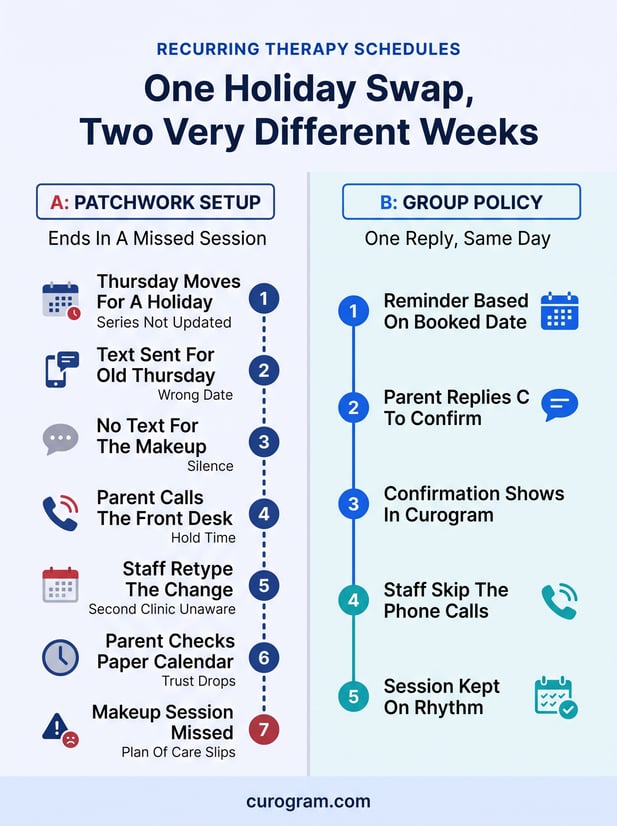
Recurring session reminder logic has to follow every one of those moves. Say a series isn't updated after a holiday swap. The parent gets a text for the session that moved and nothing for the makeup. After two wrong texts, she starts checking a paper calendar instead.
What No-Show Variance by Clinic Costs
No-show variance by clinic is the number that exposes drift. Say Brookside runs a 6% no-show rate and Lakeview runs 15% for the same care. At 400 visits a month, that nine-point gap is 36 missed sessions at one site.
Each of those sessions is a slot that can't be resold. It's also lost progress for a child mid-plan, and a harder talk with the family at the next visit.
Why Attendance Gaps Are a Clinical Problem Too
Missed visits show up in health outcomes, too. A 2024 study in Physical Therapy followed 1,395 older adults referred to outpatient PT after an emergency visit. Those who never attended had 88% higher odds of an ER return within 30 days.
An all-hands memo rarely closes these gaps. Without a system that enforces the standard, we usually see each clinic's old habits return within a quarter.
What a Group Reminder Policy Needs to Control
A standard that lives in a memo lasts until the next new hire. It needs to live in the system that sends the texts, with clear lines between what the owner locks and what each clinic sets.
Lock the Cadence, Leave the Local Details
Therapy attendance reminder cadence is the part to lock. Timing, reply options, and core wording should match at every site. Local details belong to the clinic, because a parent at Lakeview needs Lakeview's parking note.
|
Setting |
Who controls it |
|---|---|
|
Number and timing of reminders |
Owner, locked |
|
Reply options: confirm, cancel, reschedule |
Owner, locked |
|
Core message wording |
Owner, locked |
|
Therapist name and clinic address |
Each clinic |
|
Parking, entrance, and check-in notes |
Each clinic |
|
Message language |
Set per family by each clinic |
Match the Message to the Session Type
An eval visit and a regular Thursday session need different texts. The eval reminder asks the parent to bring prior reports and the insurance card. A teletherapy reminder carries the video link and a note to find a quiet room.
Plan of care adherence reminders work best when each one names the session type and discipline. A parent with kids in speech and OT can then tell at a glance which visit the text means.
Send Replies Back to the Schedule
Families should be able to confirm, cancel, or ask to reschedule in the same thread. A two-way confirmation therapy schedule gives the front desk a list of who's coming before the day starts.
Cancellations are the replies that most need to reach Fusion. If a 4 PM cancel text sits unread in someone's phone, the slot still looks booked and nobody offers it to a waiting family.
Confirmations can live in the reminder tool, where the desk checks them each morning. A reschedule still needs a person to book the new time in Fusion.
Curogram Highlight: Recurring-Schedule Sequences
Curogram's Recurring-Schedule Sequences draw on appointments from the Fusion schedule, so reminders are based on sessions as booked. The owner sets one sequence for the group, and each clinic adds its own local details.
Families reply to confirm, cancel, or ask to reschedule. With Curogram's Ensora Fusion integration, cancelled, no-show, and declined statuses write back to the Fusion schedule, and confirmations show in Curogram for the desk to review.
Setup usually takes about a day with a Fusion user login, and no server access is needed. Messages can go by text, email, or phone, and can vary by provider or visit type. Curogram is HIPAA-compliant and SOC 2 Type II certified.

One Policy, Every Clinic: A Six-Week Rollout
The rollout below follows an illustrative group of five pediatric therapy clinics on Fusion. Its figures are examples, not client results.
Week 1: Pull the Baseline by Clinic
Export last quarter's no-shows from Fusion by location. In our example, the best clinic ran 6% and the worst ran 15%. Then list each clinic's reminder setup: count, timing, channel, and any manual calls.
This group found three different setups across five clinics. One desk was still calling every family by hand, about 90 minutes a day. Another sent reminders with no way to reply, so its confirmations came by phone.
Weeks 2 and 3: Set and Lock the Standard
The owner picks one sequence from Curogram's appointment reminders for Fusion users. Ours sends a text three days out asking for a reply, then a second text the day before. Teletherapy families get a morning text with the video link.
Next, decide which system sends what, so no family gets two reminders for one session. If Fusion's own reminders stay on, plan around its limits. It sends no more than two of the same type per appointment in 24 hours, and it holds texts from 8 PM to 8 AM.
Weeks 4 to 6: Review Every Monday
Each Monday, compare confirmation rates by clinic and pull the list of unconfirmed sessions. Staff call only those families, by 2 PM the day before.
If one clinic lags, check its data first. In our example, Lakeview had stale mobile numbers for one in five caregivers. A shared view for enterprise analytics and location benchmarking makes that side-by-side check routine.
Families who drop off a plan altogether belong in a network recall and reactivation workflow instead.
What the Numbers Look Like After
Real results give a sense of scale. Atlas Medical Center cut no-shows from 14.20% to 4.91% in three months on Curogram's sequence. Covina Arthritic Clinic confirms more than 1,100 appointments a month the same way.
Curogram client data from clinical settings shows a confirmation rate above 75%. Recovered visits add a 10% to 20% revenue lift. The dollar side is covered in our look at therapy no-show rates across multi-clinic groups. For what parents see, read about consistent reminder texts for families at every clinic.
Conclusion: Protect the Cadence, Protect the Outcome
Five clinics with five reminder setups will produce five attendance rates. In a therapy group, that spread shows up in progress notes as well as on the ledger.
Fusion holds the plans of care. A governed reminder policy keeps families showing up to them, at every clinic, on the same rhythm. Owners who set the cadence once and check it each Monday stop arguing about it at every all-hands. They also stop finding out about a bad clinic quarter in the next quarter's numbers.
Start with one report. Pull last quarter's no-show rate for each clinic and line them up. The gap between your best and worst site is your revenue opportunity and your outcomes opportunity at once.
Book a demo to talk through a group-standard sequence for your clinics and see how cancellations write back to Fusion.
Frequently Asked Questions