
 Jo Galvez
Therapy front desks handle schedule changes, waitlist calls, and family questions all day. Little of that work gets counted.
Curogram reports team response times to patient messages for each clinic, beside a group-wide view. With that data, owners can coach where the numbers point and add staff where the work actually is.
Two clinics in the same therapy group can have the same staffing and very different days. At Brookside, calls come in bursts and messages trickle in. At Lakeview, the school pickup hour brings a wave of texts about late arrivals, swaps, and makeups. This scenario is illustrative.
From the owner's chair, both clinics look alike. Each has two front desk staff, the same hours, and the same Fusion schedule. Lakeview's director keeps saying her team is swamped. Brookside's director says the same thing, a little louder.
Without data, the louder clinic tends to get the help. The busier one gets questions about why its afternoon tasks slip. Good staff end up feeling judged on noise, and some of them start looking elsewhere.
Coaching drifts too. Managers spend time correcting a team that's keeping up with more than its share. The habits worth copying at the other clinic go unnoticed.
That's a costly way to make people decisions in a lean group. A therapy scheduler who knows every family's alternating weeks takes months to replace. Losing one because of a bad comparison hurts the clinic and the families who relied on her. It also tells the rest of the team that effort goes unseen.
We think front desk teams should be judged on measured work. Count the messages each clinic handles, time the replies, and read both against the hours when the work peaks. Then coach and staff from what the numbers show, and share those numbers with the teams themselves.
Why Front Desk Comparisons Go Wrong
Therapy front desks do a lot of coordination, and almost none of it leaves a trace.
The Work Nobody Counts
A pediatric therapy desk juggles alternating-week schedules, makeup sessions, waitlist calls, and caregivers who share custody. Each booked visit in Fusion may sit on top of three texts and a phone call.
Fusion records the appointment once it's set. The back-and-forth that got it there usually doesn't show up anywhere. So message volume per clinic stays invisible, even though it drives most of the desk's day.
Custody changes add another layer. Two caregivers may each want reminders, and each may text different questions about the same session.
How the Unfair Comparison Happens
Take two clinics with identical staffing. One handles far more messages and rebooks more cancelled slots. The owner sees only that its afternoon paperwork runs late.
Scrutiny lands on the team doing more work. Meanwhile, the clinic with lighter traffic looks efficient because nobody can see its volume. Neither team is treated fairly, and both know it.
What It Costs in People
Front desk turnover is already a pressure point. A 2025 MGMA Stat poll asked practices about staff turnover. Those with rising turnover most often named medical assistants and front-office staff as hotspots. MGMA noted that front desk skills transfer easily to other industries.
That makes fairness a retention issue. A scheduler who feels judged on impressions has options outside healthcare. Replacing her means training someone new on every family's schedule quirks.
What Fair Front Desk Benchmarks Measure
Fair benchmarks start with workload, then speed, then context. Skip a step and the comparison tilts.
Volume Comes First
Count what each team handles before judging how fast it handles it. A fair workload comparison clinics can trust divides messages by staff on shift, so a three-person desk isn't measured against a two-person one.
|
Measure |
Why it matters |
Read it alongside |
|---|---|---|
|
Messages handled per clinic |
Shows true workload |
Staff on shift |
|
Time to first reply |
Shows how long families wait |
Hour of day |
|
Schedule changes handled |
Shows coordination load |
Caseload mix |
|
Cancelled slots rebooked |
Shows saved therapist hours |
Waitlist size |
Response Time, Read in Context
The front desk response time therapy families feel most is on schedule changes. A reply about tomorrow's session matters more than one about a billing form.
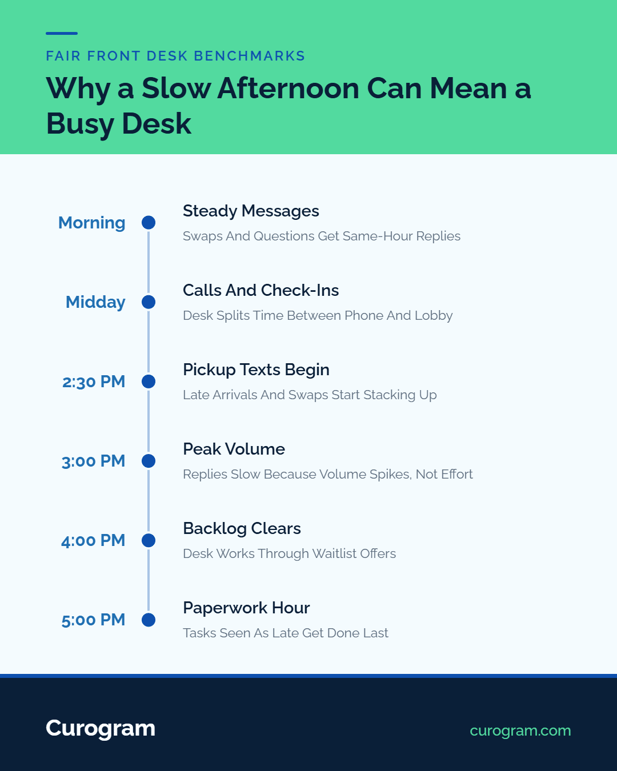
Pickup rush workload measurement belongs here too. Look at reply times by hour, because a slow 3 PM may reflect a flood of texts. Reminder days and recall campaigns add spikes of their own. Mark those days on the report, so nobody reads a campaign spike as a bad week.
Coaching With Data, Not Impressions
The staff coaching data therapy group managers use should stay at the team level and focus on trends. Share it with the team before discussing it with anyone else.
Start each conversation by asking what slowed things down, and listen before suggesting a fix. Often the answer is a fixable process. A shared phone line or one person handling every waitlist call are common culprits.
Curogram Highlight: Insight Suite Response Reporting
Curogram Insight Suite tracks team response times to patient messages, clinic by clinic. Owners see every clinic on one Master Dashboard and can switch to a single site for detail. Curogram's analytics software also lets custom reports be filtered, segmented, and exported by location.
Curogram's Ensora Fusion integration pulls appointment data from Fusion, so message activity sits beside the schedule. Setup usually takes about a day with a Fusion user login, and no server access is needed. Curogram is HIPAA compliant and SOC 2 Type II certified.

Putting Benchmarks to Work, Step by Step
This walkthrough follows the same group through its first month of benchmarking. The group and every figure in it are illustrative.
Step 1: Count a Normal Week
Pull two typical weeks of message volume and reply times for each clinic. Skip holiday weeks and any week with a staff absence, since both skew the picture.
Write down who was on shift each day. Without that, a fast week at a fully staffed clinic looks like a skill gap at a short-staffed one.
Tell each team what you're measuring and why before you start. Staff who know the goal is fairness give better context when the numbers come back.
Step 2: Find the Peaks
Chart replies by hour for each clinic. In our example, Lakeview's messages piled up in the hour around school pickup. Brookside's spread evenly through the day.
|
Two-week count (illustrative) |
Lakeview |
Brookside |
|---|---|---|
|
Messages handled |
1,100 |
700 |
|
Front desk staff |
2 |
2 |
|
Messages per staffer |
550 |
350 |
|
Typical reply, 2:30 to 4 PM |
50 minutes |
15 minutes |
|
Typical reply, rest of day |
15 minutes |
20 minutes |
Lakeview also handled more messages overall, with the same two staff, and rebooked more cancelled sessions. The "slow afternoons" were the busiest hours in the group. Brookside's director, it turned out, had room in her team's day.
Step 3: Decide, Then Recheck
Lakeview's owner shifted one part-time staffer's hours later at Lakeview to cover the pickup rush. Brookside took over Lakeview's paperwork overflow on two afternoons a week.
Two weeks later, the owner pulled the same report and compared. Lakeview's typical pickup-hour reply fell from about 50 minutes to 20.
Brookside's director reported no strain from the extra paperwork. Groups that pool messages from several clinics can also look at a multi-location command center setup.
What Changes for the Team
Performance conversations now start from shared facts. The overloaded team gets help sooner, and the efficient team's habits get studied. Directors stop competing for attention and start trading fixes.
Fewer routine calls help too. Curogram client data from clinical settings shows a confirmation rate above 75% with automated reminders, which frees desk time for work that needs a person.
For the group-wide view behind this, see clinic-level patient engagement reporting for Ensora Fusion groups.
Conclusion: Be Fair By Being Informed
Front desk teams deserve to be judged on the work they do. In a therapy group, much of that work is coordination that never shows up on the schedule.
Fusion runs the clinical workflow, from scheduling to notes. Response-time and workload data show the communication load each team carries. With both in view, staffing and coaching decisions rest on something sturdier than who spoke up last.
Before your next staffing decision, look at one week of message volume by clinic, read by hour. It may change the decision, and it will change how your team feels about it.
Book a demo to see how Curogram Insight Suite reports front desk response times by clinic.
Frequently Asked Questions