
Text Your DrChrono Practice — No OnPatient Login
 Jo Galvez : Oct 12, 2026, 8:00:00 AM
Patients shouldn’t need an OnPatient login to ask a quick question. Curogram makes every DrChrono location’s number textable.

DrChrono built its name on mobility. Its own site claims the #1 mobile EHR as voted by physicians, and the first mobile EHR to become an Apple Mobility Partner. Providers chart on iPads between rooms. Claims get approved from a parking lot. Schedules move from a phone.
One workflow stayed bolted to a desk.
A four-site group runs four phone lines and four voicemail boxes, each reachable from exactly one chair. The practice manager who could clear most of those messages before lunch is covering a different building until two.
We call that gap The Location Silo, and it’s why DrChrono multi-location patient communication still feels a decade behind everything else the group does.
Practice leaders already rank the problem near the top. An MGMA Stat poll fielded 9 December 2025 with 236 responses put phone access third among patient access priorities at 22%, behind no-shows at 27% and online scheduling at 24%.
Those three share a root cause. Patients who can’t get a quick answer don’t reschedule. They just stop showing up.
Centralized patient texting across DrChrono locations closes that gap without touching the chart. Each location keeps the number patients already dial. Threads land in one shared inbox that any authorized staffer can work from any device.
We’ll take a firm position on this. Growing group phone overload gets worse with hiring alone. Four sites answering four separate phones will always be slower than four sites working one queue, and every additional location widens the spread.
DrChrono moved the chart, the schedule, and the claim onto a tablet. Patient messages stayed on a handset.
|
What the group runs |
Works from any device |
Where it actually lives |
|---|---|---|
|
Patient chart |
Yes |
Cloud |
|
Schedule |
Yes |
Cloud |
|
Claims and billing |
Yes |
Cloud |
|
Voicemail and callbacks |
No |
One phone, one building |
That bottom row is the entire argument. A group can be fully cloud-native on paper and still route its most time-sensitive patient contact through a device that can’t leave the front counter.
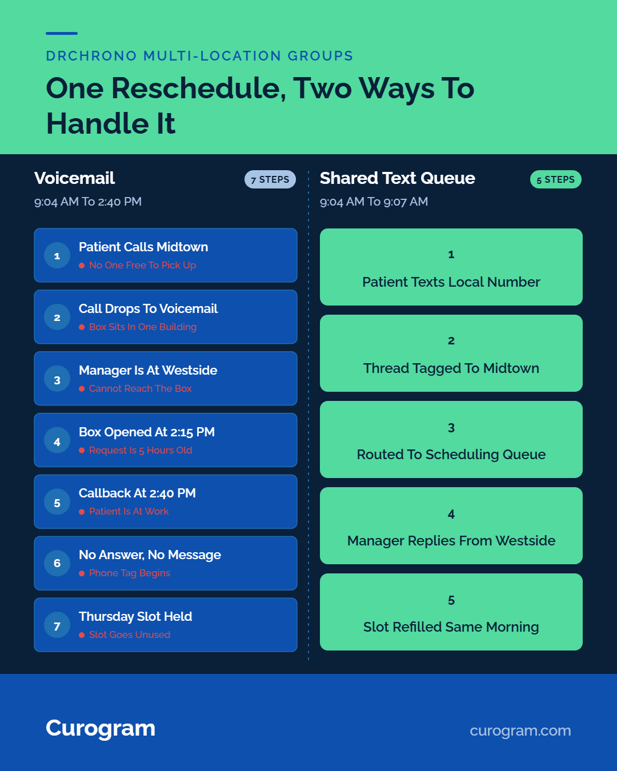
Our practice manager covers Midtown, Westside, and the surgical annex on Tuesdays. At 9:04 am a patient calls Midtown to move a Thursday post-op check. Nobody picks up.
She reaches Midtown at 2:15, works down the voicemail box, and calls back at 2:40. The patient is at work.
Thursday’s slot stays booked and stays empty. Five and a half hours passed between the request and the first callback, and none of that delay was clinical.
Front desks in the groups we demo log 80+ inbound calls a day per location, based on call reports prospects share with us. Most are routine. Someone still authenticates the caller, opens the chart, answers, documents, and hangs up.
Hiring a second person at that desk raises how fast one building answers its own phone, and leaves DrChrono message routing between offices exactly where it was. The message still can’t leave the room it landed in.
Patients don’t know your architecture. They know they left a voicemail Monday and heard back Wednesday.
Hand someone an iPad at check-in, then make them wait two days for a callback, and you’ve taught them the modern part is decoration.
That lesson resurfaces in a review, or in a records request from a competitor down the road.
Curogram runs as a layer over DrChrono and leaves the clinical system alone. Every location keeps its own local, textable number, so the caller ID saved in the patient’s phone doesn’t change.
Where the message lands does. Threads arrive in a unified patient inbox for the DrChrono group, scoped by permission and open on any browser or phone. Any authorized staffer claims a thread, answers, and closes it, whether they’re at that site or three towns over.
Threads route two ways. Site routing surfaces Midtown’s scheduling questions to Midtown’s schedulers first.
Team routing sends a billing question to billing instead of bouncing it off a front desk that has to transfer it anyway. A regional supervisor sees all locations; a part-time receptionist sees one.
HIPAA texting across multiple locations in a mobile practice rests on that scoping as much as on encryption, and every view is logged for audit.
Each conversation writes back to the patient’s DrChrono chart. No side inbox, no copy-paste into a note, no third window open during a call.
Whoever picks up Thursday’s thread can see what a colleague told the same patient on Tuesday, which is the difference between a handoff and a restart.
Location-Based Routing is what makes a single inbox workable for a group rather than a single office.
Each site is provisioned with its own local textable number, and Curogram tags every inbound thread with the location it belongs to before anyone opens it. Rules then decide who sees it: by site, by team, by role, or by any combination of the three.
Two operational details matter more than the feature list. First, coverage rules can hand a location’s queue to another site’s staff after a set wait, so a message doesn’t age just because one desk is short a person that day.
Second, consent and opt-out state travel with the patient across locations, so a STOP sent to Westside is honored at Midtown without anyone rekeying it.
One condition worth naming: routing accuracy depends on your DrChrono location records being clean. If two sites share a facility name, they’ll share a queue until the records are separated.

Curogram clients average a >75% appointment confirmation rate, per our internal data. Atlas Medical Center cut no-shows from 14.20% to 4.91% in three months.
Across our client base, no-show rates run 53% below the practices we benchmark against. Covina Arthritic Clinic confirms more than 1,100 appointments a month with no manual calling behind it.
That 9:04 am reschedule request arrives as a text instead. Curogram tags it Midtown, routes it to scheduling, and it appears in the shared queue.
Our manager, standing in Westside’s hallway, opens the thread on her phone, sees the Thursday slot in the synced chart context, and offers two alternatives. The patient replies at 9:07 while still in her car. Thursday’s slot gets refilled the same morning.
Coverage stops depending on geography. Mobile-first practice communication means the person best positioned to answer a question answers it, from wherever they’re standing.
Managers get response times per location instead of guessing which front desk is drowning. Two sites that looked identical on the schedule rarely look identical in the queue.
The Location Silo is the last desk-bound workflow in an otherwise untethered practice, and it’s the one patients feel first.
DrChrono handles your charts and schedules from anywhere. Curogram handles their conversations from anywhere, which is the same design philosophy applied to the front door.
Count yesterday’s voicemails across your locations that waited more than an hour for a callback. Each one waited because the message couldn’t leave the building it arrived in.
Book a demo and bring your busiest location’s call log. We’ll map which volume moves to text in week one, which threads route to which team, and what a shared queue does to your confirmation rate site by site.
 Jo Galvez : Oct 12, 2026, 8:00:00 AM
Patients shouldn’t need an OnPatient login to ask a quick question. Curogram makes every DrChrono location’s number textable.
 Jo Galvez : Mar 9, 2026, 9:00:01 AM
eCW call centers use Curogram smart text routing to deflect routine calls, reduce Average Handle Time, & save 1 FTE per 5 providers in communication...
 Jo Galvez : Oct 6, 2026, 8:00:03 AM
DrChrono front desks field 80+ calls daily, mostly routine. Curogram deflects confirms and quick questions to 2-way text synced to the chart at every...