11 min read
Dolphin Orthodontic Intake Automation: Zero Data Entry Dashboard
Mira Gwehn Revilla
:
April 21, 2026
-
Live dashboard shows submitted, in-progress, and not-started forms
-
Structured digital data flows in—no clipboard transcription
-
Automated text reminders chase incomplete forms for you
-
Tracks each form piece (medical, insurance, consent, ortho)
-
Works with Dolphin Desktop, Cloud, or Blue
Coordinators reclaim 30 to 75 minutes each day. Time shifts from typing to preparing cases, verifying insurance, and guiding patients.
It's 7:30 AM. Your treatment coordinator walks in with coffee in hand. Three new patient consultations are on the schedule today. Two parents never touched the portal link you sent last week.
So the printer fires up. Blank forms get clipped to boards. After each consultation, the coordinator will spend 10 to 15 minutes typing handwritten answers into Dolphin. That's 30 to 45 minutes of data entry—gone.
Now picture the same morning with a different setup. Your coordinator opens one screen and sees three green checkmarks. All three families finished their intake on their phones the night before. Insurance cards are photographed. Consent signatures are captured. Medical history is clean and readable.
That shift is what Dolphin orthodontic intake automation dashboard zero data entry pre-visit records completion tracking form status is built to deliver. Curogram's Intake Automation Dashboard removes the clipboard, the printer, and the late-morning scramble. Your coordinator walks into each consultation prepared, not panicked.
Dolphin Management handles treatment cards and clinical notes beautifully. But the pre-visit stretch—getting intake from the patient's hands into a usable record—is where most practices lose time. Portal logins get skipped. Paper forms get misread. Staff hours get eaten by typing.
This is The Data Entry Bottleneck. And it's costing your practice more than time.
In this article, we'll break down how a Dolphin ortho intake automation dashboard zero data entry pre-visit records completion form status system changes the coordinator's morning.
You'll see why orthodontic intake automation Dolphin dashboard zero data entry pre-visit records completion tracking works for lean teams with 3 to 8 staff. We'll cover the villain, the solution, and the real outcome.
Your treatment coordinator was not hired to retype handwriting. Let's fix that.
The Villain — The Data Entry Bottleneck
Picture a typical Tuesday at a busy ortho practice. Your coordinator arrives at 7:30 AM. Three new patient consultations sit on the schedule. Two families skipped the portal link entirely.
The printer starts running. Blank intake forms get clipped to boards at the front desk. Pens are placed. Clipboards are lined up.
After each consultation ends, the coordinator sits down to transcribe. Medical history, allergies, insurance details, consent signatures—all written by hand. Each form takes 10 to 15 minutes to type into Dolphin. That's 30 to 45 minutes of data entry per day, every day.
Now add a fourth consult. Or a walk-in. The timeline collapses.
The Handwriting Problem Nobody Talks About
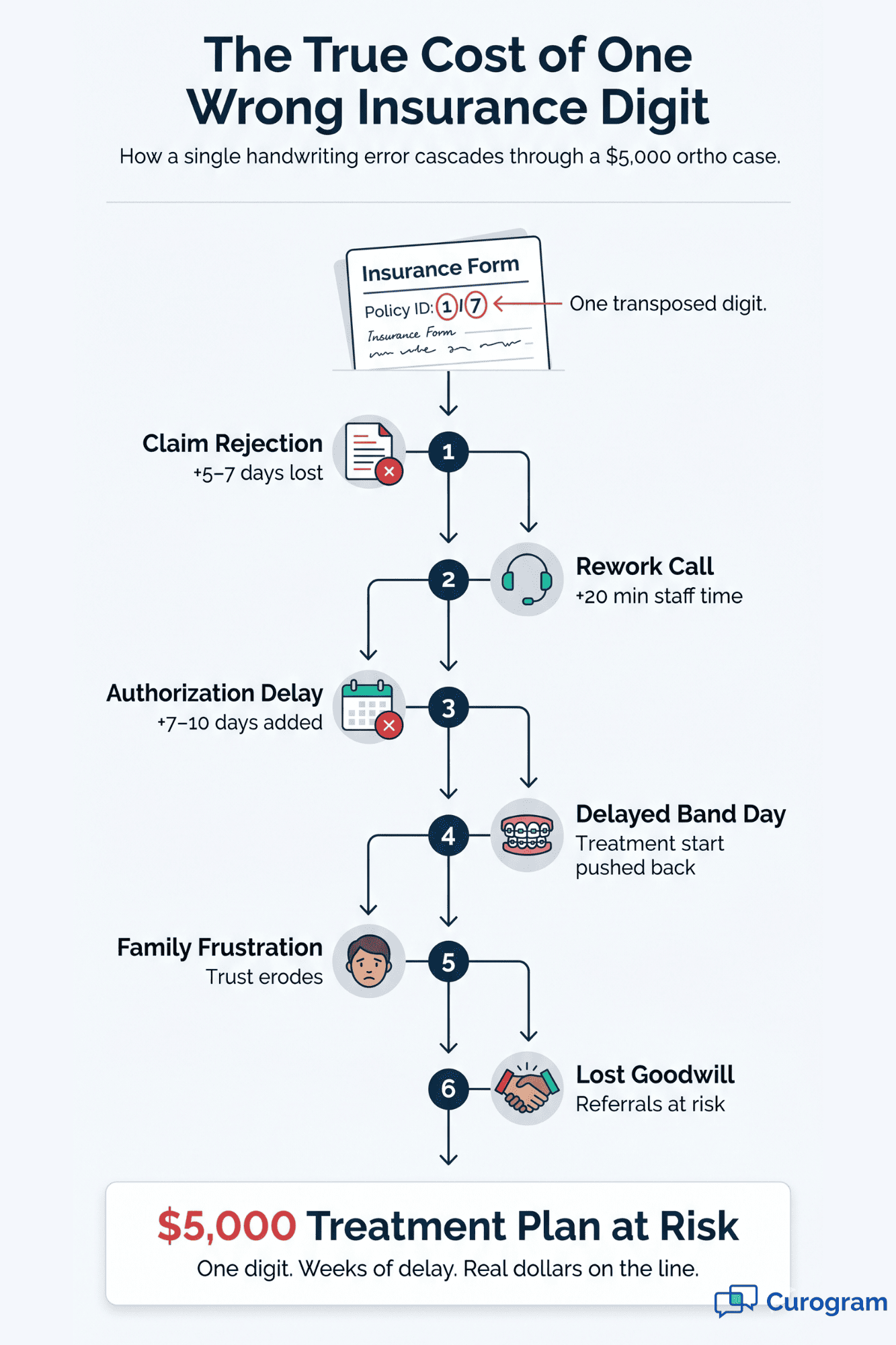
Handwriting is messy. Insurance ID numbers get transposed. Dates get skipped. Consent boxes stay unchecked. A "1" can look like a "7." A policy number might have 11 digits or 12—and your coordinator has to guess.
Here's what each error costs:
|
Error Type |
Downstream Impact |
|
Wrong insurance ID |
Delayed authorization, delayed treatment start |
|
Missing date of birth |
Claim rejection, rework |
|
Unchecked consent box |
Legal risk, same-day re-signature |
|
Illegible allergy notes |
Clinical safety flag |
For a $4,000 to $8,000 treatment plan, one wrong digit in an insurance ID can push the start date back by weeks. The family loses patience. The practice loses the start.
The Coordinator Is Your Single Point of Failure
In a lean ortho practice with 3 to 8 staff, the treatment coordinator wears every hat. They run scheduling. They verify insurance. They prep case presentations. They handle financial talks. They onboard new patients.
Every minute spent on data entry is a minute lost on the work that actually drives new starts. And new starts are the business.
When your coordinator is buried in typing, other things slip:
- Insurance eligibility checks get rushed or skipped
- Case notes arrive to the doctor half-prepared
- Financial questions from parents go unanswered longer
- Recall outreach to old leads never happens
- Morning huddles get cut short
One person. Too many jobs. The clipboard becomes the bottleneck that slows the whole practice.

The Feeling Behind the Workflow
Ask any seasoned treatment coordinator what drains them most. The answer is rarely difficult patients or complex cases. It's the data entry.
Here's how one coordinator put it: "I became a treatment coordinator to help families understand their treatment options. Instead, I spend my mornings typing handwritten forms into Dolphin. By the time the first consult starts, I haven't even reviewed insurance because I was too busy with data entry."
That frustration is not a soft metric. It drives turnover. Coordinators who leave take two things with you: institutional memory and patient relationships. Replacing a strong coordinator can cost thousands in recruiting, training, and lost productivity.
Why Dolphin's Own Questionnaires Don't Solve This
Dolphin Management has a patient questionnaire system built in. It works well inside the practice workflow. But it was not built to solve the data-handoff gap.
Parents still need to log into a portal. Portals get skipped. Paper forms get used as backup. And someone still has to move handwritten data into the record.
The same pattern shows up with Weave's digital forms. They exist, but they're bundled inside a $300 to $500+ per month platform you may not need. You pay for a full phone system to get forms you could have gotten for less.
This is the bottleneck. Now let's look at what fixes it.
The Guide — The Intake Automation Dashboard
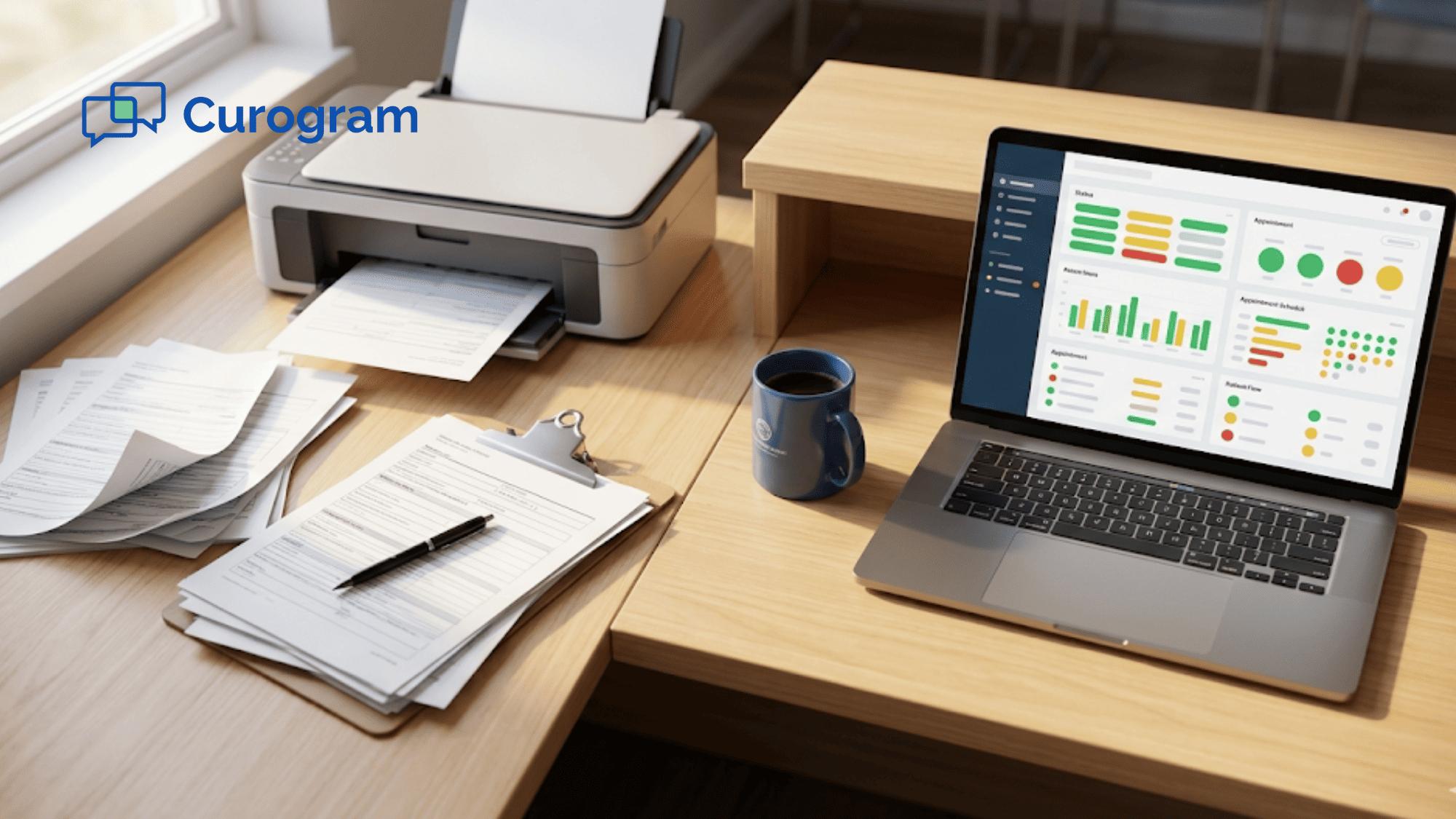
Curogram's Intake Automation Dashboard gives your treatment coordinator a single view. Every upcoming consultation is listed. Every form status is color-coded.
- Green: Submitted and ready for review
- Yellow: In progress—parent started but didn't finish
- Red: Not started
At 7:30 AM, your coordinator opens the dashboard and sees the day at a glance. No hunting. No guessing. No calling parents to ask "did you get the email?"
The data that shows up is clean, digital, and organized by field. Medical history sits in its own section. Insurance details are formatted. Consent signatures are captured and time-stamped. No handwriting to decode.
Real-Time Completion Tracking Across Every Consult
The Dolphin intake automation orthodontic dashboard zero data entry pre-visit records form tracking view is not just for today. It pulls in this week's full schedule.
Here's how it breaks down:
|
Timeframe |
What the Coordinator Sees |
|
Today |
Live status for every consult on the calendar |
|
Tomorrow |
Auto-reminder triggers for incomplete forms |
|
This week |
Priority queue of patients who haven't started |
|
Next week |
Early visibility to plan outreach |
When a parent submits forms at 10 PM the night before, your coordinator sees the green status at 7:30 AM. No chasing. No surprise clipboards.
Automated Reminders Do the Chasing
Here's the part that saves the most time. The dashboard doesn't just show status—it acts on it.
If a parent hasn't started their forms 48 hours before the consult, Curogram sends a text reminder. If they still haven't started 24 hours out, another reminder fires. If they're stuck mid-form, a gentle nudge goes out.
Your coordinator doesn't have to build a follow-up list. The system builds it for them.
Structured Data Ready for Dolphin
Every piece of information that comes in is organized by field. This is what makes the intake automation dashboard Dolphin orthodontic zero data entry pre-visit records completion tracking workflow click.
Instead of reading handwritten cursive, your coordinator sees:
- Patient name: typed, correct spelling
- Date of birth: validated format
- Insurance carrier: dropdown selected
- Policy ID: character-checked
- Allergies: listed and tagged
- Prior ortho history: yes/no with details
- Consent: signed, dated, time-stamped
Transferring this to the Dolphin patient record takes minutes—not a full typing session. Errors drop. Claims go out clean.
Built for the Quirks of Orthodontic Intake
Orthodontic intake is not the same as general dental intake. It has its own pieces:
- Parent information for minor patients
- Dental and medical history for the patient
- Prior orthodontic treatment details (appliances, retainers, past providers)
- Insurance verification (often separate from medical insurance)
- Informed consent for records (photos, X-rays, iTero scans)
- Ortho-specific questionnaires (habits, concerns, chief complaint)
The dashboard tracks each piece on its own. If a parent finished the medical history but didn't upload the insurance card photo, the coordinator sees that exact gap.
One targeted text goes out: "Hi! Just need one more thing—please snap a photo of the front and back of your insurance card." That's it. No redo of the full form.
Works Across Every Dolphin Setup
Practices run different versions of Dolphin. Some are on Desktop. Some moved to Cloud. Some are testing Blue. Your intake system shouldn't care.
Curogram's intake dashboard runs independently. Parents get the same text link. They fill out the same mobile-friendly forms. The coordinator reviews the same clean data in the same browser window.
No IT project. No migration headache. Your Dolphin setup stays exactly as it is.
What Your Coordinator Sees First Thing Monday
Monday morning. Coffee down. Dashboard open. Five consults this week. Three green, one yellow, one red.
The coordinator sends one text to the red. Reviews the three greens. Flags the yellow for a gentle follow-up. Total time: 8 minutes.
That used to be 90.
The Success — Prepare for Cases, Not Paperwork
Based on our internal data from Curogram practices, coordinators reclaim 30 to 75 minutes daily by ending manual intake data entry. That's not a vanity stat. It's real hours, every day, back in the coordinator's calendar.
Let's map it to a typical ortho practice. Say you run 4 new patient consults a day. At 10 to 15 minutes of data entry each, that's 40 to 60 minutes of typing gone. Across a 5-day week, that's over 4 hours reclaimed. Across a month, that's 16 hours.
Sixteen hours is two full work days. Every month. Per coordinator.
For lean practices with 3 to 8 staff, this is the difference between a coordinator who's constantly behind and one who's actually leading the front-of-house.
The Shift From "Transcribe and Enter" to "Review and Prepare"
The real win is not the time itself. It's what that time becomes.
Before automation, the coordinator's morning looks like this:
- 7:30 AM: Arrive, print blank forms
- 8:00 AM: Greet first family, hand over clipboard
- 8:30 AM: Consult starts, coordinator still typing yesterday's forms
- 9:15 AM: Begin typing today's first form
- 9:45 AM: Next family arrives—still typing
After automation, the same morning looks like this:
- 7:30 AM: Arrive, open Intake Automation Dashboard
- 7:45 AM: Review 3 complete digital records
- 8:00 AM: Run insurance eligibility on all three
- 8:15 AM: Prep case notes and financial summaries
- 8:30 AM: Brief the orthodontist with verified info
- 9:00 AM: First consult starts with everything ready
Same coordinator. Same three consults. Completely different day.
The shift is from reactive to proactive. From typing to thinking. From data entry to judgment work.
Real Outcomes Your Practice Can Expect
Here's what changes across your workflow once the intake bottleneck is gone:
-
Cleaner insurance claims. Typed data beats handwritten data every time. Fewer rejections. Faster authorizations. For a $5,000 treatment plan, shaving 7 to 10 days off authorization means starting treatment sooner and collecting sooner.
-
Better case presentations. When the coordinator has time to prep, the orthodontist walks into each consult with a complete picture. Chief complaint, medical flags, insurance coverage, financial snapshot. The case presentation flows better. Close rates improve.
-
Lower coordinator turnover. The #1 complaint from treatment coordinators is burnout from admin work. Remove the data entry burden and you remove a major burnout driver. Replacing a strong coordinator costs thousands—retention has real dollar value.
-
Fewer no-shows at consults. When a family has already invested time into completing their intake, they're more committed to showing up. The intake itself becomes a soft confirmation.
-
Faster start-to-treatment timeline. Clean data in means faster bands on. Every day shaved off the front end adds up across the treatment journey.
A Tuesday Morning, Automated
Let's walk through one complete morning to make this concrete.
7:30 AM. Your coordinator, Maria, arrives. She opens the Intake Automation Dashboard. She sees:
- Patient A (9:00 AM consult): All forms complete. Green across the board.
- Patient B (10:30 AM consult): Medical history and consent done. Insurance card photo missing. Yellow.
- Patient C (1:00 PM consult): Not started. Red.
7:35 AM. Maria sends one text to Patient C's parent: "Looking forward to seeing you today! Here's the link to finish your intake before your 1 PM visit."
7:40 AM. She sends a targeted text to Patient B's parent: "Almost done! Just need a photo of the front and back of your insurance card."
7:45 AM. She opens Patient A's record. Reviews medical history. Runs insurance eligibility in under 5 minutes. Preps case summary for the orthodontist.
8:15 AM. Patient B's insurance card photo arrives. Dashboard flips to green. Maria runs eligibility.
8:30 AM. Patient C's parent texts back: "Just started, sorry!" Maria flags it and moves on.
9:00 AM. Patient A arrives. Maria greets them with, "I have everything we need—the doctor will be right with you." The orthodontist walks in with a full brief. The consult runs smoothly.
11:00 AM. Patient C's forms come in. All green. Maria runs eligibility before lunch.
By 5 PM, Maria has run three consults with zero data entry. She also had time to call two old leads, send three financial follow-ups, and prep tomorrow's schedule.
What the Orthodontist Notices
Doctors notice the difference fast. Case presentations run smoother because the coordinator briefs them with clean info. Chief complaints are clear. Medical flags are obvious. Insurance coverage is known.
The doctor walks into the room ready to talk treatment—not ready to ask basic questions the patient already answered in writing.
Close rates follow. When the full team is prepared, families feel cared for. They say yes more often.

Why Curogram Is the Right Intake Layer for Your Dolphin Practice
Curogram was built by engineers who sat inside front offices and watched the work happen. The intake bottleneck is not a theory to us—it's a pattern we've seen in hundreds of practices. That's why the Intake Automation Dashboard exists, and that's why it fits alongside Dolphin instead of competing with it.
Every intake form, every text, every uploaded insurance photo travels through HIPAA-compliant channels. Your PHI is protected end to end.
The same platform that delivers intake forms also handles patient questions, appointment confirmations, and follow-ups. One tool, one training, one login.
Staff training takes as little as 10 minutes. Your coordinator is not learning a new operating system—they're learning one dashboard. Desktop, Cloud, or Blue—it doesn't matter. Curogram operates independently and delivers clean data regardless of your Dolphin setup.
Unlike bundled platforms that cost $300 to $500+ per month for features you won't use, Curogram gives you the intake automation layer without the bloat.
Based on our internal data, Curogram clients see >75% average appointment confirmation rates, which reflects the same underlying behavior: when patients get clear, mobile-friendly messages, they respond. That same response pattern drives intake completion before the consult.
The result is a coordinator who walks in prepared, a doctor who walks into a ready consult, and a family who feels cared for from the first text. That's the Curogram outcome.
Conclusion: Your Treatment Coordinator Is Not a Data Entry Clerk
Treatment coordinators are the most valuable operational staff in an orthodontic practice. They drive new starts. They build trust with families. They keep the front office running. Data entry is not in that job description.
Curogram's Intake Automation Dashboard frees them from the clipboard. The dashboard delivers complete, structured records before every consultation. Your coordinator walks into each morning ready to prepare, not ready to type.
Here's the clean split to remember. Dolphin is for treatment cards, clinical records, and case management. Curogram is for the pre-visit workflow—the automated intake system that delivers complete data to the coordinator's screen without a clipboard or a keyboard.
Two tools. One seamless handoff. Zero data entry.
The 16 to 25 hours per month your coordinator reclaims is not a soft benefit. It's real capacity for insurance verification, case preparation, financial conversations, and the follow-up work that drives new starts. It's also a retention tool—coordinators stay longer in jobs where they're not buried in admin.
Ready to end The Data Entry Bottleneck for good? Talk to one of our experts and we'll show you the dashboard, the text-link flow, and the Dolphin handoff.
Frequently Asked Questions
Curogram runs beside Dolphin, not on top of it. Parents fill out forms via text link on their phones. The structured data appears on the dashboard for your coordinator to review, then transfers cleanly to the Dolphin patient record.
Text has a >95% open rate, and mobile forms feel familiar. No passwords, no logins, no portal account to create. Parents tap the link, fill in the fields, and submit—usually within minutes of getting the text.