
 Jo Galvez

CureMD's CureConfirm calls a day ahead and asks them to press 1 or 2. Curogram moves that answer to a text and writes Confirmed or Cancel back to CureMD.
On average, Curogram clients get more than 75% of visits confirmed. At Atlas Medical Center, no-shows fell from 14.20% to 4.91% in 3 months.
Most CureMD front desks track two different facts about tomorrow's schedule and treat them as one. A reminder went out. A patient said yes. Only the second one fills an exam room.
CureMD's built-in confirmation tool, CureConfirm, places a phone call one day before the visit. Patients press 1 to confirm or 2 to deny.
If they want a new time, the call tells them to contact the practice during business hours. For a patient on a warehouse shift, that call back from the break room often never happens.
CureMD's AI Contact Center covers the inbound side. It runs 24/7, supports 14 languages, and can book, move, or cancel a visit in real time. It still needs the patient to pick up the phone and dial.
So the schedule fills with visits marked as reminded, and nobody knows which ones are real until check-in. Front desks cover the gap with confirmation calls and some defensive overbooking. Both eat staff hours, and neither one starts until the morning before the visit.
Our position: the reminder itself should take the answer. Patients should be able to reply YES, NO, or RESCHEDULE to the text already on their screen. One word closes the loop. Confirmed and cancelled visits update in CureMD, and staff save their calls for the few patients who stay silent.
CureMD stays the system of record for charts, billing, and scheduling. What changes is the reminder. It now brings back a reply the front desk can read at a glance, right next to each visit.
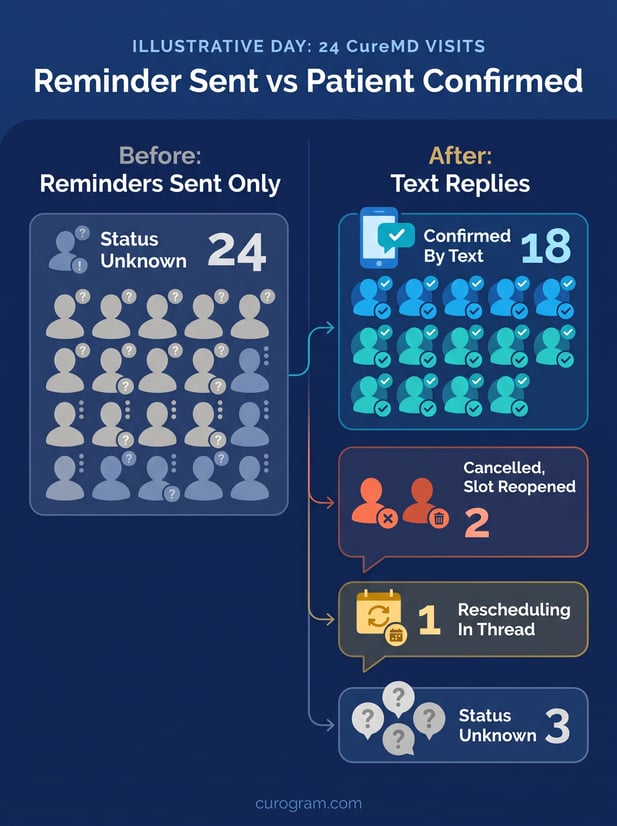
Reminder Sent vs Patient Confirmed in CureMD
CureMD's own help pages describe three ways a patient can respond to an upcoming visit. Each one asks the patient to switch channels.
What CureMD Already Handles Well
CureMD's scheduling module holds the calendar, and CureConfirm calls each patient the day before. The Patient Portal lets registered patients request visits and refills online.
The AI Contact Center answers calls around the clock and can reschedule on the spot. For charts, billing, and the master schedule, CureMD does the job practices bought it for.
In CureMD's published materials, though, none of those routes lets a patient answer by text reply.
Where the Loop Stays Open
Walk one reminder from the patient's side. The CureConfirm call lands mid-shift and goes to voicemail. The patient means to call back, then forgets, and the schedule still shows a booked visit.
MGMA's August 2025 no-show analysis names this risk directly: "Appointment reminders that can't be replied to, portals that lock people out, and language/access barriers all compound risk."
The same piece recommends two-way texting so patients can confirm, ask questions, or reschedule.
What an Unconfirmed Visit Costs
No-shows aren't easing for many groups. In an August 2026 MGMA Stat poll, 32% of medical groups reported higher no-show rates than in 2025.
Another 58% said rates were about the same. Some respondents said they now double-book or overbook to absorb expected misses.
Take an illustrative provider with 20 visits a day. Two silent no-shows remove 10% of that day's capacity. Overbooking to cover them works until all 22 patients arrive and the afternoon runs late.
How Two-Way SMS Appointment Reminders Close the Loop
A sample reminder reads: "Your visit with Dr. Lee is Thu, Mar 12 at 2:15 PM. Reply YES to confirm, NO to cancel, or RESCHEDULE for a new time."
It holds no diagnosis or visit reason. Just the time, the provider, and three reply words.
The YES, NO, or RESCHEDULE Text Reply Workflow
|
Patient reply |
What Curogram does |
What staff see in CureMD |
|---|---|---|
|
YES |
Marks the visit confirmed |
Status writes back as Confirmed |
|
NO |
Marks the visit cancelled and flags the open slot |
Status writes back as Cancelled |
|
RESCHEDULE |
Sends the thread to the shared inbox |
Staff text open times, then move the visit |
|
No reply |
Sends the next reminder in the sequence |
Visit stays on the no-reply list |
That's the minimum two-way SMS appointment reminders for medical practices should deliver. Every answer lands somewhere a person can act on it, and silence gets its own list.
How Curogram Connects With CureMD
Curogram for CureMD connects through CureMD's API. Setup needs the practice URL, a CureMD login, and an API key and secret. Appointments sync every 15 minutes for the next 3 days, then every 30 minutes for the 4 days after.
Confirmed and Cancel statuses write back to the CureMD schedule, and completed intake forms can be sent into CureMD too. CureMD bills any API fees to the practice directly. Patient language doesn't sync, so staff set message language inside Curogram.
How It Fits Across CureMD Specialties
Primary care panels with dozens of routine visits a day get the biggest drop in call volume. Psychiatry patients can confirm from work without saying a word out loud. Multi-specialty groups can time a 15-minute follow-up reminder differently from a 90-minute procedure.
Older patients who never set up a portal password can still reply YES. We cover that patient-side view in two-way text confirmations for CureMD patients. Anyone who'd rather call still reaches the AI Contact Center.
Curogram Highlight: 2-Way Smart Reminders2-Way Smart Reminders send an automated sequence before each CureMD visit and process every reply as it arrives. A YES or NO updates the visit's status without anyone touching it. A RESCHEDULE opens a text thread in the shared inbox, where staff offer a few times and rebook. Sequences run 100% automated, so the same team can handle more patients. Curogram is HIPAA compliant and SOC 2 Type II certified, signs a Business Associate Agreement, and manages consent and opt-outs. Timing, wording, and language can be set by provider or visit type. The CureMD appointment reminder options cover text, email, and phone channels. |

What a Confirmed CureMD Schedule Looks Like
Atlas Medical Center cut its no-show rate from 14.20% to 4.91% in three months with Curogram's automated reminders and confirmations.
Across clients, Curogram client data from clinical settings shows an average confirmation rate above 75%. Below is the daily routine, on an illustrative day of 24 visits.
A Worked Day: 24 Visits on Thursday
- Tuesday, 10 a.m.: the first reminder goes to all 24 patients, about 48 hours ahead.
- By Tuesday afternoon, 15 patients reply YES. Each visit writes back to CureMD as Confirmed.
- Two reply NO. Both visits write back as Cancelled, and the front desk offers the slots to waitlist patients that day.
- One replies RESCHEDULE. A staff member texts two open times, the patient picks one, and staff move the visit in CureMD.
- Wednesday, 9 a.m.: the 6 silent patients get a second reminder. Three more confirm by noon.
- Wednesday afternoon: staff calls the last 3, starting with new patients and procedures. That's 3 calls in place of 24.
Every number in this day is illustrative. Swap in your own panel and the steps hold.
Measure Your CureMD Reminder Confirmation Rate
Track one figure each week: confirmed replies divided by appointments reminded. That's your CureMD reminder confirmation rate. In the worked day, 18 of 24 patients confirmed by text, or 75%.
Pair it with a second count: slots released by NO replies and refilled before the visit date. Those two numbers show if you're starting to reduce no-shows in CureMD practices like yours. You'll see it weeks before a monthly report would.
Where the Saved Calls Go
Covina Arthritic Clinic averages more than 1,100 confirmed appointments a month after automating confirmations that once took manual staff follow-up. Hours that went to dialing can go to the waitlist, recalls, and check-in.
The same thread can deliver secure online forms once a visit is confirmed, and text-to-pay for CureMD practices after it. For the staff-side setup, see our CureMD confirmation workflow for front office staff.
Conclusion: Close the Loop on Every Reminder
CureMD earned its place for charting, billing, and the master schedule. Curogram handles a narrower job: the one-word reply that tells you whether a booked visit is real.
The AI Contact Center keeps serving patients who call. Closed-loop appointment confirmations by text cover everyone who'd answer a reminder where they read it.
Start with a count. Pull tomorrow's schedule and mark how many visits were reminded and how many were confirmed. The difference between those two numbers is the work your front desk does by phone today.
Book a Curogram demo and bring that count. We'll run two-way confirmations against a CureMD schedule and show where each reply lands, from YES to silence.
Frequently Asked Questions