



6 min read

Fill Last-Minute Cancellations Fast with CureMD Automated Waitlists

Fill Last-Minute Cancellations Fast with CureMD Automated Waitlists
💡 Automated waitlist management for CureMD schedules lets high-volume practices fill last-minute cancellations through targeted SMS. When a slot opens, Curogram sends a "first-to-reply" text to waitlisted patients. The first person to respond claims the appointment.

This replaces slow, manual phone calls with a 30-second workflow. No double bookings, no missed revenue, and no stress on your front desk.

Practices using this approach maintain 95%+ provider utilization and recover thousands in revenue that would otherwise walk out the door.

There is a moment every office manager dreads. The phone rings, and a patient cancels a high-value appointment with barely an hour's notice. Suddenly, a $400 time slot is sitting wide open—and the clock is ticking.

What happens next usually looks the same. Your front desk pulls out the call list and starts dialing. Most patients are at work and do not pick up. A few get voicemails.

By the time someone calls back, the slot has already come and gone. The provider sat idle, and the revenue disappeared.

This scene plays out in practices across the country, every single day. And for specialists, the math is brutal. Just one empty slot per day can quietly drain roughly $100,000 from your bottom line over a year. That is not a small leak. That is a hole in the boat.

The good news? It does not have to work this way. With automated waitlist management for CureMD schedules, you can turn a last-minute cancellation from a loss into a win.

Curogram connects with your CureMD scheduler, spots the open slot, and fires off a text to patients who are already waiting for an earlier appointment. The first one to reply gets in. It takes seconds, not hours.

We call this the "Revenue Rescue." Instead of scrambling to fill last-minute cancellations CureMD practices face daily, you let the system do the heavy lifting. Your staff stays focused.

Your providers stay booked. And your revenue stays right where it belongs.

In this article, we will walk you through how it works, why it matters, and what it looks like in real practice.

Whether you are running a busy dermatology clinic or a multi-provider group, this is the workflow that keeps your schedule full and your bottom line healthy.

The Real Cost of an Empty Chair in Your Schedule

Let us set the scene. It is 9:00 AM on a Tuesday. Despite sending a Patient Appointment Reminder the day before, your front desk gets the call—your 10:00 AM procedure just canceled.

With CureMD integration and Patient Self-Scheduling, that slot could have been instantly offered to another patient, keeping your Appointment Scheduling seamless.

Your team pulls up the will-call list and starts working the phones. Three calls go to voicemail. Two patients are at work and cannot talk. One says she will "try to make it," but never calls back.

By 10:30 AM, the chair is still empty and the provider is scrolling through their phone between patients, waiting on a gap that was not supposed to be there.

Why Manual Outreach Fails Every Time

The old call-down process breaks for the same reasons, day after day. When your staff has 60 minutes or less to fill a slot, the odds are stacked against them.

  • Most patients are at work during business hours and will not pick up a phone call from an unknown number.
  • Voicemails create a callback loop that rarely closes before the appointment time passes.
  • Staff can only dial one patient at a time, so reaching 15 or 20 people takes the better part of an hour.
  • By the time someone finally responds, the slot is already gone—and so is the revenue.

For specialists, this adds up fast. Here is what one unfilled slot per day actually looks like across a year.

Avg. Appointment Value Lost Per Week Lost Per Month Lost Per Year
$200 (Primary Care) $1,000 $4,000 $50,000
$400 (Specialist) $2,000 $8,000 $100,000
$600 (High-Value Procedure) $3,000 $12,000 $150,000


Based on 1 unfilled slot per provider per day, 5 days/week, 50 weeks/year.

Now multiply those numbers across two or three providers in a group practice. The problem was never that patients cancel—that is just a reality of running a practice.

The real problem is that manual phone calls are too slow to fill last-minute cancellations CureMD practices deal with on a daily basis.

One Text, One Click, One Filled Appointment

This is where things get interesting. When a slot opens in CureMD, Curogram gives your staff a simple, powerful option: send a waitlist blast. No phone trees. No sticky notes. Just one click and a text that reaches every eligible patient at once.

How the Waitlist Blast Works, Step by Step

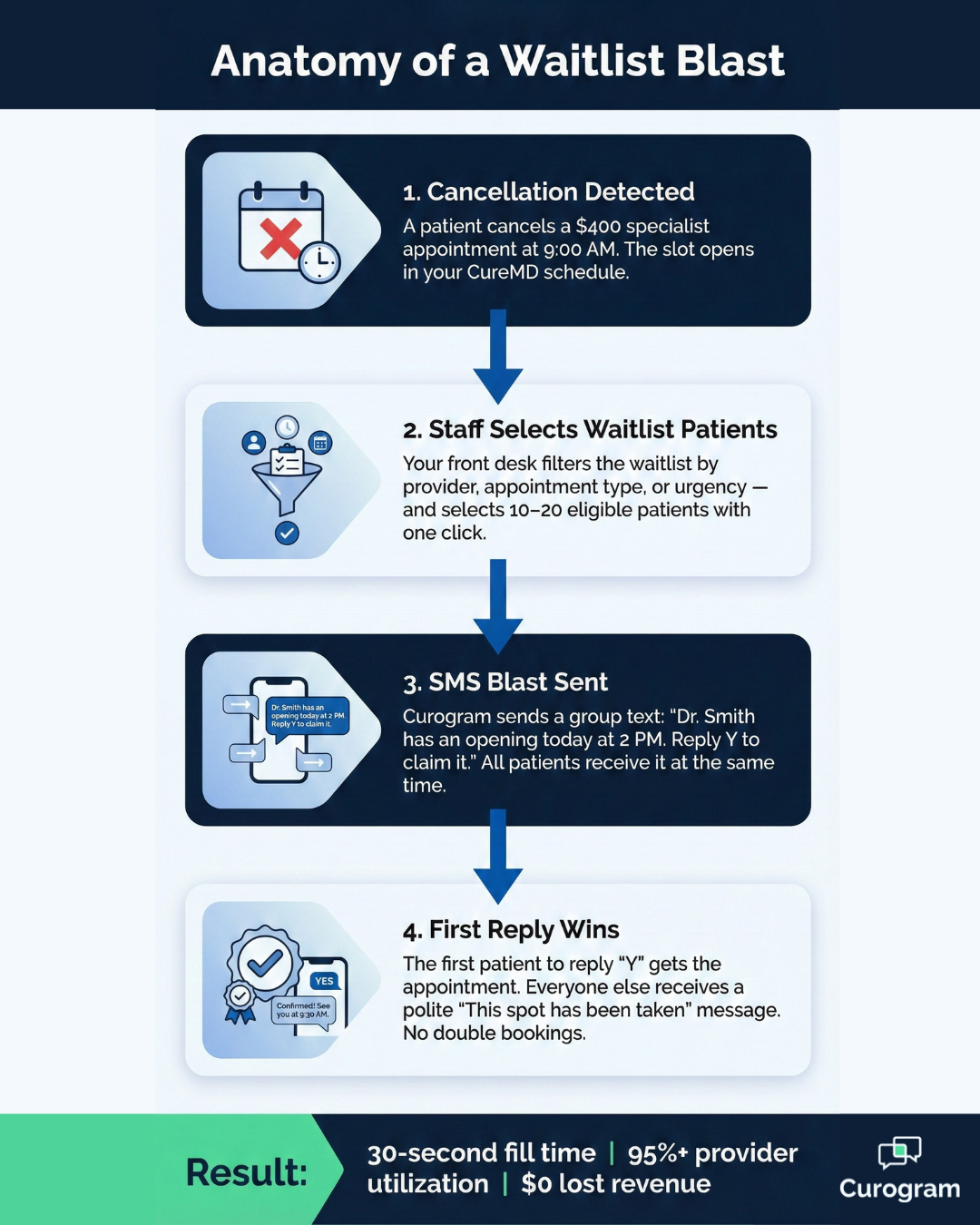
Your team selects 10 to 20 patients from the waitlist—filtered by provider, appointment type, or urgency. With a single click, Curogram sends a group text to all of them.

The message is short and clear: "Dr. Smith has an opening today at 2 PM. Reply Y to claim it."

The first patient to reply "Y" gets the appointment. Everyone else who responds after that receives a polite "Sorry, this spot has been taken" message.

No confusion, no double bookings, and no frustrated patients wondering what happened. It is clean and fast.

Think about what that means for your day-to-day operations. What used to take 45 minutes of phone tag now happens in about 30 seconds.

Your front desk is free to focus on the patients standing right in front of them. And thanks to patient recall SMS CureMD practices can send through Curogram, every cancellation now has a built-in backup plan.

What Makes This Different from a Regular Group Text

A waitlist blast is not just a mass message.

It is a managed workflow with guardrails built in to protect your schedule and your patients' experience.

  • The offer locks the moment the first patient confirms, so there is zero risk of double booking.
  • Patients who miss out get a respectful "spot taken" reply, not radio silence.
  • Every message is logged and synced to the patient chart, keeping your records complete and compliant.

That combination of speed and control is what turns a cancellation from a panic moment into a routine recovery.

Infographic showing 4-step waitlist blast process to fill CureMD cancellations in 30 seconds

A Schedule That Repairs Itself Before You Even Notice the Gap

When you use Curogram alongside your CureMD scheduler with full CureMD integration, something shifts in how your practice runs.

Open slots stop sitting empty. Even if a Patient Appointment Reminder fails to prevent a cancellation, CureMD integration for smart Appointment Scheduling helps your schedule fix itself—and your team barely has to think about it.

We like to think of this as a "self-healing schedule." It is not magic—it is a smarter workflow. The moment a gap appears, the system helps you fill it with a patient who genuinely wants that slot.

That is a win for your providers, your staff, and the patient who just got moved up from the waitlist.


What This Means for Your Patients

For practices in high-demand specialties, this kind of dermatology waitlist software—or waitlist software for any specialty—changes how patients experience your office.

People on the waitlist feel like VIPs because they got early access to a better time. That kind of experience builds loyalty, leads to stronger reviews, and keeps patients coming back for years.

Instead of waiting weeks, a patient might get a text on a Tuesday morning and be sitting in your exam room by the afternoon.

That is the kind of responsiveness that earns trust and word-of-mouth referrals—things no amount of marketing dollars can buy.

Patient smiling at phone after receiving a waitlist text for an earlier appointment

What This Means for Your Providers and Your Bottom Line

Doctors do not like downtime. When their schedule has holes, it throws off the rhythm of their day and chips away at their compensation. A full column means a productive provider, and a productive provider is a happy one.

Here is a side-by-side look at how the two approaches compare across the metrics that matter most.

Metric Manual Phone Calls Curogram Waitlist Blast
Time to fill a canceled slot 30–45 minutes ~30 seconds
Patients reached per attempt 1 at a time 10–20 at once
Risk of double booking Moderate None
Staff effort required High (phone + follow-up) Minimal (one click)
Provider utilization rate Varies widely 95%+
Patient experience Disruptive phone calls Quick, convenient text


When you can maximize provider utilization CureMD practices depend on, the financial benefits stack up quickly. The practice recovers revenue it would have lost.

Providers stay on track with their goals. And the front desk gets time back to focus on higher-value work instead of chasing patients on the phone. It is a better way to run an office, and everyone in the building can feel the difference.

Frequently Asked Questions

Does this create double bookings?

No. Curogram locks in the first patient who replies "Y" and automatically closes the offer. Anyone who responds after that gets a polite message letting them know the spot has been filled. Your schedule stays clean, and patients are not left guessing.

Can we filter who gets the text?

Absolutely. You can filter by urgency level, new patient status, or the type of procedure they need. This way, the right patient gets the right offer—and you are not sending texts to people who would not be a fit for that particular slot.

Does it write back to CureMD?

Once a patient confirms, your staff updates the time slot in CureMD. The full communication log from Curogram syncs to the patient's chart automatically, so there is a complete record of every message in one place. 

Cancellations Are Inevitable—Lost Revenue Does Not Have to Be

Every practice deals with cancellations. Patients get sick, plans change, and life gets in the way. You are never going to stop every no-show, and that is okay.

What you can control is what happens next. With automated waitlist management for CureMD schedules, a cancellation does not mean an empty chair.

It means an opportunity—a chance to serve a patient who has been waiting, keep your provider busy, and protect the revenue your practice depends on.

The workflow is simple. A slot opens. A text goes out. A patient replies. The gap is filled. What used to take 45 minutes and a stack of voicemails now takes less than a minute. That is less stress on your front desk, more time for in-person care, and fewer dollars slipping through the cracks.

If you are running a high-volume or specialty practice, the impact is even bigger. Saving just one slot per provider per day can mean tens of thousands in recovered revenue each year.

For multi-provider groups, that number grows quickly into the hundreds of thousands.

At the end of the day, this is about giving your team a better way to work and giving your patients a better experience.

No more phone tag. No more scrambling. Just a smarter, faster approach to filling your schedule—powered by Curogram.

Ready to see it in action? Schedule a demo and watch how fast a waitlist blast fills a mock appointment. It is one of those things you have to see to believe.


How to Prevent Unprepared Patients with Custom CureMD Reminders

How to Prevent Unprepared Patients with Custom CureMD Reminders

💡 Customizable appointment reminders for CureMD specialty workflows go beyond basic confirmations. Curogram reads the appointment type inside...

Read More
The ROI of Appointment Reminders for Tebra Clinics

The ROI of Appointment Reminders for Tebra Clinics

💡 Automated appointment reminders do more than reduce no-shows. Text reminders drive measurable ROI for Tebra clinics. By automating reminder...

Read More
How to Set Up HIPAA-Compliant Text Reminders in Tebra

How to Set Up HIPAA-Compliant Text Reminders in Tebra

💡 Missed appointments cost small practices thousands of dollars in lost revenue every year. For Tebra users, sending text reminders is an easy way...

Read More