

8 min read

Cloud 9 Ortho Forms | One Link, Complete in 5 Minutes Before Visit

Cloud 9 Ortho Forms | One Link, Complete in 5 Minutes Before Visit
💡 Cloud 9 orthodontic forms on your phone let parents complete every new patient intake form by tapping a single text link — no app, no portal, no password required.         

Medical history, dental history, insurance details, and consent forms with e-signatures are all finished in about five minutes on any smartphone.    

Curogram's One-Link Mobile Intake is built specifically for phone completion. Every field, upload, and signature is optimized for a phone screen.

Parents capture insurance card photos directly within the form, sign consent documents with a finger, and save their progress automatically if something comes up.


The result: 80%+ pre-visit completion rates, faster check-in, and a first impression that feels like care — not a clipboard.

It's Tuesday at noon. Sarah is eating lunch at her desk when her phone buzzes.

A text from her child's orthodontic office:

Tyler's consultation is Thursday at 3 PM — please complete his intake forms before your visit. There's a link. She taps it.

The form loads. The fields are tiny. The dropdown menus snap to the wrong option every time her thumb gets close.

She zooms in, types a few letters, scrolls up to find her place, overshoots, and starts over. She reaches the insurance card section. There's an upload button. She taps it. The browser bounces her to her camera roll. She selects the photo. The page refreshes — and her entire form is blank.

She closes the tab.

"I'll finish it on my laptop when I get home," she tells herself.

She doesn't.

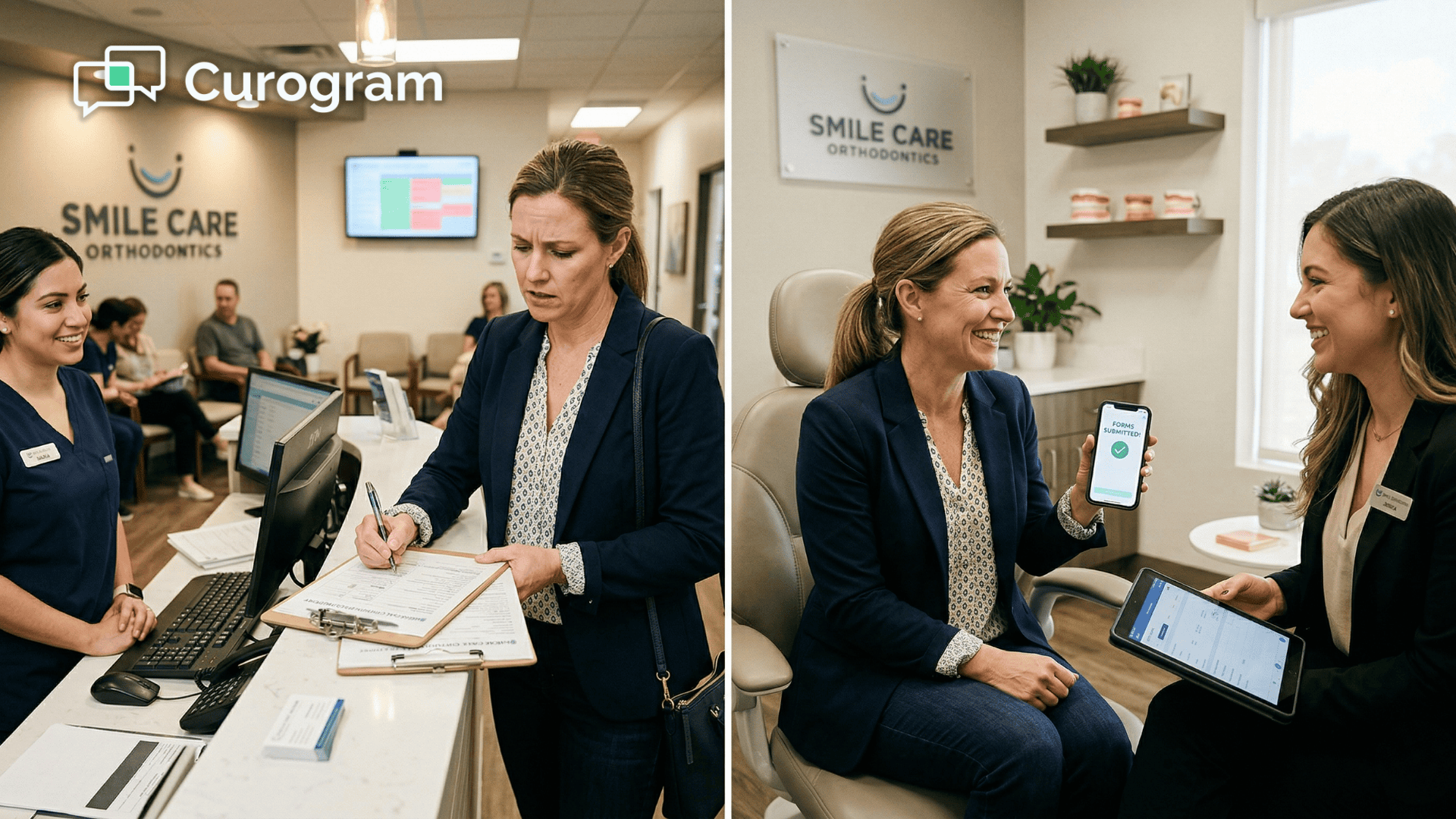
Thursday morning, she's rushing. No completed forms. She walks into the office a few minutes late and is handed a clipboard. The consultation was supposed to begin with a treatment discussion. Instead, it starts with a pen.

That's not a parent problem. That's a design problem.

Sarah wanted to complete those forms. She tried. But the intake system wasn't built for her phone — it was a desktop form that happened to open on mobile.

The text link arrived on her phone. The experience never followed.

This is the intake gap sitting quietly inside a lot of orthodontic practices right now. Things feel digital. But feeling digital and being phone-ready are two very different things. Parents live on their phones.

Their schedules live there. Their communication lives there. And their patience for clunky, half-functional form experiences? Very short.

Cloud 9 orthodontic forms on your phone through Curogram's One-Link Mobile Intake were built to fix exactly this.

One text. One tap.

Every form completed in five minutes — no app to download, no portal to log into, no password to create, and no laptop required.

Done before your patient walks through the door.

The Hidden Problem With "Digital" Intake Forms

Most digital intake systems were not designed with a phone in mind. They were built for desktop browsers, then scaled down to fit a smaller screen.

The layout shrinks. The logic doesn't.

The fields become hard to tap. Date pickers built for a mouse wheel fight back when you try to scroll them with a thumb. The further a parent gets into the form, the more friction they encounter — and every friction point triggers the same response: "I'll come back to this later."

They rarely do.

The Insurance Card Upload Is Where Most Parents Stop

On a desktop-designed mobile form, uploading an insurance card photo isn't one step. It's several:

  • Leave the browser and open the phone's camera app
  • Photograph the front and back of the card
  • Navigate back to the browser without losing the page
  • Locate both photos in the camera roll and select them
  • Wait for the upload to process — and hope the page doesn't time out

On a good day, that sequence takes longer than the rest of the form combined. On a bad day, the upload fails and the parent closes the tab entirely.

This is the most common point of abandonment in digital intake. It's not stubbornness. It's a broken experience.

Portal Login Adds Friction Before a Single Question Is Answered

Some practices route new patients through a portal for intake. In theory, it's organized and secure. In practice, it asks a first-time patient to create an account — username, password, email verification — before typing a single word of their child's medical history.

That setup takes 3–5 minutes of administration before intake even begins. If the parent forgets the password before finishing, the whole thing stalls at a reset screen.

The portal itself isn't the problem. The timing is.

Asking a new patient to create login credentials before their first visit adds friction exactly where you need momentum.

And once that friction wins, Cloud 9 patient and parent orthodontic forms that could have been submitted days in advance end up being scribbled on a clipboard on the day of the visit.

How One Text Link Replaces the Clipboard

Curogram's One-Link Mobile Intake starts with a text. Not an email. Not a portal invitation. A text — delivered to the parent's phone, containing a single link and a clear, simple message.

Tap this. Complete Tyler's forms before Thursday. It takes about five minutes.

That's the entire instruction set. There is nothing else to do first.

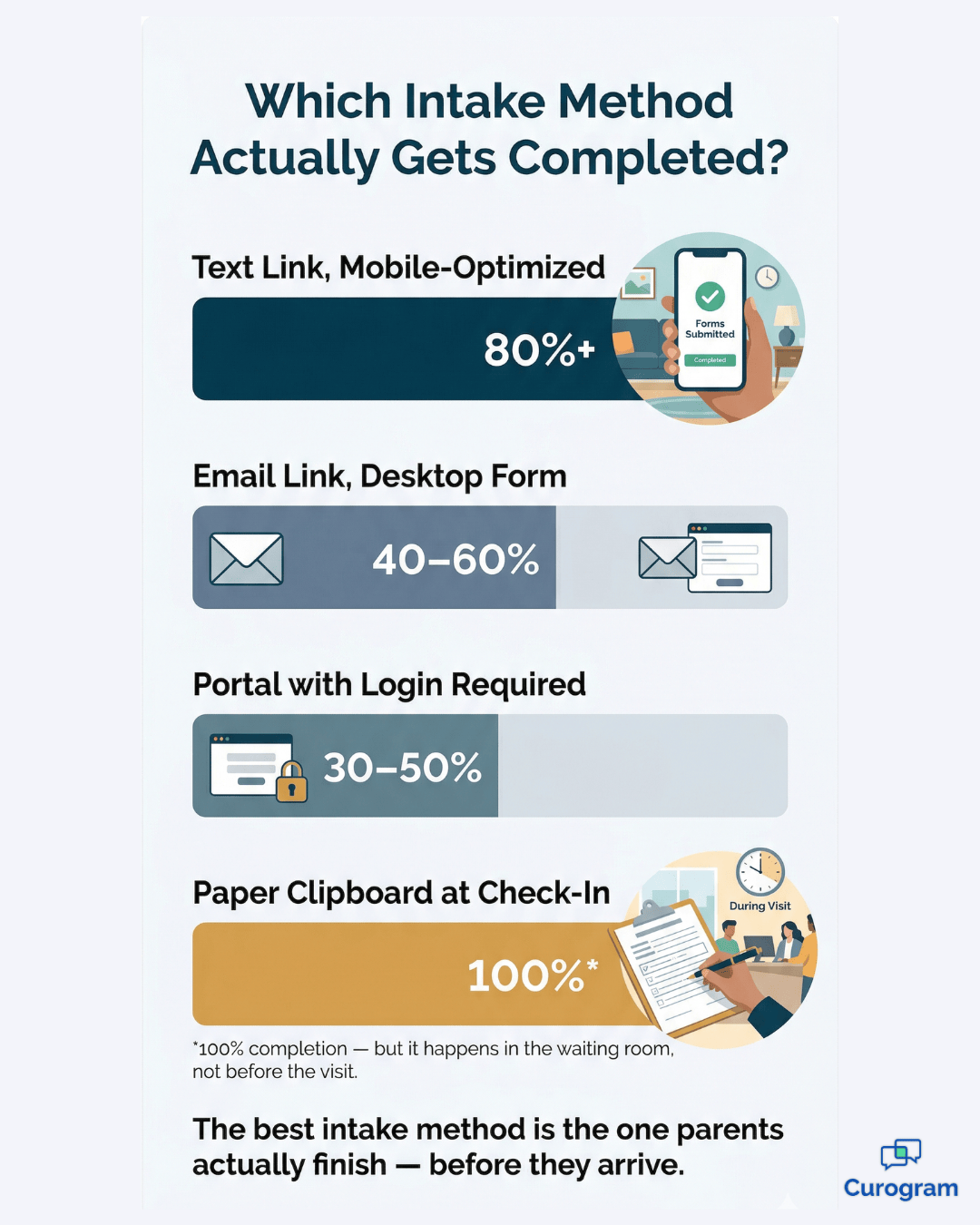
Intake completion rates by method: mobile text link leads at 80%+ vs. portal and paper forms

A Form That Does the Small Things Right

When the parent taps the link, the forms open in the phone's browser. The fields are large and thumb-friendly. Every interaction is designed for a thumb, not a cursor.

A few details worth noting:

  • Names auto-capitalize as the parent types
  • Phone numbers format themselves in real time
  • The date picker scrolls cleanly on a mobile screen — no fighting a dropdown built for a mouse
  • Entries are validated before submission, so nothing slips through incomplete

The Cloud 9 ortho forms load as one continuous scroll, not a series of pages that each require a new load. A progress bar shows exactly how far along the parent is. The whole experience moves at their pace.

Insurance Card Photos — Without Leaving the Form

When the parent reaches the insurance section, there's no upload button that kicks them out to their camera roll.

A single tap opens the phone's camera directly inside the form. They photograph the front of the card, then the back, and both images are confirmed — without switching apps or navigating a file system.

Photo ID works the same way. One tap, one capture, done.

Consent Forms Built for a Finger, Not a Mouse

Consent and HIPAA forms are formatted for mobile readability — clear text, presented one section at a time. The signature area is full-width, designed specifically for signing with a finger on a phone screen.

HIPAA acknowledgment, financial policy, treatment consent for a minor, and photo release forms are each presented and signed individually. Every signature is timestamped and stored securely, thanks to secure patient communication.

Nothing is ambiguous, nothing is rushed.

If Life Interrupts, the Form Waits

Parents rarely have five completely uninterrupted minutes. Lunch breaks get cut short. A call comes in. The meeting runs over.

The forms save progress automatically. When a parent returns to the same link — whether 20 minutes later or the following morning — everything picks up exactly where they left off.

There is no pressure to finish in one sitting. Orthodontic forms on the Cloud 9 phone link are designed to fit around the parent's schedule, not demand it all at once.

Parent completing mobile orthodontic intake forms on her phone during a lunch break

What an 80% Completion Rate Actually Looks Like in Practice

Text-link mobile intake forms designed for phone completion achieve pre-visit completion rates of 80% or higher. That number means something different depending on what you're comparing it to.

Email-delivered intake forms land at 40–60% completion — partly because email gets buried, and partly because a desktop-designed form is just as painful on mobile whether it arrives by text or email.

Portal-based forms drop even further, to 30–50%, because the account creation step alone kills momentum before a single intake question is answered.

Paper clipboards technically hit 100% — but that completion happens in your waiting room, while the consultation clock is already running.

Mobile-optimized text link intake sits above all of them at 80%+. Not because parents are more motivated.

Because the experience doesn't fight them.

Kill the clipboard! Streamline intake and decrease wait times with Curogram's mobile-friendly online forms.  

The Math Behind 32 More Prepared Parents

Here's what the numbers mean in practice. Take a practice running 80 new patient consultations per month:

  • Moving from 40% to 80% completion = 32 additional parents who arrive fully prepared
  • Reclaiming each clipboard saves approximately 12 minutes of staff and coordinator time
  • That adds up to more than 6 hours of recovered capacity every month — just from intake

That is not a rounding error.

The Emotional Shift That Changes the Whole Consultation

Parents expect orthodontic intake to be tedious. They plan for it. They arrive early. They mentally set aside the time for paperwork.

When instead they get a text, tap a link, and complete everything on their phone in five minutes during a Tuesday lunch break — days before the appointment — the expectation is exceeded before they've even pulled into the parking lot.

That shift matters more than it might seem.

A parent who arrives relaxed and informed is ready to hear about treatment.

They're not mentally reviewing everything they still need to fill out. They're present. The treatment coordinator already has the verified insurance, the medical history, and the signed consent forms. The conversation begins immediately.

That first impression — a team that's organized, prepared, and genuinely respectful of a parent's time — is one of the most powerful conversion signals in orthodontics.

It doesn't come from a lobby redesign or a new coffee machine. It comes from intake that actually works.

One Text. No Clipboard. The Intake Experience Parents Will Actually Remember.

Forms Cloud 9 orthodontic practices send on your phone via one link should take five minutes to complete before you arrive — and with the right system in place, they do.

But getting there requires being honest about what "digital intake" actually means in 2025.

If your intake link lands on a parent's phone and the experience isn't built for a phone, the link is a liability. It creates the illusion of convenience without delivering it. Parents tap, get frustrated, and abandon. You end up back at the clipboard anyway — except now the consultation has already started.

Curogram's One-Link Mobile Intake closes that gap. The forms are designed from the ground up for a smartphone, not adapted from a desktop template.

Every tap, scroll, photo capture, and signature is native to mobile. It's why completion rates climb above 80% when practices switch from portal-based or email-delivered intake.

And when 80% of your new patients arrive with every form already completed, everything downstream gets easier. Check-in is faster. Coordinators are better prepared.

Consultations start on time and on topic. Insurance verification happens before the visit, not during it. The intake process is your patient's first real interaction with your team. It sets the tone before a single word is spoken in the office.

When that experience is frictionless — when a parent taps a link, completes everything in five minutes on their phone, and walks in with nothing left to do — you've already started the relationship on the right foot.

That's what happens when Cloud 9 patient and parent orthodontic forms are built for the device parents actually use.

Stop sending portal login instructions to new patients. Stop designing intake experiences that assume there's a laptop nearby.

Send a mobile-friendly patient form link — parents complete everything in five minutes on their phone before arrival.

Ready to see it in action? Schedule a demo to experience the mobile intake forms your parents will actually complete before their Cloud 9 orthodontic consultation.


Frequently Asked Questions

What if I don't have my insurance card when I get the text?

You can complete everything except the insurance card photos and return to add them later. The form saves your progress automatically. When you have your insurance card ready, tap the same link from the original text message and the form picks up right where you left off. You can also type your insurance information manually if you know your subscriber ID and group number — the card photo is helpful for the practice but not the only way to submit your insurance details.

Does the form work on both iPhone and Android?

Yes. The intake forms open in your phone's default web browser — Safari on iPhone, Chrome on Android — and are optimized for both platforms. There is no app to download and no compatibility issues to troubleshoot. The forms work on any smartphone with a web browser, including older models. If you can receive a text message and tap a link, you can complete the forms.

Is my information secure when I submit it from my phone?

Yes. The form link uses encrypted, HIPAA-compliant transmission. Your medical information, insurance details, photos, and signatures are protected in transit and at rest. The link is unique to you and expires after submission. Curogram maintains a Business Associate Agreement (BAA) with your orthodontic practice to ensure your information is handled with the same security standards required for all healthcare data at every step of the process.

What if I started the form but never finished — can I still submit it before my appointment?

Yes. The form saves your progress automatically, so nothing you already entered is lost. Just tap the original link from the text message your practice sent and you'll land right where you left off. As long as you submit before your scheduled consultation, the treatment coordinator will have everything they need ahead of time. If you're not sure whether the link is still active, your practice can resend it.

Do I need to print anything or bring any documents to the appointment after completing the forms?

No. Once you submit the forms, your practice receives everything digitally — medical history, insurance information, card photos, photo ID, and signed consent forms. There's nothing to print, nothing to bring, and nothing to fill out at the front desk. You walk in and go straight to your consultation. If your practice needs anything additional, they'll reach out before your visit — usually through the same text thread.